


A local Codex and Claude Code session manager for safely reviewing, backing up, and deleting old sessions from a browser UI or terminal CLI.
AI coding tools can accumulate hundreds or thousands of local sessions. A session may leave behind transcripts, history, logs, checkpoints, and linked artifacts, so manual cleanup can easily miss related data.
Session Steward makes session cleanup safer by finding those records, showing what cleanup will affect, creating a local backup, removing supported data, and verifying the result afterward. Everything runs locally, and your session data stays on your computer.
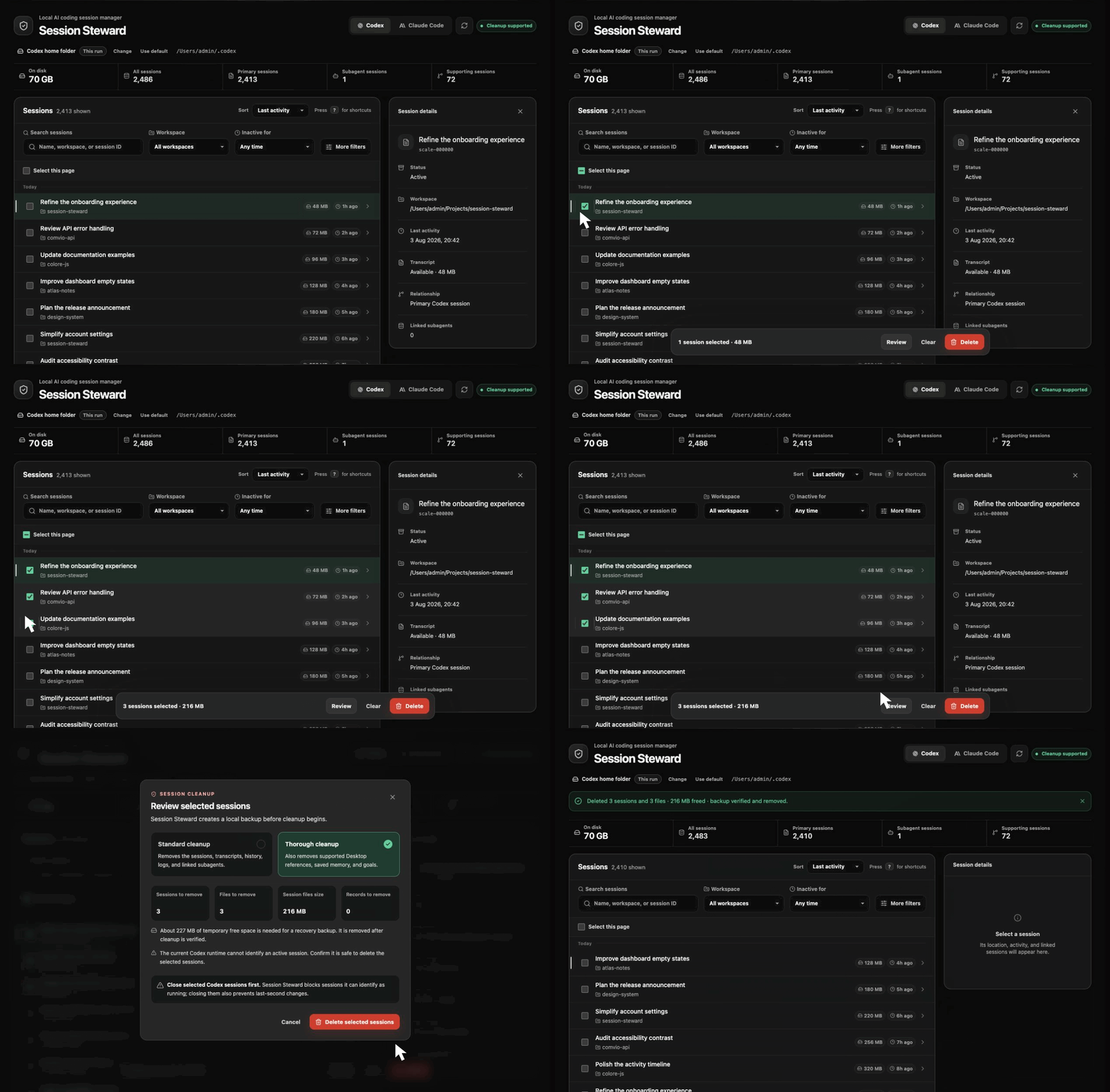
- Review sessions in a browser UI or terminal CLI.
- Switch between Codex and Claude Code without installing another package.
- See session counts and the storage used by recognized session files.
- Find sessions inactive for 30, 60, or 90 days.
- Filter active or archived sessions by workspace, name, or session ID.
- Inspect session details and affected records before deletion.
- Choose standard or thorough cleanup.
- Use custom Codex or Claude home folders across browser and terminal sessions.
- Cleanup happens entirely on your computer.
- Only records included in the reviewed cleanup plan are removed.
- A local recovery backup is created before anything changes.
- Cleanup is verified before the backup is removed.
- Unrecognized storage is reported and left untouched.
- Thorough cleanup is unavailable when the detected storage format is not supported.
- Session contents are never sent over the network.
At startup, Session Steward may contact the public npm registry to check for a newer version.
- Sign-in data or saved API credentials
- Configuration, plugins, caches, or custom prompt files
- Project files, Git repositories, or worktrees
- Sessions outside the reviewed cleanup plan
- Conversations stored in your ChatGPT or Claude account
- Claude Code worktrees, branches, repositories, remote sessions, SSH sessions, or Cowork data
Session Steward supports macOS and Linux and requires Node.js 24.15 or newer. Git and a separate SQLite installation are not required.
Install it globally:
npm install --global session-stewardThen launch it:
session-stewardOr try it without installing:
npx session-steward@latestSession Steward opens in your browser, listens only on 127.0.0.1, and detects ~/.codex and ~/.claude by default. Claude Desktop sessions are detected on macOS; Claude Code CLI sessions work on macOS and Linux.
To clean up sessions:
- Review the detected sessions.
- Select one or more sessions.
- Choose a cleanup option.
- Review exactly what will be removed.
- Close any selected sessions that may still be active.
- Confirm the cleanup.
Keep the terminal open while using Session Steward. Press Ctrl+C to stop it.
Recommended for routine removal. It removes supported transcripts, history, registry entries, logs, and linked session artifacts belonging to the selected sessions.
Includes standard cleanup and removes additional recognized session-owned data. For Codex this can include supported Desktop references, memory outputs, and goal records. For Claude Code this includes recognized file checkpoints.
Thorough cleanup is unavailable when Session Steward finds storage it does not recognize. Standard cleanup remains available for supported records that can be identified safely.
A temporary backup is created inside the active provider folder under session-steward-backups/.
After cleanup is successfully verified, the backup is removed automatically. If cleanup fails, Session Steward keeps the backup and lets you restore the sessions, keep the backup, or delete it.
Before restoring, the current versions of affected files are saved separately to provide another recovery point.
Start the interactive terminal interface:
session-steward-cliUse Claude Code instead of Codex:
session-steward-cli --provider claude-codeList sessions as JSON:
session-steward-cli --json --limit 10More terminal options
Show session and workspace storage totals:
session-steward-cli --overviewAdd --json when the output will be read by another tool.
Find sessions inactive for at least 60 days:
session-steward-cli --inactive-days 60Show only archived sessions:
session-steward-cli --archive-status archivedShow sessions from one exact workspace:
session-steward-cli --workspace /path/to/projectUse --include-internals to include subagents and --include-supporting to include supporting sessions. Session sizes are shown in the interactive list, and --sort size places the largest sessions first.
The interactive terminal accepts the same filters:
inactive 30
inactive 60
inactive 90
archive active
archive archived
workspace /path/to/project
internals
supporting
cleanup standard
cleanup thorough
overview
backups
Run inactive, archive, or workspace without a value to clear that filter.
backups lists recovery backups retained after an interrupted or unsuccessful cleanup. Use restore <number> to restore one, or delete-backup <number> to remove it permanently. Both actions require an explicit confirmation.
Use session-steward-cli --help to see all available options.
The browser interface displays the active provider folder. Select Change to choose another existing folder and remember it for later browser and terminal sessions.
For a one-time override:
session-steward --codex-home /path/to/.codexFor Claude Code:
session-steward --claude-home /path/to/.claudeThe command-line override applies only to that run and does not replace your saved folder.
Start without automatically opening the browser:
session-steward --no-openUpdate Session Steward:
npm install --global session-steward@latestUninstall it:
npm uninstall --global session-stewardUninstalling Session Steward does not remove provider sessions, recovery backups, or saved folder preferences.
- The browser did not open: Run
session-steward --no-open, then open the local address shown in the terminal. - No sessions were found: Check the selected provider and displayed home folder. Use Change or pass a one-time home-folder override.
- Thorough cleanup is unavailable: Review the compatibility details. Unrecognized storage is left untouched, but standard cleanup may still be available.
- Your Node.js version is too old: Install Node.js 24.15 or newer and run Session Steward again.
git clone https://github.com/mallikcheripally/session-steward.git
cd session-steward
npm install
npm test
npm run buildSession Steward uses paginated listings, incremental transcript reads, and bounded caches to remain responsive with large session libraries.
Current synthetic benchmarks on an arm64 Mac with Node.js 24.15.0:
| Scenario | Scale | Time | Measured memory growth |
|---|---|---|---|
| Paginated session listing | 50,003 sessions | 26 ms | 0.16 MB heap |
| Session size index | 20,003 sessions | 85 ms cold, 9.7 ms warm | 30 MB peak RSS |
| Transcript-only discovery | 5,003 sessions | 662 ms | 4.02 MB heap |
Run the scale benchmarks with:
npm run benchmark:scale
npm run benchmark:overview
npm run benchmark:size
npm run benchmark:discovery
npm run benchmark:transcripts
Results vary with hardware, disk speed, and session layout. Tests and benchmarks use temporary synthetic data and do not read or modify your local sessions.
Codex, Claude Code CLI, and local Claude Code Desktop sessions are supported. Claude Desktop archive is not treated as deletion, and Session Steward never removes its worktrees.
Use GitHub Issues to report a bug, request a provider, or share a storage format that Session Steward does not recognize.
See the changelog for published release history.
Session Steward is an independent project and is not affiliated with or endorsed by OpenAI or Anthropic.