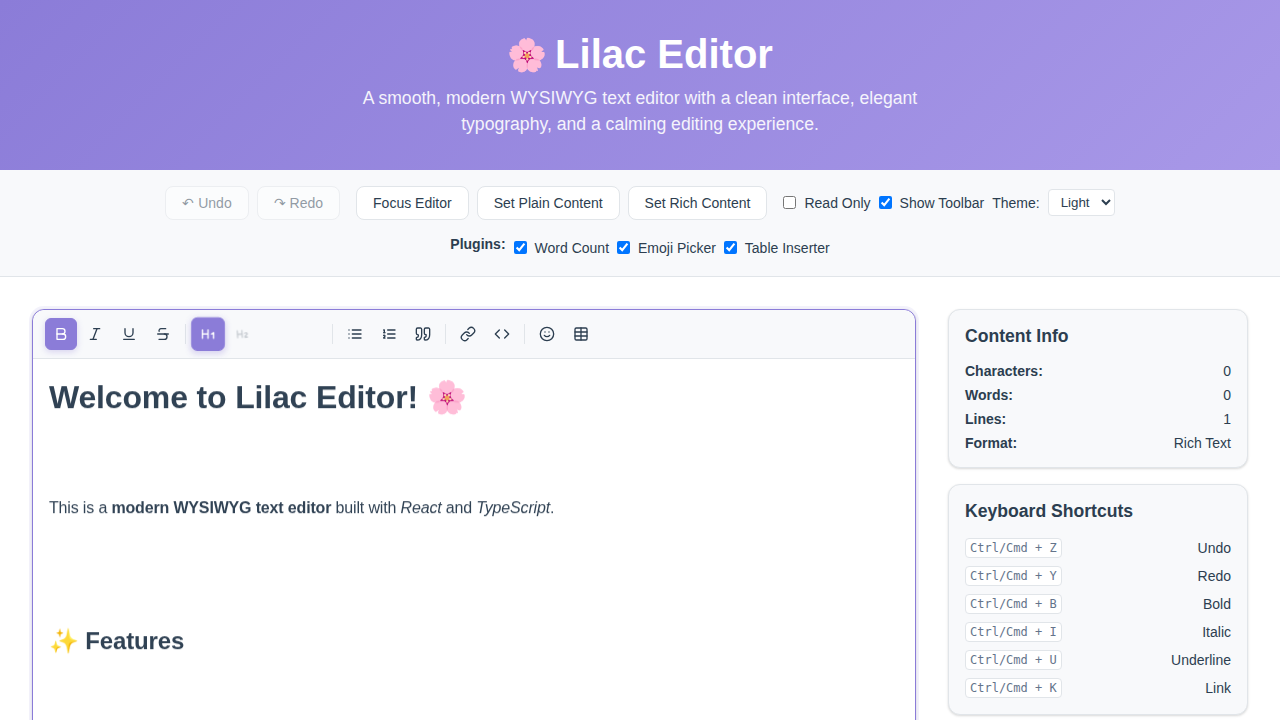
A smooth, modern WYSIWYG text editor built with TypeScript. Framework-agnostic core with adapters for React, Preact, Vue, Svelte, Solid, Angular, Lit, Qwik, Alpine.js, Ember, Astro, and Vanilla JS.



Lilac follows an adapter pattern for maximum framework compatibility. The core functionality is isolated from framework-specific implementations, ensuring consistent behavior across all platforms.
lilac/
├── core/                    # Framework-agnostic core
│   ├── types/               # TypeScript type definitions
│   ├── plugins/              # Plugin system (emoji, table, word count)
│   ├── utils/                # Utility functions (formatting, icons)
│   ├── components/           # Core components (Editor, Toolbar)
│   └── index.ts              # Core exports
├── adapter/                  # Framework-specific adapters
│   ├── react/                # React component wrapper
│   ├── preact/               # Preact component wrapper
│   ├── vue/                  # Vue component
│   ├── svelte/               # Svelte action
│   ├── solid/                # SolidJS component + use:lilac directive
│   ├── angular/              # Angular component/directive
│   ├── lit/                  # <lilac-editor> Web Component
│   ├── qwik/                 # Qwik component
│   ├── alpine/               # Alpine.js x-lilac directive
│   ├── ember/                # Ember {{lilac}} modifier
│   ├── astro/                # Astro mount helper + integration
│   └── vanilla/              # Vanilla JS wrapper
└── docs/                     # Documentation & demos
- UI Instructions in Core: The core package contains all UI styling instructions to ensure consistent appearance across all framework adapters
- Framework-Agnostic Logic: Business logic and state management are kept framework-independent
- Adapter Pattern: Each framework gets its own adapter that bridges the core with framework-specific patterns
- Framework-Agnostic Core: Pure TypeScript, zero runtime dependencies (~18 KB gzipped)
- Broad Integrations: First-party adapters for React, Preact, Vue, Svelte, Solid, Angular, Lit, Qwik, Alpine.js, Ember, and Astro — plus a UMD/CDN build and a PHP & Laravel package
- Consistent UI: Centralized UI instructions ensure identical styling across all adapters
- Plugin System: Extensible architecture with built-in plugins for emojis, tables, and word count
- Rich Text Formatting: Bold, italic, underline, strikethrough, headings, lists, blockquotes, code blocks
- Media Support: Link and image insertion with keyboard shortcuts
- Keyboard Shortcuts: Ctrl/Cmd + B for bold, Ctrl/Cmd + I for italic, etc.
- Undo/Redo: Full history support with 50-step undo stack
- Theme Support: Light and dark themes with CSS custom properties
- Accessibility: ARIA labels on the toolbar buttons and editable region, plus full keyboard navigation
- Mobile-friendly: 44px touch targets on coarse pointers, a scrollable toolbar, and a 16px editable font so iOS doesn't zoom on focus
- Plugin API: Create custom plugins with toolbar buttons, keyboard shortcuts, and lifecycle hooks
Lilac's focus is a tiny, dependency-free core and the broadest set of first-party framework adapters, under a permissive MIT license:
- 🪶 ~18 KB gzipped, zero runtime dependencies
- 🧩 11 first-party adapters — React, Preact, Vue, Svelte, Solid, Angular, Lit, Qwik, Alpine.js, Ember, Astro — plus a UMD/CDN build and a PHP / Laravel package
- 🆓 MIT-licensed, free to ship in closed-source commercial apps — no license key, no subscription
The mature enterprise editors (TinyMCE, CKEditor 5) are more feature-rich, but are GPL/commercial and typically cost thousands per year for commercial use. TipTap, Lexical, ProseMirror, Quill and Slate are excellent headless/OSS options with narrower official framework coverage.
📊 Full feature-by-feature and pricing comparison → COMPARISON.md
npm install @lilac-wysiwyg/core
pnpm add @lilac-wysiwyg/core
yarn add @lilac-wysiwyg/coreEvery adapter is a thin wrapper over the same core, published under the @lilac-wysiwyg/* scope and built with plain tsc. Install one with your package manager of choice (npm install, pnpm add, or yarn add).
| Framework | Package | Supported versions | Integration | Docs |
|---|---|---|---|---|
| React | @lilac-wysiwyg/react |
React ≥ 16.8 (hooks) | <LilacEditor> component + imperative ref |
react.html |
| Preact | @lilac-wysiwyg/preact |
Preact ≥ 10 | <LilacEditor> component + imperative ref |
preact.html |
| Vue | @lilac-wysiwyg/vue |
Vue ≥ 3 | <LilacEditor> component with v-model |
vue.html |
| Svelte | @lilac-wysiwyg/svelte |
Svelte ≥ 4 (works in 4 & 5) | use:lilac action |
svelte.html |
| Solid | @lilac-wysiwyg/solid |
solid-js ≥ 1.6 | <LilacEditor> component + use:lilac directive |
solid.html |
| Angular | @lilac-wysiwyg/angular |
@angular/core ≥ 14 | Component + directive (module) | angular.html |
| Lit | @lilac-wysiwyg/lit |
lit ≥ 2 | <lilac-editor> custom element |
lit.html |
| Qwik | @lilac-wysiwyg/qwik |
@builder.io/qwik ≥ 1.5 | <LilacEditor> component$ (QRL handlers) |
qwik.html |
| Alpine.js | @lilac-wysiwyg/alpine |
alpinejs ≥ 3 | x-lilac directive (plugin) |
alpine.html |
| Ember | @lilac-wysiwyg/ember |
ember-source ≥ 4, ember-modifier ≥ 4 | {{lilac}} element modifier |
ember.html |
| Astro | @lilac-wysiwyg/astro |
astro ≥ 3 (optional peer) | mountLilacEditor() + lilac() integration |
astro.html |
| Vanilla JS | @lilac-wysiwyg/vanilla |
— (no framework) | new LilacEditor() / factory |
vanilla.html |
All version ranges are declared as peer dependencies, so the adapter uses the copy of the framework already in your app. React also peers on
react-dom(≥ 16.8).
For no-bundler pages, load the UMD build and use the Lilac global:
<script src="https://cdn.jsdelivr.net/npm/@lilac-wysiwyg/core/dist/lilac.umd.js"></script>
<div id="editor"></div>
<script>
  new Lilac.LilacEditor({ container: document.getElementById('editor'), toolbar: { show: true } });
</script>A Composer package renders the editor server-side (it emits the container + the UMD loader script). See the PHP docs.
composer require lilac-wysiwyg/lilacuse Lilac\Editor;
echo Editor::render(['toolbar' => ['show' => true], 'placeholder' => 'Write…']);In Laravel the service provider is auto-discovered, so a Blade view can use the component directly:
<x-lilac :value="old('body', $post->body)" placeholder="Write…" />import { LilacEditor } from '@lilac-wysiwyg/core';
// Styles are injected automatically on construction. To supply your own
// stylesheet instead, pass `injectStyles: false` below.
// Create editor instance
const editor = new LilacEditor({
container: document.getElementById('editor')!,
toolbar: { show: true },
placeholder: 'Start writing...',
onChange: (content) => {
console.log('Content:', content);
}
});
// Get content
const content = editor.getContent();
// Set content
editor.setContent('<p>Hello World!</p>');import { useState } from 'react';
import { LilacEditor } from '@lilac-wysiwyg/react';
function App() {
const [content, setContent] = useState('<p>Hello!</p>');
return (
<LilacEditor
value={content}
onChange={setContent}
toolbar={{ show: true }}
placeholder="Start writing..."
/>
);
}<template>
<LilacEditor
v-model="content"
:toolbar="{ show: true }"
placeholder="Start writing..."
/>
</template>
<script setup>
import { ref } from 'vue';
import { LilacEditor } from '@lilac-wysiwyg/vue';
const content = ref('<p>Hello!</p>');
</script>The Svelte adapter ships an action, not a component, so it works on both Svelte 4 and 5 without a compiler step:
<script>
  import { lilac } from '@lilac-wysiwyg/svelte';

  let content = '<p>Hello!</p>';
</script>

<div use:lilac={{ value: content, onChange: (c) => (content = c), toolbar: true }} />The Solid adapter offers both a component and a use:lilac directive:
import { createSignal } from 'solid-js';
import { LilacEditor } from '@lilac-wysiwyg/solid';

function App() {
  const [content, setContent] = createSignal('<p>Hello!</p>');

  return <LilacEditor value={content()} onChange={setContent} toolbar />;
}Importing the package registers a <lilac-editor> custom element, usable in plain HTML or any framework:
<script type="module">
  import '@lilac-wysiwyg/lit';
</script>

<lilac-editor value="<p>Hello!</p>" toolbar></lilac-editor>
<script>
  document
    .querySelector('lilac-editor')
    .addEventListener('change', (e) => console.log(e.detail));
</script>Pass plugins through the plugins option — the editor installs them into its
own manager on construction:
import {
  LilacEditor,
  wordCountPlugin,
  emojiPlugin,
  tablePlugin
} from '@lilac-wysiwyg/core';

const editor = new LilacEditor({
  container: document.getElementById('editor')!,
  toolbar: { show: true },
  plugins: [wordCountPlugin, emojiPlugin, tablePlugin],
  onChange: (content) => console.log('Content:', content)
});
The exported
pluginManagersingleton is a standalone registry; installing into it does not affect an editor instance. Use thepluginsoption above.
| Option | Type | Default | Description |
|---|---|---|---|
container |
HTMLElement |
required | DOM element to mount the editor |
initialContent |
string |
'' |
Initial HTML content of the editor |
placeholder |
string |
'Start writing...' |
Placeholder text when editor is empty |
readOnly |
boolean |
false |
Whether the editor is read-only |
autoFocus |
boolean |
false |
Auto-focus editor on mount |
theme |
'light' | 'dark' | 'auto' |
'light' |
Editor theme ('auto' follows the OS preference) |
sanitize |
boolean |
true |
Sanitize HTML from initialContent/setContent (stored-XSS guard) |
injectStyles |
boolean |
true |
Inject Lilac's stylesheet into document.head on construction |
minHeight |
number |
undefined |
Minimum editor height in pixels |
maxHeight |
number |
undefined |
Maximum editor height in pixels |
maxLength |
number |
undefined |
Maximum content length |
className |
string |
undefined |
Extra class name on the editor root |
onChange |
(content: string) => void |
undefined |
Content change callback |
onSelectionChange |
(selection: SelectionRange | null) => void |
undefined |
Selection change callback |
onFocus |
() => void |
undefined |
Focus event callback |
onBlur |
() => void |
undefined |
Blur event callback |
toolbar |
ToolbarConfig |
undefined |
Toolbar configuration |
plugins |
EditorPlugin[] |
[] |
Plugins to install |
| Method | Description |
|---|---|
getContent() |
Get current editor HTML content |
setContent(content) |
Set editor content |
focus() |
Focus the editor |
blur() |
Blur the editor |
undo() |
Undo last change |
redo() |
Redo last undone change |
setReadOnly(readOnly) |
Enable/disable read-only mode |
destroy() |
Clean up and remove the editor |
| Tool | Keyboard Shortcut |
|---|---|
| Bold | Ctrl/Cmd + B |
| Italic | Ctrl/Cmd + I |
| Underline | Ctrl/Cmd + U |
| Strikethrough | - |
| Heading 1-3 | - |
| Paragraph | - |
| Bullet List | - |
| Ordered List | - |
| Blockquote | - |
| Code Block | - |
| Link | Ctrl/Cmd + K |
| Image | - |
Lilac features a powerful plugin system that allows extending the editor with custom functionality.
- Word Count Plugin: Real-time document statistics in a side panel, toggled from a toolbar button
- Emoji Picker Plugin: Insert emojis with an easy-to-use picker (Ctrl+Shift+E)
- Table Inserter Plugin: Insert and manage HTML tables (Ctrl+Shift+T)
import type { EditorPlugin } from '@lilac-wysiwyg/core';

export const myCustomPlugin: EditorPlugin = {
  id: 'my-custom-plugin',
  name: 'My Custom Plugin',
  version: '1.0.0',

  // Toolbar buttons
  toolbarButtons: [{
    id: 'my-button',
    icon: '<svg>...</svg>',
    label: 'My Tool',
    tooltip: 'My custom tool',
    onClick: (context) => {
      context.insertContent('<strong>Custom!</strong>');
    },
  }],

  // Keyboard shortcuts
  keyboardShortcuts: [{
    key: 'm',
    ctrlKey: true,
    action: (context) => {
      context.insertContent('<em>Shortcut!</em>');
    },
  }],

  // Lifecycle hooks
  onInstall: (context) => console.log('Installed'),
  onEditorMount: (context) => console.log('Ready'),
  onContentChange: (content, context) => {
    // React to content changes
  },
};Drop an image file onto the editor, or paste one from the clipboard, and it is
embedded at the caret. By default the image is inlined as a base64 data: URL —
fully client-side, no server required:
const editor = new LilacEditor({
  container,
  toolbar: { show: true },
  maxImageSize: 5 * 1024 * 1024, // optional: reject images over 5 MB
});
To upload to your own storage instead of inlining, provide onImageUpload and
return the URL to embed:
const editor = new LilacEditor({
  container,
  toolbar: { show: true },
  onImageUpload: async (file) => {
    const url = await myUploader(file); // your storage
    return url;
  },
});
Non-image drops and pastes fall through to the editor's normal handling.
Round-trip editor content to and from Markdown. The conversion is hand-written and zero-dependency, covering the subset the editor produces (headings, bold/italic/strikethrough, inline code and code blocks, links, images, blockquotes, lists, rules, paragraphs):
const md = editor.getMarkdown();      // serialize current content to Markdown
editor.setMarkdown('# Hello\n\nWorld'); // replace content from Markdown
The converters are also exported directly:
import { toMarkdown, fromMarkdown } from '@lilac-wysiwyg/core';

toMarkdown('<h1>Hi</h1><p>a <strong>b</strong></p>'); // "# Hi\n\na **b**"
fromMarkdown('- one\n- two');                          // "<ul><li>one</li><li>two</li></ul>"
Constructs outside that subset (tables, nested lists, HTML passthrough, underline — which has no Markdown equivalent) are not converted.
Press Ctrl/Cmd + F inside the editor to open the find bar — match count,
next/previous, replace, replace-all, and case-sensitive / whole-word toggles.
Esc closes it, and because the shortcut is bound to the editable region, the
browser's own find still works when the editor isn't focused.
editor.openFind();  // open the panel programmatically
editor.closeFind(); // close it
The matching engine is also exported for non-DOM use (e.g. searching content before it is mounted):
import { findMatches, replaceAll } from '@lilac-wysiwyg/core';

findMatches('the cat sat', 'at');                 // [{ start: 5, end: 7 }, { start: 9, end: 11 }]
replaceAll('cat cat', 'cat', 'dog', { wholeWord: true }); // { text: 'dog dog', count: 2 }Override CSS custom properties to create custom themes:
.lilac-editor {
  --lilac-color-primary: #your-color;
  --lilac-color-background: #your-bg;
  --lilac-border-radius: 8px;
}# Install dependencies
pnpm install
# Build core library
pnpm build
# Watch for changes
pnpm dev
# Type check
pnpm typecheckVisit our GitHub Pages for per-framework documentation, with a live interactive demo on the Vanilla JS page.
- Rich text toolbar with all formatting options
- Plugin system with built-in plugins
- Emoji picker
- Table inserter
- Word count plugin
- React adapter
- Preact adapter
- Svelte adapter
- Solid adapter
- Angular adapter
- Vue adapter
- Lit adapter
- Qwik adapter
- Alpine.js adapter
- Ember adapter
- Astro adapter
- Vanilla JS adapter
- UMD / CDN (script-tag) build
- PHP & Laravel integration
- Markdown export/import
- Image upload and embedding
- Find and replace
- Mobile optimizations
We welcome contributions! Please see our Contributing Guide for details.
MIT License - See LICENSE for details.
Maifee Ul Asad maifeeulasad@gmail.com
Made with by maifeeulasad
If you find this project useful, please star us on GitHub!