




English | 简体中文
Learn a foreign language while you code. A pi extension that reviews your prompts for spelling, grammar, and natural phrasing — with explanations in your native language — teaches you how to express thoughts you couldn't yet say in the learning language, and renders agent replies as bilingual immersive translations.
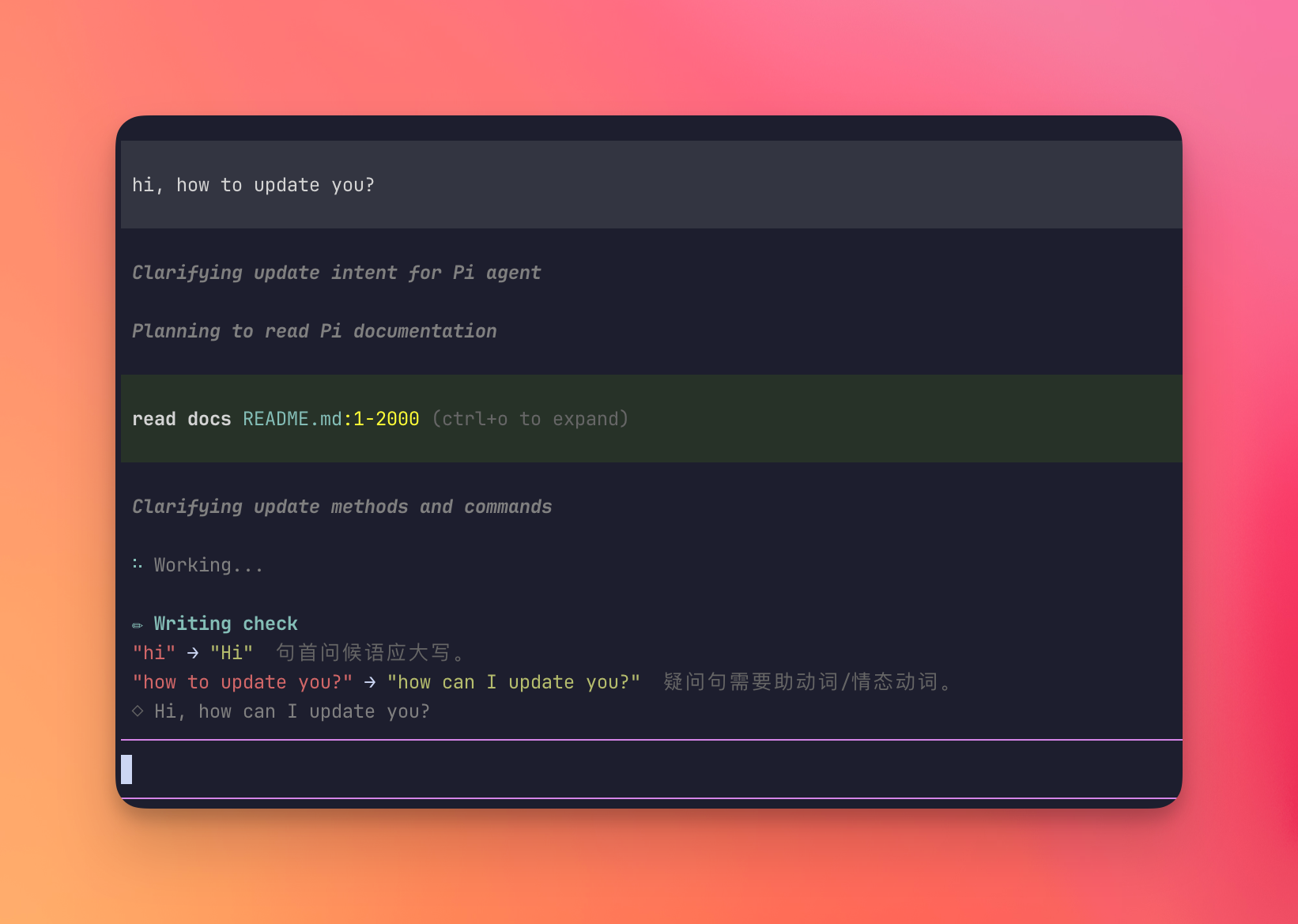
You prompt with mistakes, the agent works anyway — and the ✏ Writing check panel explains each fix in your native language.
pi install npm:pi-language-tutorThat is the only required step. The defaults (learning English, native Simplified Chinese) work out of the box. Speak another language? Type /lang and pick it from the settings menu — or one command: /lang native ja.
Alternative: install from git, or hack on a local clone
Install straight from GitHub without npm:
pi install git:github.com/mackt/pi-language-tutorOr clone and symlink into pi's global extensions directory (auto-discovered via the pi.extensions field in package.json, hot-reloads with /reload) — best for development, since there is no build step and pi loads TypeScript directly:
git clone https://github.com/mackt/pi-language-tutor.git
ln -s "$(pwd)/pi-language-tutor" ~/.pi/agent/extensions/pi-language-tutor-
Start
piand send a prompt in your learning language:when agent anwser me, I want translate it, it have three featureWhile the agent answers, a
✏ Writing checkpanel appears above the editor: each mistake with its fix and a short explanation in your native language, plus a more natural phrasing of the whole sentence. -
Write a prompt in your native language instead — because the thought came faster that way, or you couldn't yet express it in the learning language:
我想重构这个函数但是不知道怎么下手A
✏ Writing tutorpanel appears: a natural whole-sentence rendering in the learning language, the key new words (each explained in your native language — meaning, usage, why this word over a synonym), and the grammatical structures carrying the sentence. One panel teaches you how to say what you couldn't. -
When the agent finishes, press
alt+t(macOS: ⌥T — enable Option-as-Meta in your terminal, or run/translate). The response re-renders as a bilingual card: each paragraph followed by its translation.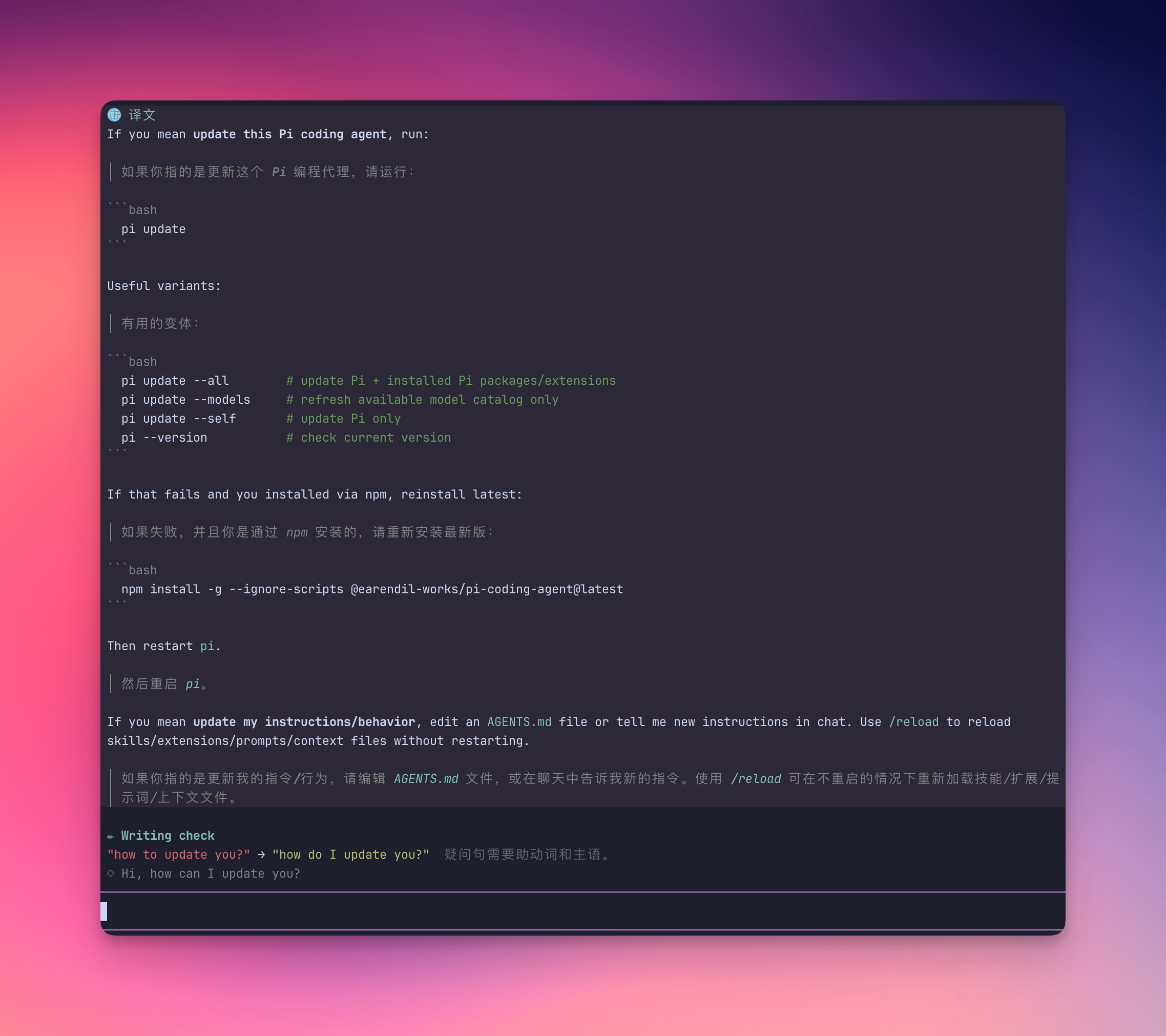
-
Like the bilingual view? Make it automatic:
/lang auto on
That is enough to start.
- Nothing ever blocks. Your message goes to the agent immediately; the review runs in parallel and the panel appears a moment later. A clean message shows no panel at all.
- Two complementary panels, never both. Prompt in the learning language →
✏ Writing checkfixes your mistakes. Prompt in your native language →✏ Writing tutorteaches you the words, grammar, and whole-sentence expression. One LLM call decides which — they never both fire. - Nothing pollutes the conversation. Translation cards live only in your terminal — they are never sent back to the LLM and cost no context.
- You control the spend. All features use your session model by default; point them at a cheaper one with
/lang modeland every review becomes nearly free.
Type /lang in the TUI to open the interactive settings menu, or set things directly with the commands below.
| Command | What it does |
|---|---|
/translate or alt+t |
Translate the last assistant response (bilingual card) |
/lang |
Open the interactive settings menu — every option with an inline description |
/lang check off | on | context |
Writing check & tutor mode — context lets the review see the conversation (/lang on/off still work as shortcuts) |
/lang tutor on | off |
Keep / drop just the writing tutor (off: native-language prompts show no panel) |
/lang auto on | off |
Auto-translate every final response |
/lang native <code> |
Set your native language — translation target and explanation language (zh-CN, ja, …) |
/lang learning <code> |
Set the language you are practicing (en, fr, …) |
/lang model [model] |
Set the model this extension uses |
/lang model default |
Go back to the session model |
/lang context on | off |
Give translations the full session context (off by default; see below) |
Settings persist in ~/.pi/agent/language-learn.json.
{
  "learning": "en",
  "native": "zh-CN",
  "model": "openai/gpt-4o-mini",
  "check": "on",
  "auto": false,
  "context": false
}
model defaults to the session model.
What gets reviewed. To avoid wasted tokens and noise, the review skips: slash/bang commands, trivially short prompts, messages that are mostly code or paths, and everything while /lang off. CJK prompts are counted by characters, not whitespace words, so a substantial native-language prompt still reaches the tutor. Reviews run only in interactive TUI mode, and a failed review never disturbs your session.
Writing check vs. Writing tutor. A single LLM call inspects each prompt and picks a mode. If the prompt is in your learning language, it reviews spelling, grammar, and phrasing (the ✏ Writing check panel). If the prompt is in your native language — you couldn't yet express it in the learning language — it teaches instead (the ✏ Writing tutor panel): a natural whole-sentence rendering, the key new vocabulary (each explained in your native language), and the grammatical structures at work. The two are complementary and never both fire on the same prompt. If you often write prompts in your native language on purpose and the tutor panel gets noisy, /lang tutor off restores the check-only behavior — native-language prompts then show no panel at all, while the writing check keeps working.
Bilingual cards. Paragraphs are aligned original-then-translation, immersive-translate style. Short code blocks (≤5 lines) are kept in the card; longer ones become a [code block ↑ N lines] placeholder since the original sits right above. Auto mode skips intermediate tool-call narration and responses under ~15 words; the footer shows 🌐 auto while enabled.
Custom providers. On pi 0.81+, checks and translations go through the composed provider's streamSimple — the same dispatch the main session uses — so custom providers work whether they were registered as a config (such as Cursor's cursor-sdk) or as a native Provider object. On pi 0.80 the extension falls back to pi-ai's completeSimple; the global api registry there already covered custom providers.
Context mode (/lang context on, off by default). By default translations see only the message being translated, so pronouns, project names, and coined terms can come out generic. Context mode forks the session instead: the translation request replays the exact prefix of the main session's last LLM request (same tools, system prompt, and message history), so the provider serves the whole history from its prompt cache and you pay cache-read prices (~10% of input on Anthropic) plus the translation itself. Two things to know:
- It only pays off when translations use the session model — a
/lang modeloverride can't hit the session's cache, and the whole history would be re-billed at full input price on every translation. It also changes where your data goes: with an override, the entire conversation is sent to the override model's provider, not just the text being translated. The extension warns about this combination at startup and when you switch;/lang model defaultfixes it. - Before the first agent turn of a session there is no captured request yet, so translations quietly fall back to context-free.
The writing check & tutor has its own context state (/lang check context), kept separate on purpose: the review fires on every message you send, so each reviewed message costs one cache read. Enable it only if the check keeps flagging project terms as errors — a contextual review recognizes names and coined words the session established, and the tutor can use them when teaching you how to express the message.
npm install
npm run check   # typecheck
npm test        # unit tests for the skip heuristics and response parsing
Layout: src/core.ts holds the pure logic (heuristics, prompts, parsing, card assembly — what the tests import, zero pi imports) and src/config.ts the config persistence. The pi-facing side is split by feature: src/llm.ts (model resolution, LLM calls, session-fork tracking), src/grammar.ts (the unified review: writing check + writing tutor dispatch), src/tutor.ts (the writing tutor renderer), src/translate.ts (bilingual cards), src/settings.ts (/lang command and menu), with src/index.ts as the composition root wiring them together. language-learn.ts is the entry point re-exporting core and the default export.