


💜 Clean, simple and beautiful segment bar for your AppleTv app

You can download this repository and see this example app.
In Podfile add
pod 'TvLightSegments'
and use pod install.
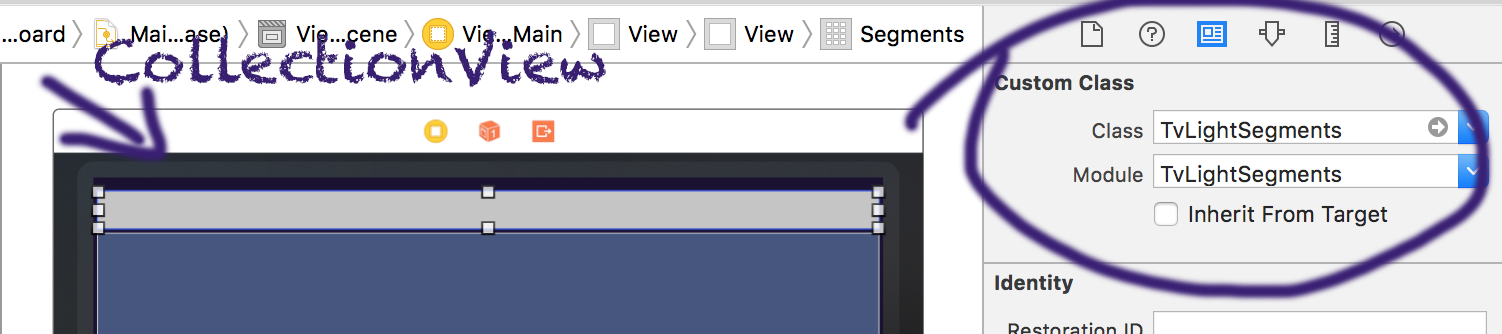
Create a new CollectionView and set TvLightSegments as a custom class
You need create create a class that subscriber TvLightSegmentsDisplay. When a segment's focus change, this class notified.
class ViewDetails: UIViewController, TvLightSegmentsDisplay {

    @IBOutlet weak var name: UILabel!
    @IBOutlet weak var textDetails: UITextView!
    @IBOutlet weak var image: UIImageView!

    // Oh! A segments' focus was changed! Then, execute this method ⚡️
    func didChangeSegment(_ segmentItem: TvLightSegmentsItem) {
        let pokemon = segmentItem as! Pokemon

        name.text = pokemon.name
        textDetails.text = pokemon.desc
        image.image = pokemon.image
    }

}
Also, you need create a class that subscriber TvLightSegmentsItem. The objects of this class will be the segments.
class Pokemon: TvLightSegmentsItem {

    let name: String
    let desc: String

    init(name: String, desc: String) {
        self.name = name
        self.desc = desc
    }

    // Text that will show in segment
    func tvLightSegmentsName() -> String {
        return name
    }
}
Now, in ViewController, we need setup the TvLightSegments, with the setup(viewDisplay:):
class ViewMain: UIViewController {
    @IBOutlet weak var segments: TvLightSegments!
    ...

    override func viewDidLoad() {
        // The parameter need be a TvLightSegmentsDisplay
        segments.setup(viewDisplay: self.containerViewDetails!)
Then, set the segments, with the set(segmentsItems:):
class ViewMain: UIViewController {
    ...

    override func viewDidLoad() {
        ...

        // The parameter need be a [TvLightSegmentsItem]
        segments.set(segmentsItems: [
            Pokemon(
                name: "Pikachu",
                desc: "Pikachu are small, chubby..."
            ),
            Pokemon(
                name: "Charmander",
                desc: "Charmander is a small, bipedal..."
            ),
            Pokemon(
                name: "Bulbasaur",
                desc: "Bulbasaur resembles a small..."
            )
        ])
Awesome! Now, our TvLightSegments work! 😆
You can change the colors.
Hey! Change the colors before the setup(viewDisplay:) method!!
segments.labelColorSelected = UIColor.red
segments.labelColorNotSelected = UIColor.blue
segments.viewFooterColorSelected = UIColor.green
segments.viewFooterColorNotSelected = UIColor.blackSet a transition animation when a segment's focus is changes.
Hey! Set the transitions before the set(segmentsItems:) method!!
segments.transitionConfig = TransitionConfig(
    transitionStart: { display in
        return { (display as! UIViewController).view!.alpha = 0 }
    },
    transitionStartTime: 0.5,
    transitionEnd: { display in
        return { (display as! UIViewController).view!.alpha = 1 }
    },
    transitionEndTime: 0.5
)Maintainer: