Play Kenshi in true first person: the camera is welded to your character's head, and the RTS click-to-move scheme is replaced with WASD + mouse-look. Built as a native code plugin — no game files are modified.
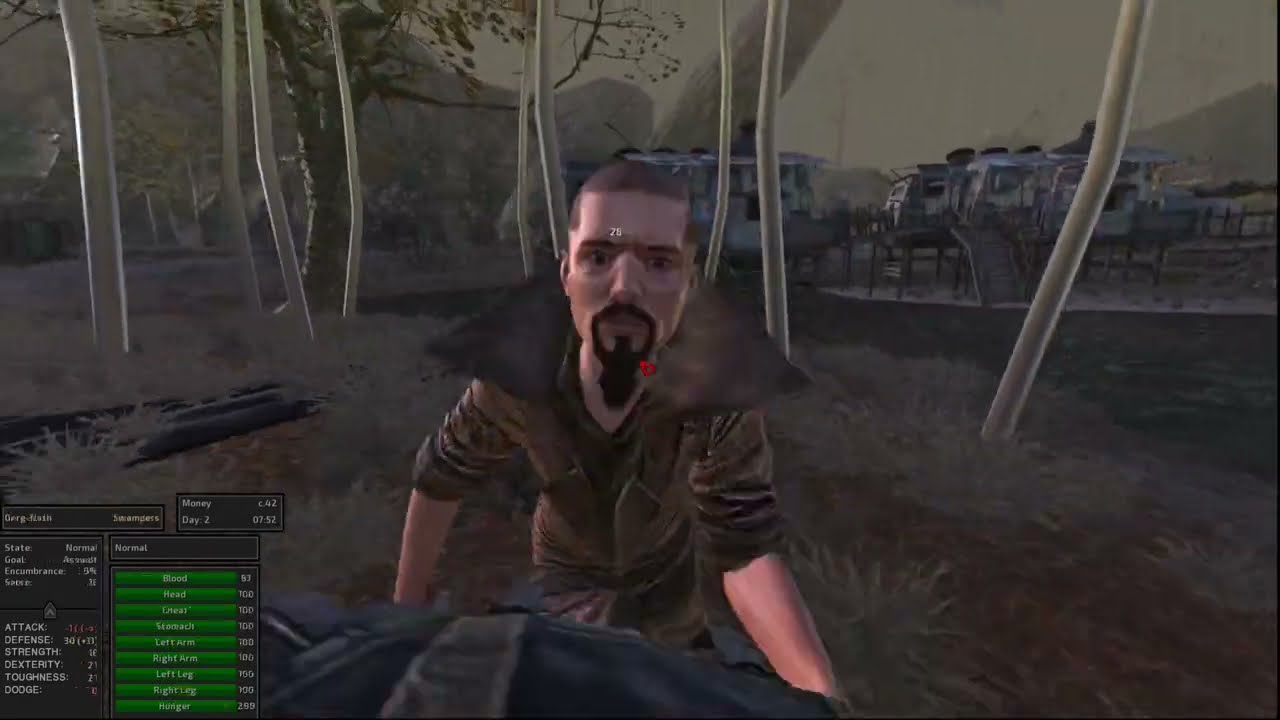
Click to watch the mod in action.
Current release: v0.4.1.
Two editions cover every Kenshi build:
- Standalone — for standard Steam. Ships address tables for both 1.0.68 and 1.0.65 and auto-detects the build at load; on an unrecognized build it disables itself cleanly (logged). Windows or Linux/Proton.
- RE_Kenshi Edition — runs as an RE_Kenshi plugin and resolves its hooks by runtime signature scan, so it works on every build RE_Kenshi supports — GOG and old versions included. Feature-identical to the standalone.
- In-game settings panel — press F10 for a live settings window:
sliders for FOV, sensitivity, and camera feel, plus checkboxes for every
feature toggle, all applied instantly. A "Reset to Defaults" button, close
via the X / Escape / F10. No more editing files by hand (the
.inistill works and stays in sync). - True first-person camera — attached to the head bone; tracks animations and ragdolls, roll-free, with FOV and near-clip tuned for FP. The camera leads your movement and scales with game speed, so it keeps up at 2x/5x.
- Engine-native WASD movement — drives the game's own direction-based locomotion: reliable inside buildings, on ramps and platforms, real walk/jog/run gaits. WASD overrides move orders, works with UI panels open (inventory/squad/jobs), and gets you up from playing dead, beds, or sitting.
- Works in combat — WASD wins the fight's locomotion race, so retreat, strafe, and kite work even while locked onto a target.
- Character switching — first person follows your selected squad member; camera-lock another character and FP swaps to them.
- Aim-lean — with a weapon drawn, your character physically bends through the spine as you look up/down (procedural spine IK).
- Ranged free-aim in combat — the aim pose tracks your crosshair, bolts fly where you aim (vanilla accuracy spread kept), and lock-on no longer overrides your look.
- Ragdoll camera — knocked out, the camera tumbles with your head (roll/pitch/yaw) and recovers on get-up.
- Mouse-look via DirectInput — raw-quality hardware deltas that coexist with the game's own input (no stolen registrations, no cursor-warp lag).
- Scroll wheel speed control — from a slow walk to a full run.
- Turn in place — your character's body follows the camera while idle.
- Colored crosshair — replaces the arrow cursor; turns red over hostiles and yellow over allies; the game's tool cursors (talk, doors, loot) still appear when relevant.
- Smart cursor release — the mouse frees automatically for dialogue, inventory, trade/looting, stats, map/factions, options, save/load, message boxes, and the right-click context menu; recaptures on close.
- Building interiors preload as you approach from outside — no more empty doorways.
- Foliage fix — grass no longer vanishes underfoot in first person.
- Unconsciousness blackout — knocked out, the screen fades to black through a closing tunnel; on coming to, vision returns with a gradual wake-up fade while the camera untumbles.
- Live-tunable settings — via the F10 panel (above) or by editing
KenshiFP.ini, which is hot-reloaded in-game (edit and save, changes apply within a second). Toggles (aim-lean, ranged free-aim, wheel speed, KO blackout), camera/feel tuning (fov,near_clip,sensitivity,eye_forward,move_forward,move_speed_ref,aim_lean_amount), key rebinds (FP toggle, WASD, settings key), and an FPS cap (fps_cap=N— precise frame limiting without vsync). - Framerate-independent mouse — look input captured at ~1kHz on a dedicated thread; identical feel at any fps.
| Input | Action |
|---|---|
| Right Alt | Toggle first-person on/off for the selected character |
| Mouse | Look |
| W A S D | Move (camera-relative) |
| Scroll wheel | Movement speed (walk ↔ run) |
| F10 | Open/close the settings panel |
| Everything else | Vanilla Kenshi bindings |
All keys are rebindable in KenshiFP.ini.
Standalone edition (standard Steam):
- Download the standalone release zip.
- Copy
KenshiFP_x64.dlland thekenshifp/folder into your Kenshi install directory (next tokenshi_x64.exe). - Open
Plugins_x64.cfgin the same directory and add this line at the end of the plugin list:Plugin=KenshiFP_x64 - Launch the game, select a character, press Right Alt.
RE_Kenshi edition (GOG / old builds / anyone using RE_Kenshi):
- Download the RE_Kenshi edition zip.
- Copy the
KenshiFPfolder into your Kenshimods/folder. - Enable KenshiFP in the in-game mod list. (Requires
RE_Kenshi.) Do not also
add the
Plugin=line — that's the standalone only.
To uninstall the standalone, remove that line (and optionally the files); for the RE_Kenshi edition, disable it in the mod list.
A log (KenshiFP.log) is written next to the game exe — include it in any
bug report.
- RE_Kenshi: the standalone edition runs with or without it (RE_Kenshi downgrades installs to 1.0.65; KenshiFP auto-detects and adapts). On GOG or any other build, use the RE_Kenshi edition, which resolves its hooks by runtime signature scan and works on every build RE_Kenshi supports.
- Coexists fine with other mods that don't replace the game executable.
- The settings panel opens in-game, not on the main menu.
- Backpedaling (S) turns the character around rather than walking backward facing the camera (the engine's physics drives orientation during movement; a facing-locked backpedal is future work).
- Grass billboards shimmer when rotating the view — an engine impostor artifact that eye-level viewing makes more visible.
Cross-compiles from Linux (or MSYS2) with mingw-w64 — no Windows SDK
needed. Both editions build from the same client/kenshifp_client.c:
cd client && ./build.sh          # standalone -> KenshiFP_x64.dll
cd re_plugin && ./build.sh       # RE_Kenshi edition -> KenshiFP.dll
The RE_Kenshi edition is the same client compiled with -DKFP_RE_PLUGIN, so
it resolves game addresses by runtime signature scan instead of the hard-coded
per-version tables. Requires x86_64-w64-mingw32-gcc with
libdinput8/libdxguid (mingw-w64 ships both).
MinHook (BSD-2-Clause) is vendored
under third_party/minhook/.
The DLL loads through Ogre's plugin path and detours the game's per-frame
update plus the camera update with MinHook. All game structures and
functions were located by reverse engineering the 1.0.68 binary with
headless Ghidra — the offset map and methodology live in re/NOTES.md and
DESIGN.md. Risky calls into game code run inside a vectored-exception
guard, so a bad pointer degrades a feature (with a log line) instead of
crashing the game.
Field-layout documentation from the KenshiLib headers was used as a reference map during reverse engineering (function addresses there are stale for 1.0.68; every address this mod calls was re-derived and verified against the live binary).
GPL-3.0 (see LICENSE). Vendored MinHook is BSD-2-Clause (see
third_party/minhook/LICENSE.txt).