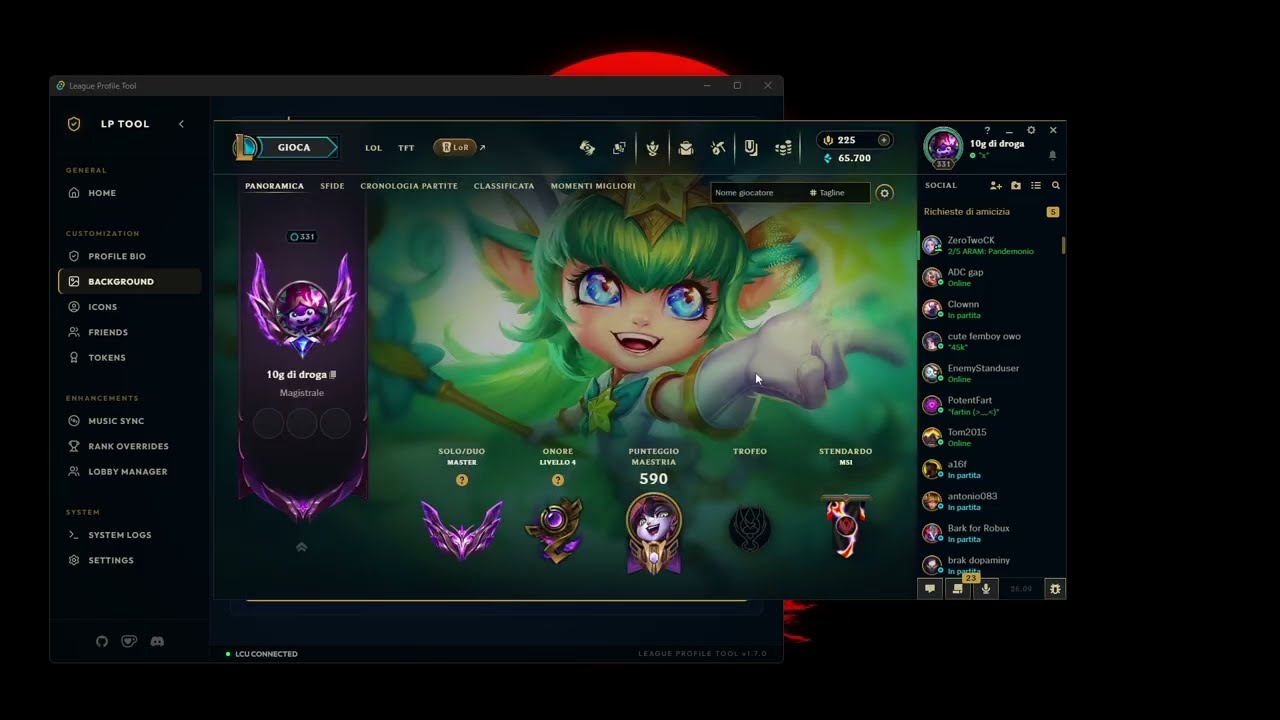
A desktop tool built with Tauri v2 and React for League of Legends profile customization through the LCU (League Client Update) API.


🎥 Click here to watch the full video demo
Tip: Fast links: Download • Security Report • Changelog
| 🚀 Start Here | 🔗 Link |
|---|---|
| Latest Release | GitHub Releases |
| CI Workflows | GitHub Actions |
| Security Report | res/docs/SECURITY_REPORT.md |
- 🗂️ Categorized Navigation: Premium vertical sidebar with grouped categories (Customization, Enhancements, System).
- 🧹 Smart Friend Manager: Bulk delete friends with ease, featuring real-time Riot ID display (Name#Tag) and a detailed progress tracker.
- 🏠 Live Profile Dashboard: Redesigned home page with a live header displaying your current summoner icon, level, and Riot ID.
- 🖼️ Profile Background: Dedicated tab to set any champion skin as your profile background with lazy loading.
- 🆕 Profile Tokens: Customize your 3 challenge medals with a visual image picker powered by HD Community Dragon assets.
- 🎵 Music Integration: Synchronize your profile bio with your Last.fm scrobbles automatically. Supports 255-char bios with ASCII art; idle text can be used standalone as your profile bio via a toggle switch.
- 🏆 Rank Override: Customize the visible queue, tier, and division used by chat and social cards.
- 🔷 Challenge Level: Set the challenge crystal level and challenge points from a dedicated editor.
- 🐧 PenguLoader Overview Override: Optionally mirror the selected rank in the League Profile Overview card, tooltip text, and regalia emblem through the bundled PenguLoader plugin.
- 🖼️ Icon Swapper: Browse and apply 6,000+ profile icons with descriptive names (e.g., "Blue Minion Bruiser").
- 📝 Presence Control: Edit bio/chat status and set LCU presence (Online, Away, Mobile, Offline). Auto-expanding textareas with monospace font for ASCII art, live char counter (N/255), and a toggle to use the Music Sync idle text as your bio for more room.
- ⚡ Performance Optimized: Version-aware local cache for metadata and JPG previews for instant loading.
- 🔄 Auto-Updater: Built-in update detection with secure ED25519 signatures.
↔️ Collapsible Sidebar: Support for icon-only mode with smooth transitions.
- Download the latest build from Releases.
- Start League of Legends client.
- Open League Profile Tool.
- Join our Discord Server (Optional) for support and updates.
- Apply your desired customizations directly through the Hextech-inspired UI.
Chat and social rank overrides work directly through the LCU. Overriding the rank shown in the League Profile Overview additionally requires PenguLoader:
- Install PenguLoader from its official releases page.
- Open Settings > Pengu Loader in League Profile Tool.
- Select Install / Update Plugin.
- Enable PenguLoader Overview Override in the Rank Override section, apply the changes, and fully restart League.
The Overview toggle is independent: disabling it does not affect chat or social hover cards.
- Node.js:
v20.xor newer - Rust: latest stable via rustup
- League of Legends client installed
git clone https://github.com/lenny-ts/league_profile_tool.git
cd league_profile_tool
npm ci
npm run tauri devnpm run tauri buildThis project uses automated checks and public reporting:
- CodeQL for static security analysis
- SonarCloud for quality and hotspot analysis
- Dependabot for dependency updates
- VirusTotal release report generated in CI and published at
res/docs/SECURITY_REPORT.md
All checks run in GitHub Actions and are publicly visible from the repository Actions tab.
🧪 How release verification works (CLICK HERE)
- CI builds release artifacts.
- Release assets are scanned via VirusTotal.
- Results are published to
res/docs/SECURITY_REPORT.md. - Users can cross-check release notes, hashes/signatures, and scan report.
This project is licensed under the MIT License.
If the project is useful to you, you can support it here:

 lenny-ts 💻 🎨 🚧 |
This project follows the all-contributors specification.
Disclaimer: This tool is not affiliated with, endorsed by, or integrated with Riot Games in any official capacity.