This repository is a public Obsidian plugin/tooling support project. It demonstrates a small productivity plugin that improves sidebar readability through label display, custom button names, width controls, command-palette actions, and settings import/export.
For interviews, use it as supporting evidence for product-minded tooling work: identifying a personal workflow pain point, packaging it as an Obsidian plugin, documenting install paths, and maintaining a user-facing settings surface.
manifest.json: Obsidian plugin metadata.main.js: plugin behavior and command integration.styles.css: sidebar layout and visual adjustments.screenshots: public UI evidence for settings and behavior.
This repository should not include private vault content, note titles, workspace screenshots with personal data, synced vault configuration, plugin tokens, or unpublished writing material. Keep screenshots and examples sanitized and focused on plugin behavior.



这个Obsidian插件通过以下功能增强了侧边栏:
- 名称显示在图标右侧: 在侧边栏中以水平布局显示图标和名称
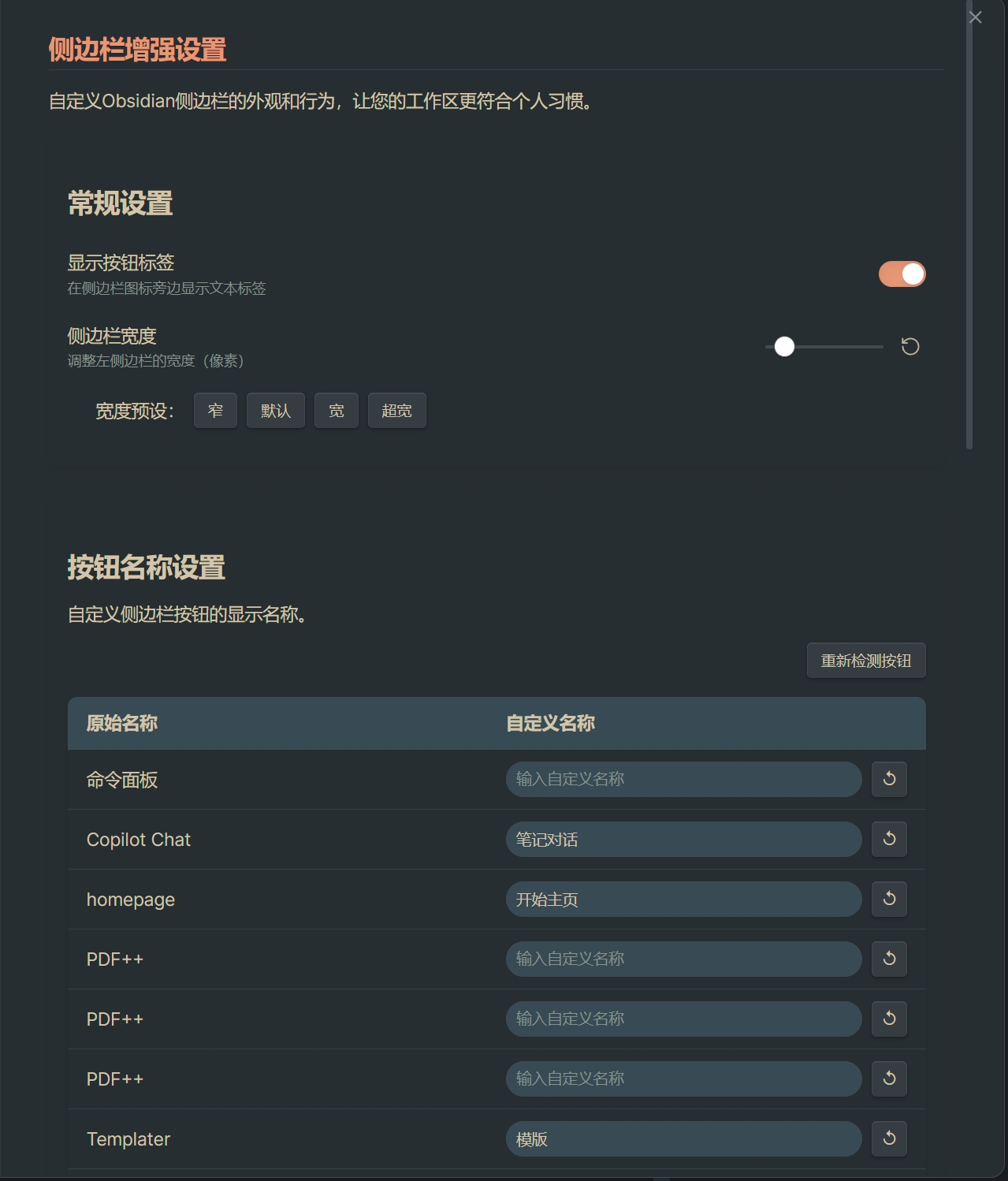
- 自定义按钮名称: 可以为每个侧边栏按钮指定自定义显示名称
- 调整侧边栏宽度: 通过拖拽或滑块调整侧边栏的宽度
- 自动检测按钮: 自动识别所有侧边栏按钮,包括插件添加的按钮
插件自动将侧边栏的图标和文本转为水平布局,文本显示在图标右侧,使侧边栏更直观、更易于使用。
可以为侧边栏中的每个按钮设置自定义的显示名称,包括:
- 核心功能按钮 (文件、搜索、收藏等)
- 第三方插件添加的按钮
- 自动检测新添加的按钮
提供多种方式调整侧边栏宽度:
- 通过设置页面的滑块精确调整
- 通过鼠标拖拽侧边栏右侧边缘
- 使用预设宽度按钮(窄、默认、宽、超宽)
- 通过命令面板调整
- 打开Obsidian设置
- 转到"第三方插件"
- 禁用"安全模式"
- 点击"浏览"
- 搜索"Sidebar Enhancer"
- 点击安装
- 安装完成后,启用插件
- 下载最新版本的发布包 (GitHub Releases)
- 解压到您的Obsidian库的
.obsidian/plugins目录 - 重新启动Obsidian
- 在Obsidian设置中启用插件
- 安装 BRAT插件
- 添加beta插件:
q442333521/obsidian-sidebar-enhancer - 启用"侧边栏增强"插件
- 转到插件设置
- 使用"侧边栏宽度"滑块调整宽度
- 或者直接用鼠标拖拽侧边栏右侧边缘
- 使用"宽度预设"快速设置常用宽度
- 转到插件设置
- 在"按钮名称设置"部分找到想要修改的按钮
- 在"自定义名称"栏中输入新的名称
- 名称会自动保存并实时应用
- 随时可以点击重置按钮恢复原始名称
- 使用"重新检测按钮"功能可以刷新侧边栏按钮列表
- 当安装新插件或调整布局后,可以使用此功能更新按钮列表
插件添加了以下命令:
切换侧边栏标签显示: 快速开启/关闭所有标签增加侧边栏宽度: 增加10px宽度减小侧边栏宽度: 减少10px宽度
- 在设置页面中可以导出当前配置为JSON文件
- 可以导入之前保存的设置或从其他设备同步设置
# 克隆仓库
git clone https://github.com/q442333521/obsidian-sidebar-enhancer.git

# 安装依赖
cd obsidian-sidebar-enhancer
npm install

# 开发模式
npm run dev

# 构建
npm run build- 如有问题或建议,请提交Issue
- 欢迎提交Pull Request贡献代码
- 添加自动检测按钮功能
- 改进设置界面,更直观易用
- 添加原始名称显示
- 添加按钮重置功能
- 添加宽度预设
- 初始版本发布
- 实现基本的侧边栏名称自定义
- 添加侧边栏宽度调整