By Kim Schulz kim@schulz.dk
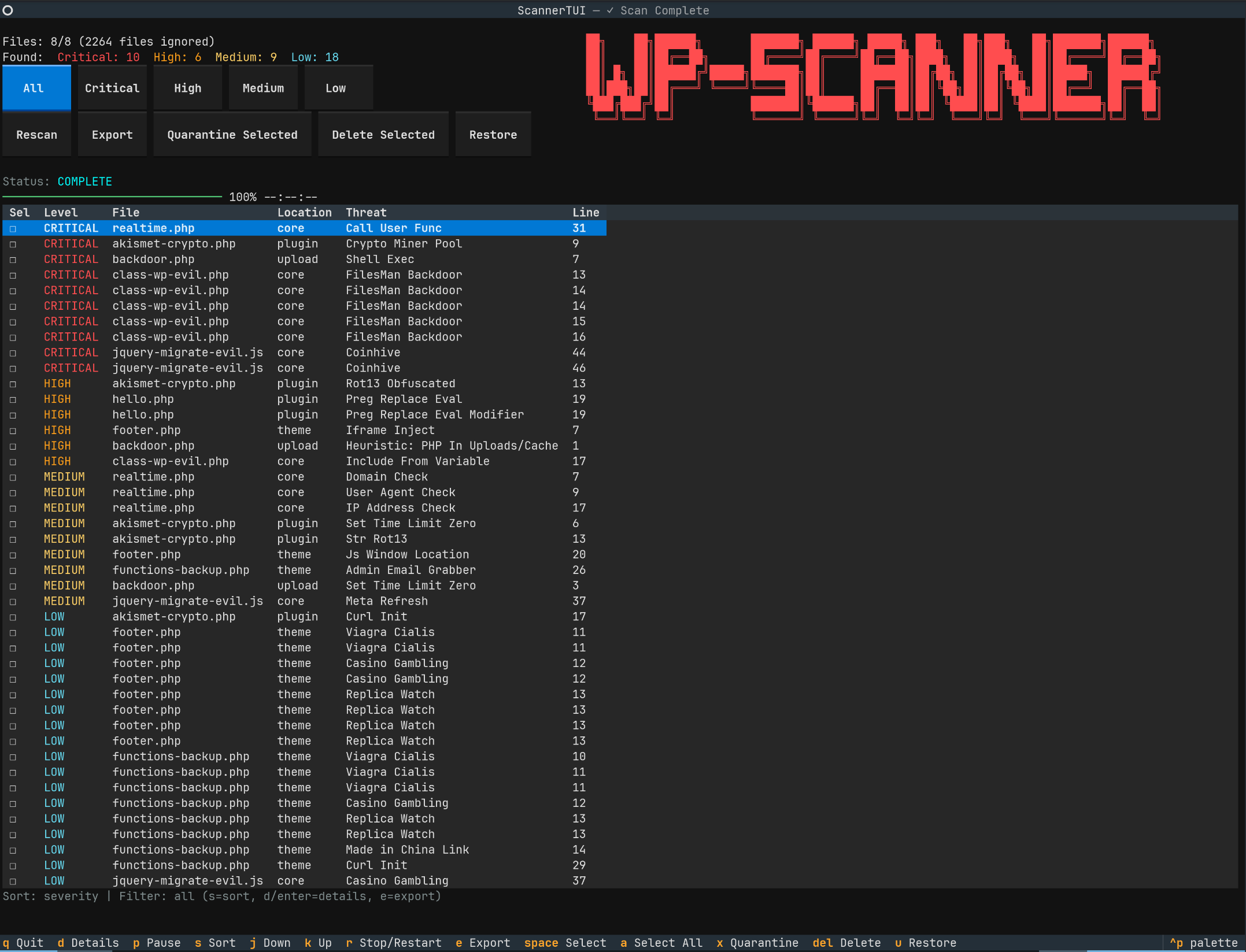
wp-scanner is a WordPress malware scanner focused on finding backdoors, crypto miners, suspicious loaders, and obfuscated payloads in WordPress file trees.
Use this tool carefully. Quarantine/delete actions can change or remove files. Always take a backup before remediation.
- Signature-based malware detection (100+ built-in signatures)
- Heuristic detection for suspicious WordPress patterns
- Optional WordPress core verification to skip unchanged official core files
- Interactive Textual TUI with sortable findings, details modal with source view, filtering, export, and remediation actions
- Headless mode with JSON/HTML report output
- Audit logging for remediation actions
- Restore support from quarantine via audit log
Install from PyPI:
pip install wp-scannerInstall from PyPI with TUI dependencies:
pip install 'wp-scanner[tui]'Install from local repository checkout:
pip install .
pip install '.[tui]'Install from PyPI as an isolated CLI app:
pipx install wp-scannerInstall from PyPI with TUI dependencies:
pipx install 'wp-scanner[tui]'Install from local repository checkout:
pipx install .
pipx install --pip-args='.[tui]' .
If you run without TUI dependencies, the scanner falls back to headless mode automatically.
Run TUI scan:
wp-scanner /path/to/wordpressRun headless scan:
wp-scanner /path/to/wordpress --no-tuiHeadless scan with reports:
wp-scanner /path/to/wordpress --no-tui --report-json ./ --report-html ./Use custom signatures:
wp-scanner /path/to/wordpress --no-tui --signatures ./custom-signatures.jsonVerify against official WordPress core and skip unchanged core files:
wp-scanner /path/to/wordpress --verify-coreOffline core verification (cached core only):
wp-scanner /path/to/wordpress --verify-core --verify-core-offlineScan a remote WordPress tree over SSH (key-based auth):
wp-scanner /dummy --remote-ssh user@example.com:/var/www/html --remote-key ~/.ssh/id_rsa --verify-core --verify-extensionsHeadless remote scan:
wp-scanner /dummy --remote-ssh user@example.com:/var/www/html --no-tui --report-json ./ --report-html ./Inventory-first remote fetch (fetch only scan-relevant files):
wp-scanner /dummy --remote-ssh user@example.com:/var/www/html --remote-inventory-first --no-tuiUse a non-default SSH port and explicit known-hosts file:
wp-scanner /dummy --remote-ssh user@example.com:/var/www/html --remote-port 2222 --remote-known-hosts ~/.ssh/known_hostsKeep temporary remote snapshot files for debugging:
wp-scanner /dummy --remote-ssh user@example.com:/var/www/html --remote-keep-temp --no-tuiDisable host key verification (not recommended, legacy environments only):
wp-scanner /dummy --remote-ssh user@example.com:/var/www/html --remote-insecure-host-key --no-tuiNotes:
- In TUI mode, if no SSH key is provided, the app prompts for SSH password in a modal.
- In headless mode, if no SSH key is provided, password is prompted in terminal.
- The local path argument is ignored when
--remote-sshis set;/dummyis a placeholder.
Use a remote profile JSON file:
wp-scanner /dummy --remote-profile ./remote-profile.json --no-tuiExample remote-profile.json:
{
  "remote_ssh": "user@example.com:/var/www/html",
  "port": 22,
  "key_file": "/home/user/.ssh/id_rsa",
  "known_hosts": "/home/user/.ssh/known_hosts",
  "inventory_first": true,
  "keep_temp_snapshot": false,
  "password_env": "WP_SCANNER_SSH_PASSWORD"
}
Using password_env (recommended over plain-text password):
export WP_SCANNER_SSH_PASSWORD='your-ssh-password'
wp-scanner /dummy --remote-profile ./remote-profile.json --no-tuiQuarantine infected files:
wp-scanner /path/to/wordpress --no-tui --quarantine --quarantine-dir ./quarantine --yesDelete infected files:
wp-scanner /path/to/wordpress --no-tui --delete --yesRestore from quarantine using audit log:
wp-scanner /path/to/wordpress --no-tui --restore --audit-log ./wp-scan-remediation-audit.jsonl --yesMain controls:
q: quitp: pause/resume scanr: stop/restart scanj/kor arrows: move selectiondorenter: open details modals: toggle sorte: export findingsspace: select/unselect current findinga: select/unselect all visible findingsx: quarantine selecteddelete: delete selectedu: open restore modal
- Findings can include false positives. Review critical/high findings first.
- Core verification and remediation audit logging are intended to reduce unnecessary scanning and improve operational safety.