







Your Unraid data, sealed in a vault. Drop a backup. Detonate a restore.
BombVault backs up Docker containers, KVM VMs, appdata, the Unraid flash config — and even itself —
and restores everything with a single click. Containers automatically reappear in the
Docker tab, VMs automatically in the VM tab — no manual reinstall, no
reconfiguration, no drama.
Your data, locked in. Loss, locked out. Data loss doesn't stand a chance.
Powered by restic — deduplicated, incremental, always encrypted.
Status: one-click Docker container, KVM/libvirt VM, Unraid flash, app configuration and files/folders backup & restore are all live (VMs over SSH — no libvirt mount), with off-site repos (SMB/NFS/rclone/SSH-sftp), per-source retention, file-level restore, integrity checks, pre/post-backup hooks, a protection-status dashboard with restore-verification drills, immutable/append-only off-site with tamper verification (ransomware-resistant), live restore progress + cancel, restore from another BombVault repo (one-time, read-only), a read-only fleet view over your other BombVault boxes, self-healing maintenance (orphaned-lock auto-recovery), a whole-server "Backup Everything" pass (every domain in one run, with global pre/post commands for a dead-man's-switch ping), and notifications (webhook / Matrix / email / Apprise / Healthchecks / Unraid-native / Prometheus), each channel with its own on/off switch.

Maintained solo, in whatever spare time there is. Questions via the support thread, bugs, ideas and feature requests via GitHub issues. If it's useful to you, a coffee is always welcome.

- What is this?
- Screenshots
- Features
- How it works
- Security / trust model
- Requirements
- Install on Unraid
- Configuration
- Development
- Credits
- License
- Support this project
BombVault is a self-hosted, Unraid-native web app for backup and full disaster recovery of your Docker containers and KVM/libvirt VMs; it also runs on a plain Docker host or TrueNAS Scale (see Other platforms). It ships as a single Docker container, gives you a modern web UI that follows your system's light/dark preference, or the theme you pick yourself, and handles the whole lifecycle:
- Backs up Docker appdata + container definitions, KVM/libvirt VM disks + XML (incl. UEFI NVRAM), the whole Unraid flash (
/boot), any folders you point it at (named file sets with per-set excludes), and its own/config(settings database + off-site credentials). - Restores automatically — containers are reinstalled and restarted so they reappear in the Docker tab exactly as before, and VMs are re-defined in the VM Manager with their disks + NVRAM reattached.
- Schedules incremental backups in the background (per domain) from one place — the Schedules tab under Settings — with one-click "include all in schedule" for containers and VMs, so you never have to think about it.
- Backs the whole server up in one pass — Backup Everything (Settings → Schedules) runs containers, VMs, flash, folders and the self-backup once each, in that order, under a single entry in the Activity Log. Give it a post-command and one ping after the pass tells you the entire server is protected, instead of five separate schedules you have to correlate by hand. Off by default, and independent of each domain's own schedule.
- Optionally updates a container right after its backup — flip on Update after successful backup on a container (advanced, off by default) and BombVault pulls the newest image and recreates it, but only when there's actually a newer image. A fresh restore point always exists first, so a bad update is one restore away. Optional extras: a notification per updated container so you know to check it, and image cleanup (Settings → Paths & Storage) that removes the superseded image afterwards — a base image shared by other containers is never deleted.
- Keeps an eye on your other BombVault boxes — turn on Fleet (Settings, off by default) and a Fleet tab lists the other instances you run, each with its own protection scorecard. It is read-only in both directions: this box only ever asks a peer for its status. Fleet peers can also hand each other off-site storage, so setting up a mutual off-site no longer means mailing repository addresses and passwords around.
The core idea — one-click backup and automatic re-install of Docker containers — comes from VolumeVault by @Darkdragon14 (Apache-2.0). BombVault is a fresh, independent implementation with restic as the engine; see Credits.
Unraid's usual backup answer is Appdata.Backup (the community-maintained successor to the old Appdata Backup/Restore plugin) — a native CA plugin, but a file-level one: it archives the appdata folder (and optionally VM disks + Unraid flash), with no awareness of what a Docker container or a libvirt VM is, so a restore is copying files back, not the container reappearing in the Docker tab on its own. The other well-known route is a generic dedup/encrypted engine — Duplicati, Kopia, Duplicacy or BorgBackup — run by hand or via a community Docker template; all are solid, actively developed engines (restic's own closest siblings, in Kopia's, Duplicacy's and Borg's case), but none of them know what a container or a VM is either, and none ship as a native Unraid plugin.
| BombVault | Appdata.Backup (CA) | Duplicati | Kopia | BorgBackup | |
|---|---|---|---|---|---|
| Docker restore reinstalls the container (image, env, ports, labels) | ✅ | ❌ files only | ❌ | ❌ | ❌ |
| VM/guest restore re-defines it (not just a disk copy) | ✅ via libvirt | ❌ | ❌ | ❌ | |
| Deduplication | ✅ content-defined | ❓ undocumented | ✅ content-defined | ✅ content-defined | |
| Client-side encryption | ✅ | ❓ undocumented | ✅ | ✅ | ✅ |
| Immutable / append-only off-site | ✅ + an active tamper test proves it | ❌ | ✅ Object Lock | ✅ append-only SSH mode | |
| Automated restore-verification drills | ✅ local + off-site sandbox restore | ❌ | ✅ opt-in full test-restore | ❌ manual convention only | |
| Multiple off-site targets, independent credentials | ✅ | ❌ | ✅ | ❌ needs manual scripting | |
| Native pre/post-backup hooks | ✅ | ✅ | ✅ | ✅ | ❌ core has none — Borgmatic adds it |
| Live restore progress + cancel | ✅ | ❓ | ✅ | ❌ confirmed gap | |
| Native platform packaging | ✅ Unraid CA | ✅ Unraid CA | ❌ generic Docker template | ❌ generic Docker template | ❌ generic Docker template |
| Web UI | ✅ | ✅ | ✅ | ❌ CLI/config-file only |
✅ yes · ❌ no ·
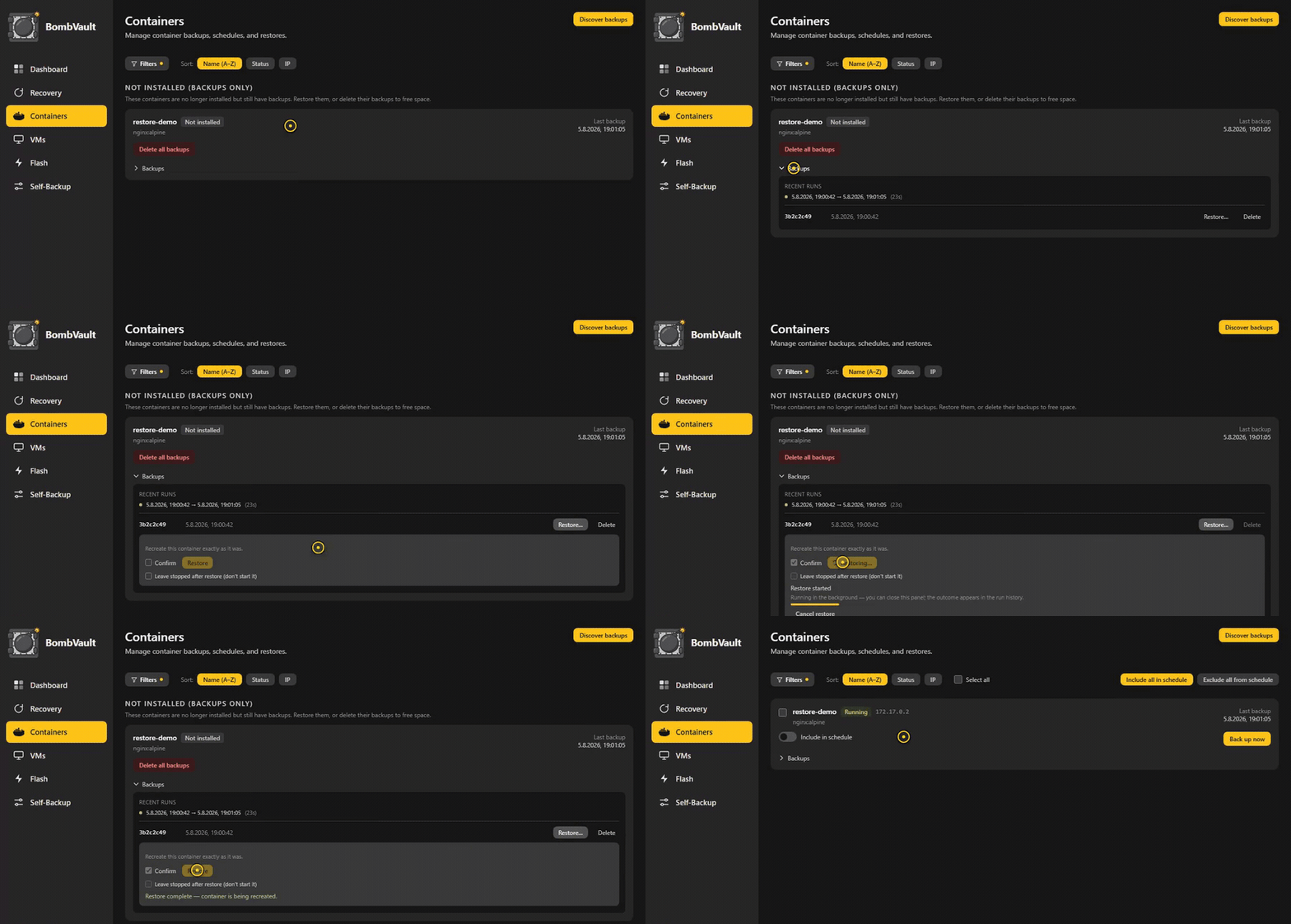
A container that no longer exists, restored from its backup and running again in seconds. The confirm switch is deliberate: a restore in place recreates the container, so it asks before it does.
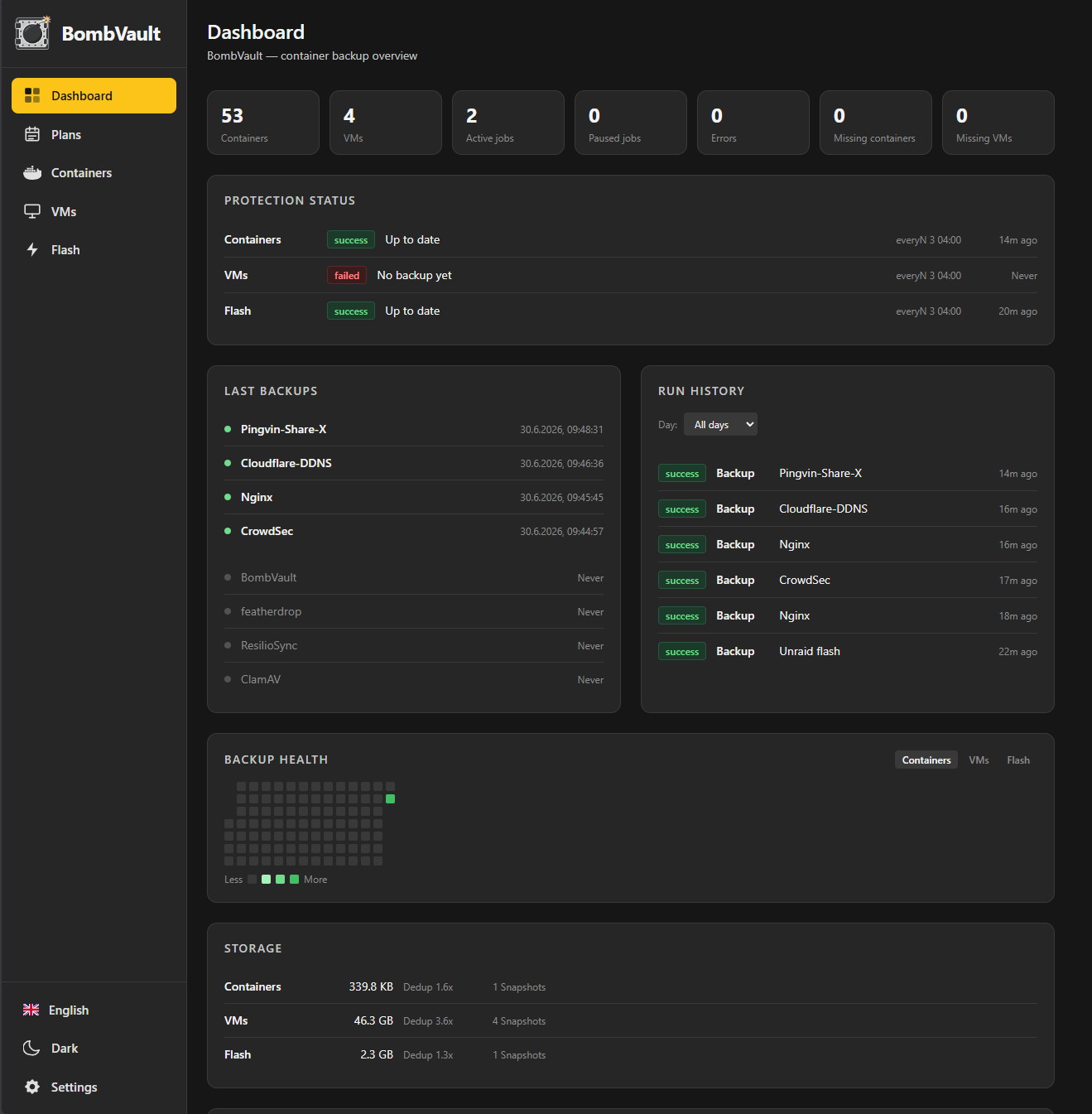
Dashboard — a compact health summary (overall status, next backup, last result) above a live activity log, protection status per domain, run history and a backup-health heatmap. The log carries off-site replication and the tamper test that proves the far side refuses a delete.
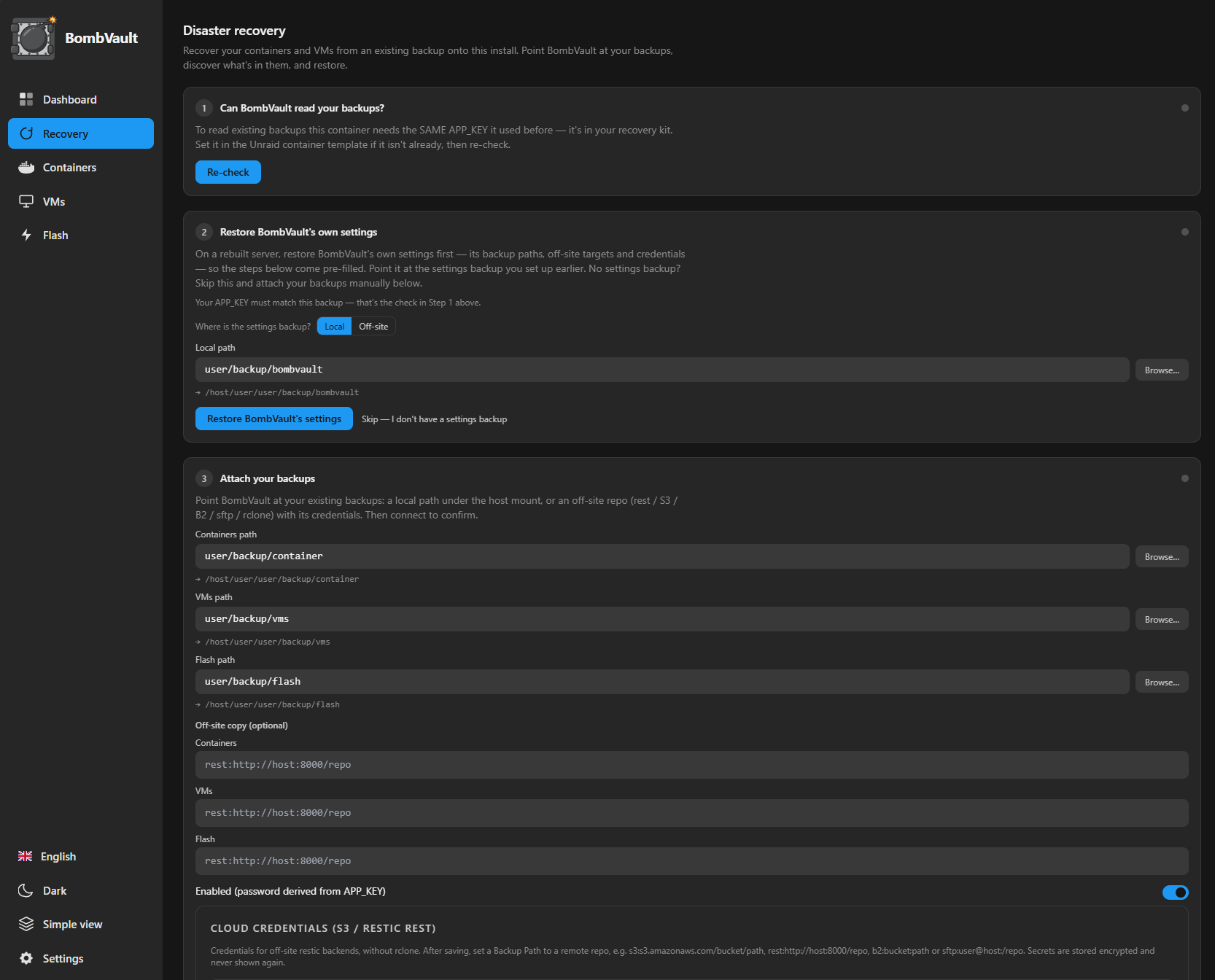
Recovery — a guided disaster-recovery flow: confirm your backups are readable, restore BombVault's own settings, then attach and restore your container, VM and flash backups onto a fresh install.
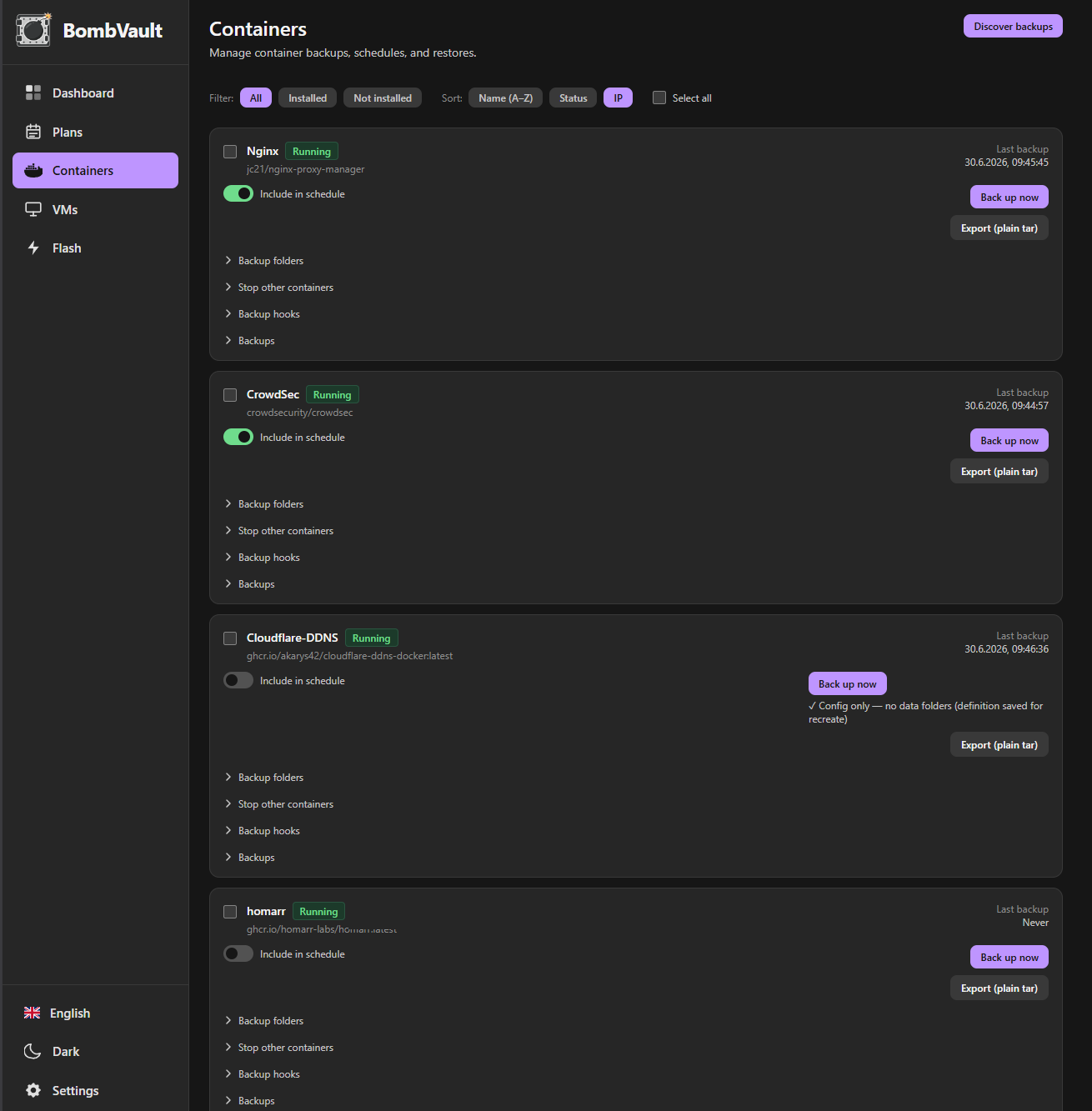
Containers — per-container backup with an include-in-schedule toggle, collapsible filters, bulk include/exclude, one-click backup and an expandable per-container history.
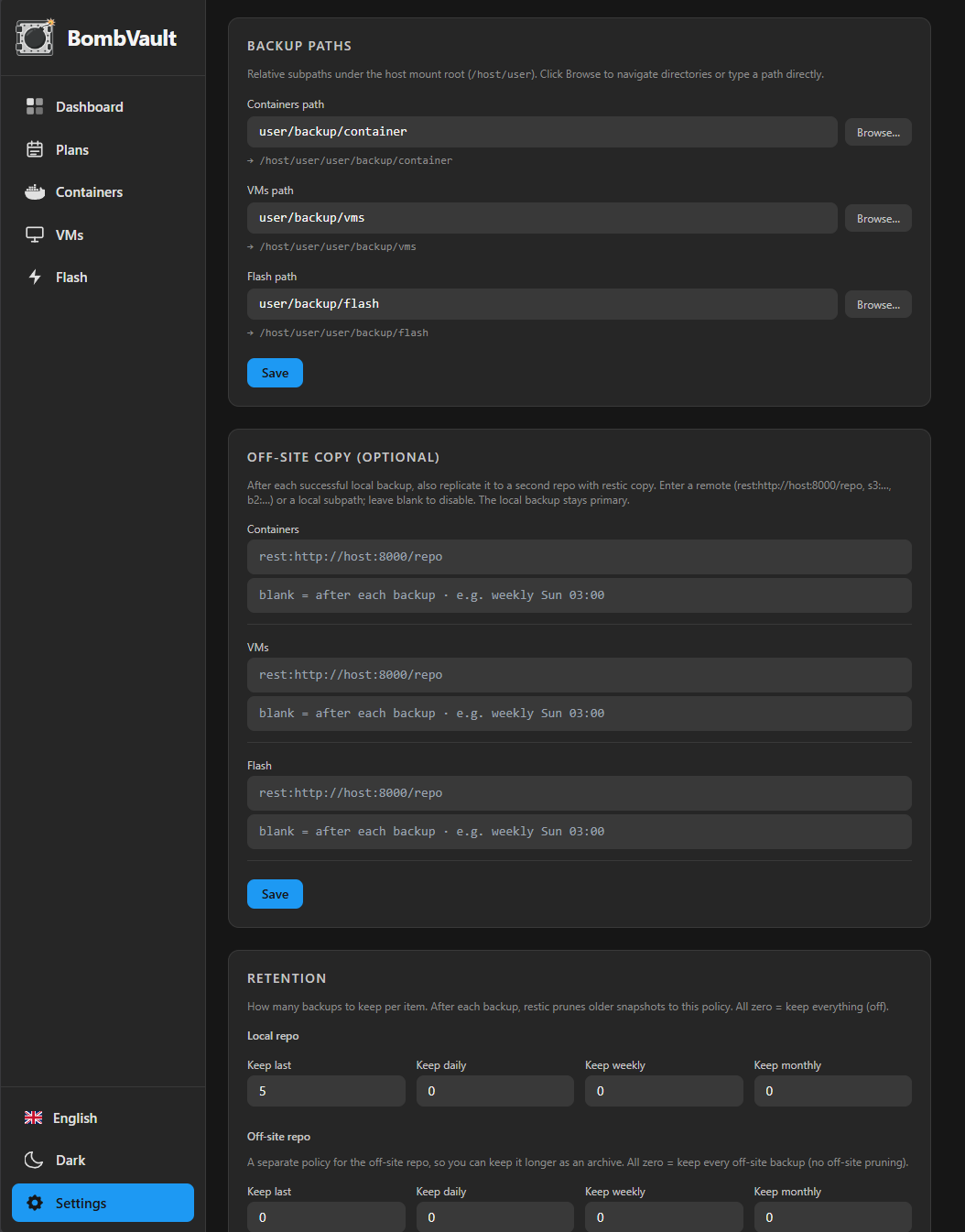
Settings — organised into tabs (General · Paths & Storage · Schedules · Off-site · Notifications · Integrity · System). General turns each backup domain on or off and holds the look of the app: language, theme, colours, corners, animations and quiet toasts. Nothing here has a Save button; every change is written as you make it.
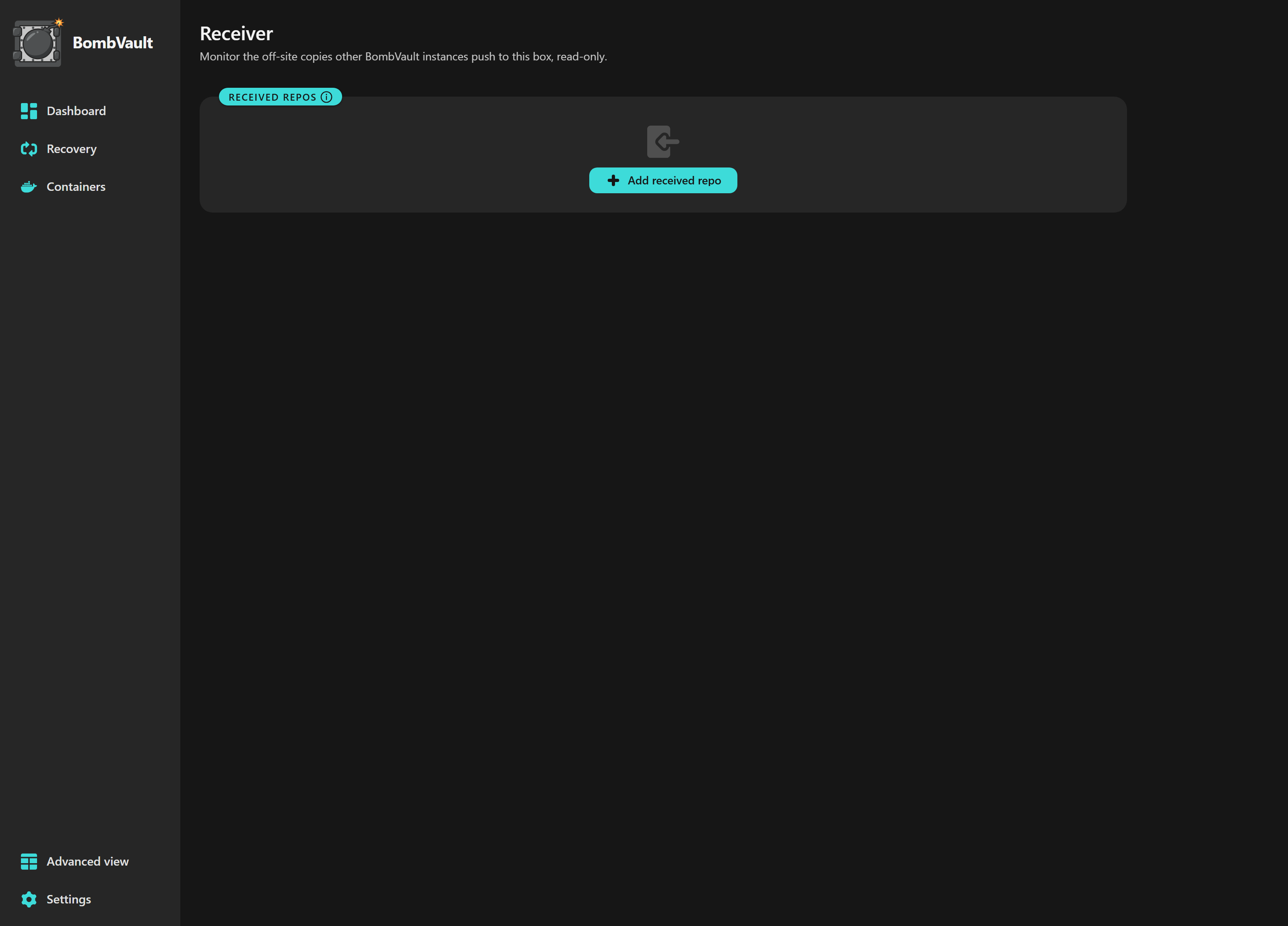
Receiver — the other end of an off-site copy. It watches what other instances push to this box, read-only: what arrived, when the last backup came in, and an independent integrity check run on this hardware rather than trusted from the sender.
Simple by default. The interface shows only the essentials (back up, restore, schedule). Use the Simple / Advanced switch in the sidebar to reveal the expert controls — retention, off-site copy, pre/post hooks, file-level restore, notifications, Prometheus metrics, integrity/maintenance tools and more. It's a per-browser preference, off by default, so newcomers get a clean UI and power users get everything.
| What | What is saved |
|---|---|
| Docker containers | Appdata directory + container definition (image, env vars, ports, labels, volumes) |
| KVM / libvirt VMs | VM disk image(s) + XML definition + UEFI NVRAM (graceful-shutdown or live-snapshot, over SSH). Live snapshots fall back to a graceful backup automatically if the snapshot can't be created, so a VM backup never just errors out. ZFS zvol-backed disks are covered too: each is streamed with zfs send over the same SSH link and kept under its own snapshot history, so a VM whose disks are zvols (TrueNAS Scale's default) is backed up as one VM rather than half of one. A guest's vTPM state is saved next to the NVRAM whenever the domain XML names its path, so a Secure-Boot guest comes back able to unseal its own disk. That is the passthrough case, a real TPM chip. An emulated vTPM, which is what TrueNAS provisions for Windows 11 and Secure Boot guests, does not publish its state path in the domain XML at all, so its state is not captured: keep that guest's recovery key to hand before you restore it. BombVault reports "no TPM path found" instead of guessing a path (the full reasoning) |
| Unraid flash | The whole USB flash (/boot) — OS, license, array config, shares, network + plugin config. Restore is a one-click .zip download (never overwrites the live flash) |
| App configuration | BombVault's own /config — its settings database, off-site credentials (rclone.conf) and libvirt SSH keypair, snapshotted with SQLite VACUUM INTO so a WAL-mode database is never captured mid-write. No container stop. Restore is from the Recovery tab, staged and applied by a self-restart so the live database is never overwritten under an open handle |
| Files & folders | Named file sets — any folder on the server (a share, your documents, a photo library), each with optional per-set exclude patterns. Full parity with the other domains: schedules, retention, off-site copy, integrity checks and restore drills. Sources just need to be visible under the container's /mnt mapping — the Unraid template's default Host Data mount (all of /mnt) already covers shares, cache and pool paths |
Restore (the good part)
- One-click full restore — pick a snapshot, click Restore. Done.
- Restore from local or off-site — every backup browser (and the integrity/maintenance card) has a Local | Off-site switch, so if a local repo is lost or corrupt you can list and restore straight from the off-site replica. Delete is per-source: removing a backup only affects the copy you're viewing, never both.
- Containers are automatically reinstalled: the container definition is replayed against the Docker API so the container reappears in the Unraid Docker tab exactly as it was — same image, same settings, same port mappings.
- VMs are automatically recreated: the XML definition is re-imported over SSH so the VM reappears in the VM Manager with its disk + UEFI NVRAM reattached, even after the VM was deleted. A VM deleted from the host shows under Not installed in the VM tab; if its entry is gone too (e.g. after a fresh install), Discover backups rebuilds it from storage — same as for containers.
- Individual restore — restore one container, one VM or one file set without touching the others.
- Flash restore is a
.zipdownload — pick a snapshot and it streams straight to your browser asflash-<id>.zip, ready to drop into the Unraid USB creator (or unzip onto a fresh USB). The live, running/bootis never touched, and because a zip carries no filesystem metadata there are no permission errors on the way out. - Scheduled flash zip export — turn it on and, after every flash backup, BombVault also writes the snapshot out as a plain
.zipto a folder you pick — either a singleflash-latest.zipthat's overwritten each time or a rolling history of timestamped zips. Point it at a Syncthing or rclone folder and your bootable-USB backup leaves the server automatically, so it's reachable even when the server itself won't boot. - Pre-flight conflict check — before anything is stopped or removed, restore verifies the container's static IP and published host ports are free; if another container already holds one, it aborts with a clear, actionable message instead of leaving you with a half-finished restore.
- File-level restore — expand a container snapshot's Files, filter, tick any number of files and folders, then restore the whole selection in place (original locations) or into a folder you pick.
- File-set restore — restore a file-set snapshot in place (back to its original folder, after an explicit confirmation) or into a folder you pick — never silently. Selective restore works here too: list the snapshot's contents, tick only the files and folders you want, and restore just those — same file-tree picker as the container file-level restore.
- Restore keeps the run-state — a container (or VM) that was running when backed up comes back running; one that was stopped stays stopped. Tick Leave stopped after restore to recreate it without starting it, so you can rebuild a group of dependent containers one by one and start them yourself afterwards.
- Restore a whole stack — containers from the same Docker Compose project (via the
com.docker.compose.projectlabel) are grouped into a Stacks panel. Restore stack rebuilds every member from its latest backup left stopped, then optionally starts them independs_onorder — so a compose stack (e.g. managed with Dockhand) comes back without members racing ahead of their dependencies. - Live progress, cancel & busy feedback — a long restore shows a live percentage bar ("Restoring… NN%") instead of a bare spinner, and can be cancelled with a type-aware confirmation (a restore-to-a-folder cancels cleanly; an in-place restore warns it leaves the target partial). A cancelled restore is recorded as cancelled, not failed. And starting a backup while a restore (or a scheduled/maintenance op) holds a repository now shows a clear "a restore is running" hint instead of silently doing nothing.
- Guided recovery — a dedicated Recovery tab walks a fresh or rebuilt install through the disaster case: it restores BombVault's own settings first (so the backup paths, off-site targets and credentials the rest of the flow needs come pre-filled — applied via a self-restart over the Docker socket, so the live settings database is never overwritten under an open handle), checks BombVault can read your backups and tells you whether the repository it found is encrypted instead of asking you to remember (one it could not reach is reported as "couldn't be read", never as "there is nothing here", so a wrong answer is caught before the restore rather than during it), lets you point at your existing repo (local or off-site), discovers the containers, VMs and file sets stored in it, and restores them all (left stopped, so you start them deliberately) — with your recovery kit one click away. Everything a disaster recovery needs, in one place.
- Restore from another BombVault repo — a separate card on the Recovery tab opens a different BombVault instance's repo (mount that server's backup share under
/mntand point at it; a remote repo URL is deliberately refused here, so a third party's address is never handed to restic with your key) with that instance'sAPP_KEY, in a one-time, read-only session: browse the containers, VMs and file sets stored there, pick a snapshot and restore it — the restored object becomes a normal local container / VM / file set. Nothing is ever written to the other repo, and your own backup settings stay untouched (the session lives in memory and expires by itself), so moving a container from server A to server B no longer means repointing your repo settings and reverting them afterwards. Live server-to-server federation (two instances talking to each other) is explicitly out of scope — this is a deliberate one-shot pull.
Storage & scheduling
- Incremental, deduplicated backups via restic — even large VM disks don't balloon the repo.
- Destinations: a local path, or off-site — SMB/CIFS & NFS (mount the share on Unraid and point a Backup Path at it), native restic backends without rclone (
s3:…,rest:http://host:8000/repo,b2:…,sftp:user@host:/repo) with their credentials stored encrypted under Settings → Off-site → Cloud credentials, or rclone (any of its remotes) via Settings → Off-site (rclone:<remote>:<bucket>/path). All credentials are stored encrypted. - Multiple S3/restic-REST targets with different credentials. The Shared cloud credentials apply everywhere by default, but any destination can instead pick a named credential set (Settings → Off-site → Additional credential sets) — so, say, a Hetzner S3 bucket and a local Garage server can run side by side, each with its own access key. That includes a domain's primary off-site destination, its additional ones, and a primary backup path that is itself a remote repository, whatever the backend: the selector is offered for S3 and rclone as well as restic-REST.
- SSH targets need nothing installed on the far side —
sftp:only requires an SSH server, so a bare Raspberry Pi (no Docker, no restic) works as an off-site destination. BombVault connects with its own persistent SSH keypair: add the public key shown under Settings → System → VM Backup over SSH (also at/config/ssh/id_ed25519.pub) to the target user's~/.ssh/authorized_keys, then usesftp:user@host:/path/to/repo. Host keys are pinned automatically on first contact. - Off-site copy (local + remote): keep the fast local backup and add an off-site replica. Set a second repo per domain on the Settings → Off-site tab; BombVault replicates new snapshots there with
restic copy(best-effort — an off-site hiccup never fails the local backup). The local repo stays primary. Each domain has its own off-site schedule (edited alongside every other schedule on the Settings → Schedules tab): leave it blank to replicate after every local backup, or set a cadence (e.g.weekly Sun 03:00) to ship off-site less often than you back up locally — plus a Replicate now button for on-demand runs. While a replication is in flight, an off-site replication indicator shows which domain is running (on its page and the Dashboard); it is an active indicator, not a percentage bar, sincerestic copyexposes no machine-readable progress. - Configurable retention: keep-last / daily / weekly / monthly, pruned automatically after each backup. Set it per source — the local policy sits on Settings → Paths & Storage next to the backup paths it prunes, the off-site policy on Settings → Off-site, so you can keep off-site copies longer as an archive. Leave the off-site policy all-zero to never auto-trim off-site snapshots.
- Per-domain scheduling (daily / weekly incl. multi-day sets / every-N-days / raw cron), all edited in one place on Settings → Schedules, and an individual container, VM or file set can carry its own cadence as an override; per-backup-group scheduling is (planned). Every N days now works on the restore drill, the tamper test and the weekly digest too, so a check you only want every ten days no longer has to be faked with a cron line. It stays unavailable in the two places that keep no record of a previous run to count an interval from (the five off-site replication schedules and the per-item overrides), and the picker says so rather than quietly hiding the option.
- Off-site bandwidth limits (Settings → Off-site) — cap the
resticupload/download rate so replication doesn't saturate your WAN. - Cold and archival storage class (S3). For a native S3 off-site repo you can pick the storage class on Settings → Off-site, restricted to restore-readable tiers (Standard, Standard-IA, One Zone-IA, Intelligent-Tiering, Glacier Instant Retrieval) so archival pricing never silently breaks a restore. The deep-archive tiers that first need an async thaw (Glacier Flexible, Deep Archive) are intentionally left out. Native S3 backends only; rclone remotes set their class in the rclone config.
- Backup folders stay copyable off-box — restic writes local repos owner-only (
0700/0600), which over an SMB share can lock a non-root sync user out of the whole folder. After every backup BombVault relaxes the local repo tree to dirs0755/ files0644(repos are encrypted, so nothing is exposed) and heals folders an older version locked down. Recovery definitions live inside each repo (<repo>/def,<repo>/vm-def), so a copied repo folder is fully self-contained.
Insight, verification & monitoring
- Protection status (RPO) — the Dashboard shows a green / amber / red indicator per domain comparing the last successful backup against its schedule, so an overdue backup turns red instead of hiding in a log.
- Backup-health heatmap — a GitHub-contributions-style calendar of per-day backup outcomes per domain (green = all OK, red = a failure), with a Containers / VMs / Flash / Config / Files toggle.
- Run timing everywhere — every run-history entry reads
start → end (duration), and each container and VM carries its own Recent runs list right on its page, so per-item timing never hides in a log. - A dashboard you can rearrange — the pencil icon in the top-right toggles customize mode: drag the cards into your order (or nudge them up/down) and hide the ones you don't need; the layout is saved per browser.
- Repository size & dedup trend — current repo size, deduplication ratio and snapshot count per domain, with a sparkline of how storage grows over time.
- Restore-verification drills — BombVault periodically proves your backups are restorable (
restic check --read-data-subset, bounded — never a disk-filling full restore) and shows a "last verified restorable" badge per domain. Both the drill itself and how often it runs now sit together on Settings → Integrity: what gets verified and how often belongs next to the verify/unlock/prune actions, not on the Schedules tab with the backup jobs. - Self-healing operations — an orphaned restic lock (left behind when the container is updated or restarted mid-operation) used to fail the next verify or retention prune with "repository is already locked". Both now detect the provably orphaned lock, force-clear it and retry once, automatically; a real problem still surfaces. Retention itself is identity-stable — snapshots are pruned per item, immune to path or host changes — and a retention failure sends a notification instead of hiding in the container log.
- Encryption-key recovery kit — one-click download of the master key, the derived restic password and the exact repo locations + commands, so you can restore without a running BombVault. A Dashboard reminder nags until you've stored it.
- Export and import your settings — an "Export and import settings" card on the Settings page writes your whole configuration (domain settings, off-site targets, schedules, retention, notifications) to a portable JSON file, so moving to a new box or cloning a setup does not mean re-entering everything by hand. You choose whether to include the off-site and notification credentials (with them, the file is as sensitive as your recovery kit). Import shows a preview and a confirmation, and never touches your backup data or history.
- Notifications — webhook (Discord / Slack / Gotify / ntfy), Matrix, Healthchecks.io, email (SMTP), a self-hosted Apprise API server (point BombVault at its
/notify/<key>endpoint to fan out to Apprise's 100+ services — Telegram, Pushover, Signal, …) and Unraid's native notification system (over the SSH link); policy per backup: never / on failure / always. Each channel has its own on/off switch, so you can leave a webhook URL or a Matrix room configured and simply silence it instead of clearing the field and typing it back in later; Healthchecks sits in its own card with the same treatment. A scheduled run of many containers/VMs can send one "N of M succeeded" summary per run instead of a message per item (off by default — 45 containers no longer means 45 emails); manual backups still notify per item. Healthchecks gets the full lifecycle — a/startping when a backup begins, then success //failon done — whenever a URL is set, independent of that policy, so it measures duration, catches a run that started but never finished, and stays green on success even with failure-only notifications. You can also give each domain (containers / VMs / flash / config / files) its own Healthchecks check for per-domain runtime and history, or leave them blank to share one global check. - Weekly digest — one message per week through those same channels: run counts, how much new backup data landed, whether off-site is current, and the top failures. Off by default, with its own cadence on Settings → Notifications, so a week in which nothing needed you is still reported as such instead of being indistinguishable from a week the alerts never fired.
- Prometheus
/metrics— opt-in (default off, optional bearer token) for Grafana or Uptime Kuma; exposes backup status, sizes and timestamps, with no secrets or paths in the labels.
Ransomware protection
- Immutable (append-only) off-site — flag an off-site repo append-only so ransomware (or a compromised host) can't delete or rewrite your backups. The far side (a
restic/rest-serverin--append-onlymode) enforces it; BombVault only ever verifies it and never shows green on a configuration claim alone. - Tamper test — BombVault periodically proves the append-only guarantee by actually attempting a delete against the off-site repo (aimed at a non-existent object): refused = protected, accepted = not protected. An inconclusive result (server unreachable, auth error) never flips the stored verdict, and a real protected → unprotected flip fires a single alert.
- Guided off-site setup — a wizard walks you from backend choice (rest-server / rclone / S3) through a ready-to-paste rest-server deploy snippet, a connection test, the immutable toggle (which runs the tamper test immediately) and a retention strategy — so append-only off-site is reachable without hand-editing configs.
- DR drills (off-site) — beyond the local integrity drill, BombVault can restore a real target from the off-site repo into a throwaway sandbox, verify it file-for-file and byte-for-byte, then clean up — proving you can actually recover from off-site, not just that the repo answers.
- Ransomware-protection scorecard — a Dashboard card with a green / amber / red posture per domain and an age-stamped checklist (off-site configured, append-only verified, replication current, restore drill passed, encryption on, prune strategy set); every red row deep-links to the fix. The card and its chip only ever go green on verified facts, never on intent.
- Growth-budget alarm — for an immutable off-site (where old snapshots are deliberately never pruned), set a size budget and get alerted before it runs away.
- Receiver dashboard (receiving side) — on the box that receives immutable off-site copies from another BombVault, turn on the Receiver toggle (Settings) to reveal a Receiver tab. Register a received repository read-only (opened with the sending instance's key) to see its snapshot inventory grouped by source, when each source last arrived, and run an independent
restic checkon the receiving hardware. It alerts you when a source stops sending within a window you set (a dead-man's switch) or when an integrity check fails. Strictly read-only, so it never writes to the received repository, and off by default. - Fleet dashboard (every box you run) — turn on the Fleet toggle (Settings) to reveal a Fleet tab, then add each other instance by its address and by the fleet token generated on that instance's own Settings page. This box polls a peer once a day and whenever you press Poll now, and caches what comes back: each domain's protection state (protected / degraded / at risk) and when it was last backed up — the same red/amber/green verdict the local Dashboard shows, for boxes you are not sitting in front of. It is read-only in both directions: asking for that scorecard is the only thing this instance ever does to a peer, nothing on the page can start, stop or delete anything remotely, and the token grants the scorecard and nothing else, revocable on the spot from the box that issued it. Adding or editing a peer probes it immediately, so a wrong address or a stale token is reported there and then instead of sitting in the list looking configured. Off by default.
- Mesh off-site (fleet peers hand each other storage) — rather than mailing a repository address and a password back and forth, the offering instance sends its own off-site connection details to a peer over the Fleet connection the two already trust: pick the domain the storage is meant for and the address the rest-server will answer on, and send. The receiving admin sees a pending offer on their Fleet page and accepts or declines it — nothing is ever applied automatically. Accepting creates an ordinary named credential set and an ordinary off-site target, both editable and removable afterwards like any other. Only connection details travel over this channel, never backup data; BombVault still does not host storage itself, so the offering side deploys the rest-server, and the page hands over the ready-made run command and compose file for it.
Other
- Back up many at once — multi-select containers and hit Back up selected. The batch runs server-side, so it keeps going even if you close the tab, lose the connection, or back up the very container your browser is running in. Each container shows its own progress bar plus an overall batch indicator. BombVault never backs up (and so never stops) its own container.
- Snapshot browser with a restore-point list; delete individual backups you no longer want, and a collapsible folder tree for file-level restore.
- Repository maintenance per domain (Settings → Integrity & maintenance): Verify (
restic check), Unlock (clear a stale lock left by an interrupted run), and Prune — when a retention policy is set, Prune applies it (collapses snapshots per your keep-last/daily/weekly/monthly rules and reclaims space), so you can enforce a newly-changed policy on demand instead of waiting for the next backup; with no policy set it stays a plain space-reclaim. - Pre/post-backup hooks per container — shell commands run inside the container (e.g.
mysqldumpinto appdata before backup); a failing pre-hook aborts the backup. - Stop other containers during backup — name dependent containers (e.g. a database) to stop while this one is backed up and start again afterwards.
- Exclude patterns per container — list subdirectories to skip inside a backed-up volume, one per line (e.g. Plex's regenerable
.../Plex Media Server/Cache), to shrink the backup while keeping the important data. Type the paths as you see them inside the container (/config/…); BombVault translates them to what restic stores so they match exactly, and a live preview shows what each line resolves to and warns when a line would exclude nothing. - Plain export — a per-container Export button writes a browsable, tool-free copy next to the repo:
<name>.tar.gzof the backup folders plus the Unraid<name>.xmltemplate (like the Appdata Backup plugin). Restic stays the engine; the export is an extra convenience copy, plaintext by default but optionally age-encrypted (see below). - VM plain export — VMs have the same Export (plain tar):
<name>.tar.gzof the disk image(s) plus<name>.xml(the persistent domain definition), restorable withvirsh define+ the disk, no BombVault or restic needed. - Encrypt the plain exports (age). The exports above sit outside restic, so they are plaintext by default. Turn on age encryption under Settings and add one or more recipients (an age public key or an SSH public key); each export (container and VM
.tar.gz, their.xmlsidecars, and the flash ZIP) is then sealed for those recipients, and you decrypt it later off the box with the matching private key. As a safety rule, with encryption on and no valid recipient set, an export fails with a clear error instead of ever writing plaintext. - Restore to an alternate folder — restore a container snapshot (or individual files) to a different path instead of in place, for cloning or inspection.
- Snapshot diff & tags — compare two snapshots to see what changed (files added / changed / removed and the size delta), and tag snapshots to filter them.
- What's new after an update — the release notes pop up once per new version, served from notes embedded in the binary, so the dialog works offline and without GitHub rate limits.
- Quiet toasts (Settings → General) — mute the browser's own pop-up confirmations so only failures still interrupt you; routine save/copy confirmations stay silent. Purely client-side and per-browser — separate from the Notifications system above, which keeps sending webhook/email/etc. alerts on its own policy either way.
- Settings save themselves. The Save buttons are gone from every Settings tab: flip a toggle or leave a field and it is written straight away, with a short confirmation flash on the control itself and a shake if the server refuses it. Three places deliberately keep a Save button, because auto-saving them would be unsafe rather than convenient: the rclone config paste box (it replaces the whole config in one go), the credential-set editor (a draft that should not exist until you finish it) and the login password (two fields have to agree first).
- Embeddable activity log — generate a read-only token under Settings → System and you get a URL you can drop into any dashboard that shows an iframe (Homepage, Organizr, Heimdall): a tiny standalone page with just the Activity Log on it, live. The token grants that log and nothing else, and Disable revokes it immediately. The embedded page is English-only. On Unraid there is also a companion dashboard plugin — one click on the same card installs it over the existing host SSH link (or hands you the
.plgURL to install by hand if SSH isn't set up), and a BombVault widget showing the same log appears on the Unraid Dashboard itself. It uninstalls from the same card, or from Unraid's Plugins page like any other plugin. - HTTPS out of the box (self-signed, or BYO cert behind a reverse proxy).
- Docker healthcheck — the container reports healthy/unhealthy from its own
/api/health, so an auto-heal tool (Autoheal and the like) can restart it automatically if the engine ever wedges. - Dark/light UI in 42 languages with a flag picker.
- Make it look how you want it. Three switches on Settings → General, applied across the whole app and remembered per browser: Colors (one accent, or Rainbow Mode, where every card, list row and toolbar takes its own colour from an editable palette of eight and paints the controls inside it, with optional Reactive Mode and Colour Rotation), Corners (round, soft or square, for cards, buttons, tabs, inputs and badges at once) and Animations (off, subtle or full). Animations is a manual dial that sits alongside your system's reduced-motion setting and never overrides it: if your OS asks for less motion, that still wins.
Browser ──HTTPS──> BombVault container
                   ├─ Go binary: JSON API + embedded React UI
                   ├─ Background worker (per-domain scheduler + job executor)
                   │
                   ├─ /var/run/docker.sock  ─> Docker API (container stop/inspect/recreate)
                   ├─ qemu+ssh://host       ─> libvirt / KVM on the HOST over SSH (no mount)
                   ├─ /mnt/ ─> /host/user   ─> appdata, VM disks + restic repos (read/write)
                   ├─ /boot/ ─> /host/boot  ─> Unraid flash backup (whole USB)
                   ├─ /config               ─> BombVault's own settings + credentials (self-backup)
                   └─ <repo path>           ─> restic repository (local or remote: rclone/s3/rest/sftp)
BombVault talks to the Docker socket to stop containers before backup and recreate them after restore. For VMs it runs virsh on the host over SSH (qemu+ssh://) to gracefully shut down or live-snapshot a domain — it never bind-mounts any libvirt path, so it can never interfere with the host VM Manager. All actual data movement goes through restic — BombVault is the orchestration and UI layer, not the storage engine.
Restore is the star: after copying data back from the restic snapshot, BombVault replays the saved container definition against the Docker API (docker run equivalent), so the container reappears in the Unraid Docker tab as if it had always been there. VMs get their XML re-defined over SSH and their disks + UEFI NVRAM reattached.
Warning
BombVault holds root-equivalent control of the host: via the Docker socket it can
stop, remove and recreate containers and reads/writes appdata, and for VM backup it logs
in to the host over SSH (qemu+ssh://, root by default) to run virsh. Anyone who can
reach its web UI effectively has root on the host.
BombVault has optional built-in password protection (Settings → System → Security): set a password
to require login, clear it to disable. It is off by default for trusted-LAN use. Sessions are
signed (HMAC, derived from APP_KEY) and changing the password invalidates them; logins are
rate-limited to slow guessing. Regardless,
run BombVault only on a trusted, non-exposed network — never publish it directly to the
internet; for remote access put it behind a reverse proxy that adds authentication and TLS.
Responses carry baseline security headers (CSP, nosniff, X-Frame-Options, Referrer-Policy).
Requests that CHANGE something must declare Content-Type: application/json and must not be
marked cross-site by the browser, so a page on another site cannot make your browser reach in and
change settings on a LAN address. If you drive the API from a script, send that header - anything
else is refused with 415.
Because the password gate is opt-in, when it is unset the whole UI and API are reachable by anyone who can reach the port — including the off-site setup and tamper-test routes that mint or use append-only credentials, and the encryption-key recovery kit. Enable the password gate (Settings → System → Security), especially once off-site/immutable backups or encryption are in use, and never expose the port directly to the internet — reach it over a VPN or a reverse proxy that adds authentication.
Two caveats for the security-conscious: with HTTP_ONLY=true the session cookie loses its
Secure flag (it has to, to work over plain HTTP), so only enable the password behind a
TLS-terminating proxy if confidentiality matters. And the VM-backup SSH connection trusts the
host key on first connect (TOFU) and pins it thereafter — fine on a trusted LAN, but verify the
host's key out-of-band if your container↔host path isn't trusted.
Backups are encrypted by restic when encryption is enabled (Settings; on by default), with the
key derived from APP_KEY.
| Requirement | Notes |
|---|---|
| Unraid 6.12+ | Earlier versions not tested. Unraid is the primary target, but not the only one: BombVault also runs on a plain Docker host and on TrueNAS Scale, see Other platforms |
| Restic repo location | Local path (recommended: your array or cache), SMB, NFS, or any rclone backend |
| Docker socket | Mounted by the template automatically (/var/run/docker.sock) |
Unraid flash (/boot) |
Mounted whole by the template automatically (/boot → /host/boot). Powers Flash backup of the entire USB, and lets a restored container reappear as a normal, editable Unraid app (via the templates folder under /boot) instead of a "third-party" container |
| KVM VMs (opt-in) | VM backup talks to libvirt over SSH — no libvirt mount. Set it up in Settings → see below |
Important
VM backup uses SSH, not a libvirt mount. BombVault never bind-mounts any
libvirt path (mounting the host's libvirt socket/runtime on Unraid is fragile —
the VM Manager owns those paths and toggling "Enable VMs" can leave libvirt
unable to start). Instead it runs virsh on the host over SSH
(qemu+ssh://), so it can never affect your host VM Manager. Setup:
Settings → System → VM Backup over SSH → copy the shown public key → append it to
Unraid's /root/.ssh/authorized_keys → click Test connection. The template
adds --add-host=host.docker.internal:host-gateway so the container reaches the
host; set LIBVIRT_HOST to your Unraid LAN IP if that name doesn't resolve (e.g.
when the container runs on a custom br0.x network). If you changed Unraid's SSH
port, set LIBVIRT_SSH_PORT to match (default 22). The
SSH key grants root on the host — the same trust level as the docker.sock
BombVault already uses. Live snapshots additionally need the qemu guest
agent in the VM and the disk on /mnt/cache (not /mnt/user).
Full setup + networking guide: docs/vm-backup-ssh-setup.md.
Install via Community Applications — search for BombVault.
Or add the template manually:
- In Unraid, go to Docker → Add Container → Template repositories and add:
https://github.com/junkerderprovinz/unraid-apps - Search for BombVault in Templates.
- Set the required variables (see Configuration) and click Apply.
BombVault also runs as a plain container on any Docker host, and on TrueNAS Scale. Set PLATFORM to generic or truenas (leave it unset and BombVault detects Unraid by its own marker on the flash mount and treats anything else as generic), and the handful of genuinely Unraid-specific steps are skipped outright instead of attempted and failing.
- Any Docker host — copy
deploy/docker-compose.generic.yml, setAPP_KEY, point the Host Data volume at your real data root, thendocker compose up -dand openhttps://<host-ip>:3443/. The file's own comments walk through both settings; the longer version is in docs/getting-started.md. - TrueNAS Scale — the same compose route today (a catalog entry is prepared under
truenas-apps/but not submitted yet). VM backup there needsLIBVIRT_URI, because TrueNAS's libvirtd listens on a non-standard socket (/run/truenas_libvirt/libvirt-sock) that the threeLIBVIRT_*variables cannot express between them; without it the connection fails outright. Also setbombvault.self_container_name, since TrueNAS names an app's container after the app instance rather than after the service.
How far this is proven: the zvol backup path was exercised against a real TrueNAS Scale box, on a zvol attached to a running VM, and the full chain (zfs snapshot→zfs send→ restic →zfs receive) round-tripped byte-identically. A complete restore driven end to end by BombVault's own orchestration has not been run on TrueNAS hardware yet, and the verified zvol was sparse, so multi-gigabyte throughput is untested. Treat TrueNAS as supported and measured, not as long-proven in the field the way Unraid is, and test a restore before you rely on it.
What changes away from Unraid: the flash domain does not exist, since there is no boot USB to capture or restore, so the Files domain offers a one-click Host system config preset (a starting /etc file set you review before saving) as the practical equivalent. Unraid's native notification mirror and the dashboard-widget plugin are skipped for the same reason. And a container's data folder is found from the segments you name in DATA_ROOT_SEGMENTS, plus Docker named volumes, a Compose project's own working directory and a bombvault.data label, instead of from Unraid's appdata convention. Named volumes and the /etc preset can only reach paths that lie inside your Host Data mount, so point Host Data at a common ancestor that also covers Docker's data root.
| Variable | Required | Description |
|---|---|---|
APP_KEY |
Yes | 32-byte hex secret (64 hex chars) used to derive the restic repo password. Generate with openssl rand -hex 32. Keep this safe — losing it makes encrypted backups unrecoverable. |
LIBVIRT_HOST |
For VMs | Unraid host reached over SSH for VM backup (default host.docker.internal; the template pre-fills a LAN-IP placeholder — use your Unraid LAN IP, required on a custom br0.x network). |
LIBVIRT_SSH_PORT |
No | Host SSH port for VM backup (default 22). |
LIBVIRT_SSH_USER |
No | SSH user on the host for VM backup (default root). |
LIBVIRT_URI |
No | Full libvirt connection URI, used verbatim instead of building one from the three LIBVIRT_* variables above (which are then ignored for the connection string). Unset by default. Needed on TrueNAS Scale, whose libvirtd listens on a non-standard socket the built-string form cannot express. |
PORT |
No | HTTP port (default 3000; only used with HTTP_ONLY=true). |
HTTPS_PORT |
No | HTTPS port (default 3443; the template publishes it 1:1, so the WebUI answers on https://<ip>:3443). |
HTTP_ONLY |
No | Set true to disable the self-signed HTTPS listener and serve plain HTTP only (for use behind a TLS-terminating reverse proxy). |
HOST_SOURCE_ROOT |
No | The host path mounted as Host Data (default /mnt). BombVault translates the bind-mount sources Docker reports (e.g. /mnt/user/appdata/x) into paths under this mount — change only if you mounted a different host root. |
DATA_ROOT_SEGMENTS |
No | Comma-separated path-segment names that mark a bind-mount source as backup data (default appdata). A container's bind mount is auto-selected when any listed segment appears as a full path segment of its host source. |
PLATFORM |
No | Forces which platform BombVault treats itself as: unraid, generic or truenas (unset by default, auto-detected). Set it explicitly on a generic Docker host or TrueNAS Scale rather than relying on the Unraid-only auto-probe. |
BOMBVAULT_SELF_CONTAINER |
No | The name of the BombVault container itself, so it never backs up (and thus stops) itself (default BombVault; auto-detected via the hostname on bridge networking). |
BACKUP_MAX_HOURS |
No | Maximum wall-clock hours a single backup run may hold its domain lock before it is force-cancelled (a guard so a wedged run cannot block the domain forever). Empty (the default) uses 48. Raise it for very large or slow cloud backups (a run cancelled at the cap fails with context deadline exceeded). Set 0 to disable the cap entirely. |
TZ |
No | Timezone for the scheduler (e.g. Europe/Berlin). Leave it unset and every schedule runs in UTC: one set to 02:30 then fires at 02:30 UTC rather than on your own wall clock. The boot log states which way it resolved. On Unraid you never set this yourself: the system passes its own timezone into every container, and adding a TZ variable to the template would only produce a second one. If the boot log there still reports UTC, the container predates that behaviour and just needs recreating. Note the trade-off either way: a zone with daylight saving skips one run in spring and runs twice in autumn, while UTC does neither but drifts an hour against your local clock twice a year. |
Mount the Docker socket, the flash (/boot) and the Host Data root (/mnt) as shown in the CA template — backup sources and destinations both live under Host Data, and it is mounted rslave so a remote share that mounts after the container starts (e.g. under /mnt/remotes) becomes visible without a restart. Backup repository paths are configured in the app (Settings → Backup paths) — not via env — and default to /mnt/user/bombvault/{container,vms,flash,config,files}, created on the first backup (change the location any time in Settings). VM backup needs no mount: see §6 and docs/vm-backup-ssh-setup.md.
Note
Host integration check: open /spike in the web UI after the container starts. It probes every mount and CLI (Docker socket, libvirt, restic, qemu-img, rclone) and reports any missing pieces.
BombVault is a single static Go binary that serves a JSON API and an embedded
React/Vite SPA (go:embed). Build the SPA first, then run the binary:
npm --prefix web ci
npm --prefix web run build     # outputs web/dist (embedded into the binary)
export APP_KEY=$(openssl rand -hex 32)
go test ./...                  # Go unit + integration tests (real restic roundtrip)
golangci-lint run ./...        # lint
go run ./cmd/bombvault         # serves https://localhost:3443 (self-signed cert)
Real Docker, libvirt and Unraid behavior cannot be tested in CI (no KVM, no Unraid on runners). Use the host integration check (/spike in the web UI) to validate mounts, restic and the VM SSH connection on your actual Unraid host before submitting a PR.
- VolumeVault by @Darkdragon14 (Apache-2.0) — the original idea that sparked BombVault: one-click backup and automatic re-install of Docker containers. Thank you. BombVault is an independent rewrite (Go + restic) that extends the concept to VMs and the Unraid flash.
- restic — the fast, secure, deduplicating backup engine BombVault orchestrates.
- rclone — off-site cloud backends.
- Free icons from Streamline — the action glyphs on buttons come from Streamline's free Core Solid set (CC BY 4.0, source). Only the free set is used; the larger paid sets are not redistributable.
Copyright (C) 2026 Junker der Provinz.
BombVault is free software under the GNU Affero General Public License v3.0 (AGPL-3.0); see LICENSE. You may run, study, share and modify it. If you distribute it, or run a modified version as a network service, you must release your source under the same AGPL-3.0 terms and keep the existing copyright and attribution notices intact.
Name and branding are not licensed. The AGPL covers the source code only. "BombVault", its logo and its branding remain reserved: a fork or derivative must use its own distinct name and branding, and may not present itself as BombVault. This keeps it unambiguous which project is the original.
Questions? Check the support thread. Bugs, ideas or feature requests? Please open a GitHub issue.
This is a one-person project. I put a lot of time and effort into building and maintaining it, in whatever free time I have. If it's helped you, I'd genuinely appreciate the support: you're welcome to buy me a coffee.