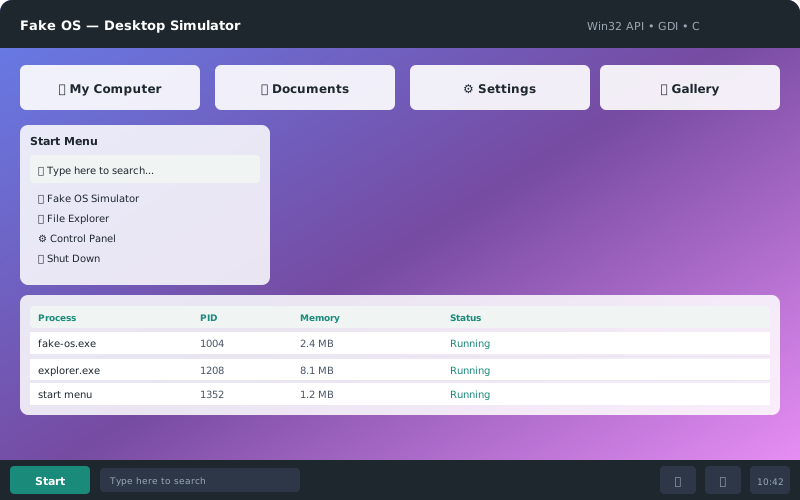


Fake OS is a lightweight Windows desktop environment simulator written entirely in C using the native Win32 API and GDI (Graphics Device Interface). It demonstrates low-level systems programming by recreating the visual elements of a Windows operating system desktop — including gradient backgrounds, a dark taskbar, and a functional start menu.
Built without any external libraries or frameworks — just pure Windows API calls.
- Gradient desktop — Multi-color gradient background rendered with
GradientFillAPI - Dark taskbar — Windows 11-style semi-transparent taskbar at the bottom
- Start menu — Functional start button with menu popup
- Window management — Basic window creation and event handling
- GDI rendering — All graphics drawn using native GDI functions
- Lightweight — Single C file, compiles to a small executable
- Windows OS (Win32 API is platform-specific)
- MSVC (Microsoft Visual C++ Compiler) or MinGW-w64
- Windows SDK (comes with MSVC)
cl fake-os.c /Fe:fake-os.exe /link user32.lib gdi32.libgcc fake-os.c -o fake-os.exe -lgdi32 -luser32cl.exe fake-os.c user32.lib gdi32.libSimply run the compiled executable:
fake-os.exeThe simulator window will appear with a gradient desktop background and taskbar.
fake-os.c          # Single source file — the entire simulator
├── WinMain()      # Application entry point
├── WndProc()      # Window procedure (event handler)
├── RenderDesktop() # GDI gradient background rendering
├── Taskbar drawing # Dark taskbar with start button
└── Start menu     # Popup menu implementation
- API: Win32 API (
windows.h), GDI (GradientFill,CreateSolidBrush, etc.) - Rendering: Double-buffered GDI rendering for smooth visuals
- Messaging: Standard Windows message loop with
GetMessage/DispatchMessage - Entry point:
WinMainwith proper window class registration
This project was built to explore low-level Windows programming concepts:
- Understanding the Windows message loop and event-driven architecture
- Working directly with GDI for graphics rendering
- OS-like UI element implementation (taskbar, start menu)
- Systems programming without frameworks or libraries
- ⭐ Star this repo — helps others discover it
- 🐛 Report issues — I respond within 24 hours
- 📬 Share feedback — contact@jaytechsoln.in
- ☕ Buy me a coffee — Sponsor
Made with ❤️ by Aswin Jay — part of JAY TECH SOLUTIONS
MIT License — see LICENSE for details.