TL;DR: Turn hours of raw GoPro footage + a .fit file into a 60-second highlight reel with ride telemetry burned in. Every second of the ride is ranked and edited by a LLM. The whole thing costs about $0.04 per ride and takes 10 minutes.
Alternate TL;DR: How I managed to turn 3 hours of boring GoPro footage into 30 seconds of boring GoPro footage.

I ride most weekends, usually out of Manhattan and up 9W. By the end of a ride I have hours of GoPro footage and one .fit file with per-second speed, power, heart rate, cadence, and GPS. Absolutely no one wants to watch 3 hours of being stuck behind Citibikes on West Side Highway. It's fun to look through past footage, identify the fun parts, and put together a narrative to remember. But since cycling is already time consuming, manually editing a highlight reel edit per ride is a nonstarter. So I built and open-sourced this repo.
One command, about ten minutes, roughly four cents of gemini-3.5-flash:
ride-recap process data/raw/2026-07-10/The outputs: highlight_landscape.mp4 (60s, 16:9) and highlight_portrait.mp4 (30s, 9:16). The clips are always in ride order with telemetry burned in.
▶ Click the image below to watch a finished highlight (River Road to 9W Market):
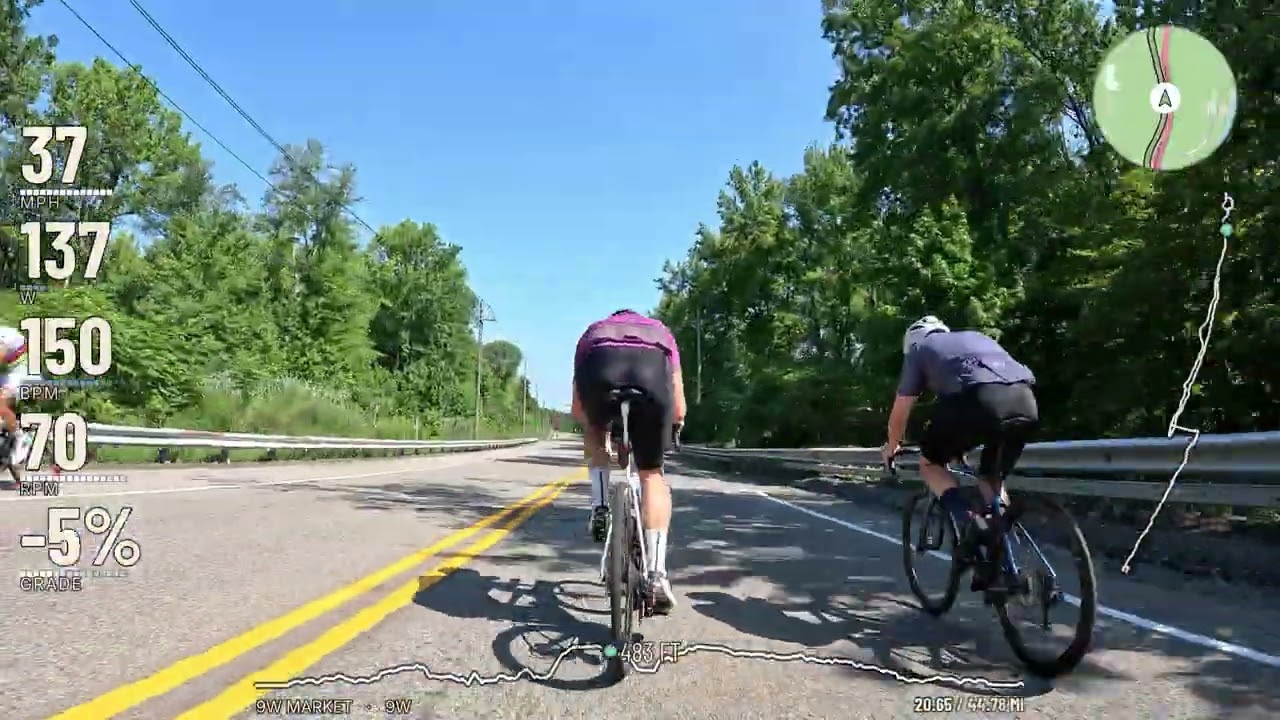
Here's my long write-up of how it works and everything I got wrong building it: Teaching LLMs Taste.

We identify compelling moments from four separate sources:
- Garmin telemetry via
.fitfile (speed, HR, power spikes, sprints, climbs) - Strava via API (popular segments)
- Configured vision-model scan + rating of individual frames
- (optional) hand-labels via Streamlit app
Here's an example of one moment being scored across all sources:

The fusion step works like this:
- “Must include” manual labels are picked first
- A model narrative pass picks 20 clips to best tell the story of the ride, boosting “cross-source agreements” (if a human label + telemetry + Strava + vision all agree that a clip is interesting)
- Greedy re-ranking with a crowding penalty to avoid clips too close to something already selected
- First, a “quality” phase that picks best-first until the best remaining candidate is net-negative with crowding penalty
- Second, a “coverage” fill that guarantees the exact clip count by placing the liveliest available clips into the biggest timeline holes.
Generally, the visual rubric is the score of record, and telemetry is a tiebreaker.
You need: Python 3.11+, ffmpeg, and one configured vision-model provider. You also need a road bike mounted with a GoPro and a Garmin.
git clone https://github.com/ianmacomber/ride-recap.git
cd ride-recap
python -m venv .venv && source .venv/bin/activate
pip install -e ".[dev]"

# macOS: brew install ffmpeg     Debian/Ubuntu: sudo apt install ffmpeg

cp .env.example .env
Gemini is the default provider. To use it, open .env and set:
GEMINI_API_KEY=your-key-here    # https://aistudio.google.com/apikey

FTP=240                          # ← YOUR functional threshold power
MAX_HEART_RATE=196               # ← YOUR max heart rate
Set FTP and MAX_HEART_RATE regardless of provider. These numbers drive three things: the spike thresholds that decide what counts as a hard effort, the HUD's zone colors, and the power zones written into the vision prompt so the model knows whether 216W means "cruising" or "peak effort" for you.
Verify it runs:
ride-recap --help
pytest # smoke tests, no video or API keys neededGemini remains the default. A complete run uses one provider for the vision scan, narrative selection, and prompt evaluation; caches and comparison reports are isolated by provider and model.
For OpenAI:
MODEL_PROVIDER=openai
OPENAI_API_KEY=your-key-here
OPENAI_MODEL=gpt-4.1-mini
For a local OpenAI-compatible VLM:
MODEL_PROVIDER=local
LOCAL_BASE_URL=http://127.0.0.1:8080/v1
LOCAL_API_KEY=local
LOCAL_MODEL=mlx-community/Qwen3-VL-8B-Instruct-3bit
LOCAL_MAX_CONCURRENCY=1
LOCAL_TIMEOUT_SECONDS=600
One way to serve that model on Apple Silicon is
mlx-vlm:
python -m pip install -U mlx-vlm
python -m mlx_vlm.server \
  --model mlx-community/Qwen3-VL-8B-Instruct-3bit \
  --host 127.0.0.1 \
  --port 8080
Keep the server running and confirm it is ready before starting a scan:
curl http://127.0.0.1:8080/health
curl http://127.0.0.1:8080/v1/models
The default local concurrency is deliberately one. The scanner evaluates multiple chapters and regions concurrently, while a single Apple Silicon VLM usually needs requests serialized to avoid memory pressure.
Put everything for one ride in a single date folder — GoPro .MP4s and the Garmin .fit together:
data/raw/2026-07-10/
├── GX010123.MP4
├── GX010124.MP4
├── GL010123.LRV     ← copy these too, see below
├── GL010124.LRV
└── ride.fit
The FIT comes off the Edge over USB, or ride-recap garmin-download --date 2026-07-10 --output-dir data/raw/2026-07-10.
Copy the .LRV files off the SD card. GoPro already writes an 848×480 H.264 proxy next to every recording. The scan downscales to 480px anyway, so the proxy is exactly the resolution needed and decodes 10-20x faster — frame extraction drops from ~25 minutes to ~30 seconds. The pipeline auto-detects them and still burns from the full-res .MP4. Look for the artifact the hardware already produces before optimizing the computation.
Then:
ride-recap process data/raw/2026-07-10/It'll ask five questions (start, destination, road, a saying, who you rode with, all with GPS-derived defaults, just hit Enter), sync the clocks, scan the footage, and open a Streamlit reviewer at :8501 with 5-second preview clips.
process stops at the reviewer. Pick your clips, then run the command it prints:
ride-recap compose-selected data/raw/2026-07-10/selected_candidates.json \
    data/raw/2026-07-10 data/raw/2026-07-10/ride.fit
Or skip the human entirely:
ride-recap process data/raw/2026-07-10/ --skip-reviewThat command runs end to end. The autonomous output is usually good.
samples/2026-07-10/ is a real ride — 44.7 miles up 9W
and back — with my hand labels, the Gemini baseline ratings, and the sync
sidecars committed right here. That's enough to reproduce the scoring
comparison without downloading any video or holding a Gemini key. The footage
itself lives on Hugging Face as
iandmacomber/ride-recap-sample-2026-07-10,
tiered so you can pull 1 MB, 6 GB, or the whole 14 GB depending on what you're
testing:
pip install huggingface_hub
hf download iandmacomber/ride-recap-sample-2026-07-10 --repo-type dataset \
    --include "clips/*" "sidecars/*" --local-dir hf_ride
That's the 6 GB tier — the 8 chapters my hand labels reference, which is the
one issue #2 needs. Swap clips for full for the whole ride. The
samples README has the couple of mv commands that turn
the download into a data/raw/2026-07-10/ folder every command above runs
against verbatim.
See the issue #2 model comparison for the Gemini, GPT-4.1 mini, and local Qwen3-VL results on these same eight chapters.
Only ffmpeg, a FIT file, and at least one .MP4 are actually required. Everything else turns itself off politely:
| Missing | What happens |
|---|---|
| Active provider credentials/server | Prints a warning or a clear connection error; without a working vision provider, candidates fall back to telemetry + Strava and greedy selection. |
| Strava credentials | Only runs if you pass --strava-activity anyway. Warns and continues. |
| Garmin credentials | Only needed for garmin-download. process never touches them. |
OSM_CONTACT_EMAIL |
No GPS-derived place names; falls back to your --origin/--road flags or the design tokens. |
| rclone | Skips the Drive upload. Files stay in <date>/highlights/. |
.LRV proxies |
Falls back to the .MP4 with keyframe-only decode. Slower, same result. |
| Labels | Fully optional. This is the default mode. |
| ffmpeg | Hard stop, up front, with install instructions. |
src/gopro_garmin_pipeline/prompts/gemini_scan/v10.md is the most important file in the repo. It's the system instruction for the vision scan: a five-dimension rubric (light, composition, motion, scenery, subject, each 1–10) with anchored examples and a set of named rules. Each rule is traceable to a specific clip that Gemini skipped and I loved, or Gemini included and I hated. My taste is legislated in there: the openness gate exists because a rail-trail tunnel scored 7.2 and I think tunnels look like being stuck in a concrete tube. You may disagree. If your taste is different, write v11.md.
Prompts are immutable and versioned: never edit v10, write v11. The version string is baked into the scan's cache key, so a bump invalidates exactly the affected results and nothing else. Frontmatter requires a rationale explaining what failure prompted the version.
src/gopro_garmin_pipeline/design/tokens.json owns the design: colors, fonts, and the lockup defaults. Rebrand there, not in the drawing code.
If you want to teach it your taste systematically: label a ride, scan it, diff your ratings against the model's, change the prompt.
ride-recap extract-frames <fit> <dir>   # once per ride, ~2 min
ride-recap label <fit> <dir> --offset <secs>
ride-recap compare <date-folder>        # your labels vs the scan
ride-recap eval-prompt <folder>...      # feeds the diff back for suggestions
This is basically coaching a video intern by showing them the cuts you didn't like.
ride-recap process <date-folder>            # the main one
ride-recap process <date-folder> --skip-review

ride-recap compose <video-dir> <fit>        # compose without the reviewer
ride-recap compose-selected <sel> <dir> <fit>
ride-recap review-candidates <video-dir> <fit>
ride-recap review <video> <fit>             # single-clip overlay preview (Flask)
ride-recap burn <video> <fit> -o out.mp4    # overlay a single clip

ride-recap inspect-fit <fit>                # ride stats, no video needed
ride-recap find-highlights <fit>            # telemetry highlights only
ride-recap garmin-download --date 2026-07-10
ride-recap strava-segments <activity-id>
gopro-garmin works as an alias for ride-recap everywhere (it's the original name, still used in the write-up and its figures).
src/gopro_garmin_pipeline/
  cli.py              # Click CLI — every command above
  fit_parser.py       # .fit → RideData (power, HR, speed, GPS)
  gpmf_sync.py        # GoPro GPS-time → FIT offset. The clock sync that matters.
  gemini_scan.py      # Two-pass vision scan (coarse regions → fine rubric)
  models/             # Gemini, OpenAI, and local OpenAI-compatible adapters
  composer.py         # Candidate generation, fusion, selection, composition
  burn_overlay.py     # The 5-element HUD, landscape + portrait
  intro_outro.py      # Blur→title opener, outro recap card
  route_metadata.py   # Start / Far / Road from GPS via OSM + Overpass
  highlights.py       # Telemetry spike detection
  strava.py           # Segment efforts + star counts
  candidate_review.py # Streamlit reviewer
  labeler.py          # Streamlit labeler (ground truth for prompt work)
  web/                # Flask single-clip overlay preview (review)
  design/tokens.json  # All color, type, and lockup tokens
  prompts/            # Versioned, immutable LLM prompts (ship with the package)
  assets/fonts/       # Bundled OFL faces (ship with the package)
tests/                # Smoke tests
- Built for one setup: GoPro Hero 13 + Garmin Edge 540 + road cycling. Other cameras and head units should work (GPMF sync reads the standard telemetry track), but are untested.
- I only tested on macOS: should work for Linux but I haven't tested yet.
- The learned ranker is WIP.
learned_ranker.pylogs training data on every compose and will fit a logistic regression at ~100 examples. I never reached the threshold before the feature schema went stale. It's honest to call it unfinished. - Video and FIT files are gitignored.
MIT — see LICENSE. Bundled fonts (Barlow Condensed, Inter) are SIL OFL 1.1; see src/gopro_garmin_pipeline/assets/fonts/OFL.txt.
Contributions welcome, but this is a personal project I use most weekends and I have a real job. If you fork it and make it yours, tell me! I'd love to see your reel.