AstraFund is an AI-powered financial compliance co-pilot for non-profits that helps manage restricted grants. It uses Google's Gemini API to automatically check if proposed expenses comply with grant rules before submission, and includes a collaborative "co-sign" feature for final approval.
- Smart Compliance Checking: Automatic validation of expenses against grant rules
- Expense Allocation Suggestions: AI recommends the best grant for each expense
- Budget Optimization: AI-driven budget recommendations and insights
- Demo Mode: Works without API key using intelligent keyword matching
- Grant Proposals: Submit and review grant applications with AI scoring
- Expense Tracking: Create, approve, and track expenses across multiple grants
- Payment Processing: Automated payment workflow with approval chains
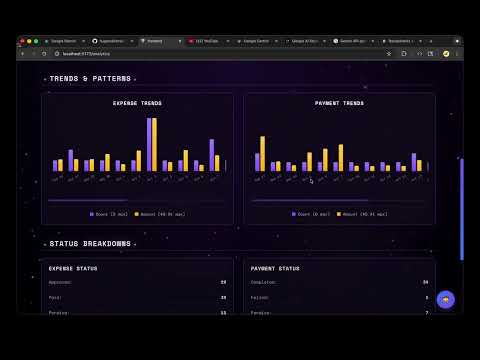
- Real-time Analytics: Beautiful charts showing trends and patterns
- Document Management: Upload and analyze compliance documents
- Program Manager: Create grants, submit expenses, view analytics
- Finance Director: Approve expenses, process payments, manage finance workflow
- Administrator: Full system access and user management
- Galaxy-themed UI: Beautiful cosmic design with smooth animations
- Responsive Design: Works seamlessly on desktop and mobile
- Real-time Notifications: Toast messages for all actions
- Interactive Charts: Visual analytics with expense and payment trends
- React 18 with TypeScript for type safety
- Vite for lightning-fast development
- React Router for navigation
- CSS Modules for scoped styling (no component libraries)
- Chart visualization with custom components
- FastAPI for high-performance API
- SQLAlchemy ORM for database operations
- Pydantic for data validation
- Google Gemini API for AI features (with demo fallback)
- Docker & Docker Compose for containerization
- SQLite database (PostgreSQL ready for production)
- Nginx for production frontend serving
- Health checks and logging built-in
- Docker Desktop installed
- 8GB RAM minimum
- Git
# Clone the repository
git clone https://github.com/hugoev/AstraFund.git
cd AstraFund

# Start in development mode with hot reload
docker compose -f docker-compose.dev.yml up -d

# OR start in production mode
docker compose up -d

# Seed the database (first time only)
docker compose -f docker-compose.dev.yml exec backend python seed_docker.py
Access the application:
- Frontend: http://localhost:5173 (dev) or http://localhost:3000 (prod)
- Backend API: http://localhost:8000
- API Docs: http://localhost:8000/docs
| Username | Password | Role | Permissions |
|---|---|---|---|
john_manager |
password123 |
Program Manager | Create grants & expenses |
sarah_finance |
password123 |
Finance Director | Approve & process payments |
admin |
admin123 |
Administrator | Full access |
For detailed Docker commands and troubleshooting, see DOCKER_GUIDE.md
- Use credentials:
john_manager/password123 - Navigate to "Program Manager Dashboard"
- Go to "Smart Capture" tab
- Enter: "Laptops for coding bootcamp students" - $2,500
- AI automatically suggests "STEM Education Grant"
- Click "Create Expense" - AI compliance check appears ✅
- Logout and login as:
sarah_finance/password123 - Navigate to "Finance" section
- View pending expenses with AI compliance scores
- Click "Approve & Pay" on any expense
- Payment automatically created and processed
- View updated analytics dashboard
- Navigate to "Analytics"
- See beautiful charts with expense/payment trends
- Real data from the seeded database
AstraFund/
├── backend/
│   ├── app/
│   │   ├── api/v1/          # API endpoints
│   │   │   ├── analytics.py
│   │   │   ├── approvals.py
│   │   │   ├── budget.py
│   │   │   ├── expenses.py
│   │   │   ├── grants.py
│   │   │   ├── payments.py
│   │   │   ├── proposals.py
│   │   │   └── users.py
│   │   ├── core/            # Core utilities
│   │   │   ├── config.py
│   │   │   ├── database.py
│   │   │   ├── logging.py
│   │   │   └── security.py
│   │   ├── models/          # Data models
│   │   │   ├── database.py  # SQLAlchemy models
│   │   │   └── schemas.py   # Pydantic schemas
│   │   └── services/        # Business logic
│   │       └── gemini_service.py  # AI integration
│   ├── seed_docker.py       # Database seeding
│   ├── requirements.txt
│   └── Dockerfile
├── frontend/
│   ├── src/
│   │   ├── api/            # API client
│   │   ├── components/     # Reusable components
│   │   │   ├── auth/       # Login & protected routes
│   │   │   ├── common/     # Shared UI components
│   │   │   └── layout/     # Header & layout
│   │   ├── contexts/       # React context (Auth)
│   │   ├── features/       # Feature modules
│   │   │   ├── analytics/  # Analytics dashboard
│   │   │   ├── expenses/   # Expense management
│   │   │   ├── finance/    # Finance workflow
│   │   │   ├── grants/     # Grant management
│   │   │   ├── program-manager/  # PM dashboard
│   │   │   ├── proposals/  # Grant proposals
│   │   │   └── users/      # User management
│   │   ├── types/         # TypeScript types
│   │   └── styles/        # Global styles
│   ├── nginx.conf         # Production web server
│   ├── Dockerfile.prod
│   └── package.json
└── docker-compose.yml
GET /grants/- List all grantsGET /grants/{id}- Get grant details with expensesPOST /grants/- Create new grantPOST /grants/{id}/expenses- Create expense for grant
GET /expenses/- List all expensesGET /expenses/queue- Get pending expenses for approvalPOST /expenses/{id}/approve- Approve expensePOST /expenses/{id}/reject- Reject expensePOST /expenses/copilot/suggest-allocation- AI expense allocation
GET /payments/- List all paymentsGET /payments/pending- Get pending paymentsPOST /payments/- Create payment for approved expensePOST /payments/{id}/process- Process pending payment
GET /analytics/overview- System-wide analyticsGET /analytics/trends?days=30- Expense/payment trendsGET /analytics/grants/{id}/analytics- Grant-specific analytics
GET /proposals/- List grant proposalsPOST /proposals/- Submit new proposalGET /proposals/{id}- Get proposal details
POST /check_compliance- Check expense compliancePOST /chatbot/query- AI chatbot queriesPOST /documents/analyze- Document analysis
Full API documentation: http://localhost:8000/docs
The database comes pre-populated with:
- 3 Demo Users (Program Manager, Finance Director, Admin)
- 6 Grants ($365K total budget)
- 90 Expenses (spread over 60 days)
- 62 Approvals
- 36 Payments ($36K processed)
- 6 Grant Proposals (various statuses)
All data includes realistic timestamps, AI compliance checks, and varied statuses for demonstration purposes.
The system uses Google's Gemini API for intelligent features. Features work in two modes:
With API Key (Production):
- Set
GEMINI_API_KEYin environment variables - Full AI analysis and natural language processing
Demo Mode (No API Key):
- Intelligent keyword-based matching
- Pre-configured responses for common scenarios
- Perfect for demos and development
- Compliance Checking: Validates expenses against grant rules
- Expense Allocation: Suggests best grant for each expense
- Budget Optimization: Recommends budget adjustments
- Document Analysis: Extracts requirements from documents
- Chatbot Assistant: Answers questions about grants and compliance
- Background:
#0a0118(Deep Space) - Primary:
#8B5CF6(Cosmic Purple) - Accent:
#FFB800(Gold) - Text:
#F0F0F0(Starlight)
- Galaxy Background: Animated stars and cosmic effects
- Glass Morphism: Frosted glass UI elements
- Smooth Animations: Subtle transitions throughout
- Space Mono Font: Monospace for that tech/space feel
# Backend
GEMINI_API_KEY=your_api_key_here  # Optional for demo
DATABASE_URL=sqlite:///./astrafund.db
CORS_ORIGINS=http://localhost:5173,http://localhost:3000

# Frontend (Vite)
VITE_API_URL= # Empty for Docker (uses nginx proxy)- Replace SQLite with PostgreSQL
- Set up proper authentication (JWT tokens)
- Configure HTTPS with SSL certificates
- Use Gunicorn/Uvicorn workers for backend
- Enable rate limiting and request validation
- Set up proper logging and monitoring
- DOCKER_GUIDE.md: Complete Docker setup and troubleshooting
- README-Docker.md: Docker-specific documentation
- frontend/README.md: Frontend architecture details
- frontend/DEVELOPMENT.md: Frontend development guide
- frontend/FOLDER_STRUCTURE.md: Frontend organization
# Rebuild containers
docker compose -f docker-compose.dev.yml build --no-cache

# Reset everything
docker compose down -v
docker compose -f docker-compose.dev.yml up -d

# View logs
docker compose -f docker-compose.dev.yml logs -f# Reseed database
docker compose -f docker-compose.dev.yml exec backend rm -f astrafund.db
docker compose -f docker-compose.dev.yml restart backend
docker compose -f docker-compose.dev.yml exec backend python seed_docker.py- Hard refresh:
Ctrl+Shift+R(Windows) orCmd+Shift+R(Mac) - Clear browser cache
- Check browser console for errors
# Build production images
docker compose build

# Start production stack
docker compose up -d

# Check health
docker compose ps- Set
GEMINI_API_KEYfor full AI features - Configure production database (PostgreSQL recommended)
- Update CORS origins in
backend/app/core/config.py - Set up reverse proxy (nginx/Caddy) with SSL
- Configure monitoring and logging
This project demonstrates modern full-stack development with AI integration. Contributions are welcome!
- Fork the repository
- Create feature branch:
git checkout -b feature/amazing-feature - Make changes and test locally
- Commit:
git commit -m 'Add amazing feature' - Push:
git push origin feature/amazing-feature - Open a Pull Request
MIT License - Feel free to use this project for your own applications!
- Built with Google's Gemini AI
- Inspired by real non-profit grant management challenges
- Designed for maximum user experience and efficiency
Made with ❤️ for non-profits managing restricted grants