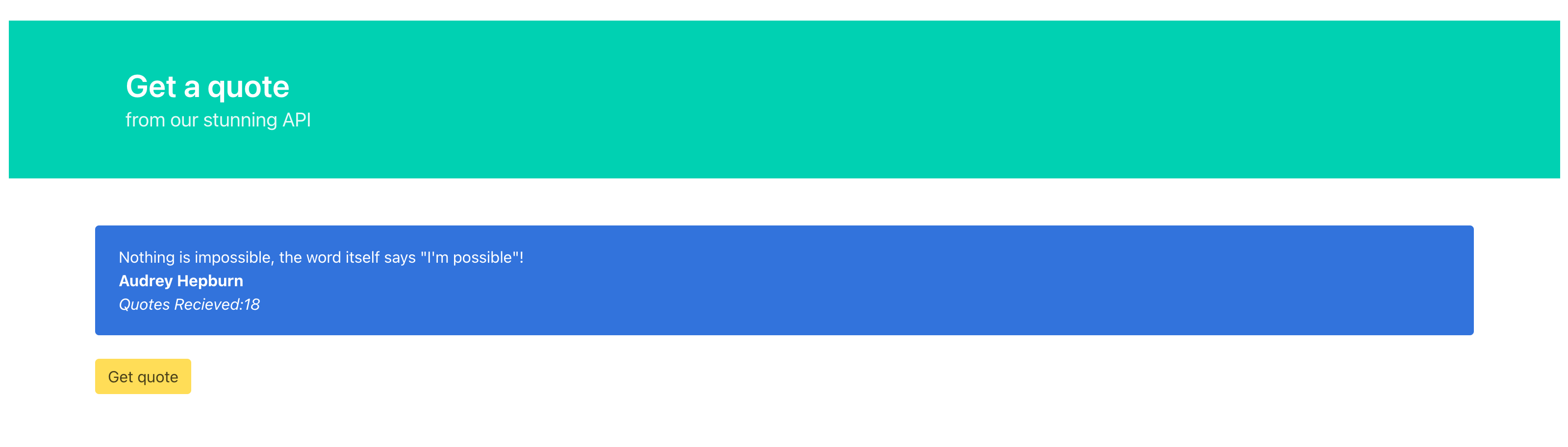
A microservice application example deployed on Kubernetes with NodeJS, Python, Redis, and MongoDB.
See himanshu_working.png for deployment verification.
This application demonstrates a microservices architecture deployed on Kubernetes (Minikube):
- Frontend: NGINX serving static HTML/JS (with jQuery and Bulma CSS)
- API Gateway: Node.js service routing API requests
- Quote Service: Python Flask application for quote management
- Databases: MongoDB (persistent storage) and Redis (caching)
- Node.js
- Python 3
- pip3
- Docker
- Minikube
- kubectl
- flask
- pymongo
- redis
The deployment includes the following Kubernetes resources:
Deployments:
apigateway-deployment.yml- API Gateway servicemongo-deployment.yml- MongoDB databasenginx-deployment.yml- NGINX web serverquote-deployment.yml- Quote serviceredis-deployment.yml- Redis cache
Services:
apigateway-service.yml- ClusterIP service for API Gatewaymongo-service.yml- ClusterIP service for MongoDBnginx-service.yml- NodePort/LoadBalancer service for web accessquote-service.yml- ClusterIP service for Quote APIredis-service.yml- ClusterIP service for Redis
Storage:
mongo-pvc.yml- PersistentVolumeClaim for MongoDB dataredis-pvc.yml- PersistentVolumeClaim for Redis data
ConfigMaps:
- MongoDB initialization script (created from
MongoDB/init-db.js) - NGINX configuration (created from
FrontendApplication/vhost.conf)
Run the provided script:
chmod +x run_script.sh
./run_script.sh
This script will:
- Start Minikube
- Create PersistentVolumeClaims
- Deploy Redis and MongoDB with ConfigMaps
- Build Docker images using Minikube's Docker daemon
- Deploy all microservices
- Set up networking with Kubernetes Services
- Start Minikube:
minikube start- Deploy storage and databases:
kubectl apply -f redis-pvc.yml
kubectl apply -f redis-deployment.yml
kubectl apply -f redis-service.yml

kubectl create configmap mongo-config --from-file=./MongoDB/init-db.js
kubectl apply -f mongo-pvc.yml
kubectl apply -f mongo-deployment.yml
kubectl apply -f mongo-service.yml- Build and deploy Quote Service:
eval $(minikube docker-env)
docker build -t quote ./QuoteService
kubectl apply -f quote-deployment.yml
kubectl apply -f quote-service.yml- Build and deploy API Gateway:
docker build -t apigateway ./ApiGateway
kubectl apply -f apigateway-deployment.yml
kubectl apply -f apigateway-service.yml- Build and deploy Frontend:
docker build -t nginx-frontend ./FrontendApplication
kubectl create configmap nginx-config --from-file=nginx.conf=./FrontendApplication/vhost.conf
kubectl apply -f nginx-deployment.yml
kubectl apply -f nginx-service.yml
eval $(minikube docker-env --unset)Get the service URL:
minikube service nginx-service --urlThen open the URL in your browser to access the application.
If you need to rebuild the frontend with a custom API Gateway URL:
- Go to
FrontendApplicationdirectory - Run
npm installoryarnto install packages - Set the API Gateway environment variable:
- Linux/Mac:
export API_GATEWAY=http://YOUR_HOST - Windows:
set API_GATEWAY=http://YOUR_HOST - Note: No trailing slash, add port if not using standard ports
- Linux/Mac:
- Run
npm run buildoryarn build - Check
dist/folder for the built files
Check all pods are running:
kubectl get podsCheck all services:
kubectl get servicesView logs for troubleshooting:
kubectl logs <pod-name>- Port: 3000
- Routes requests to Quote Service
- Environment variable:
QUOTES_API=http://quote-service
- Connects to MongoDB and Redis
- Provides quote management API
- Port: 27017
- Credentials: root/pass (configured in deployment YAML)
- Database: quote_db
- Persistent storage via PVC
- Caching layer
- Persistent storage via PVC
- Port: 80
- Serves static frontend files
- Configured via ConfigMap
- Images use
imagePullPolicy: Neverto use locally built images from Minikube's Docker daemon - Default configuration uses
localhost- modify for production deployments - MongoDB and Redis data persists across pod restarts using PersistentVolumeClaims