Heightmap
Derived from Element -> Widget
The "heightmap" widget displays a 2D rendering of the current /sys/heightmap.csv.
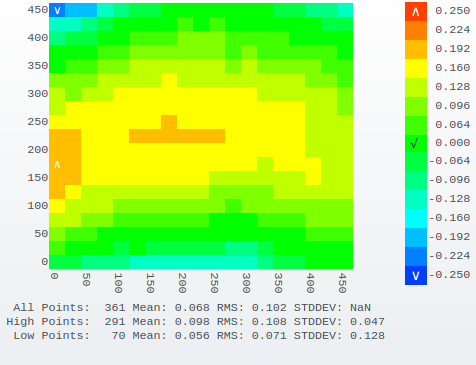
If you hover over any of the grid points, a little popup will appear showing the coordinates and height correction.
Configuration is fairly simple. The number of grid points is taken right from the heightmap. The symbols representing the high, low and zero points are configurable but have the defaults shown.
{
	"id": "heightmap",
	"type": "heightmap",

	/*
	 * The character to use to indicate the high, low and zero
	 * points in the grid. Any valid HTML can be used.
	 * These are the defaults so you don't need to specify them
	 * unless you want something different.
	 */
	"high_point_char": "∧",
	"low_point_char": "∨",
	"zero_point_char": "√",

	/*
	 * These are the styles to apply to each of
	 * the parts of the heightmap.
	 */
	"point_style": {
		"height": "1em", "width": "2.5ch", "font-size": "13px"
	},
	"xaxis_style": {
		"font-size": "20px"
	},
	"yaxis_style": {
		"font-size": "20px"
	},
	"scale_style": {
		"font-size": "20px"
	},
	"summary_style": {
		"font-size": "16px"
	},

	/*
	 * You can fix the scale minimum and maximum or leave these
	 * parameters unset to let them be auto calculated from the data.
	 */
	"scale_min": -0.250,
	"scale_max": 0.250
}
This widget automatically updates when grid probing is complete but it also accepts the DUEUI.EVENTS.REFRESH event so you could configure a button to manually refresh it as well.
{
	"id": "refresh_button,
	"type": "button",
	"value": "Reload Map",
	"actions": {"type": "event", "event": DUEUI.EVENTS.REFRESH, "target": "#heightmap"}
}