For an interview challenge, I created a simple web page with two deployment methods and documentation for the whole project.
Note: This project was built entirely from scratch, before the era of AI coding assistants.
Note: The sites are no longer deployed — the AWS infrastructure was torn down to avoid ongoing AWS bills. The URLs below are kept for reference.
- Deployed website URL (S3+Cloudfront): https://srechallenge.online
- Deployed alternate environment (ECS+ELB): https://alternate.srechallenge.online
- Note: currently inactive (was costing $60/month, roughly half ECS and half ELB)
- Status/monitoring: https://status.srechallenge.online/
- Status/monitoring for internal services: https://internal-status.srechallenge.online/
- (Normally I'd not make the internal page public, but the free version of Better Uptime doesn't support password protecting pages).
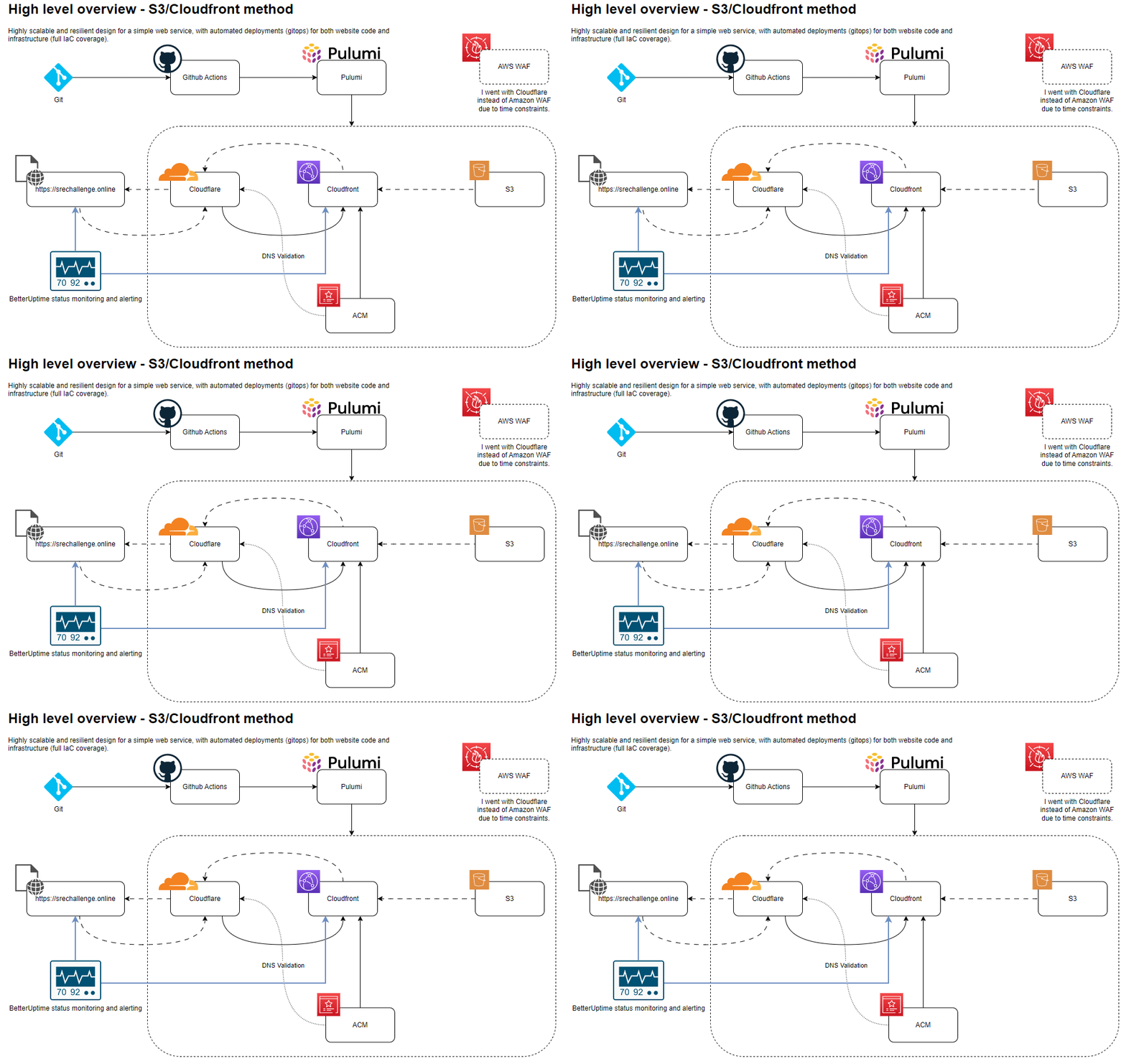
- build simple website with text & image
- deploy in AWS
- upload to public Github repo
- Provide documentation for running locally
- Set up monitoring and alerting
- https://status.srechallenge.online/
- https://internal-status.srechallenge.online/ (would not normally be public, but the free version doesn't support password protecting pages).
- Add logging
- I plan to add logging from the container to either Papertrail, Datadog or Coralogix.
- My main goal is observability as to which containers are being hit to see if loadbalancing and scaling are working as expected.
- Normally with docker compose or docker swarm, this would be simple to do but ECS has its own requirements.
- So options are:
- log from inside the container (there are a copule of methods I can think of for doing this)
- use AWS tools and configuation to ship logs out to our chosen 3rd party service
- Such as: https://docs.datadoghq.com/integrations/ecs_fargate/?tab=awscli
- Or: https://www.papertrail.com/help/amazon-ecs/
- I ended up adding logging into the container itself. Logs get sent to Papertrail. See screenshots below.
- Provide a mechanism for scaling the service
- Cloudfront/S3 are inherently scalable with no further action required.
- However since the exercise appears to require it, I added an alternative deployment method that can be manually scaled.
- I have chosen a container deployed on ECS, with an elastic load balancer in front. Cloudflare is also in front of that.
- Provide documentation for scaling up (See below)
- Add automation
- Github actions will run and deploy on pushes to
main - I have only implemented simple pipeline automation here because I'm not so familiar with Github, my experience is primarily with Gitlab.
- Github actions will run and deploy on pushes to
- Provide network diagrams
- Make it reasonably secure [WIP]
- content is served from Cloudfront to hide the S3 bucket origin
- make bucket private [NOTCOMPLETED] Ran out of time.
- Use modern standards
- Using a pipeline deployment (Github actions) for automation and better maintainability
- Using IaC rather than manual configuration is considered a modern standard.
- Use modern practices in AWS
- I chose a combination of S3 with something in front (CDN/API Gateway/WAF) which is one of the best ways of hosting a static website currently.
There are a few options.
cd ./simplewebsite
python3 -m http.servercd ./simplewebsite
python -m SimpleHTTPServerThen go to http://localhost:PORT. Get the port from the output. It uses 8000 by default.
Example output:
james@SHAKURAS:~/git/james/sre-interview-challenge/simplewebsite$ python -m SimpleHTTPServer
Serving HTTP on 0.0.0.0 port 8000 ...
127.0.0.1 - - [30/Apr/2023 21:41:05] "GET / HTTP/1.1" 200 -
127.0.0.1 - - [30/Apr/2023 21:41:05] "GET /assets/style.css HTTP/1.1" 200 -
127.0.0.1 - - [30/Apr/2023 21:41:05] "GET /assets/main.js HTTP/1.1" 200 -
127.0.0.1 - - [30/Apr/2023 21:41:05] "GET /assets/perth-koondoola-evening.jpg HTTP/1.1" 200 -
If you don't have Python installed locally, this is a good option (assuming you have Docker). Unfortunately it doesn't printout the initial text showing what port, but it should always be http://localhost:8000.
docker compose up (CTRL+C to stop), add -d to run in the background. docker compose down to stop and/or delete the container.
Example output:
james@SHAKURAS:~/git/james/sre-interview-challenge$ docker compose up
[+] Running 1/1
 ⠿ Container sre-interview-challenge-python-1  Recreated                                                                                                                                                                                                                       0.1s
Attaching to sre-interview-challenge-python-1
sre-interview-challenge-python-1  | 172.18.0.1 - - [30/Apr/2023 13:57:21] "GET / HTTP/1.1" 304 -
sre-interview-challenge-python-1  | 172.18.0.1 - - [30/Apr/2023 13:57:21] "GET /assets/style.css HTTP/1.1" 304 -
sre-interview-challenge-python-1  | 172.18.0.1 - - [30/Apr/2023 13:57:21] "GET /assets/main.js HTTP/1.1" 304 -
sre-interview-challenge-python-1  | 172.18.0.1 - - [30/Apr/2023 13:57:21] "GET /assets/perth-koondoola-evening.jpg HTTP/1.1" 304 -
cd ./simplewebsite
docker build . -t simpleweb
docker run -p 8000:8000 simpleweb # -d optionalThe site can be deployed from a local terminal (Pulumi is required).
It can also be deployed by a merge into the main branch of the Github repo.
Normally I'd use a git flow type workflow, but due to time constraints and less familiarity with Github Actions I just deploy straight from main.
- Install pulumi
- Ensure AWS credentials are present in
./aws/credentials - Ensure Cloudflare API token is present (
export CLOUDFLARE_API_TOKEN=xxx) - Run
pulumi stack select devorpulumi stack select productiondepending on requirements - Run
pulumi preview(optionally, with--diff) - Run
pulumi up
Pulumi will output various values of interest. Such as
Outputs:
    altURL        : "https://alternate.srechallenge.online"
    cdnHostname   : "d318******tq6.cloudfront.net"
    cdnURL        : "https://d318******tq6.cloudfront.net"
    lbUrl         : "http://lb-******-1578047453.ap-southeast-2.elb.amazonaws.com"
    originHostname: "bucket-****.s3-website-ap-southeast-2.amazonaws.com"
    originURL     : "http://bucket-****.s3-website-ap-southeast-2.amazonaws.com"
    publicURL     : "https://srechallenge.online"
- Make changes (either to infrastructure, or the website code)
- Commit to git and push to
mainon this Github repository. - The changes will be deployed automatically.
The alternate method using ECS, Fargate and ELB can be scaled by increasing the memory/cpu on the containers, or increasing the desiredCount of the service.
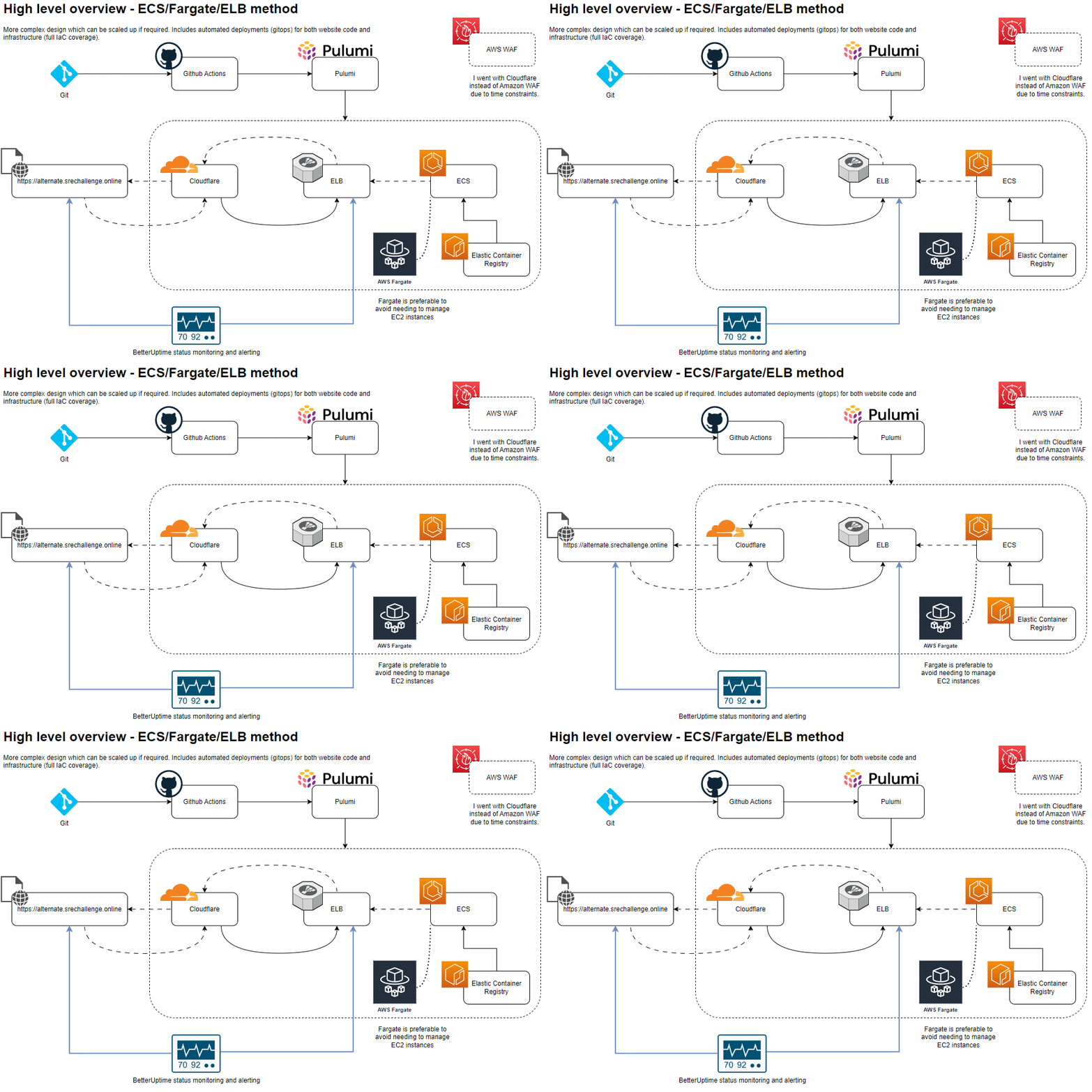
- In
Pulumi.yaml, finddesiredCountand increase as required.
OR
- In
Pulumi.yaml, findcpu:andmemory:and increase as desired. This will cause Fargate to reprovision on higher spec instances.
Note: this is not really required for the current use case since Cloudflare & Cloudfront caching will handle any kind of increase in load.
service:
  type: awsx:ecs:FargateService
  properties:
    cluster: ${cluster.arn}
    assignPublicIp: true
    desiredCount: 4 # <<<<
    taskDefinitionArgs:
      container:
        image: ${image.imageUri}
        cpu: 512 # <<<<
memory: 128 # <<<<For the S3/Cloudfront solution, there is no additional logging configured, this didn't make sense for this small solution.
So for these, go to the respective AWS services & Cloudtrail to view logs.
- Logging is to papertrail. It happens from inside the container. As the solution is simple, the logs are basic. For a more complex service or with more time, I would add a lot of additional logging for visibility and troubleshooting.
- Container logs can also be viewed from within ECS by going to
- ECS > CLusters > cluster-xxxx > Services > service-xxxx > Logs
- Or clicking on the invidual 'Tasks' (which is what Amazon calls the containers).
- Unfortunately I couldn't get the logs working exactly as I wanted in the time allowed, so some of the container logs are only visible in EC2 and the HTTP request logs are only in papertrail.
- Arguably, this might actually be a useful separation but it's hard to know without having a few real troubleshooting scenarios.
Example of papertrail logs (aggregated from all containers):
May 02 23:00:21 f247fca9c11c web.log 172.17.0.1 - - [02/May/2023 15:00:20] "GET / HTTP/1.1" 304 -
May 02 23:03:11 745851fab700 web.log 172.17.0.1 - - [02/May/2023 15:03:10] "GET / HTTP/1.1" 200 -
May 02 23:03:11 745851fab700 web.log 172.17.0.1 - - [02/May/2023 15:03:10] "GET /assets/main.js HTTP/1.1" 200 -
May 02 23:03:11 745851fab700 web.log 172.17.0.1 - - [02/May/2023 15:03:10] "GET /assets/style.css HTTP/1.1" 200 -
May 02 23:03:11 745851fab700 web.log 172.17.0.1 - - [02/May/2023 15:03:10] "GET /assets/perth-koondoola-evening.jpg HTTP/1.1" 200 -
May 02 23:03:11 745851fab700 web.log 172.17.0.1 - - [02/May/2023 15:03:10] "GET /favicon.ico HTTP/1.1" 200 -
May 02 23:03:12 745851fab700 web.log 172.17.0.1 - - [02/May/2023 15:03:11] "GET / HTTP/1.1" 304 -
May 02 23:03:18 745851fab700 web.log 172.17.0.1 - - [02/May/2023 15:03:18] "GET / HTTP/1.1" 304 -
May 02 23:05:14 2cbaa51b01c9 web.log 172.17.0.1 - - [02/May/2023 15:05:13] "GET / HTTP/1.1" 200 -
May 02 23:05:14 2cbaa51b01c9 web.log 172.17.0.1 - - [02/May/2023 15:05:13] "GET /assets/style.css HTTP/1.1" 200 -
May 02 23:05:14 2cbaa51b01c9 web.log 172.17.0.1 - - [02/May/2023 15:05:13] "GET /assets/main.js HTTP/1.1" 200 -
May 02 23:05:14 2cbaa51b01c9 web.log 172.17.0.1 - - [02/May/2023 15:05:13] "GET /assets/perth-koondoola-evening.jpg HTTP/1.1" 200 -
May 02 23:05:14 2cbaa51b01c9 web.log 172.17.0.1 - - [02/May/2023 15:05:14] "GET /favicon.ico HTTP/1.1" 200 -
May 02 23:11:56 cebea6415c34 web.log 172.19.0.1 - - [02/May/2023 15:11:55] "GET / HTTP/1.1" 304 -
May 02 23:12:01 cebea6415c34 web.log 172.19.0.1 - - [02/May/2023 15:12:00] "GET / HTTP/1.1" 304 -
May 02 23:12:04 cebea6415c34 web.log 172.19.0.1 - - [02/May/2023 15:12:03] "GET / HTTP/1.1" 200 -
May 02 23:12:04 cebea6415c34 web.log 172.19.0.1 - - [02/May/2023 15:12:03] "GET /assets/main.js HTTP/1.1" 200 -
May 02 23:12:04 cebea6415c34 web.log 172.19.0.1 - - [02/May/2023 15:12:03] "GET /assets/style.css HTTP/1.1" 200 -
May 02 23:12:04 cebea6415c34 web.log 172.19.0.1 - - [02/May/2023 15:12:03] "GET /assets/perth-koondoola-evening.jpg HTTP/1.1" 200 -
May 02 23:12:04 cebea6415c34 web.log 172.19.0.1 - - [02/May/2023 15:12:03] "GET /favicon.ico HTTP/1.1" 200 -
Example of ECS logs (also aggregated, but in this screenshot there's only one container in the pool)
#
Screenshot showing that individual containers can be seen (running locally)
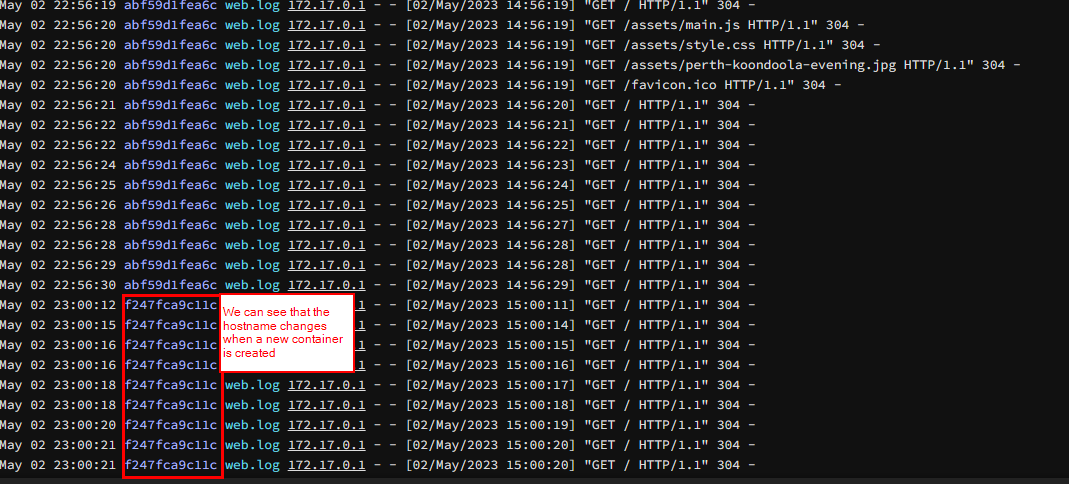
Screenshot showing loadbalancing spread over multiple containers (running in ECS)

- favicon: generated free from https://favicon.io/favicon-generator/
- morning, afternoon, evening images: James' personal photographs.
- website: based on https://codepen.io/bradtraversy/pen/XLrQvz