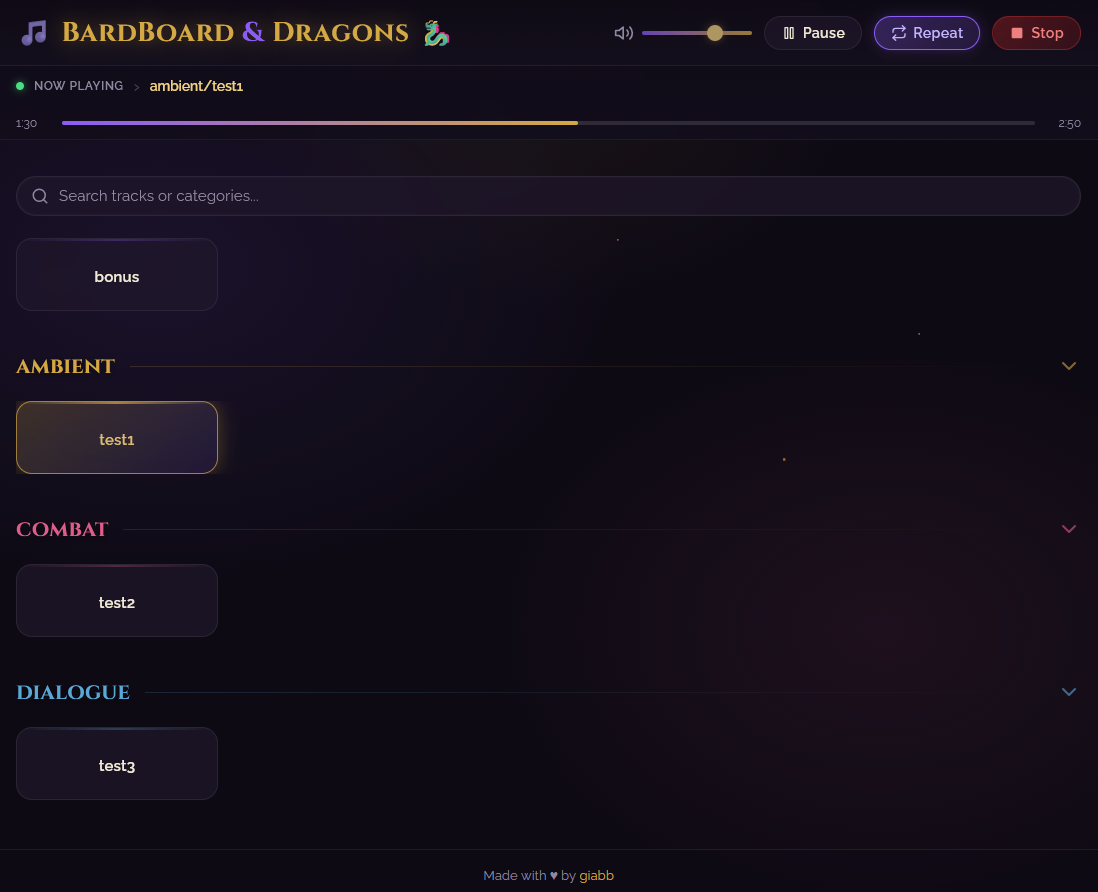
A Discord soundboard with a browser UI.
BardBoard lets you play sound effects, music, and voice lines into a Discord voice channel from a clean web interface. It is designed for tabletop sessions, watch parties, and any server where quick audio cues are useful.




- Features
- Requirements
- Discord Bot Setup
- Run With Docker
- Run Locally
- Adding Sounds
- Using BardBoard
- Configuration
- Troubleshooting
- Development
- License
- Browser-based soundboard for Discord voice channels.
- One-click playback with volume, pause/resume, stop, repeat, and seeking.
- Playlist queue with drag-and-drop ordering.
- Drag tracks into the playlist to queue them.
- Upload audio from the browser by browsing or dragging files into the upload modal.
- Organize tracks into categories.
- Drag tracks between categories to move files on disk.
- Create categories manually or by dragging a track to the "New Category" drop zone.
- Rename or delete tracks and categories from the UI.
- Optional admin and readonly authentication.
- First-run setup page: no manual
.envfile is required for Docker. - Swagger UI at
/api-docs.
For the normal Docker setup:
- Docker Desktop or Docker Engine with Docker Compose.
- A Discord bot token.
- A Discord server where you can invite the bot.
For local development without Docker:
- Node.js 24.
ffmpegavailable in yourPATH.- Platform audio dependencies required by Discord voice packages.
- Create a Discord application in the Discord Developer Portal.
- Create a bot and copy its token.
- In OAuth2 -> URL Generator, select the
botscope. - Give the bot at least Connect and Speak permissions.
- Open the generated invite URL and add the bot to your server.
Keep the bot token private. Do not commit it.
The Docker setup does not require a host .env file. On first start, BardBoard creates a config file inside the Docker volume bardboard-config and sends you to the setup page.
- Clone or download this repository.
- Open a terminal in the project folder.
- Start the app:
docker compose up --build -d- Open
http://localhost:3000. - Complete the first-run setup page:
- Discord bot token.
- Admin username.
- Admin password.
- Optional readonly user.
- Save and restart when prompted.
After setup, configuration is stored in the named Docker volume:
bardboard-config:/usr/src/app/config
Audio files and sessions are mounted from the project folder:
./audio-files -> /usr/src/app/audio-files
./sessions    -> /usr/src/app/sessions
A host .env file is optional. Use it only when you want to change values before containers start, especially ports and build-time web proxy settings.
Example:
WEB_PORT=3000
BOT_PORT=3001
BACKEND_URL=http://localhost:3001
UPLOAD_MAX_MB=50
If you change WEB_PORT, BOT_PORT, BACKEND_URL, or UPLOAD_MAX_MB, rebuild:
docker compose up --build -dThis deletes the persisted BardBoard config volume. Audio files are not stored in this volume.
docker compose down
docker volume rm bardboardanddragons_bardboard-config
docker compose up --build -d
The exact volume name can vary if your Compose project name changes. List volumes with:
docker volume lsLocal development also supports first-run setup. If .env is missing, the backend creates one in the project root and the web UI redirects to /setup.
- Install dependencies:
npm install- Start the bot/API and web app:
npm run dev- Open
http://localhost:3000. - Complete the setup page if prompted.
You can also copy .env.sample to .env and pre-fill values manually.
Supported formats:
- MP3
- WAV
- OGG
- M4A
You can add sounds in two ways.
Click Add Song, then drag files into the upload modal or browse for files. You can:
- Upload multiple files at once.
- Remove files from the pending upload list.
- Choose an existing category.
- Create a new category during upload.
- See upload progress.
Put audio files in audio-files/ and refresh the page.
Use first-level folders for categories:
audio-files/
  Tavern.mp3
  Intro.ogg
  Combat/
    Clash.mp3
    Bash.wav
    Roar.ogg
  NPCs/
    Merchant.mp3
    Guard.mp3
This creates root tracks plus Combat and NPCs sections in the UI.
Open the web UI, select a Discord voice channel, then click a track.
- Click a track to play it immediately.
- Use the mini buttons on each track to add to playlist, rename, or delete.
- Drag tracks between categories to move the underlying audio file.
- Drag tracks to the playlist to queue them without moving the file.
- Categories can be expanded and collapsed.
- Rename or delete categories from the category header.
- Drag a track to another category to move it.
- Drag a track to New Category to create a category and move the track into it.
- Select the Discord voice channel.
- Adjust volume.
- Mute and restore volume.
- Pause/resume.
- Repeat the current track.
- Stop playback.
- Seek within the current track using the progress bar.
- Queue tracks from the soundboard.
- Drag tracks into the playlist panel.
- Reorder queued tracks with drag and drop.
- Shuffle, clear, play queue, or skip.
The settings page is available to admins. It shows editable runtime configuration values. Changes that affect bot login, auth, rate limits, or sessions require a restart.
BardBoard reads configuration from:
- Docker:
/usr/src/app/config/.envby default, persisted in thebardboard-configvolume. - Local development:
./.envby default. - Custom path: set
BARDBOARD_ENV_PATH. - Process environment variables, used as defaults when generating a missing config file.
The setup page requires:
DISCORD_TOKENAUTH_ADMIN_USERAUTH_ADMIN_PASS
AUTH_READONLY_USER and AUTH_READONLY_PASS are optional.
| Variable | Required | Default | Description | Apply method |
|---|---|---|---|---|
DISCORD_TOKEN |
Yes | empty | Discord bot token. | Restart |
AUTH_ADMIN_USER |
Yes for setup | empty | Admin username. | Restart |
AUTH_ADMIN_PASS |
Yes for setup | empty | Admin password. | Restart |
AUTH_READONLY_USER |
No | empty | Optional readonly username. | Restart |
AUTH_READONLY_PASS |
No | empty | Optional readonly password. | Restart |
SESSION_SECRET |
Recommended | generated | Session signing secret. | Restart |
LOGIN_REMEMBER_DAYS |
No | 30 |
Remember-me cookie duration. | Restart |
SESSION_DIR |
No | ./sessions |
Session file storage directory. | Restart |
NOISES_FOLDER |
No | !noises |
Category folder used for overlay noises. | Restart |
RATE_LIMIT_AUDIO |
No | 120 |
Requests/minute for audio actions. | Restart |
RATE_LIMIT_FILES |
No | 60 |
Requests/minute for file actions. | Restart |
RATE_LIMIT_AUDIO_STATUS |
No | 600 |
Requests/minute for status polling. | Restart |
RATE_LIMIT_PLAYLIST |
No | 120 |
Requests/minute for playlist actions. | Restart |
CORS_ORIGINS |
No | empty | Comma-separated allowed origins. | Restart |
SESSION_FILE_RETRIES |
No | 5 |
Session file-store retry attempts. | Restart |
SESSION_FILE_RETRY_FACTOR |
No | 1 |
Session file-store retry backoff factor. | Restart |
SESSION_FILE_RETRY_MIN_MS |
No | 50 |
Minimum session retry delay in ms. | Restart |
SESSION_FILE_RETRY_MAX_MS |
No | 200 |
Maximum session retry delay in ms. | Restart |
SESSION_WRITE_RETRIES |
No | 6 |
Extra retries for transient file-lock races. | Restart |
WEB_PORT |
No | 3000 |
Web UI port. | Rebuild container |
BOT_PORT |
No | 3001 |
Bot/API port. | Rebuild container |
BACKEND_URL |
No | http://localhost:3001 |
Next.js API proxy target. | Rebuild container |
UPLOAD_MAX_MB |
No | 50 |
Max upload size per file in MB. | Rebuild container |
BARDBOARD_ENV_PATH |
No | varies | Path to the config file. Docker sets this automatically. | Restart |
Docker does not rely on the project-root .env for persisted app configuration. It writes setup values to the bardboard-config volume at /usr/src/app/config/.env.
If you want to reset Docker setup, remove the config volume as shown in Reset Docker First-Run Setup.
- Make sure the bot is invited to your server.
- Make sure the bot has Connect and Speak permissions.
- Select a voice channel in the BardBoard header.
- Check logs:
docker compose logs -f- Check the Discord token in setup/settings.
- Restart the bot container:
docker compose restart bard-board-bot- Add supported audio files to
audio-files/. - Refresh the page.
- Use first-level subfolders only for categories.
- Use the admin credentials configured during first-run setup.
- If credentials were changed, old sessions may no longer be valid.
- Restart after changing auth-related settings.
- Swagger UI:
http://localhost:3000/api-docs - Raw OpenAPI JSON:
http://localhost:3000/api-docs.json
Useful commands:
npm install
npm run dev
npm run build
npm run start
npm run lint
npm test
npm audit
The project uses:
- Next.js 16
- React 19
- Express 5
- Discord.js 14
- Node.js 24
package.json includes a targeted postcss override because the current Next.js release depends on a vulnerable PostCSS range. Keep this override until Next.js ships a patched dependency.
Issues and pull requests are welcome.
For bugs, include:
- What you expected.
- What happened.
- Relevant logs from
docker compose logs -f. - Browser console errors if the issue is UI-related.
BardBoard is licensed under the GNU General Public License v3.0. See LICENSE.md.