Fork of mskayyali/nodepad — adds local-first AI support via Ollama, so it runs entirely on your machine with no API keys required.
A design experiment in spatial, AI-augmented thinking.
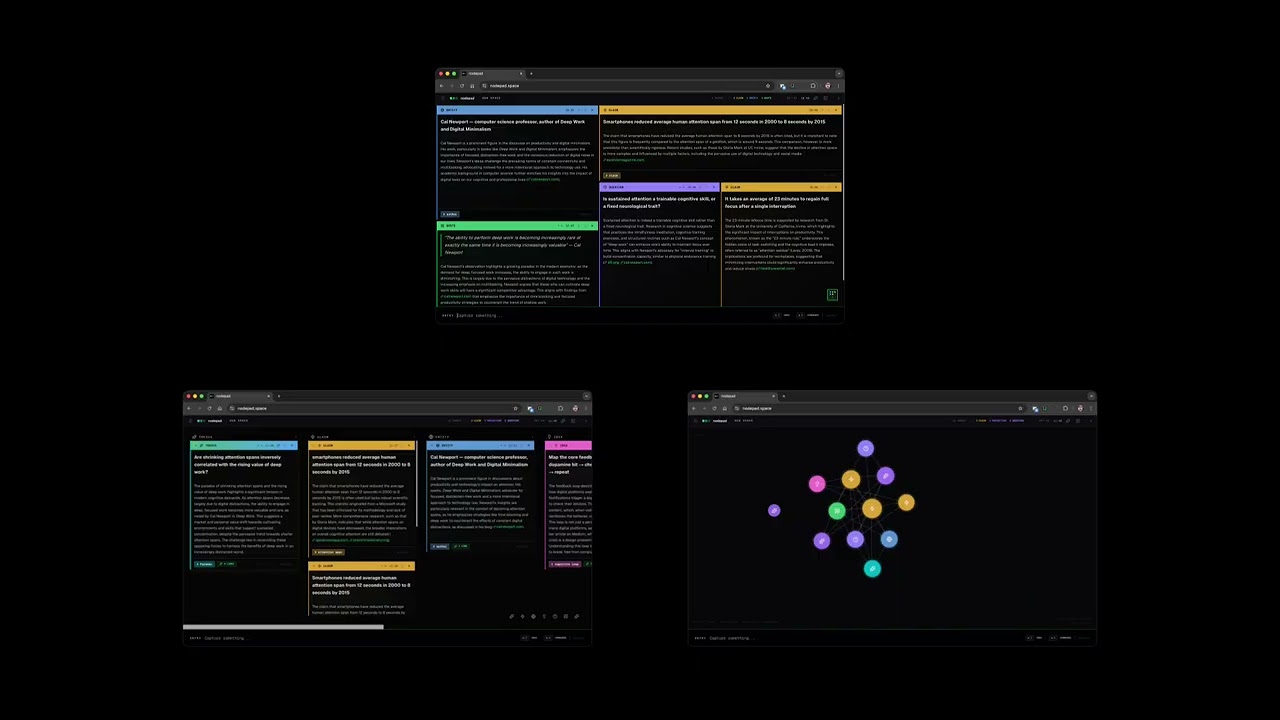
Most AI tools are built around a chat interface: you ask, it answers, you ask again. The interaction is sequential, conversational, and optimised for producing output. nodepad is built around a different premise: that thinking is spatial and associative, and that AI is most useful when it works quietly in the background rather than at the centre of attention.
You add notes. The AI classifies them, finds connections between them, surfaces what you haven't said yet, and occasionally synthesises an emergent insight from the whole canvas. You stay in control of the space. The AI earns its place by being genuinely useful rather than prominent.
Notes are typed into the input bar and placed onto a spatial canvas. Each note is automatically classified into one of 14 types — claim, question, idea, task, entity, quote, reference, definition, opinion, reflection, narrative, comparison, thesis, general — and enriched with a short annotation that adds something the note doesn't already say.
Connections between notes are inferred from content. When you hover a connection indicator, unrelated notes dim. When enough notes accumulate, a synthesis emerges — a single sentence that bridges the tensions across the canvas. You can solidify it into a thesis note or dismiss it.
Three views: tiling (spatial BSP grid), kanban (grouped by type), graph (force-directed, centrality-radial).
Requirements: a desktop browser and one AI provider:
- OpenRouter API key
- OpenAI API key
- OpenAI-compatible endpoint
- Local Ollama runtime
git clone https://github.com/fuoar/nodepad.git
cd nodepad
npm install
npm run dev
Open localhost:3000.
Configure AI: click the menu icon (top-left) → Settings → choose provider, model, and endpoint.
- OpenRouter/OpenAI: add your API key
- Ollama: usually no key required, default base URL is
http://localhost:11434/v1
Settings are stored in your browser's localStorage, and requests go directly from browser to your configured provider endpoint.
Enable web grounding (optional): currently available for OpenRouter models that support the :online suffix.
| Provider | Default base URL | API key required | Model input |
|---|---|---|---|
| OpenRouter | https://openrouter.ai/api/v1 |
Yes | Picker (OpenRouter models) |
| OpenAI | https://api.openai.com/v1 |
Yes | Free text |
| OpenAI-compatible | https://api.openai.com/v1 |
Yes | Free text |
| Ollama (local) | http://localhost:11434/v1 |
No | Free text (for example llama3.2) |
- Start Ollama locally (default host:
http://localhost:11434). - Pull a model (for example
llama3.2). - In nodepad settings choose Ollama (local).
- Keep base URL as
http://localhost:11434/v1(or your custom host). - Enter your local model name in Model and save.
nodepad tries provider endpoints in this order:
- OpenAI-compatible
POST {baseUrl}/chat/completions - If unsupported response format is detected, fallback prompt/format variants are retried.
- For Ollama provider only, native
POST {host}/api/chatis attempted as final fallback.
This allows both OpenRouter and common Ollama configurations to work without manual code changes.
- If Ollama fails from a remote deployment, your browser may not be able to reach
localhoston the machine running Ollama. - If you run nodepad and Ollama on different hosts, set Base URL to the reachable Ollama host/IP.
- If you use OpenAI-compatible providers, confirm the endpoint supports Chat Completions and the selected model exists.
- If you change provider/model and still see old behavior, re-open Settings and click Save Settings once.
See CHANGELOG.md for implementation-level changes.
Select from the sidebar Settings panel. Default is GPT-4o.
| Model | Notes |
|---|---|
openai/gpt-4o |
Default OpenRouter model. Strong annotation quality. |
anthropic/claude-sonnet-4-5 |
Strong reasoning, good for complex research. |
google/gemini-2.5-pro |
Supports web grounding. |
deepseek/deepseek-chat |
Fast, cost-effective. |
mistralai/mistral-small-3.2 |
Lightweight, supports grounding. |
Enter |
Add note |
⌘K |
Command palette (views, navigation, export) |
⌘Z |
Undo |
Escape |
Deselect / close panels |
Double-click any note to edit. Click the type label to reclassify manually.
Everything lives in your browser. No account, no server, no database.
- Notes are persisted to
localStorageundernodepad-projects - A silent rolling backup is written on every change to
nodepad-backup - Export to
.mdor.nodepad(versioned JSON) via⌘K - Import
.nodepadfiles via the sidebar
Next.js · React 19 · TypeScript · Tailwind CSS v4 · D3.js · Framer Motion · OpenRouter/OpenAI/Ollama-compatible APIs
A design experiment by Saleh Kayyali.