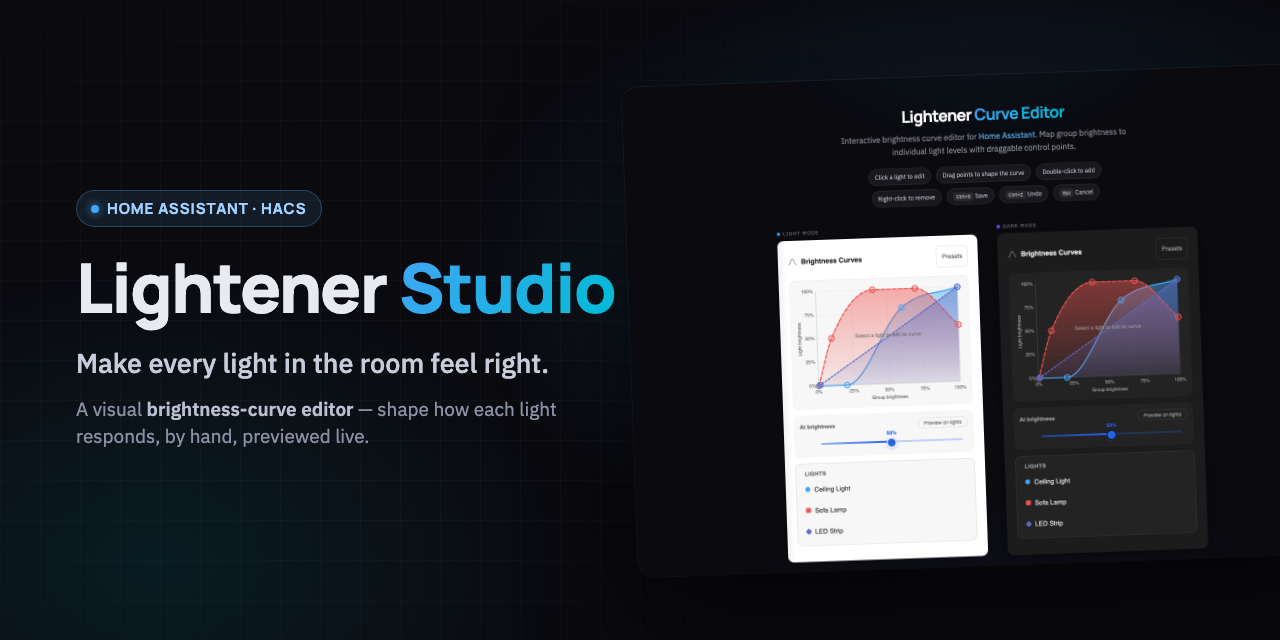
Shape how each light in a Home Assistant room responds to brightness — by hand, previewed live on your real lights. Save when it looks right.


Coming next: per-light color temperature curves — try the interactive preview
What it does · Highlights · Install · API · Contribute


Lightener lets one control drive many lights at once. Lightener Studio adds the missing piece: a visual editor for how each light reacts as you turn the group up and down. Pull the accent lamp down so it stays a soft glow at low levels, let the ceiling lights ramp faster, give the corner lamp a dim floor so it never drops to black. You drag the shape; the room follows. No YAML, no typing number pairs by hand.
Built on the Lightener integration by @fredck, extended for the visual editor (the WebSocket commands the card needs, plus config-flow and state-handling hardening). Upstream MIT license intact.
- Drag control points on smooth curves to shape each light's brightness response.
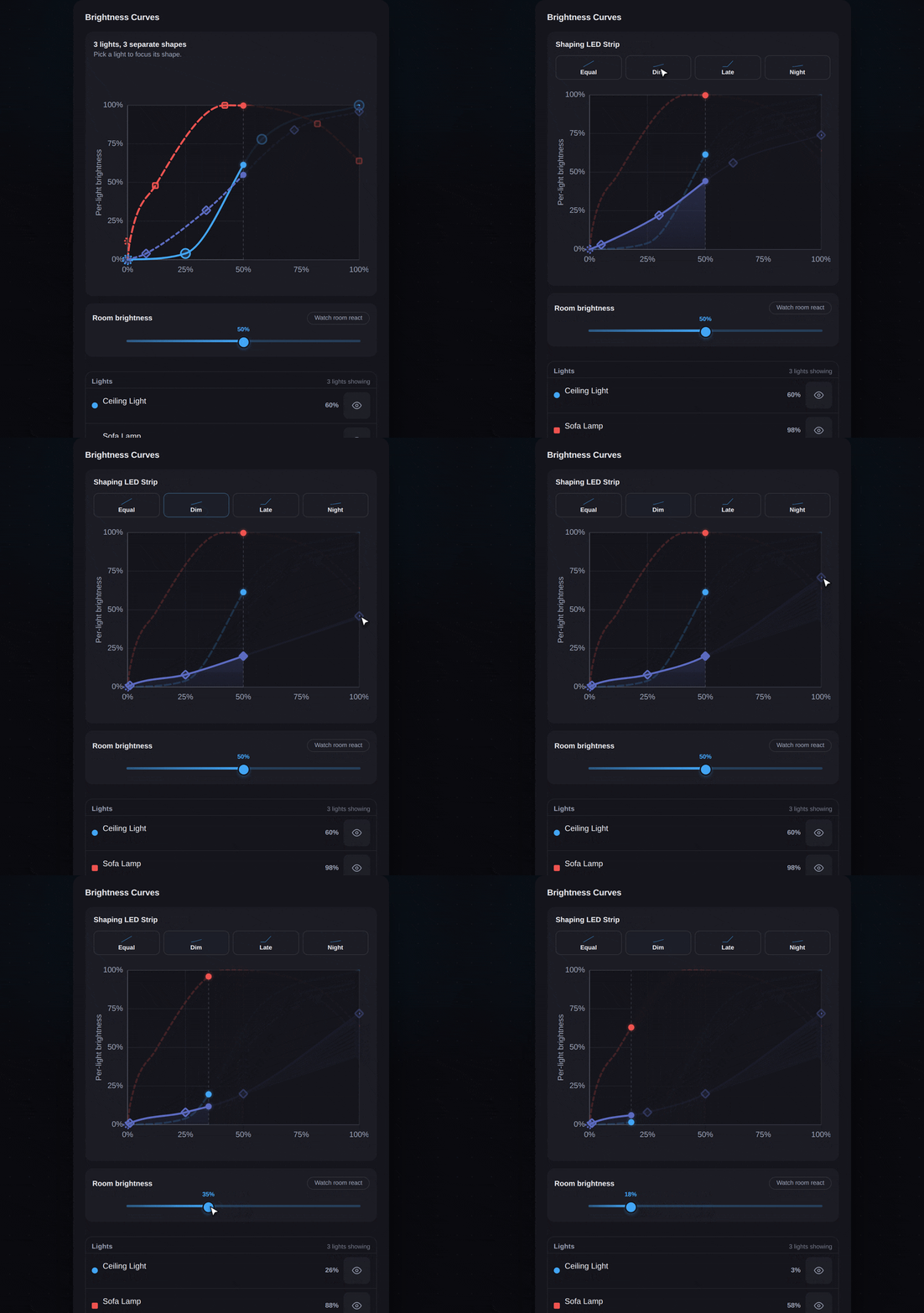
- Live light preview — the Preview button pushes real brightness to your lights while you shape, and the scrubber pushes live brightness too. Lights ease smoothly between levels where they support transitions, and restore automatically when you stop.
- Brightness scrubber with graph sync — drag to preview every light's output at any level; a vertical indicator and per-curve dots track on the graph.
- One-click presets — Equal brightness, Dim accent, Late starter, Night mode, applied to one light or all, fully undoable.
- Sidebar panel — pick a Lightener group and edit curves without adding a dashboard card first.
- Colorblind-accessible — dash patterns and shape markers distinguish curves without relying on color.
- Keyboard and mobile friendly — arrow keys on the scrubber, Ctrl+S to save, Ctrl+Z to undo, 44px touch targets, long-press to delete.
- Scales from 2 to 20+ lights — legend rows and curve labels truncate cleanly at any width; non-admins see curves read-only.
Requires Home Assistant 2024.2.0 or newer.
The badge adds the repository in HACS. Then install Lightener Studio, restart Home Assistant, and open the Lightener Studio panel from the sidebar (registered automatically at /lightener-editor) — pick a Lightener group and start shaping curves, no dashboard card required.
Or add it manually:
- In HACS, go to the three-dot menu → Custom repositories
- Add
florianhorner/lightener-studioas an Integration - Search for "Lightener Studio" and install it
- Restart Home Assistant
- Open the Lightener Studio panel from the Home Assistant sidebar (registered automatically at
/lightener-editor). Pick a Lightener group and start shaping curves — no dashboard card required.
Prefer editing from a dashboard? The card script loads automatically on every dashboard (storage- and YAML-mode alike — no resource setup needed). On Home Assistant 2026.6+, picking a Lightener light in the card picker suggests Lightener Studio under Community. Or add a card manually to any view:
type: custom:lightener-curve-card
entity: light.your_lightener_device
If you previously added
/lightener/lightener-curve-card.jsas a Lovelace resource by hand, remove it (Settings → Dashboards → Resources) — the integration now loads the card itself, and the leftover resource just double-loads the module.
Removing Lightener Studio removes the integration and the grouped Lightener entities it created. Your underlying lights and their devices are untouched, and nothing else in your Home Assistant config is modified. (Dashboard cards you added yourself will show "custom element doesn't exist" after removal, like any uninstalled custom card, so delete them from the dashboard.)
Home Assistant keys integrations by domain and runs their Python at startup, so installing Lightener Studio, and any release that changes backend behavior, still needs a Home Assistant restart. HACS shows its usual "restart to finish" prompt because Lightener Studio is a HACS integration.
Frontend-only releases (the editor panel and the curve card) are served from stable URLs, so they no longer need a restart: update in HACS, then refresh the browser. If the old editor still shows after one refresh, refresh once more — Home Assistant's frontend caches the previous bundle and serves the new one on the following load. "Refresh" means a full page reload, not switching sidebar panels.
The card and sidebar panel talk to the integration over these commands. All require an authenticated Home Assistant connection; write commands additionally require an admin user.
| Command | Params | Auth | Purpose |
|---|---|---|---|
lightener/get_curves |
entity_id |
any user | Read a group's per-light brightness curves. |
lightener/list_entities |
— | any user | List available Lightener groups (used by the sidebar panel). |
lightener/list_candidate_lights |
entity_id |
admin | List lights eligible to join the group, plus its current members (used by the Edit lights dialog). |
lightener/save_curves |
entity_id, curves (dict) |
admin | Write a group's brightness curves. |
lightener/set_controlled_lights |
entity_id, controlled_entity_ids (list), observed_controlled_entity_ids (list) |
admin | Replace a group's controlled lights in one optimistic, transactional update. |
lightener/add_light |
entity_id, controlled_entity_id, preset (optional) |
admin | Legacy single-light add, superseded by set_controlled_lights and retained for cached bundles. |
lightener/remove_light |
entity_id, controlled_entity_id |
admin | Legacy single-light remove, superseded by set_controlled_lights. |
lightener/resolve_handoff |
token |
admin | Exchange a config-flow handoff token for the new group's editor URL. |
From the browser console while logged into Home Assistant, run this authenticated request:
const hass = document.querySelector("home-assistant").hass;
const curves = await hass.callWS({
  type: "lightener/get_curves",
  entity_id: "light.my_lightener_group",
});
console.log(curves);
entity_id is the Lightener group; controlled_entity_id is a member light.
controlled_entity_ids is the full desired member set and observed_controlled_entity_ids is the set the client last loaded — the backend rejects the write as a conflict when they diverge, so concurrent edits can't silently clobber each other.
- CHANGELOG.md — release history
- CONTRIBUTING.md — local setup, tooling, and workflow
- SECURITY.md — vulnerability reporting policy
- DESIGN.md — UI tokens, patterns, and accessibility baseline
- docs/TROUBLESHOOTING.md — upgrade and caching recovery guide
scripts/setup-python   # Python venv + deps
scripts/test-python    # backend pytest
See CONTRIBUTING.md for the full workflow including scripts/ha-sync for direct deployment to a test HA instance.