This repository was archived by the owner on Feb 8, 2022. It is now read-only.
Repository navigation
CommonViewController
#Use CommonViewController
<com.github.florent37.carpaccio.Carpaccio
        app:register="
            com.github.florent37.carpaccio.controllers.ImageViewController;
        ">

        <ImageView
             android:tag="
                 MY_IMAGEVIEW_ACTIONS
             " />
</com.github.florent37.carpaccio.Carpaccio>
Bind a RecyclerView (see Wiki/RecyclerView)
Usage :
- adapter(listMappedName,cellLayoutName)
<android.support.v7.widget.RecyclerView
     android:layout_width="match_parent"
     android:layout_height="match_parent"

     android:tag="
         adapter(user,R.layout.cell_user)
     "
     />
#Replace a view
You can replace by another View class
This method is used for ImageViewController methods like kenburns() which replace by https://github.com/flavioarfaria/KenBurnsView
<ScrollView
      android:layout_width="match_parent"
      android:layout_height="match_parent"

      android:tag="
          replace(com.github.ksoichiro.android.observablescrollview.ObservableScrollView);
      "
      />
#Loop include view
- forInclude( LAYOUT_NAME , NUMBER)
<LinearLayout
      android:layout_width="match_parent"
      android:layout_height="match_parent"
      android:layout_marginTop="150dp"
      android:orientation="vertical"
      android:tag="forInclude(R.layout.card_view,10);"/>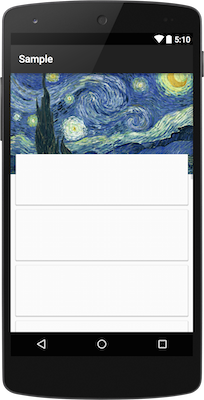
#Open an activity onClick
- **clickStartActivity(activityName) **
<Button
      android:tag="clickStartActivity(.MainActivitySample)"
      />

<Button
      android:tag="clickStartActivity(com.github.florent37.carpaccio.sample.MainActivitySample)"
      />

<Button
      android:tag="clickStartActivity($activity1)"
      />
#Margin and Padding
- margin(top,right,bottom,left) & padding(top,right,bottom,left)
<View
      android:layout_width="match_parent"
      android:layout_height="match_parent"

      android:tag="
          margin(0,10,0,0);
          padding(5,0,5,0);
      "
      />