Scene Description File Format
Scene is described by a json file in Asuna. A skeleton of typical scene description file is shown as below:
{
  "state": { },
  "camera": { },
  "lights": [ ],
  "envmap": { },
  "textures": [ ],
  "materials": [ ],
  "meshes": [ ],
  "instances": [ ],
  "shots": [ ]
}
Generally speaking, scene description file is composed of 7 parts:
- state: settings for path integrator and post processor. This part is required for the scene file.
- camera: settings for camera used in the scene. Up to now, Asuna supports only one camera per scene. This part is required for the scene file.
- ➕lights: all the lights in the scene. This part is optional.
- ➕materials: all the materials in the scene. This part is optional.
- ➕textures: all the textures in the scene. This part is optional.
- meshes: all the meshes in the scene. This part is required for the scene file.
-
instances: all the instances in the scene. A instance is composed of a
mesh, amaterialand a transformation used for that mesh. This part is required for the scene file. - ➕shots: shot is used to describe the pose or extrinsic parameter of the camera and the
stateused for that pose. A scene can have multiple shots, so you can render multi view images. This part is optional.
Example scene description files can be found in Cornell Box and Asuna-Scenes.
For more details of forementioned parts, please refer to their corresponding sections in this page.
The use of textures, materials and meshes is in declaration-reference manner. That is, if you want to create a material which uses texture A as normal map, you should first do declaration: put A in textures part of scene description file. Another case: if you want to create an instance that uses mesh B and material C, you should put B in meshes part and C in materials part. A example declaration-reference procedure is shown below:
    "textures": [{ "name": "cloth", "path": "textures/Clothes_emissive.png" }],
    "materials": [{ "name": "cloth", "type": "brdf_emissive", "radiance_texture": "cloth"}],
    "meshes": [{ "name": "cloth3", "path": "Cloth3.obj" }],
    "instances": [{ "mesh": "cloth3", "material": "cloth" }]
where texture "cloth" is referenced by material "cloth", mesh "cloth3" and material "cloth" are referenced by instances[0].
State describes Asune inner ray tracing and post processing pipelines.
| key | type | description |
|---|---|---|
| path_tracing | json | settings of ray tracing pipeline |
| post_processing | json | settings of post processing pipeline |
| key | type | description |
|---|---|---|
| ➕spp | integer | samples per pixel (default 1) |
| ➕max_path_depth | integer | maximal number of ray bounces (default 3) |
| ➕use_face_normal | bool | use facet normal as shading normal (default false) |
| ➕ignore_emissive | bool | ignore emissve brdf radiance (default false) |
| ➕background_color | float3 | background color (default false) |
| ➕envmap_intensity | float | scale of environment light (default 1) |
Note that spp is only valid in offline rendering. In online rendering with GUI, spp is forced to be 1 and procedural rendering will never be stopped until user quits window.
| key | type | description |
|---|---|---|
| tone_mapping | string | type of tone mapper |
Available tone mappers are:
"none", "gamma", "reinhard", "Aces",
"filmic", "pbrt", "custom"A camera model describes how ray passes through lens, hits the film plane and forms the final image. A typical camera json element is composed of 3 parts.
{
  "type": "perspective",
  "film": { "resolution": [800, 600] },
  "fov": 22.5
}
type specifies which camera model Asuna will use.
| key | type | description |
|---|---|---|
| resolution | float2 | width and height of rendered image |
film specifies the properties of film plane. Up to now, it only has resolution which describes the size of output image in [width, height] manner. Following film and type is the camera-model-specific data.
Asuna supports following camera models.
| key | type | description |
|---|---|---|
| type | string | must be "perspective" |
| film | json | |
| fov | float | field of view |
| ➕aperture | float | radius of camera aperture (default 0.0) |
| ➕focal_distance | float | distance of focal length (default 0.1) |
| key | type | description |
|---|---|---|
| type | string | must be "opencv" |
| film | json | |
| fx | float | focal length in x axis |
| fy | float | focal length in y axis |
| cx | float | optical center in x axis |
| yc | float | optical center in y axis |
In fact, fx,fy,cx,cy is equivalent with opencv camera intrinsic matrix K. Note that though loader is ok to load opencv camera json element, it is not supported by the ray tracing pipeline of Asuna now, which corresponds to the ray generation process in src/shaders/raytrace.projective.rgen.
A texture describes a 2D resources that can be mapped to the object surface.
Asuna supports loading .jpg/.png/.bmp/.tga/.exr/.hdr image as texture.
| key | type | description |
|---|---|---|
| name | string | brief alias of the texture to be loaded |
| path | string | absolute/relative path of the texture |
| ➕gamma | float | gamma correction for ldr image, data=pow(texture, gamma) (default 1.0) |
A mesh describes the graphics primitives. Up to now, Asuna supports only .obj mesh file and will convert all the facets to triangles.
| key | type | description |
|---|---|---|
| name | string | brief alias of the mesh to be loaded |
| path | string | absolute/relative path of the mesh |
| ➕recompute_normal | bool | recompute the mesh normal (default false). You'd better do not let Asuna compute normal for the mesh. |
| ➕uv_scale | float2 | scale of the vertex texture coordinates, usually useful for a plane mesh (default [1,1]) |
A light describes the objects that will actively send out emittance and will not bounce rays in the scene.
The design of light is quite complex in Asuna (maybe I will simplify it later):
-
For light that has no detection of ray collision (e.g. point light, directional light, spot light), Asuna will only create gpu data
src/shared/light.hfor that light to make it accessible to ray tracing shaders. -
For light that need to do detection of ray collision (e.g. rectangle light, triangle light, mesh light), Asuna will not only create gpu data
src/shared/light.hbut also automatically create a mesh/an instance for that light in the same time, so that these lights can be hit in the ray tracing pipeline. The lightId of all the light instances is non-negative number. The material applied to light instance is brdf_lambertian. So, you can find procedure of ray hitting light insrc/shaders/bxdf/raytrace.brdf_lambertian.rchit.
Asuna supports following light models.
| key | type | description |
|---|---|---|
| type | string | must be "triangle" |
| radiance | float3 | radiance of light |
| position | float3 | one of the vertices of a triangle |
| v1 | float3 | one of the vertices of a triangle |
| v2 | float3 | one of the vertices of a triangle |
| key | type | description |
|---|---|---|
| type | string | must be "rect" |
| radiance | float3 | radiance of light |
| position | float3 | one of the vertices of a rectangle |
| v1 | float3 | adjacent point of the rectangle origin |
| v2 | float3 | adjacent point of rectangle origin |
| key | type | description |
|---|---|---|
| type | string | must be "mesh" |
| radiance | float3 | radiance of light |
| path | string | absolute/relative path to the mesh |
Note that Asuna loads mesh as an array of triangle facets. Say the mesh has # of triangle facets, then Asuna will create # triangle light instances.
| key | type | description |
|---|---|---|
| type | string | must be "distant" |
| radiance | float3 | radiance of light |
| direction | float3 | direction of light |
Please refer to envmap.
A envmap describe the surrounding environment light by an image which is typically high dynamic range (e.g. hdr, exr).
| key | type | description |
|---|---|---|
| path | string | absolute/relative path to environment map. |
To change envmap intensity, or to rotate envmap, please refer to state section.
Envmap will be later merged into light.
A material describes how ray behaves when bouncing at surface.
Asuna supports following materials.
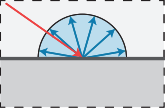
| key | type | description |
|---|---|---|
| type | string | must be "brdf_lambertian" |
| ➕diffuse_reflectance | float3 | diffuse albedo color (default [0,0,0]) |
| ➕diffuse_texture | string | name of reference diffuse texture (default NONE) |
| ➕normal_texture | string | name of reference normal texture (default NONE) |
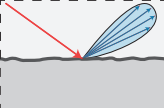
| key | type | description |
|---|---|---|
| type | string | must be "brdf_pbr_metalness_roughness" |
| ➕diffuse_reflectance | float3 | diffuse albedo color (default [0,0,0]) |
| ➕diffuse_texture | string | name of reference diffuse texture (default NONE) |
| ➕normal_texture | string | name of reference normal texture (default NONE) |
| ➕metalness | float | metalness (default 0) |
| ➕metalness_texture | string | name of metalness texture (default NONE) |
| ➕roughness | float | roughness (default 0) |
| ➕roughness_texture | string | name of roughness texture (default NONE) |
| ➕ior | float | index of refraction (default 1.5) |
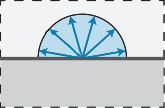
Note that ray will terminate after hitting this BRDF.
| key | type | description |
|---|---|---|
| type | string | must be "brdf_emissive" |
| ➕radiance | float3 | emissive radiance (default [0,0,0]) |
| ➕radiance_factor | float3 | multiply factor (default [1,1,1]) |
| ➕radiance_texture | string | name of reference radiance texture (default NONE) |
This material implements BRDF mentioned in Efficient reflectance capture using an autoencoder.
| key | type | description |
|---|---|---|
| type | string | must be "brdf_kang18" |
| diffuse_texture | string | name of reference diffuse texture |
| specular_texture | string | name of reference specular texture |
| normal_texture | string | name of reference normal texture |
| tangent_texture | string | name of reference tagent texture |
| alpha_texture | string | name of reference alpha texture |
| ➕ior | float | index of refraction (default 1.5) |
Note that:
- Normal and tangent are in object space, while other BRDF usually uses normal map in tangent space.
- Red and green channel of alpha texture is used as anisotropic alpha.
- Alpha texture is different with roughness texture as alpha=roughness*roughness.
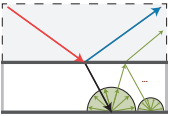
| key | type | description |
|---|---|---|
| type | string | must be "brdf_plastic" |
| ➕diffuse_reflectance | float3 | diffuse albedo color (default [0,0,0]) |
| ➕diffuse_texture | string | name of reference diffuse texture (default NONE) |
| ➕normal_texture | string | name of reference normal texture (default NONE) |
| ➕ior | float | index of refraction (default 1.5) |
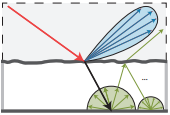
| key | type | description |
|---|---|---|
| type | string | must be "brdf_rough_plastic" |
| ➕diffuse_reflectance | float3 | diffuse albedo color (default [0,0,0]) |
| ➕diffuse_texture | string | name of reference diffuse texture (default NONE) |
| ➕alpha | float2 | anisotropic alpha (default [0,0]) |
| ➕alpha_texture | string | name of reference alpha texture (default NONE) |
| ➕ior | float | index of refraction (default 1.5) |
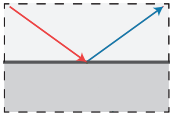
| key | type | description |
|---|---|---|
| type | string | must be "brdf_mirror" |
| ➕diffuse_reflectance | float3 | diffuse albedo color (default [0,0,0]) |
| ➕diffuse_texture | string | name of reference diffuse texture (default NONE) |
| ➕normal_texture | string | name of reference normal texture (default NONE) |
| key | type | description |
|---|---|---|
| type | string | must be "brdf_conductor" |
| ➕diffuse_reflectance | float3 | diffuse albedo color (default [0,0,0]) |
| ➕diffuse_texture | string | name of reference diffuse texture (default NONE) |
| ➕normal_texture | string | name of reference normal texture (default NONE) |
| ➕material | string | name of conductor (default "Cu") |
Available material names are:
"a-C", "Ag", "Al", "AlAs", "AlSb", "Au", "Be", "Cr", "CsI", "Cu", "Cu2O", "CuO",
    "d-C", "Hg", "HgTe", "Ir", "K", "Li", "MgO", "Mo", "Na", "Nb", "Ni", "Rh",
    "Se-e", "Se", "SiC", "SnTe", "Ta", "Te-e", "Te", "ThF4", "TiC", "TiN",
    "TiO2-e", "TiO2", "VC", "VN", "V", "W"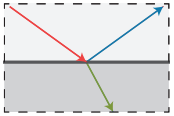
| key | type | description |
|---|---|---|
| type | string | must be "brdf_dielectric" |
| ➕normal_texture | string | name of reference normal texture (default NONE) |
| ➕ior | float | index of refraction (default 1.5) |
An instance describes a combination of mesh, material and transformation.
| key | type | description |
|---|---|---|
| mesh | string | name of reference mesh |
| material | string | name of reference material |
| ➕toworld | json | see blow (default no_transformation) |
If you want the instance have transformation, you can specify toworld. It is a sequence of simple transformations, which will be applied to the instance successively. A typical toworld sequence is shown below:
"toworld": [
    {
        "type": "rotate",
        "value": [90, 0, -98.5]
    },
    {
        "type": "translate",
        "value": [109.32, 107.883, 38.03 ]
    }
]Every simple transformation requires two keys:
| key | type | description |
|---|---|---|
| type | string | type of transformation |
| value | ? | depends on type |
Asuna supports following simple transformations:
| type of transformation | type | value | description |
|---|---|---|---|
| rotate with respect to xyz axis | must be "rotate" | float3 | rotate degrees respect to xyz axis, rotation is applied in xyz order |
| scale | must be "scale" | float3 | xyz scale |
| translate | must be "translate" | float3 | xyz translation |
| transformation matrix | must be "matrix" | float16 | in row order (m[0,0], m[0,1]...) with translate vector=m[0:3,3] |
| rotate with respect to x axis | must be "rotx" | float | rotate degrees respect to x axis |
| rotate with respect to y axis | must be "roty" | float | rotate degrees respect to y axis |
| rotate with respect to z axis | must be "rotz" | float | rotate degrees respect to z axis |
A shot describes how to place the camera and what the state is when rendering image use that camera pose. If there is no shot in the scene description file, Asuna will automatically fit the camera to the scene size, and use forementioned global state.
A shot is composed of camera pose and state.
{
  "type": "lookat",
  "eye": [0, 1, 6.8],
  "lookat": [0, 1, 0],
  "up": [0, 1, 0],
  "state": {
    "path_tracing": { "spp": 1024 }
  }
}Asuna supports 2 ways to specify camera pose.
| key | type | description |
|---|---|---|
| type | string | must be "lookat" |
| eye | float3 | camera position |
| lookat | float3 | point of interest |
| up | float3 | world up vector |
| key | type | description |
|---|---|---|
| type | string | must be "opencv" |
| matrix | float16 | camera extrinsic matrix |
Note that this is still not supported up to now.
If a shot does not explicitly specify state, it will defaultly use global state.
To specify state, please refer to state section.
This page is still in progress.