






Multi-account and usage manager for Claude Code and OpenAI Codex. Save multiple logins, check their quota windows, switch manually or automatically before you hit a rate limit, and manage both providers from one dashboard.
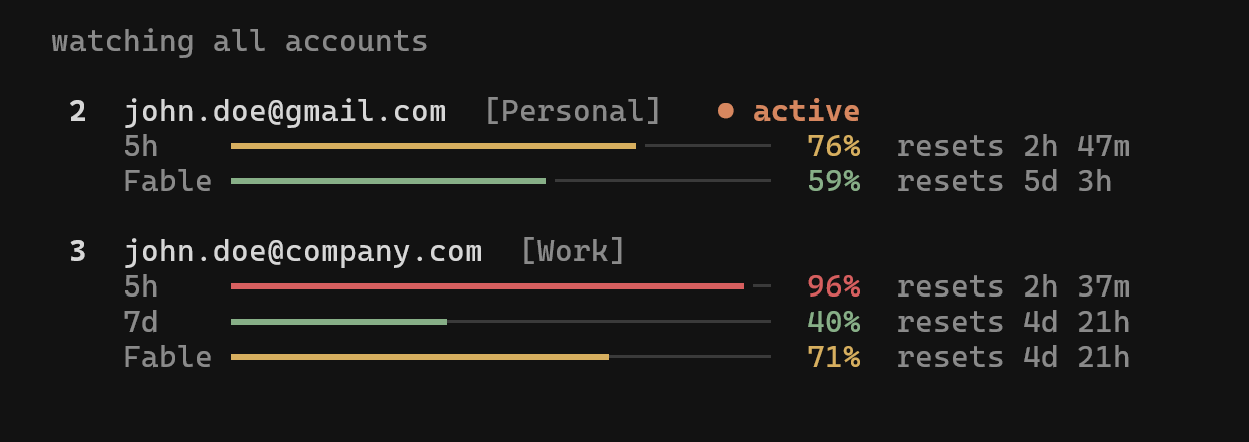
- Keeps several Claude Code and Codex CLI logins side by side and switches the active one with
ccswap switch 2orccswap codex switch 2. - Shows every account's 5-hour, 7-day and Codex weekly usage with reset times in
ccswap list. ccswap autoswitches to the account with the most quota left once the active one crosses 90%, before the rate limit hits.ccswap run 2starts Claude Code as account 2 in one terminal only, so two accounts work in parallel.- A full-screen dashboard (
ccswap) on macOS, Linux and Windows, and an optional macOS menu bar app. --jsonoutput and exit codes for scripts and cron.
uv tool install ccswap     # or: pipx install ccswap

# Log into Claude Code with your first account, then:
ccswap add
# Log in with the next account, then:
ccswap add

ccswap list       # every account's usage and reset times
ccswap switch 2   # or: ccswap switch --strategy best
ccswap auto       # or let it switch for you before a limit is hit
Codex accounts work the same way: run codex login, then ccswap codex add.
You usually don't need to restart Claude Code after a switch. Codex always needs one. See restarts.
Switch by quota. ccswap switch --strategy best picks the account with the most quota left. --strategy consume-first picks the one whose weekly limit resets soonest, so none of it expires unused. All switch options
Switch automatically. ccswap auto polls every 60 seconds and is safe to run while Claude Code works. Thresholds, per-model limits, cron mode and strategies are in auto-switching.
Two accounts at once. ccswap run 2 launches Claude Code as account 2 in this terminal only. ccswap map 2 ~/work makes a bare ccswap run pick account 2 in that folder. Session mode
Codex. ccswap codex list, codex switch and codex auto mirror the Claude commands. Codex must use its file credential store. Codex accounts
Dashboard and menu bar. Run ccswap for the dashboard, or ccswap watch for the live monitor above. On macOS, ccswap menubar --install-service keeps a menu bar app running at login. Dashboard and menu bar
Inside Claude Code. An optional statusline and a /ccswap pane, both off until you turn them on. Statusline and mod
- Commands: every command, expired tokens, adding a raw token or API key
- Automatic switching
- Session mode
- Codex accounts
- Dashboard and menu bar
- Statusline and mod
- Configuration, backup and sharing
- JSON output for scripting
- How it works: restarts, credential handling, where data is stored
skills/ccswap-orchestration/ teaches a coding agent to check account headroom before a big fan-out and to pick a switch strategy under quota pressure:
npx skills add errhythm/ccswap --skill ccswap-orchestrationccswap upgrade # detects uv or pipx and upgrades
ccswap purge # remove all ccswap data, then:
uv tool uninstall ccswap # or: pipx uninstall ccswapFrom source: git clone https://github.com/errhythm/ccswap.git && cd ccswap && uv sync && uv run ccswap help.
- Python 3.12+
- Claude Code and/or Codex CLI
- A file-backed login for managed Codex accounts
If ccswap saved you from a rate limit, a ⭐ on GitHub helps other people find it. Bugs and ideas go in issues.
ccswap began as a fork of claude-swap (cswap) by Onur Cetinkol, and still carries the original MIT license and credit for that. Since then it's grown into its own project: no more tracking upstream, no cswap compatibility, its own package and release line, and adds Codex support. It's MIT-licensed too, so fork it, file issues, send PRs — whatever's useful to you.
MIT. This fork retains the original project's copyright and license notice; see LICENSE. Upstream: realiti4/claude-swap.