Mercury is a browser-based real-device lab for Android and iOS. This project is optimized for macOS because iOS automation requires Xcode tooling on host.
Website: mercury-farm-brand.netlify.app
Logo:

Login Page:

Devices Page:

Remote Controller For Android Page:

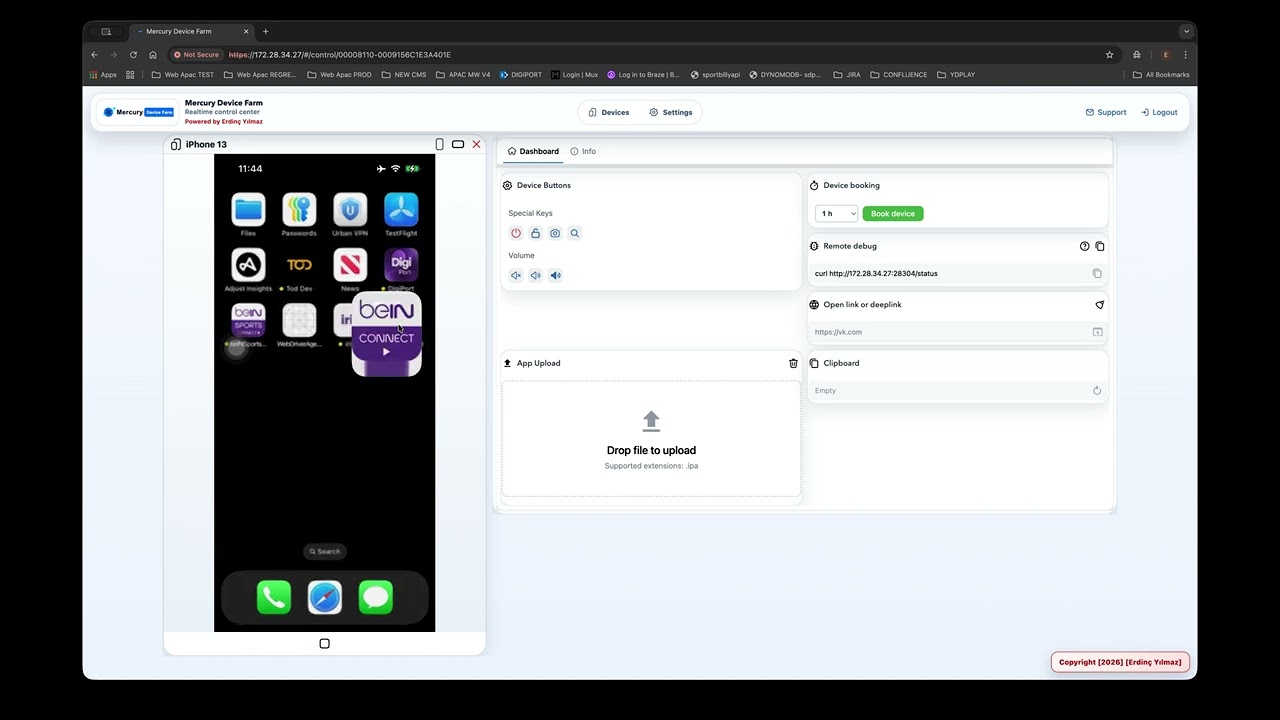
Remote Controller For iOS Page:

Settings Page:

Public users do not need to clone this repository. A GitHub Release provides the macOS launcher, Docker Compose files, and the host-side iOS provider. The matching GHCR image contains all backend services and the compiled web UI.
brew install --cask docker
brew install --cask android-platform-tools
For iOS support, also install:
brew install node
brew install libimobiledevice usbmuxd
xcode-select --install
Open Docker Desktop and Xcode at least once after installation.
curl -fsSL https://github.com/erdncyz/mercury-farm/releases/latest/download/install.sh | bashFor Android-only installations, skip the host iOS dependencies:
curl -fsSL https://github.com/erdncyz/mercury-farm/releases/latest/download/install.sh | bash -s -- --android-onlyThe installer verifies the release archive checksum, installs it under
~/.mercury-farm, and pins the Docker image by its immutable release digest.
The UI source is not downloaded because the compiled UI is already in that image.
If iOS support is enabled, installer output can include npm deprecation warnings from transitive dependencies. These warnings do not block installation.
~/.mercury-farm/mercury upThe first run can take several minutes because Docker pulls the Mercury image
and base images. Progress lines like [+] pull x/y are expected.
For iOS, complete the one-time WebDriverAgent (WDA) signing setup in Xcode:
open ~/.mercury-farm/current/WebDriverAgent/WebDriverAgent.xcodeprojIn Xcode:
- Select the WebDriverAgent project → WebDriverAgentRunner target.
- Open Signing & Capabilities, enable Automatically manage signing, and pick your Team (a free Apple ID works).
- If the bundle identifier conflicts, change it to something unique, e.g.
com.yourname.WebDriverAgentRunner. - On the device, trust the developer certificate (Settings → General → VPN & Device Management) and enable Developer Mode (iOS 16+: Settings → Privacy & Security → Developer Mode).
WDA is installed on the iPhone/iPad, not on the Mac. After this one-time
setup, the iOS provider rebuilds and installs WDA automatically via
xcodebuild -allowProvisioningUpdates; you do not need to open Xcode again.
Note: always edit the project under ~/.mercury-farm/current/. The
~/.mercury-farm-runtime/ folder is a working copy that the provider
recreates from current on every deploy, so manual edits there are lost.
After mercury update replaces current with a new release, the Team
setting is reset and this signing step must be repeated.
Troubleshooting — empty WebDriverAgent folder: if iOS devices stay stuck
in Preparing, or WebDriverAgent.xcodeproj does not open, check whether
the WDA folder is empty (release bundles v0.4.1–v0.4.2 shipped without it):
ls ~/.mercury-farm/current/WebDriverAgentIf it is empty, restore it manually:
mkdir -p ~/.mercury-farm/current/WebDriverAgent
cd ~/.mercury-farm/current/WebDriverAgent
git clone --depth 1 --branch v16.11.4 https://github.com/appium/WebDriverAgent.git .
Then repeat the signing step above and re-run
~/.mercury-farm/mercury ios-auto. Updating to the latest release
(~/.mercury-farm/mercury update) also fixes this permanently: the installer
restores missing WDA sources in already-installed releases, and ios-auto
refuses to deploy a runtime without WDA instead of deleting a manually
restored copy in ~/.mercury-farm-runtime/.
Then install the host provider as a LaunchAgent so it starts automatically:
~/.mercury-farm/mercury ios-auto~/.mercury-farm/mercury statusMercury uses dynamic domain detection (MERCURY_DOMAIN).
Open with your detected host domain/IP:
https://<MERCURY_DOMAIN>- Example:
https://192.168.x.xxx
Building the image from source requires access to the private mercury-ui
submodule. Authorized maintainers:
git clone --recurse-submodules https://github.com/erdncyz/mercury-farm.git
cd mercury-farm
npm ci
npm --prefix ./ui ci          # UI deps (private submodule)
npm run stack:up:macos        # builds the image locally (compiles the UI)
./scripts/start-ios-provider.sh
Commit UI changes and bump the submodule pointer in one step:
npm run ui:commit -- "your message"WebDriverAgent/ tracks upstream appium/WebDriverAgent
as a git submodule pinned to a specific commit. Dependabot opens a weekly PR to
bump the pointer when upstream advances (see .github/dependabot.yml).
After a git pull (or when the Dependabot PR is merged) sync the submodule:
git submodule update --init --recursiveManual bump to a specific WDA version:
cd WebDriverAgent
git fetch --tags
git checkout vX.Y.Z
cd ..
git add WebDriverAgent
git commit -m "chore(deps): bump WebDriverAgent to vX.Y.Z"package.json is the release version source, but maintainers do not bump it
manually anymore. Push to main with Conventional Commit messages and Mercury
bumps the version automatically:
git push origin mainVersion rules:
feat:-> minor bumptype(scope)!:orBREAKING CHANGE-> major bump- all other commits -> patch bump
On push, the version workflow creates a chore(release): vX.Y.Z commit with
updated package files, then dispatches the release workflow for main. The
release workflow creates the Git tag, multi-architecture GHCR image, macOS
bundle, checksum, and GitHub Release together. Do not create release tags by hand.
Use the following admin login:
- Name:
Mercury - Email:
mercury@test.com
Notes:
- Mock form fields are empty by default; users fill their own values.
- In mock mode, first successful login is created as admin if no admin exists.
Update the host tools, Docker services, and UI together:
~/.mercury-farm/mercury updateThe command downloads the latest GitHub Release, verifies its checksum, pins the
digest of the matching ghcr.io/erdncyz/mercury-farm:vX.Y.Z image, and refreshes the stack. It
also refreshes the iOS LaunchAgent when one is installed. Configuration and the
MongoDB Docker volume are preserved.
Mercury verifies every long-running service and the UI before completing an
update. If validation fails, it restores the previous host release, image
digest, Docker stack, and iOS provider. An interrupted update is recovered on
the next mercury command.
To install or roll back to an exact version:
curl -fsSL https://github.com/erdncyz/mercury-farm/releases/latest/download/install.sh | bash -s -- --version v0.0.47
~/.mercury-farm/mercury up
~/.mercury-farm/mercury ios-auto  # when iOS support is enabled
For an Android-only install, add --android-only to the installer command and
omit ios-auto.
Common questions from users planning a physical device farm with Android and/or iOS devices.
A 1 Gbps wired connection at the device location is more than sufficient for up to 20 concurrent devices. Screen streaming + control traffic per device is well under 10 Mbps. The real bottleneck is almost never the uplink — it is the host CPU/RAM, USB hub quality, and device agent stability (ADB for Android, WebDriverAgent for iOS).
Connect the host machine via wired Ethernet (not Wi-Fi). WebSocket screen streams are sensitive to packet jitter.
| Model | Notes |
|---|---|
| Mac mini M2 Pro / M4 Pro ✓ | Recommended for 10–20 devices. Extra CPU cores and memory bandwidth handle concurrent device workers comfortably. |
| Mac mini M2 / M4 base | Adequate for up to ~10 devices. |
iOS automation requires macOS + Xcode. Android-only setups can also run on Linux, but macOS is the primary supported platform.
Avoid generic or passive hubs — they are the #1 cause of device drops with large fleets, for both Android and iOS.
- Use powered USB hubs with per-port power switching (e.g. Anker PowerExpand, BYEASY industrial USB 3.0 hubs rated 20W+ per port).
- Connect no more than 7–8 devices per hub, even if the hub supports more ports. For 20 devices, spread them across 3 hubs.
- Plug hubs directly into Mac mini USB-A or USB-C ports — do not chain hubs.
- Use short cables (0.5 m) — long cables increase connection noise.
- Enable Developer Options and turn on USB Debugging on each device.
- Set Stay awake while charging to prevent the screen from sleeping during sessions.
- Keep devices on a consistent Android version per test requirement; ADB reconnects automatically on reboot.
- Keep all devices on the same iOS version if possible — simplifies WebDriverAgent builds and avoids per-device re-pairing.
- Enable Developer Mode on each device before provisioning (iOS 16+: Settings → Privacy & Security → Developer Mode).
- Trust the developer certificate on each device after WDA signing (Settings → General → VPN & Device Management).
| Platform | Technology | Notes |
|---|---|---|
| Android | Minicap / Scrcpy over WebSocket | Works out of the box, low latency |
| iOS | WebDriverAgent MJPEG over WebSocket | Works out of the box; native H.264/WebRTC would require additional development |
Bandwidth tuning — defaults are optimized for ~1-2 Mbps per device (15 fps), matching commercial device farms. Streams automatically pause when the browser tab is hidden, and iOS frame resolution adapts to the viewer window size. Override via environment variables:
| Variable | Default | Effect |
|---|---|---|
SCREEN_FRAME_RATE |
15 |
Frames per second (both platforms). Raise to 24-30 for smoother motion at 2-4x bandwidth |
SCREEN_JPEG_QUALITY |
25 (Android) / 15 (iOS) |
JPEG compression quality (1-100) |
IOS_WDA_MJPEG_QUALITY |
10 |
WDA-side JPEG quality for iOS capture |
IOS_WDA_MJPEG_SCALING |
50 |
iOS frame resolution scaling cap (percent); actual scaling adapts to viewer window |
IOS_WDA_WAIT_FOR_IDLE_TIMEOUT |
0 |
Seconds WDA waits for UI idle before taps; 0 gives snappiest touch response |
Example — higher quality on a fast LAN:
SCREEN_FRAME_RATE=30 SCREEN_JPEG_QUALITY=40 ./scripts/install.sh- In-app
Contact Supportpoints to: GitHub Issues
Each stable version has three matching parts:
- GitHub Release: the user-facing download with
install.sh, the macOS host bundle, checksum, and release notes. - Git tag: the immutable source marker for maintainers. Users do not need to clone or download a tag.
- GHCR package:
ghcr.io/erdncyz/mercury-farm:vX.Y.Z, containing the backend and compiled UI. The installer pulls it automatically.
The release, tag, and package always use the same vX.Y.Z. stable and latest
point to the newest stable image, while normal installations pin the immutable
image digest to prevent host/UI version drift or tag mutation.
Manual image pull, normally not needed:
docker pull ghcr.io/erdncyz/mercury-farm:stableStart here: Documentation Index — organized by topic, available in English and Turkish.
Key documents:
- Getting Started (EN + TR)
- Hardware Recommendations — Mac mini specs, USB hubs, network setup
- H.264/WebRTC Feature Plan (EN + TR) — streaming upgrade roadmap with test-driven gates
- iOS Setup (EN + TR)
- Parallel Execution (EN + TR)
- Appium Setup (EN + TR)
- Appium Integration (EN + TR)
- Automation API (EN + TR)
- Architecture (EN) / Mimari (TR)
- Troubleshooting (EN + TR)
- Smart TV (Tizen) Guide (EN + TR)
- ESP32 Notes (EN + TR)
- Docker Services & Logs (EN + TR)
- API Reference (EN + TR)
Public kullanici repoyu clone etmez. GitHub Release, macOS host dosyalarini; ayni surumdeki GHCR Package ise backend ile derlenmis UI'yi getirir.
brew --versionHomebrew kurulu degilse once brew.sh uzerinden kurun.
brew install --cask docker
brew install --cask android-platform-tools
Docker Desktop'i bir kez acin ve tamamen baslamasini bekleyin:
open -a DockerBu adim yalnizca iPhone, iPad veya Apple TV yonetecekseniz gereklidir:
brew install node
brew install libimobiledevice usbmuxd
xcode-select --install
Xcode'u en az bir kez acin ve lisans/ilk kurulum adimlarini tamamlayin.
Android ve iOS destekli tam kurulum:
curl -fsSL https://github.com/erdncyz/mercury-farm/releases/latest/download/install.sh | bashYalnizca Android kullanacaksaniz Node ve Xcode gerekmez:
curl -fsSL https://github.com/erdncyz/mercury-farm/releases/latest/download/install.sh | bash -s -- --android-onlyKurucu arsiv checksum degerini dogrular ve Mercury'yi
~/.mercury-farm dizinine kurar.
~/.mercury-farm/mercury upBu komut Release'e ait degismez Docker image digest'ini ceker, servisleri baslatir ve saglik kontrollerini yapar.
iOS kullanacaksaniz once WebDriverAgent (WDA) projesini Xcode'da acip imzalayin:
open ~/.mercury-farm/current/WebDriverAgent/WebDriverAgent.xcodeprojXcode'da:
- Sol panelde WebDriverAgent projesini, target listesinden WebDriverAgentRunner target'ini secin.
- Signing & Capabilities sekmesinde Automatically manage signing secenegini isaretleyin ve Team olarak kendi Apple hesabinizi secin (ucretsiz Apple ID yeterlidir).
- Bundle identifier cakisma hatasi verirse benzersiz bir deger yazin,
ornek:
com.adiniz.WebDriverAgentRunner. - Telefonda gelistirici sertifikasina guven verin (Ayarlar → Genel → VPN ve Aygit Yonetimi) ve Gelistirici Modu'nu acin (iOS 16+: Ayarlar → Gizlilik ve Guvenlik → Gelistirici Modu).
WDA, Mac'e degil iPhone/iPad'e kurulur. Bu tek seferlik ayardan sonra iOS
provider WDA'yi xcodebuild -allowProvisioningUpdates ile otomatik derleyip
cihaza kurar; Xcode'u tekrar acmaniz gerekmez.
Not: Duzenlemeyi her zaman ~/.mercury-farm/current/ altindaki projede yapin.
~/.mercury-farm-runtime/ klasoru her deploy'da current uzerinden yeniden
olusturulan calisma kopyasidir; oradaki elle yapilan degisiklikler kaybolur.
mercury update yeni surum indirdiginde current degistigi icin Team ayari
sifirlanir ve bu imzalama adimini tekrarlamaniz gerekir.
Sorun giderme — bos WebDriverAgent klasoru: iOS cihazlar surekli
Preparing durumunda kaliyorsa veya WebDriverAgent.xcodeproj acilmiyorsa
WDA klasorunun bos olup olmadigini kontrol edin (v0.4.1–v0.4.2 paketleri bu
klasor bos gelebilir):
ls ~/.mercury-farm/current/WebDriverAgentKlasor bossa elle doldurun:
mkdir -p ~/.mercury-farm/current/WebDriverAgent
cd ~/.mercury-farm/current/WebDriverAgent
git clone --depth 1 --branch v16.11.4 https://github.com/appium/WebDriverAgent.git .
Ardindan yukaridaki imzalama adimini tekrarlayin ve
~/.mercury-farm/mercury ios-auto komutunu yeniden calistirin. En son surume
guncellemek (~/.mercury-farm/mercury update) de bu sorunu kalici olarak
cozer.
iOS kullanacaksaniz:
~/.mercury-farm/mercury ios-autoBu komut iOS provider'i macOS LaunchAgent olarak kurar. Mac yeniden basladiginda iOS provider otomatik olarak yeniden baslar.
~/.mercury-farm/mercury statusTerminalde yazan adresi tarayicida acin:
https://<MERCURY_DOMAIN>- Ornek:
https://192.168.1.100
Sertifika yerel olarak olusturuldugu icin tarayici ilk acilista guvenlik uyarisi gosterebilir.
- Name:
Mercury - Email:
mercury@test.com
Mock auth modunda ilk basarili giris yapan kullanici admin olarak olusturulur.
~/.mercury-farm/mercury updateGuncelleme; host dosyalarini, backend'i ve UI'yi birlikte yeniler. Ayarlar ve MongoDB verileri korunur. Saglik kontrolu basarisiz olursa onceki surum otomatik geri yuklenir.
curl -fsSL https://github.com/erdncyz/mercury-farm/releases/latest/download/install.sh | bash -s -- --version v0.0.47
~/.mercury-farm/mercury up
~/.mercury-farm/mercury ios-auto # iOS kullaniyorsaniz~/.mercury-farm/mercury logsAndroid ve/veya iOS cihaz filosu kurmayı planlayan kullanıcıların sıkça sorduğu sorular.
İnternet / Ağ
Cihazların bulunduğu konumda 1 Gbps kablolu bağlantı, 20 eş zamanlı cihaz için fazlasıyla yeterlidir. Cihaz başına ekran akışı + kontrol trafiği 10 Mbps'nin çok altındadır. Gerçek darboğaz neredeyse hiçbir zaman internet hattı değil; host CPU/RAM, USB hub kalitesi ve cihaz agent stabilitesidir (Android için ADB, iOS için WebDriverAgent).
Host makineyi kablolu Ethernet ile bağlayın (Wi-Fi değil). WebSocket ekran akışları paket gecikmesine duyarlıdır.
Mac mini
| Model | Notlar |
|---|---|
| Mac mini M2 Pro / M4 Pro ✓ | 10–20 cihaz için önerilir. Fazladan CPU çekirdeği ve bellek bant genişliği, eş zamanlı cihaz worker'larını rahatça kaldırır. |
| Mac mini M2 / M4 base | ~10 cihaza kadar yeterlidir. |
iOS otomasyonu macOS + Xcode gerektirir. Yalnızca Android kullanıyorsanız Linux'ta da çalışır; ancak birincil desteklenen platform macOS'tur.
USB Hub
Ucuz veya pasif hub kullanmayın — büyük filolarda hem Android hem iOS cihaz düşmelerinin 1 numaralı nedeni budur.
- Port başına 20W+ güç sağlayan harici güçlü (powered) USB hub kullanın (örn. Anker PowerExpand, BYEASY endüstriyel USB 3.0 hub).
- Hub başına en fazla 7–8 cihaz bağlayın, hub'ın daha fazla portu olsa bile. 20 cihaz için 3 hub'a dağıtın.
- Hub'ları Mac mini USB-A veya USB-C portlarına doğrudan takın — hub'ları birbirine zincirlemeyin.
- Kısa kablo (0,5 m) kullanın — uzun kablolar bağlantı gürültüsünü artırır.
Android Cihaz Hazırlığı
- Her cihazda Geliştirici Seçenekleri'ni açın ve USB Hata Ayıklama'yı etkinleştirin.
- Oturum sırasında ekranın kararmaması için Şarj olurken açık kal seçeneğini aktif edin.
- ADB yeniden başlatma sonrasında otomatik bağlanır; cihazları test gereksinimine göre tutarlı Android sürümünde tutun.
iOS Cihaz Hazırlığı (iPhone / iPad)
- Mümkünse tüm cihazları aynı iOS sürümünde tutun — WebDriverAgent derlemeyi kolaylaştırır ve yeniden eşleştirme sorunlarını önler.
- Her cihazda Geliştirici Modu'nu etkinleştirin (iOS 16+: Ayarlar → Gizlilik ve Güvenlik → Geliştirici Modu).
- WDA imzalandıktan sonra her cihazda geliştirici sertifikasına güven verin (Ayarlar → Genel → VPN ve Aygıt Yönetimi).
Ekran Akışı Notları
| Platform | Teknoloji | Notlar |
|---|---|---|
| Android | Minicap / Scrcpy over WebSocket | Kutudan çıkar, düşük gecikme |
| iOS | WebDriverAgent MJPEG over WebSocket | Kutudan çıkar; native H.264/WebRTC ek geliştirme gerektirir |
Bant genişliği ayarı — varsayılanlar cihaz başına ~1-2 Mbps (15 fps) için optimize edilmiştir; ticari cihaz çiftlikleriyle aynı seviyededir. Tarayıcı sekmesi gizlendiğinde akış otomatik duraklar, iOS kare çözünürlüğü izleyici pencere boyutuna uyum sağlar. Ortam değişkenleriyle değiştirilebilir:
| Değişken | Varsayılan | Etkisi |
|---|---|---|
SCREEN_FRAME_RATE |
15 |
Saniyedeki kare sayısı (her iki platform). Daha akıcı görüntü için 24-30 yapın (2-4 kat bant genişliği) |
SCREEN_JPEG_QUALITY |
25 (Android) / 15 (iOS) |
JPEG sıkıştırma kalitesi (1-100) |
IOS_WDA_MJPEG_QUALITY |
10 |
iOS yakalama tarafında WDA JPEG kalitesi |
IOS_WDA_MJPEG_SCALING |
50 |
iOS kare çözünürlük ölçekleme tavanı (yüzde); gerçek ölçek izleyici pencereye uyum sağlar |
IOS_WDA_WAIT_FOR_IDLE_TIMEOUT |
0 |
WDA'nın tap öncesi UI idle bekleme süresi (saniye); 0 en hızlı dokunma tepkisi |
Copyright 2026 Erdinc Yilmaz
The backend and CLI in this repository are licensed under the Apache License,
Version 2.0 (below). The web UI (ui/) is proprietary and is maintained in
a separate private repository, referenced here as a git submodule. Its
source is not publicly available and access requires authorization. Public
users should run Mercury via the prebuilt Docker image. All rights to the UI are
reserved.
Licensed under the Apache License, Version 2.0 (the "License"); you may not use this file except in compliance with the License. You may obtain a copy of the License at
http://www.apache.org/licenses/LICENSE-2.0
Unless required by applicable law or agreed to in writing, software distributed under the License is distributed on an "AS IS" BASIS, WITHOUT WARRANTIES OR CONDITIONS OF ANY KIND, either express or implied. See the License for the specific language governing permissions and limitations under the License.
BSD 3-Clause: https://opensource.org/license/bsd-3-clause