A fast-paced 2D arcade pop game made in Unity.
Pop the falling meteors, dodge the skulls, and grab the green hearts before the world collapses.




This is the first game I ever developed — a small 2D Unity project kept here in full, source and builds included.
You can also run one of the prebuilt Windows players straight from this repository — see Prebuilt builds.
You start with 1 life and a score of 0. Everything falls from the top of the screen; you click things with the mouse.
| Object | What it does | |
|---|---|---|
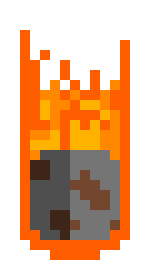 |
Meteor | Click it → +1 score. Let it reach the bottom of the screen → −1 life. |
 |
Skull | Don't touch it. Clicking it costs you −1 life. Letting it fall off-screen is harmless. |
 |
Green Heart | Click it → +1 life, up to a maximum of 3. Rare, and very fast. |
 |
Heart (HUD) | Not clickable — the hearts in the corner show how many lives you have left. |
When your lives hit 0, every object still on screen pops at once, the GAME OVER screen appears, and you can choose PLAY AGAIN or MAIN MENU.
The goal is simple: get the highest score before the world collapses.
Both modes are picked from the main menu.
The full game — all three objects spawn.
| Spawns | Meteor every 1 s · Skull every 5 s · Green heart after 20 s, then every 15 s |
| Lives | Start at 1, maximum 3, shown as hearts in the HUD |
| Difficulty | Everything falls faster in steps: extra downward force is added for every 10 points you score |
| Twist | Past 50 points, green hearts start falling about twice as fast — that +1 life gets much harder to catch |
Pure reflexes. Only meteors spawn — no skulls, no green hearts, and no way to gain a life back.
| Spawns | Meteor every 1 s |
| Lives | 1, and there is no HUD — a single missed meteor ends the run |
| Difficulty | Speed ramps up every 5 points instead of every 10, so it gets brutal roughly twice as fast |
| Main Menu | Normal Mode |
|---|---|
 |
 |
| Speed Mode | Game Over |
|---|---|
 |
 |
SaveTheWorld/
├── SaveTheWorld/        # The Unity project — open this folder in Unity
│   ├── Assets/
│   │   ├── Fonts/       # Arcade / pixel display fonts
│   │   ├── Images/      # Sprites, backgrounds, PSD sources
│   │   ├── Prefabs/     # Meteor, skull, green heart + pop animations
│   │   ├── Scenes/      # ana_sahne (menu), game (normal), speedgame (speed)
│   │   ├── Scripts/     # 17 C# MonoBehaviours
│   │   └── Sounds/      # Music and SFX
│   ├── Packages/
│   └── ProjectSettings/
├── PlayforPC/           # Prebuilt Windows player
├── Playformobile/       # Prebuilt Windows player, alternate scene layout
└── .github/
Both folders are ready-to-run Windows (x86) Unity players — download the folder and run Save The World.exe. They ship the same executable and the same compiled game code; only the baked scene layouts differ (Playformobile uses a lighter background setup).
⚠️ Despite its name,Playformobileis not an Android or iOS package — it is a Windows build too. For mobile-friendly play, use the itch.io page.
Requirements: Unity 2019.4.15f1 (LTS) — other 2019.4.x versions will very likely work as well.
git clone https://github.com/emirsakal/SaveTheWorld.git- Open Unity Hub → Add project, and select the inner
SaveTheWorld/folder (the one containingAssets/,Packages/andProjectSettings/) — not the repository root. - Open
Assets/Scenes/ana_sahne.unityand press ▶ Play. - To make your own build: File → Build Settings → PC, Mac & Linux Standalone → Build. All three scenes are already registered in the build list.
The code is small and deliberately straightforward — a good read if you are starting out with Unity 2D. Scripts are named in Turkish (top = ball, kontrol = control, oluşturucu = spawner, can = life, puan/patlayan balon = score).
| Script | Role |
|---|---|
oyunKontrol.cs |
Normal-mode game state: score, lives, heart HUD, game-over sequence |
speedKontrol.cs |
The same for Speed Mode, minus the heart HUD |
*olusturucu.cs / speedmavi.cs |
Spawners — pick a random X at the top of the screen, instantiate an object, and add downward force scaled to the current score |
*kontrol*.cs |
Per-object behaviour — OnMouseDown to pop, plus the off-screen check at y < -5.5 |
Buton*.cs, digersahne.cs, speedSahne.cs |
Scene navigation for the menu and game-over buttons |
Difficulty scaling in one line: each spawner computes -(score / N) (where N is 10 in Normal Mode and 5 in Speed Mode) and uses it to multiply the extra downward force applied to every new object. Below the first threshold the objects simply fall under gravity; past it, every tier makes the screen noticeably faster.
Technical details
- Engine: Unity 2019.4.15f1, 2D (URP not used), Mono scripting backend
- Rendering: Sprite Renderer + Unity UI (uGUI), TextMeshPro available
- Physics: 2D rigidbodies with
AddForce; objects are cleaned up once they passy = -5.5 - Input: Legacy input via
OnMouseDown(mouse click / touch tap) - Product:
Save The Worldv1.2 by EFS
The code in this repository is released under the MIT License.
The assets are not all mine to license. Several sprites, fonts and the background music come from third parties (see Credits) and remain under their own terms. If you want to reuse the art or audio, check the original source first — the MIT License above covers the C# code and project files only.
- Game, art assembly and code: @emirsakal
- Music: Cherry Metal by Arthur Vyncke
Made with Unity 🎮 — my first game. Thanks for playing!