





Features • Modes • Install • Post Installation • Usage • Running SubCat • Screenshots & Reports • Available Modules
SubCat is a powerful subdomain discovery tool that combines passive aggregation from a variety of online sources with active DNS brute forcing, continuous monitoring, screenshots, and a built-in web report to identify and triage valid subdomains for websites. Designed with a modular and efficient architecture, SubCat is ideal for penetration testers, bug bounty hunters, and security researchers.
From quick passive recon to deep, browser-rendered detection and visual reporting, SubCat delivers in-depth subdomain intelligence while keeping its passive sources compliant with their licensing and usage restrictions.

- Multiple Modes:
passive(API/passive sources),brute(DNS brute force),monitor(continuous monitoring), andreport(serve the screenshot web UI). - Fast Enumeration: Leverages a high-performance resolution and wildcard elimination module.
- Curated Passive Sources: Gathers subdomains from trusted online sources to maximize coverage.
- DNS Brute Force: Resolve subdomains from a built-in or custom wordlist.
- Continuous Monitoring: Re-scan on an interval and log newly discovered subdomains over time.
- Screenshots: Capture screenshots of discovered subdomains with Playwright (Chromium).
- Web Report UI: Browse screenshots, titles, status codes, and detected technologies in a built-in web report.
- Deep Detection: Optional browser-mode detection that renders JS, cookies, and the DOM for more accurate tech/title/status results.
- Lightweight & Efficient: Optimized for speed with minimal resource consumption.
- STDIN/STDOUT Integration: Seamlessly integrate with other tools and workflows.
- IP Scope Filtering: Filter results by IP addresses using a provided scope (CIDR or file-based).
- Detailed Output: Options to display HTTP status codes, page titles, IP addresses, and technology detection.
- Multiple Output Formats: Export results in TXT, JSON, CSV, and XML formats for easy integration with other tools.
- Intelligent Caching: Cache API responses to improve performance and reduce external API calls.
- Advanced Rate Limiting: Domain-specific rate limiting to prevent API throttling and ensure reliable results.
- Reverse Lookup Mode: Supports reverse lookup to load only modules that handle reverse enumeration (requires a valid IP scope).
- Custom Module Selection: Include or exclude specific modules via command-line flags.
- Enhanced Multi-threading: Uses 50 concurrent threads by default for rapid processing.
SubCat is organized into subcommands. Running subcat without a subcommand defaults to passive mode, so the classic subcat -d example.com still works.
| Mode | Description |
|---|---|
passive (default) |
Passive enumeration using APIs and passive sources. |
brute |
DNS brute force enumeration from a wordlist. |
monitor |
Continuously re-scan on an interval and log changes. |
report |
List or serve a saved screenshot scan in the web report UI. |
subcat -h            # top-level help (lists all modes)
subcat passive -h    # help for a specific mode
subcat brute -h
subcat monitor -h
subcat report -h# Linux, Windows, MacOS
pip install subcat
Or install the latest development version straight from GitHub:
pip install git+https://github.com/duty1g/subcat.git
Screenshots and deep-detection (browser mode) require the Playwright Chromium browser. Install it once after installing SubCat:
playwright install chromiumBefore querying third-party services, configure your API keys in the config.yaml file.
By default, SubCat looks for the configuration file in your user's home directory under ~/.subcat/config.yaml. You can also specify a custom config path using the -c or --config option.
Not all modules require an API key, but the following sources do:
- BinaryEdge
- Virustotal
- SecurityTrails
- Shodan
- Bevigil
- Chaos
- DNSDumpster
- Netlas
- DigitalYama
- Censys
- AlienVault
- CertSpotter
- URLScan (for advanced usage)
An example provider config file
binaryedge:
  - e3a2f1c4-9d2b-47f3-a1e2-4b8d7f0a1c2e
virustotal:
  - b1e2d3c4f5a6978877665544332211ffeeddccbbaa99887766554433221100ff
securitytrails:
  - X7a9B2c4D6e8F0g1H3i5J7k9L1m3N5o7
  - P8q6R4s2T0u8V6w4X2y0Z8a6B4c2D0e2
shodan:
  - M3n4O5p6Q7r8S9t0U1v2W3x4Y5z6A7b8
bevigil:
  - F1g2H3i4J5k6L7m8
chaos:
  - d2c4b6a8-90ef-12ab-34cd-56ef78ab90cd
dnsdumpster:
  - c3d4e5f6a7b8c9d0e1f2a3b4c5d6e7f8a9b0c1d2e3f4a5b6c7d8e9f0a1b2c3d4
  - e4f5a6b7c8d9e0f1a2b3c4d5e6f7a8b9c0d1e2f3a4b5c6d7e8f9a0b1c2d3e4f5
netlas:
  - Z1x2C3v4B5n6M7a8S9d0F1g2H3j4K5l6
digitalyama:
  - Q1w2E3r4T5y6U7i8O9p0
subcat passive -hThis will display help for passive mode. Here are all the switches it supports.
INPUT:
  -d DOMAIN, --domain DOMAIN
                        Target domain to scan (required if -l not provided)
  -l LIST, --list LIST  File containing list of domains (required if -d not provided)
  --scope SCOPE         IP scope filter (IP or CIDR)

OUTPUT:
  -o OUTPUT, --output OUTPUT
                        Output file
  -of {txt,json,csv,xml}, --output-format {txt,json,csv,xml}
                        Output format (default: txt)
  -title, --title       Show page titles
  -ip, --ip             Resolve IP addresses
  -sc, --status-code    Show HTTP status codes
  --up                  Show only alive domains
  -td, --tech           Show detected technologies
  -sm, --show-modules   Show module names

SCREENSHOTS:
  -ss, --screenshot     Capture screenshots of discovered subdomains (Playwright)
  -dd, --deep-detect    Run detection in browser mode (renders JS, cookies, DOM) — pair
                        with --tech/--title/--status-code. No screenshots
  --screenshot-dir SCREENSHOT_DIR
                        Directory for screenshots (default: ~/.subcat/screenshots)
  --screenshot-full     Capture full-page screenshots
  --screenshot-timeout SCREENSHOT_TIMEOUT
                        Per-page screenshot timeout in seconds (default: 15)
  --serve               Capture screenshots then open the report in a browser
  --serve-host SERVE_HOST
                        Report server host (default: 127.0.0.1)
  --serve-port SERVE_PORT
                        Report server port (default: 7171)

FILTERS:
  -mc MATCH_CODES, --match-codes MATCH_CODES
                        Comma separated list of HTTP status codes to filter (e.g., 200,404)

SOURCES:
  -s SOURCES, --sources SOURCES
                        Specific sources to use (comma-separated, e.g., crtsh,wayback)
  -es EXCLUDE_SOURCES, --exclude-sources EXCLUDE_SOURCES
                        Sources to exclude (comma-separated, e.g., alienvault,crtsh)
  -r, --reverse         Enable reverse lookup mode (loads only modules supporting reverse
                        lookup). Requires --scope to be provided.

CONFIGURATION:
  -t THREADS, --threads THREADS
                        Number of threads (default: 50)
  -c CONFIG, --config CONFIG
                        Path to YAML config file (default: config.yaml)
  --no-cache            Disable caching of results
  --cache-ttl CACHE_TTL
                        Cache TTL in seconds (default: 86400 = 24 hours)
  --clear-cache         Clear all cached data before running
  -ls                   List available modules and exit

DEBUG:
  -v, --verbose         Increase verbosity level (-v, -vv, -vvv)
  -silent, --silent     Suppress all output except results
  -nc, --no-colors      Disable colored output
Brute force mode adds a wordlist option (-w/--wordlist, defaults to a built-in list of 100 common subdomains) and a --timeout flag. Monitor mode adds --interval (seconds between scans, default 3600) and --iterations (max scans, default infinite). Run subcat brute -h / subcat monitor -h / subcat report -h for the full per-mode switches.
Here are several examples to help you get started:
Scan a Single Domain:
subcat passive -d hackerone.com -sc --title --tech --up

    ΄Υκκ;                                                                νΗΗ;
     ΎΗκ΅ΚΝΚ;                                             Μ          ;ΚΝΜγΎΚ΅
     ΄ΗΉ   ΄ΎΝΝη                                        ύ΅        υΝΝΜ΄   ήΗ
      ΎΗι   ΄ ΄΅ΚΝΝ;                                  υΜ       υΝΝΜ΅      ΝΝ
       ΝΝ         ΅ΚΝΝ; ΄                           κΜ      υΝΝΜ΄        ΄Ν
       ΄Νκ           ΄ΚΝΝΝ;;                       ΄     ;ΝΝΜ΄   ΄       ΝΝ
       κΎΝ              ΄ΝΚβΝη    ΅                    ήΉΚ΅              Νυ΅
       ΄ΚΝΝ        ΅Ην     ΅ΏήΚμ              ΄      ΝΝΜ                κΝΝ
 ΄       ΚΝ;        ΄Υ΄΅;    ΄Μ ΅ν                 ΠΚ΄                  ΝΝ
         ΄ΚΝ          ΄  ΄        ΄               ΄           ΄        γΝ΄  ΄
        ΅η ΚΠ                                                          ΝΜ
          ΚΝΚΝ      ΄                                                 ΝΚ              ν΅
   ν;      ΄Κω΅        ΄΄΅ν                                ΄΄         Ν            ΅΅ν΅
             ΄Ν            ΄΄       ΄                  ΄΄            Ν
               ΄         ΚΝβΝυ     ΄        ΄          υηΝΚ         ΄
   ΅Κ                     ΝΝΚΉω  ;   ΄               ;βΝΝΝ
    ΄ΚβΚ;                  ΆΝΝΏ  ΏΝΝ          ΄  βΚ  βΝΝΏ           ΄      Λ΅
           ;κ΅    ΄΄         ΅ΆΏφΝΝΆ΅΅         ΜΒββψβΝΝ΅             νΗΚΗ΅    ΄΄
   ΄΅   υΜ΅;εβΈβω                                  ΄       ΄      ΄ΚΜΜ΅΅΅΄΄   ;;    ;     ΄
    υΚ΅ μφΈβββββΈ ΄                 ςΈ΄            ;;               ;μφφβΈφφββΈΈββββΏ
 ;Ν΅ ;φβΈΈβββΈβΈβΨ Ύ        ωβΈ  έΈΌβ           μββΈΈΈβ λ  ;μφφβ ΈΏΏφβΈβΈΈβΈΈβββΦΦΡΈΌ
ΚΉ΄ ;ββββββΈΈΈβΈΈΈ   ;ςΈΜ   βΈΈΈ ;ΈββΈμφφββΈ   υΏβΈΈΈΈΈΈΈ   ΈΈΈβΈΨ ΈΈβΈΈΈΈΈββ
ίΚ  χβββββΈ΅   ΧΌ ΅    βΨβ    ΝΈΈΜ βΈΈΈβΈΈΈΈΈΈ  ΄φΈΈΈ΅ ΪβΈΈ  βΈΈΒΈβΈ      βΈββΉ          ΄
;ψ ΄Έβββφφωω          φββΈ    βΈβ  φΈΈΈ;φΈΈΌ   νΈΈΈΌ   έβΜΜ βΈΈΈ ΈΈβΨ     βΈββ   ΄
΅  ΄ΦΈβββββββΈΈφμ   βΈββΜ    βΈΈ ΤβΈΈΈβΈμμφφ βΈΈΈΜ        χβΈΈ  βΏβΈψμι ΥβΈΏΈ
      ΄ΪΏΈΈβΈβΈΈΈΈώΒΈΈ    ΪΈΈΈ  ΈΈΈΆΈΪΪΪΈΈΈΈβΈΈ        ;ΈΈΈβΈβΈΈΈΈΏΪ΄ βββΊ   Κ
          ΅  ΪβΈΈΈΈβΈφ    βΈΈΈ γΈΈΉ   εβΈΈβΈΈΈφ     μφΈΈΈΈΈΈΪ΅ ΈΈΈΈ   ΈβΈΓ  Λ
    Μ      μβββΈφβΈφΈΈ μφΈβββΈ ββΈ;μφβββΈΌ ΪββΈ  μφΈβΈΏββΏ     πβββ   Ώβ    Κ
  Μ     μβφββββΈΈ  ΒβββΏβΈ΅Έ΅Ψ ββββΏΒΆ΅     ΦββββββΈ΅ βΏΈ       βΏΒΈ ΄φΏ   Νζ
Μ΄    έΒΏΏΏΈβΈ΅ ΄   ΄ΪΈ΅       φΆΡΌ΄         ΅ΌΌ΅      ΄      ΄  ψ΄Ώ  βΉ  ι΅ήΚΝ
   ηββββΏφΈ΅        ΄         ;υρθΚβΘβΏΝΝβΝΝΉΝΝΝΝΝΝΝΏΝΚΜΜΜυυ;      ΐ  Ή   Μ
  υΏΚΏΆΜ     ΅        ημΚΚΝΝΝΝβΝΝΜΜ΅΅΅΅;;;;υ                          Κ  ΅
΄μΜ΅    ν΅΄     ΄  ΄    ΄΄     ;γΚΚΝΝ΅
΄      ΄        ;;            ΄΅΅΄΄
        ΄    ΄΄              ΅΄
                      ΅          v1.6.0{#dev}@duty1g

[11:51:23][INF]: Starting enumeration for hackerone.com
[11:51:23][INF]: Loaded 19 modules
[11:51:23][INF]: Using config: /home/duty1g/.subcat/config.yaml
https://mta-sts.managed.hackerone.com              [404] [Page not found · GitHub] [Fastly,GitHub Pages]
https://mta-sts.hackerone.com                      [404] [Page not found · GitHub] [GitHub Pages,Fastly]
https://hackerone.com                              [200] [HackerOne | Leader in Continuo] [HSTS,Cloudflare,Pantheon,Google Tag Manager,Drupal,Wistia,jQuery,Fastly,MariaDB,Nginx,PHP]
https://mta-sts.forwarding.hackerone.com           [404] [Page not found · GitHub] [Fastly,GitHub Pages]
https://gslink.hackerone.com                       [404] [404 Not Found] [Amazon CloudFront,Nginx,Amazon Web Services]
https://api.hackerone.com                          [200] [HackerOne API] [HSTS,Algolia,Cloudflare,jQuery,jsDelivr]
https://www.hackerone.com                          [200] [HackerOne | Leader in Continuo] [Drupal,Cloudflare,HSTS,Google Tag Manager,Wistia,Pantheon,jQuery,PHP,Fastly,MariaDB,Nginx]
https://docs.hackerone.com                         [200] [Home | HackerOne Help Center] [Cloudflare,HSTS]
https://support.hackerone.com                      [200] [Sign into : HackerOne Support ] [Ruby on Rails,Cloudflare,Cloudflare Bot Management,Envoy,HSTS,Ruby]
http://pmbounces.hackerone.com                     [200] [Postmark — Email deliver] [Nginx,Amazon Web Services]
[11:52:09][INF]: Subdomains (0.3/s avg) (10/12 alive / 83%) ━━━━━━━━━━━━━━━━━━━━━━━━━━━━━━━━━━━━━━━━ 100% 12/12 0:00:46
[11:52:09][INF]: Completed with 12 subdomains for hackerone.com in 46 seconds 489 milliseconds
Pipe Domains from a File with IP Resolution and HTTP Status Codes:
cat domains.txt | subcat -ip -scRun with Reverse Lookup Mode (Requires IP Scope):
subcat -d example.com --scope 8.8.8.0/24 -rScan a Domain and Save the Output to a File (Verbose Mode):
subcat -d hackerone.com -o output.txt -vIntegrate with HTTPx for Further Processing or any other tool:
echo hackerone.com | subcat -silent -td -title | httpx -silentScan Multiple Domains from a List:
subcat -l domains.txtCustom Module Selection:
subcat -d example.com -s dnsdumpster,virustotal,urlscan -es digitalyama,anubisExport Results in JSON Format:
subcat -d example.com -o results.json -of jsonExport Results in CSV Format with Status Codes and IP Addresses:
subcat -d example.com -o results.csv -of csv -sc -ipSave Results Using Specific Modules:
subcat -d example.com -s ctrsh,wayback,hackertarget -o example_results.txtThis command will:
- Scan only the example.com domain
- Use only the crt.sh, Wayback, and HackerTarget modules
- Save all discovered subdomains to example_results.txt
Save Results in Different Formats Using Specific Modules:
# Save as JSON
subcat -d example.com -s ctrsh,wayback,hackertarget -o example_results.json -of json

# Save as CSV
subcat -d example.com -s ctrsh,wayback,hackertarget -o example_results.csv -of csv

# Save as XML
subcat -d example.com -s ctrsh,wayback,hackertarget -o example_results.xml -of xml
Use Caching with Custom TTL:
subcat -d example.com --cache-ttl 3600Clear Cache Before Running:
subcat -d example.com --clear-cacheDNS Brute Force (built-in wordlist):
subcat brute -d example.com --sc --titleDNS Brute Force with a Custom Wordlist:
subcat brute -d example.com -w wordlist.txt -t 150Continuous Monitoring (every hour, log new subdomains):
subcat monitor -d example.com --interval 3600 -o changes.logDeep Detection in Browser Mode (renders JS/cookies/DOM):
subcat -d example.com -dd -td -title -scCapture Screenshots and Open the Web Report:
subcat -d example.com -ss --serve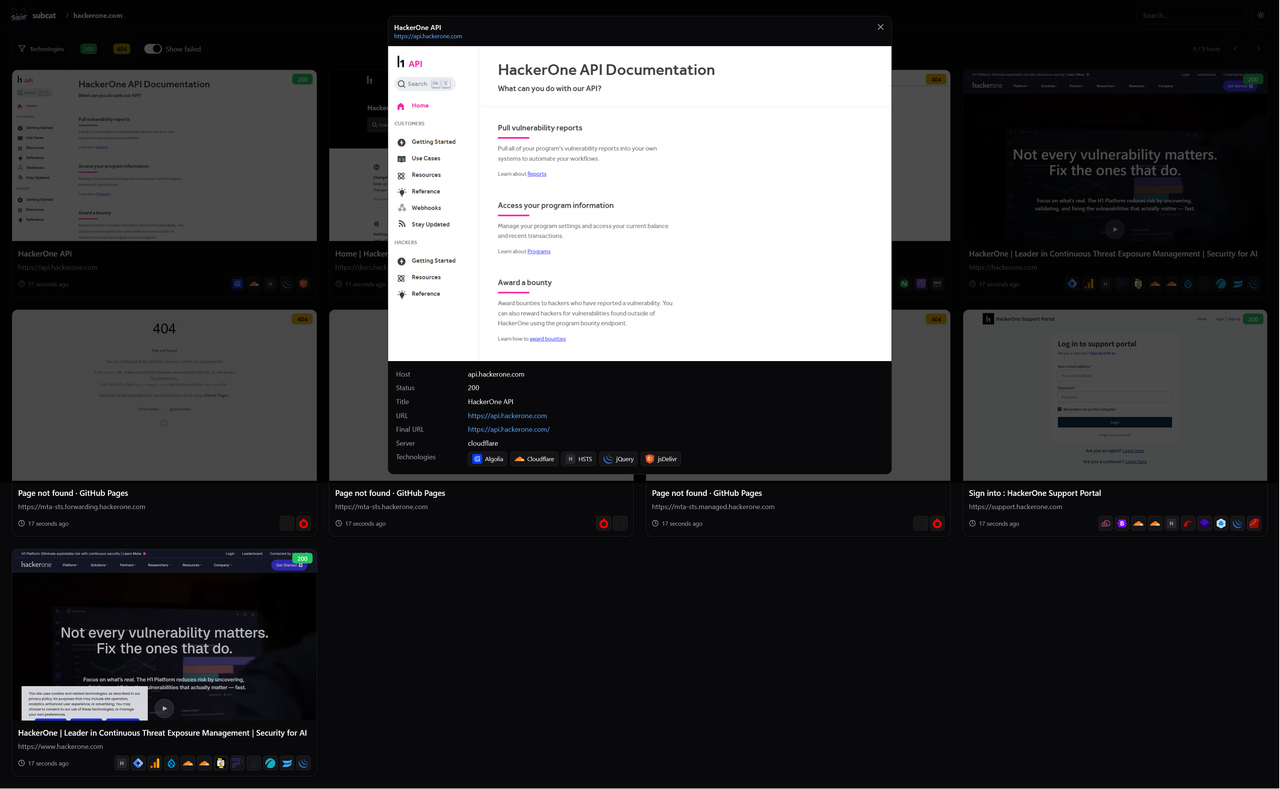
With -ss/--screenshot, SubCat captures a screenshot of every discovered subdomain using Playwright (Chromium) and fingerprints technologies during the browser render. Each run is saved as a scan under ~/.subcat/screenshots/<scan-id>/. The built-in web report shows a gallery of screenshots and a detail view with the host's status code, title, final URL, server, and detected technologies.
Use the report mode to browse saved scans in a built-in web UI:
# List all saved scans and their ids
subcat report --list

# Serve a specific scan in the browser
subcat report serve <scan-id>

# Bind to a custom host/port
subcat report serve <scan-id> --host 0.0.0.0 -p 8080
Or capture and open the report in one step with --serve:
subcat -d example.com -ss --serveScreenshots and deep-detect require the Chromium browser — run
playwright install chromiumonce after installing SubCat.
SubCat currently supports the following modules for passive subdomain discovery:
- dnsdumpster
- digitalyama
- virustotal
- binaryedge
- chaos
- bevigil
- dnsarchive
- netlas
- wayback
- shodan
- securitytrails
- urlscan
- ctrsh
- threatcrowd
- anubis
- censys
- alienvault
- hackertarget
- certspotter
SubCat's modular architecture is designed for flexibility and ease of extension.
If you have an idea for a new module or want to contribute improvements, feel free to submit a pull request. Your contributions help make SubCat even better!
SubCat is now organized into modes — passive (default), brute, monitor, and report. The legacy subcat -d example.com syntax still works and maps to passive mode.
A new brute mode resolves subdomains from a wordlist (built-in list of common subdomains, or your own via -w/--wordlist):
subcat brute -d example.com -w wordlist.txt -t 150The monitor mode re-scans a target on an interval and logs newly discovered subdomains, ideal for ongoing attack-surface tracking:
subcat monitor -d example.com --interval 3600 -o changes.logCapture screenshots of discovered subdomains with Playwright and browse them — alongside titles, status codes, and detected technologies — in a built-in web report:
subcat -d example.com -ss --serve
subcat report --list
subcat report serve <scan-id>The -dd/--deep-detect flag runs detection inside a real browser, rendering JavaScript, cookies, and the DOM for more accurate technology, title, and status-code results:
subcat -d example.com -dd -td -title -scSpecial thanks to all the contributors who help make SubCat better! Want to contribute? Pull requests are welcome. 🙌
SubCat is licensed under the MIT License. Made with 🖤 by @duty1g