Sentra Smartboard is the operational decision center for Semayot. It turns sales, inventory, cashier activity, customer signals, reports, and AI summaries into clear daily priorities that owners and staff can act on immediately.
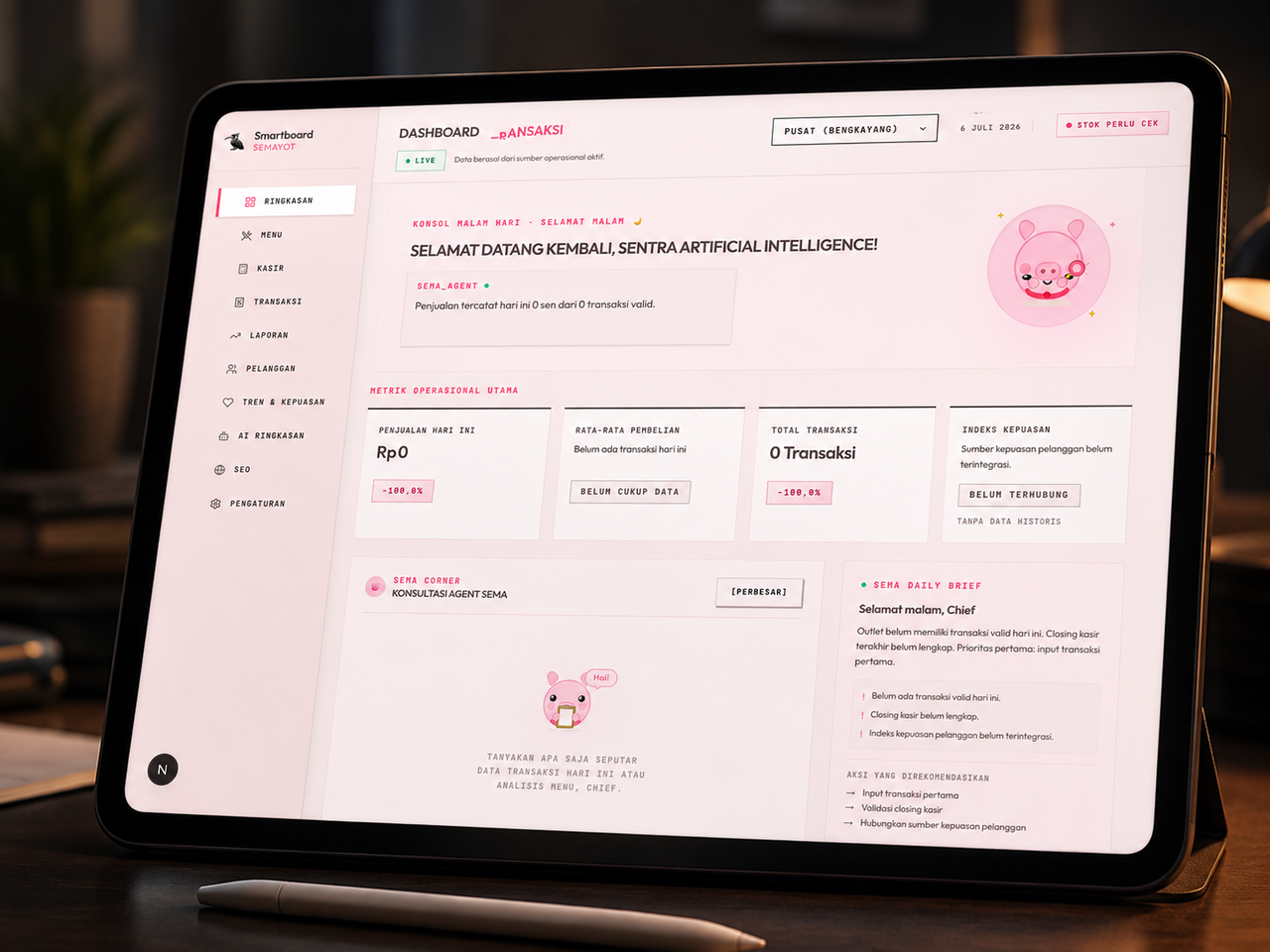
Sentra Smartboard Semayot is the command-center layer for Rumah Makan Semayot. It is not positioned as a simple restaurant website. It is an operational work system that connects four surfaces inside one codebase:
- Owner/staff Smartboard at
/admin/overview - Admin Workspace for menu, POS, transactions, reports, customers, SEO, and settings
- AI + Intelligence Layer for business summaries, owner consultation, memory, priorities, and public chat
- Public Restaurant Site as the brand entry point and customer conversation surface
This README intentionally focuses on Sentra Smartboard, because that is where Semayot's daily decisions are formed: operational numbers are read, risks are surfaced, priorities are selected, AI explains context, and the owner or staff moves into the right action surface.
A good dashboard does not merely show numbers. A correct dashboard helps the owner take the right action on the same day.
Sentra Smartboard is built to answer four operational questions:
| Owner Question | Smartboard Answer |
|---|---|
| How is the outlet performing today? | Nadi Outlet, KPIs, transactions, cashier closing, and data status |
| What needs to be handled first? | Today's Priorities, Stock Risk Radar, and deterministic recommendations |
| Which risks must not be missed? | critical stock, unsafe closing, weak transactions, missing data |
| How can AI help without inventing facts? | SEMA Daily Brief, quick prompts, owner chat, public chat, memory inbox |
The README and product direction follow the Sentra Smartboard language: warm, tactical, operational, and precise.
| Element | Sentra Direction |
|---|---|
| Visual tone | Warm operational command center |
| Background | Blush-pink, warm-neutral, and high-contrast cards |
| Accent | Coral, rose, amber, violet, sky, emerald |
| Typography | Strong display headlines, mono labels for status and signals |
| Component shape | Flat boxes, tactical chips, command-center cards |
| Motion | Used for orientation and emphasis, not empty decoration |
| AI posture | Helps the owner think; does not replace business judgment |
- Executive Summary
- Product Thesis
- Sentra Design Language
- System Map
- Smartboard Command Loop
- Product Surfaces
- Smartboard Modules
- AI and Intelligence Boundary
- Data Truth Model
- Role and Access Boundary
- Route Map
- Architecture Folder Map
- Local Runbook
- Environment Variables
- Testing and Governance
- Most Important Files
- Product Truth Principles
flowchart LR
    Public["Public Site<br/>Homepage + Visitor Chat"]
    Smartboard["Sentra Smartboard<br/>/admin/overview"]
    Workspace["Admin Workspace<br/>Menu, POS, Transactions, Reports"]
    APIs["App Router APIs<br/>/app/api/**"]
    Supabase["Supabase<br/>Auth + Tables + RLS"]
    Deterministic["Deterministic Intelligence<br/>Scoring + Priority Engine"]
    GenAI["Generative AI Layer<br/>Gemini via AI SDK"]
    Owner["Owner / Staff<br/>Operational Decisions"]

    Public --> APIs
    Smartboard --> APIs
    Workspace --> APIs
    APIs --> Supabase
    APIs --> Deterministic
    APIs --> GenAI
    Supabase --> APIs
    Deterministic --> Smartboard
    GenAI --> Smartboard
    GenAI --> Public
    Smartboard --> Owner
    Workspace --> Owner

    classDef public fill:#FFF7D6,stroke:#D97706,color:#422006,stroke-width:2px;
    classDef board fill:#FFE8EE,stroke:#FF4F79,color:#4A1020,stroke-width:3px;
    classDef workspace fill:#F5F3FF,stroke:#8B5CF6,color:#2D1B69,stroke-width:2px;
    classDef api fill:#E0F2FE,stroke:#0284C7,color:#0C4A6E,stroke-width:2px;
    classDef data fill:#ECFDF5,stroke:#10B981,color:#064E3B,stroke-width:2px;
    classDef ai fill:#FFF1F2,stroke:#FB7185,color:#881337,stroke-width:2px;
    classDef user fill:#F8FAFC,stroke:#475569,color:#0F172A,stroke-width:2px;

    class Public public;
    class Smartboard board;
    class Workspace workspace;
    class APIs api;
    class Supabase data;
    class Deterministic data;
    class GenAI ai;
    class Owner user;
Sentra Smartboard is not a static dashboard. It is a decision loop.
flowchart TD
    A["Raw Outlet Signals<br/>sales, inventory, cashier, customer, expense"] --> B["Server Summary Route<br/>/api/admin/overview/summary"]
    B --> C["DashboardOverviewData<br/>raw operational contract"]
    C --> D["Outlet Adapter<br/>normalization + mapping"]
    D --> E["OutletDashboardData<br/>Smartboard contract"]
    E --> F["Nadi Outlet<br/>health score 0-100"]
    E --> G["Today's Priorities<br/>daily action queue"]
    E --> H["Stock Risk Radar<br/>critical, warning, safe, unknown"]
    E --> I["Cashier Closing<br/>cashier close status"]
    E --> J["SEMA Daily Brief<br/>operational summary"]
    J --> K["Quick Prompts<br/>owner asks SEMA"]
    K --> L["Owner Chat Panel<br/>streaming explanation"]
    L --> M["Action Surface<br/>inventory, POS, reports, AI"]

    classDef raw fill:#FFF7D6,stroke:#D97706,color:#422006,stroke-width:2px;
    classDef route fill:#E0F2FE,stroke:#0284C7,color:#0C4A6E,stroke-width:2px;
    classDef contract fill:#F5F3FF,stroke:#7C3AED,color:#312E81,stroke-width:2px;
    classDef module fill:#FFE8EE,stroke:#FF4F79,color:#4A1020,stroke-width:2px;
    classDef action fill:#ECFDF5,stroke:#10B981,color:#065F46,stroke-width:2px;
    classDef ai fill:#FFF1F2,stroke:#FB7185,color:#881337,stroke-width:2px;

    class A raw;
    class B route;
    class C,D,E contract;
    class F,G,H,I,J module;
    class K,L ai;
    class M action;
mindmap
  root((Sentra Smartboard Semayot))
    Admin Overview
      Nadi Outlet
      KPI Summary
      Today's Priorities
      Stock Risk Radar
      SEMA Daily Brief
      Cashier Closing
      Overview Chat
      Analytics
      Transactions
    Admin Workspace
      Menu
      POS
      Transactions
      Reports
      Customers
      Customer Trends
      AI View
      SEO
      Settings
    Intelligence
      Deterministic Scoring
      Stock Risk
      Daily Priorities
      Empty State
      Data Contract
    AI
      Public Chat
      Owner Summary
      Owner Chat
      Memory Inbox
      Quick Prompts
    Public Site
      Homepage
      Hero Media
      Restaurant Info
      Visitor Chat
      llms.txt
flowchart TB
    Page["Overview Page Client<br/>Smartboard Shell"]

    Hero["OverviewHero<br/>operator greeting"]
    KPIs["OverviewKpis<br/>sales, transactions, AOV, satisfaction"]
    Health["OutletHealthCard<br/>Nadi Outlet"]
    Priority["TodayPriorityPanel<br/>daily action queue"]
    Stock["StockRiskRadar<br/>inventory risk"]
    Brief["SemaDailyBrief<br/>SEMA action brief"]
    Closing["CashierClosingAssistant<br/>cashier close state"]
    Chat["OverviewChatPanel<br/>owner/staff consultation"]
    Analytics["OverviewAnalytics<br/>operational charts"]
    Transactions["OverviewTransactions<br/>latest activity"]
    Sidebar["OverviewSidebar<br/>user + outlet context"]
    Badge["DashboardModeBadge<br/>live, demo, empty"]
    Empty["SmartEmptyState<br/>honest fallback"]

    Page --> Hero
    Page --> KPIs
    Page --> Health
    Page --> Priority
    Page --> Stock
    Page --> Brief
    Page --> Closing
    Page --> Chat
    Page --> Analytics
    Page --> Transactions
    Page --> Sidebar
    Page --> Badge
    Page --> Empty

    classDef page fill:#111827,stroke:#FF4F79,color:#FFFFFF,stroke-width:3px;
    classDef primary fill:#FFE8EE,stroke:#FF4F79,color:#4A1020,stroke-width:2px;
    classDef metric fill:#E0F2FE,stroke:#0284C7,color:#0C4A6E,stroke-width:2px;
    classDef action fill:#ECFDF5,stroke:#10B981,color:#065F46,stroke-width:2px;
    classDef ai fill:#FFF1F2,stroke:#FB7185,color:#881337,stroke-width:2px;
    classDef support fill:#F5F3FF,stroke:#8B5CF6,color:#2D1B69,stroke-width:2px;
    classDef fallback fill:#F8FAFC,stroke:#64748B,color:#334155,stroke-width:2px;

    class Page page;
    class Hero,Health,Priority,Stock,Closing primary;
    class KPIs,Analytics,Transactions metric;
    class Brief,Chat ai;
    class Sidebar,Badge support;
    class Empty fallback;
| Module | Function | Data Source | Output | Guardrail |
|---|---|---|---|---|
OverviewHero |
Opens operator and outlet context | session + outlet | greeting, role, mode | does not show business claims |
OverviewKpis |
Summarizes outlet performance | sales + transactions | revenue, orders, AOV, satisfaction signal | numbers must come from summary |
OutletHealthCard |
Scores outlet health | outlet contract | 0-100 score + reasons | deterministic only |
TodayPriorityPanel |
Builds today's action queue | health + stock + cashier + activity | operational priority list | does not invent priorities |
StockRiskRadar |
Reads stock risk | inventory | critical/warning/safe/unknown | unknown remains unknown |
CashierClosingAssistant |
Checks cashier closing | cashier/shift data | closing status | never assumes safe without data |
SemaDailyBrief |
Summarizes operational actions | deterministic summary | brief + quick prompts | not a fake business diagnosis |
OverviewChatPanel |
Owner/staff dialogue with SEMA | context + prompt | streaming answer | role-aware, context-bound |
OverviewAnalytics |
Visualizes operations | summary data | chart/graph | visuals must not overstate data |
OverviewTransactions |
Shows recent activity | transactions | latest activity | follows transaction data |
DashboardModeBadge |
Marks data mode | app state | live/demo/empty | mode must be visible |
SmartEmptyState |
Honest fallback | missing data | empty state | no fake metrics |
This separation is a core Semayot principle: not every intelligent behavior should come from an LLM.
flowchart LR
    Data["Outlet Data<br/>transactions, stock, cashier, customer"] --> Deterministic["Deterministic Intelligence"]
    Data --> Aggregate["Business Aggregation"]
    Aggregate --> PromptContext["Prompt Context"]
    PromptContext --> LLM["Gemini via AI SDK"]

    Deterministic --> Score["Nadi Outlet Score"]
    Deterministic --> Priority["Daily Priorities"]
    Deterministic --> Stock["Stock Risk Radar"]
    Deterministic --> Empty["Honest Empty State"]

    LLM --> OwnerSummary["Owner AI Summary"]
    LLM --> OwnerChat["Owner AI Chat"]
    LLM --> PublicChat["Public Customer Chat"]

    Score --> Smartboard["Sentra Smartboard"]
    Priority --> Smartboard
    Stock --> Smartboard
    Empty --> Smartboard
    OwnerSummary --> Smartboard
    OwnerChat --> Smartboard
    PublicChat --> Public["Public Site"]

    classDef source fill:#FFF7D6,stroke:#D97706,color:#422006,stroke-width:2px;
    classDef deterministic fill:#ECFDF5,stroke:#10B981,color:#065F46,stroke-width:3px;
    classDef ai fill:#FFF1F2,stroke:#FB7185,color:#881337,stroke-width:3px;
    classDef output fill:#E0F2FE,stroke:#0284C7,color:#0C4A6E,stroke-width:2px;
    classDef board fill:#FFE8EE,stroke:#FF4F79,color:#4A1020,stroke-width:3px;
    classDef public fill:#F5F3FF,stroke:#8B5CF6,color:#2D1B69,stroke-width:2px;

    class Data source;
    class Deterministic deterministic;
    class Aggregate,PromptContext source;
    class LLM ai;
    class Score,Priority,Stock,Empty,OwnerSummary,OwnerChat,PublicChat output;
    class Smartboard board;
    class Public public;
Primary locations:
lib/admin/overview/intelligence.tslib/admin/overview/outlet-contracts.tslib/admin/overview/outlet-adapter.ts
Responsibilities:
- Calculate Nadi Outlet from transactions, inventory, cashier closing, cashier activity, menu movement, and anomaly placeholders
- Classify stock risk into
critical,warning,safe, orunknown - Build daily operational priorities
- Generate SEMA Daily Brief while remaining honest when data is incomplete
- Produce empty states that do not invent data
Strengths:
- fast
- deterministic
- testable
- not token-dependent
- suitable for core dashboard logic
Primary locations:
app/api/chat/route.tsapp/api/admin/ai/chat/route.tsapp/api/admin/ai/summary/route.tsapp/api/admin/ai/memory/route.tslib/admin/ai/aggregate.tslib/admin/ai/prompts.tslib/semayot/chat-system-prompt.ts
Responsibilities:
- Answer customer questions on the public site
- Generate owner business summaries by period
- Run owner chat using bounded context
- Read and mark memory inbox items
- Turn Smartboard quick prompts into operational dialogue
Guardrails:
- owner AI is limited to the owner role
- public chat must not invent restaurant information
- summaries require an API key
- cache is preferred before regeneration
- deterministic signals must not be disguised as LLM output
- LLM output must not replace source numbers
flowchart TD
    Real["Real Data<br/>Supabase rows"] --> Summary["Server Summary<br/>validated aggregate"]
    Summary --> Contract["Dashboard Contract<br/>typed and normalized"]
    Contract --> Deterministic["Deterministic Output<br/>score, risk, priority"]
    Contract --> AIContext["AI Context<br/>bounded summary"]
    AIContext --> GenAI["Generative Output<br/>explanation, advice, chat"]

    Deterministic --> UI["Smartboard UI"]
    GenAI --> UI

    Empty["Missing / Insufficient Data"] --> EmptyState["Honest Empty State"]
    EmptyState --> UI

    Fake["Invented Number"] -. blocked .-> UI
    FakeAI["Unbounded AI Claim"] -. blocked .-> UI

    classDef truth fill:#ECFDF5,stroke:#10B981,color:#064E3B,stroke-width:3px;
    classDef contract fill:#E0F2FE,stroke:#0284C7,color:#0C4A6E,stroke-width:2px;
    classDef ai fill:#FFF1F2,stroke:#FB7185,color:#881337,stroke-width:2px;
    classDef ui fill:#FFE8EE,stroke:#FF4F79,color:#4A1020,stroke-width:3px;
    classDef empty fill:#F8FAFC,stroke:#64748B,color:#334155,stroke-width:2px;
    classDef blocked fill:#FEE2E2,stroke:#DC2626,color:#7F1D1D,stroke-width:2px,stroke-dasharray:5 5;

    class Real,Summary truth;
    class Contract,Deterministic,AIContext contract;
    class GenAI ai;
    class UI ui;
    class Empty,EmptyState empty;
    class Fake,FakeAI blocked;
| Level | Name | Source | Can Be Displayed? | Notes |
|---|---|---|---|---|
| L0 | Raw data | Supabase tables | only through aggregate | should not directly become UI claims |
| L1 | Server summary | API route | yes | primary operational numbers |
| L2 | Dashboard contract | adapter + type contract | yes | safe shape for UI |
| L3 | Deterministic intelligence | scoring/rules | yes | must be testable |
| L4 | Generative AI | Gemini | yes, with AI label | must not replace data |
| L5 | Missing data | null/empty/unknown | yes | display as empty/unknown |
| L6 | Invented data | no source | no | must be blocked |
flowchart LR
    Visitor["Visitor"] --> Public["Public Homepage"]
    Visitor --> PublicChat["Public Chat"]

    Staff["Staff"] --> StaffOverview["Limited Overview"]
    Staff --> POS["POS"]
    Staff --> Transactions["Transactions"]

    Owner["Owner"] --> Smartboard["Full Sentra Smartboard"]
    Owner --> Reports["Reports"]
    Owner --> AI["Owner AI"]
    Owner --> Branch["Branch Switching"]
    Owner --> Settings["Settings"]

    Middleware["Middleware<br/>/admin/* + /api/admin/*"] --> Session["Session Check"]
    Session --> RoleCheck["Route-level Role Check"]

    RoleCheck --> Staff
    RoleCheck --> Owner

    classDef visitor fill:#FFF7D6,stroke:#D97706,color:#422006,stroke-width:2px;
    classDef staff fill:#E0F2FE,stroke:#0284C7,color:#0C4A6E,stroke-width:2px;
    classDef owner fill:#FFE8EE,stroke:#FF4F79,color:#4A1020,stroke-width:3px;
    classDef auth fill:#F5F3FF,stroke:#8B5CF6,color:#2D1B69,stroke-width:2px;
    classDef ai fill:#FFF1F2,stroke:#FB7185,color:#881337,stroke-width:2px;

    class Visitor,Public,PublicChat visitor;
    class Staff,StaffOverview,POS,Transactions staff;
    class Owner,Smartboard,Reports,Branch,Settings owner;
    class Middleware,Session,RoleCheck auth;
    class AI ai;
| Role | Surface | Access |
|---|---|---|
| Visitor | Homepage + public chat | restaurant information and hospitality chat |
| Staff | overview subset, cashier, transactions | limited daily operations |
| Owner | full Smartboard, reports, AI, branch, settings | full decision and administration access |
flowchart TB
    Root["semayot app"] --> Admin["/admin"]
    Root --> Public["/"]
    Root --> API["/api"]

    Admin --> Login["/admin/login"]
    Admin --> Overview["/admin/overview"]
    Admin --> Menu["/admin/menu"]
    Admin --> POS["/admin/pos"]
    Admin --> Tx["/admin/transactions"]
    Admin --> Reports["/admin/reports"]
    Admin --> Customers["/admin/customers"]
    Admin --> Trends["/admin/customers/trends"]
    Admin --> AIPage["/admin/ai"]
    Admin --> SEO["/admin/seo"]
    Admin --> Settings["/admin/settings"]

    API --> PublicChat["/api/chat"]
    API --> AdminAPI["/api/admin"]
    AdminAPI --> OverviewSummary["/api/admin/overview/summary"]
    AdminAPI --> AIChat["/api/admin/ai/chat"]
    AdminAPI --> AISummary["/api/admin/ai/summary"]
    AdminAPI --> AIMemory["/api/admin/ai/memory"]
    AdminAPI --> Branches["/api/admin/branches"]
    AdminAPI --> MenuAPI["/api/admin/menu"]
    AdminAPI --> POSAPI["/api/admin/pos"]
    AdminAPI --> TxAPI["/api/admin/transactions"]
    AdminAPI --> ReportsDaily["/api/admin/reports/daily"]
    AdminAPI --> ReportsMonthly["/api/admin/reports/monthly"]
    AdminAPI --> ReportsExport["/api/admin/reports/export"]

    classDef root fill:#111827,stroke:#FF4F79,color:#FFFFFF,stroke-width:3px;
    classDef public fill:#FFF7D6,stroke:#D97706,color:#422006,stroke-width:2px;
    classDef admin fill:#FFE8EE,stroke:#FF4F79,color:#4A1020,stroke-width:2px;
    classDef api fill:#E0F2FE,stroke:#0284C7,color:#0C4A6E,stroke-width:2px;
    classDef ai fill:#FFF1F2,stroke:#FB7185,color:#881337,stroke-width:2px;
    classDef reports fill:#ECFDF5,stroke:#10B981,color:#065F46,stroke-width:2px;

    class Root root;
    class Public,PublicChat public;
    class Admin,Login,Overview,Menu,POS,Tx,Reports,Customers,Trends,SEO,Settings admin;
    class API,AdminAPI,OverviewSummary,Branches,MenuAPI,POSAPI,TxAPI api;
    class AIPage,AIChat,AISummary,AIMemory ai;
    class ReportsDaily,ReportsMonthly,ReportsExport reports;
Smartboard is the decision center. Workspace pages are the execution surfaces.
| Route | Function | Relation to Smartboard |
|---|---|---|
/admin/menu |
manage menu | action surface for menu performance and stock signals |
/admin/pos |
cashier and transaction workflow | direct staff execution surface |
/admin/transactions |
transaction history | source for latest activity |
/admin/reports |
business reports | KPI drill-down |
/admin/customers |
customers | basis for retention and trends |
/admin/customers/trends |
customer trends | loyalty and traffic signals |
/admin/ai |
full AI workspace | continuation from overview chat |
/admin/seo |
public site optimization | brand discovery |
/admin/settings |
outlet configuration | operational control |
The public site remains the brand front door for Semayot, but it is not the product's center of gravity.
| Public Surface | Function |
|---|---|
| Homepage | introduces the restaurant brand |
| Hero media | builds taste and visual identity |
| Restaurant info | communicates outlet information |
| Visitor chat widget | customer conversation |
llms.txt |
information surface for AI crawlers/agents |
sequenceDiagram
    participant Owner as Owner
    participant AIView as /admin/ai
    participant Route as /api/admin/ai/summary
    participant Agg as lib/admin/ai/aggregate.ts
    participant Prompt as lib/admin/ai/prompts.ts
    participant Gemini as Gemini
    participant DB as Supabase ai_summaries

    Owner->>AIView: select period today / 7d / 30d
    AIView->>Route: request summary
    Route->>DB: check period cache
    alt cache available
        DB-->>Route: cached summary
        Route-->>AIView: render cached result
    else no cache
        Route->>Agg: read transactions + expenses
        Agg-->>Route: aggregate context
        Route->>Prompt: format owner prompt
        Prompt-->>Route: bounded prompt
        Route->>Gemini: generate summary
        Gemini-->>Route: highlights, concerns, actions
        Route->>DB: store summary
        Route-->>AIView: render new summary
    end
sequenceDiagram
    participant Owner as Owner
    participant Brief as SEMA Daily Brief
    participant Chat as OverviewChatPanel
    participant Route as /api/admin/ai/chat
    participant Memory as AI Memory
    participant Context as Business Context
    participant Gemini as Gemini

    Brief->>Owner: show quick prompt
    Owner->>Chat: click quick prompt / type question
    Chat->>Route: stream chat request
    Route->>Memory: read unread memory
    Route->>Context: include business summary
    Route->>Gemini: generate bounded answer
    Gemini-->>Route: streaming response
    Route-->>Chat: stream answer
    Chat-->>Owner: operational recommendation dialogue
flowchart LR
    Inventory["Inventory Items"] --> Classifier["Risk Classifier"]
    Classifier --> Critical["critical<br/>stock requires action"]
    Classifier --> Warning["warning<br/>stock needs monitoring"]
    Classifier --> Safe["safe<br/>stock is sufficient"]
    Classifier --> Unknown["unknown<br/>not enough data"]

    Critical --> Priority["Today's Priorities"]
    Warning --> Priority
    Safe --> Smartboard["Smartboard Display"]
    Unknown --> Empty["Honest Unknown State"]
    Priority --> Smartboard
    Empty --> Smartboard

    classDef source fill:#FFF7D6,stroke:#D97706,color:#422006,stroke-width:2px;
    classDef critical fill:#FEE2E2,stroke:#DC2626,color:#7F1D1D,stroke-width:3px;
    classDef warning fill:#FEF3C7,stroke:#D97706,color:#78350F,stroke-width:2px;
    classDef safe fill:#ECFDF5,stroke:#10B981,color:#065F46,stroke-width:2px;
    classDef unknown fill:#F8FAFC,stroke:#64748B,color:#334155,stroke-width:2px;
    classDef board fill:#FFE8EE,stroke:#FF4F79,color:#4A1020,stroke-width:3px;

    class Inventory,Classifier source;
    class Critical critical;
    class Warning warning;
    class Safe safe;
    class Unknown,Empty unknown;
    class Priority,Smartboard board;
stateDiagram-v2
    [*] --> Loading
    Loading --> Live: valid data
    Loading --> Demo: demo mode
    Loading --> Empty: insufficient data
    Loading --> Error: request failed

    Live --> SmartboardOperational
    Demo --> SmartboardDemo
    Empty --> SmartEmptyState
    Error --> SafeFailure

    SmartboardOperational --> ActionLoop
    SmartboardDemo --> EducationLoop
    SmartEmptyState --> SetupGuidance
    SafeFailure --> RetryOrEscalate

    ActionLoop --> [*]
    EducationLoop --> [*]
    SetupGuidance --> [*]
    RetryOrEscalate --> [*]
semayot/
├── app/
│   ├── admin/
│   │   ├── (authenticated)/        # active admin pages
│   │   ├── login/                  # admin login
│   │   └── layout.tsx              # admin wrapper
│   ├── api/
│   │   ├── admin/
│   │   │   ├── ai/                 # chat, summary, memory
│   │   │   ├── overview/summary/   # Smartboard loader
│   │   │   ├── reports/            # daily, monthly, export
│   │   │   ├── menu/
│   │   │   ├── pos/
│   │   │   ├── inventory/
│   │   │   ├── staff/
│   │   │   ├── customers/
│   │   │   └── branches/           # add new outlet
│   │   └── chat/                   # public customer chat
│   ├── globals.css
│   ├── layout.tsx
│   └── page.tsx
├── components/
│   ├── admin/
│   │   ├── overview/               # heart of Sentra Smartboard
│   │   └── pages/                  # admin work pages
│   ├── semayot/                    # public restaurant surface
│   └── ui/                         # utility components
├── lib/
│   ├── admin/
│   │   ├── ai/                     # prompts + AI aggregation
│   │   ├── overview/               # contracts, adapter, intelligence
│   │   ├── schemas/                # admin validation
│   │   ├── supabase/               # client + generated types
│   │   └── rls/                    # SQL/RLS artifacts
│   ├── http/                       # response/error helpers
│   └── semayot/                    # public copy and knowledge
├── public/
│   ├── semayot/images/             # public assets in use
│   ├── Chat WhatsApp.lottie
│   └── llms.txt
└── tests/
    ├── admin/overview/
    ├── admin/routes/
    ├── admin/reports/
    └── http/
flowchart LR
    Next["Next.js 16<br/>App Router"] --> App["Semayot App"]
    React["React 19"] --> App
    TS["TypeScript strict"] --> App
    Tailwind["Tailwind CSS v4"] --> UI["UI System"]
    Motion["Framer Motion"] --> UI
    Supabase["Supabase SSR + browser client"] --> Data["Auth + Data Layer"]
    AISDK["AI SDK"] --> AI["Gemini Integration"]
    Gemini["Google Gemini"] --> AI
    Vitest["Vitest"] --> Tests["Test Suite"]

    App --> UI
    App --> Data
    App --> AI
    App --> Tests

    classDef framework fill:#111827,stroke:#FF4F79,color:#FFFFFF,stroke-width:3px;
    classDef ui fill:#FFE8EE,stroke:#FF4F79,color:#4A1020,stroke-width:2px;
    classDef data fill:#ECFDF5,stroke:#10B981,color:#065F46,stroke-width:2px;
    classDef ai fill:#FFF1F2,stroke:#FB7185,color:#881337,stroke-width:2px;
    classDef test fill:#F5F3FF,stroke:#8B5CF6,color:#2D1B69,stroke-width:2px;

    class Next,React,TS,App framework;
    class Tailwind,Motion,UI ui;
    class Supabase,Data data;
    class AISDK,Gemini,AI ai;
    class Vitest,Tests test;
| Layer | Technology |
|---|---|
| Framework | Next.js 16 App Router |
| Runtime UI | React 19 |
| Language | TypeScript strict |
| Styling | Tailwind CSS v4 |
| Motion | Framer Motion |
| Auth/Data | Supabase SSR + browser client |
| AI | AI SDK + Google Gemini |
| Test | Vitest |
| Package manager | pnpm only |
pnpm dev
pnpm build
pnpm start
pnpm lint
pnpm test
Execution notes:
- Use
pnpm, not npm/yarn/bun. - Admin AI and public chat require
GEMINI_API_KEYorGOOGLE_GENERATIVE_AI_API_KEY. - Supabase is used for auth, transactions, inventory, reports, and memory.
- Smartboard must remain safe when data is empty: show
emptyorunknown, not fake numbers.
| Variable | Required By | Notes |
|---|---|---|
GEMINI_API_KEY |
AI SDK / Gemini | used for public chat and owner AI |
GOOGLE_GENERATIVE_AI_API_KEY |
alternative Gemini key | fallback according to implementation |
NEXT_PUBLIC_SUPABASE_URL |
Supabase client | Supabase project URL |
NEXT_PUBLIC_SUPABASE_ANON_KEY |
browser client | anon key governed by RLS |
SUPABASE_SERVICE_ROLE_KEY |
server-only operations | must never be exposed to client |
NEXT_PUBLIC_APP_URL |
app runtime | base URL for routes/callbacks when needed |
Actual variable names must follow the current
.env.exampleor deployment environment. This table is an architectural checklist, not a replacement for secret configuration.
flowchart TD
    Change["Code Change"] --> Typecheck["TypeScript Check"]
    Change --> Unit["Vitest Unit Tests"]
    Change --> Route["Route Contract Tests"]
    Change --> UI["Smartboard UI Review"]
    Change --> Guardrail["Data Truth Guardrail"]

    Typecheck --> Pass["Can Merge"]
    Unit --> Pass
    Route --> Pass
    UI --> Pass
    Guardrail --> Pass

    Typecheck -. fail .-> Block["Block Merge"]
    Unit -. fail .-> Block
    Route -. fail .-> Block
    UI -. fail .-> Block
    Guardrail -. fail .-> Block

    classDef change fill:#FFF7D6,stroke:#D97706,color:#422006,stroke-width:2px;
    classDef check fill:#E0F2FE,stroke:#0284C7,color:#0C4A6E,stroke-width:2px;
    classDef pass fill:#ECFDF5,stroke:#10B981,color:#065F46,stroke-width:3px;
    classDef block fill:#FEE2E2,stroke:#DC2626,color:#7F1D1D,stroke-width:3px;

    class Change change;
    class Typecheck,Unit,Route,UI,Guardrail check;
    class Pass pass;
    class Block block;
| Area | Minimum Check |
|---|---|
| Type safety | TypeScript strict must not break |
| Overview contract | adapter and contract must not mismatch |
| Intelligence | scoring and priorities must remain deterministic |
| API routes | auth/session/role checks must not rely on middleware alone |
| Empty state | missing data must be displayed honestly |
| AI output | must be role-aware and context-bound |
| UI | Smartboard remains the primary surface, not a generic admin dashboard |
flowchart LR
    Client["Client UI"] --> Middleware["Middleware Gate"]
    Middleware --> AdminRoute["Admin Route Handler"]
    AdminRoute --> Session["Session Re-check"]
    Session --> Role["Role Authorization"]
    Role --> Supabase["Supabase + RLS"]
    Supabase --> Summary["Server Summary"]
    Summary --> Client

    Client -. no direct privileged write .-> Supabase
    Public["Public Visitor"] --> PublicRoute["/api/chat"]
    PublicRoute --> PublicPrompt["Public Prompt Boundary"]
    PublicPrompt --> Gemini["Gemini"]

    Owner["Owner"] --> OwnerAIRoute["/api/admin/ai/**"]
    OwnerAIRoute --> OwnerRole["Owner-only Check"]
    OwnerRole --> Gemini

    classDef client fill:#FFE8EE,stroke:#FF4F79,color:#4A1020,stroke-width:2px;
    classDef auth fill:#F5F3FF,stroke:#8B5CF6,color:#2D1B69,stroke-width:2px;
    classDef data fill:#ECFDF5,stroke:#10B981,color:#065F46,stroke-width:2px;
    classDef ai fill:#FFF1F2,stroke:#FB7185,color:#881337,stroke-width:2px;
    classDef public fill:#FFF7D6,stroke:#D97706,color:#422006,stroke-width:2px;

    class Client,Owner client;
    class Middleware,AdminRoute,Session,Role,OwnerAIRoute,OwnerRole auth;
    class Supabase,Summary data;
    class Public,PublicRoute,PublicPrompt public;
    class Gemini ai;
Principles:
- Middleware protects
/admin/*and/api/admin/*. - Route handlers still re-check session.
- The owner role is required for sensitive features such as owner AI, reports, and branch switching.
- Smartboard reads outlet summaries from the server summary route instead of making direct client-side claims.
- Generated Supabase types are the primary schema typing source.
- Server secrets must never enter the client bundle.
| File | Why It Matters |
|---|---|
components/admin/overview/overview-page-client.tsx |
main Sentra Smartboard shell |
components/admin/overview/overview-chat-panel.tsx |
owner/staff consultation panel |
lib/admin/overview/intelligence.ts |
scoring, priorities, stock risk |
lib/admin/overview/outlet-contracts.ts |
Smartboard data contract |
lib/admin/overview/outlet-adapter.ts |
maps summary into Smartboard shape |
app/api/admin/overview/summary/route.ts |
main dashboard data loader |
app/api/admin/ai/chat/route.ts |
owner AI chat |
app/api/admin/ai/summary/route.ts |
owner AI summary |
app/api/admin/ai/memory/route.ts |
AI memory inbox |
components/admin/pages/AIView.tsx |
full AI workspace |
components/admin/Sidebar.tsx |
admin navigation |
components/admin/Topbar.tsx |
top-level admin context |
Semayot Smartboard is intentionally governed by these product rules:
- Do not invent numbers. If data is missing, show an empty state.
- Separate real data, deterministic inference, and generative output.
- Deterministic intelligence is the backbone of the decision layer. LLMs explain, summarize, and support dialogue.
- Owner AI is a business copilot, not a replacement for owner judgment.
- Public and admin surfaces may share a codebase, but their context and guardrails must stay different.
- Smartboard must be actionable. Every important signal should lead to a next action.
- Unknown is safer than a fake number.
- The command center must be concise, honest, and fast to read.
flowchart TD
    Homepage["Homepage"] --> Smartboard["Sentra Smartboard"]
    PublicChat["Public Chat"] --> Smartboard
    AdminPages["Admin Workspace"] --> Smartboard
    Reports["Reports"] --> Smartboard
    POS["POS"] --> Smartboard
    Inventory["Inventory"] --> Smartboard
    AI["Owner AI"] --> Smartboard
    Memory["Memory Inbox"] --> Smartboard

    Smartboard --> Decision["Owner Decision"]
    Decision --> Action["Operational Action"]
    Action --> NewData["New Outlet Data"]
    NewData --> Smartboard

    classDef feeder fill:#FFF7D6,stroke:#D97706,color:#422006,stroke-width:2px;
    classDef board fill:#FFE8EE,stroke:#FF4F79,color:#4A1020,stroke-width:4px;
    classDef action fill:#ECFDF5,stroke:#10B981,color:#065F46,stroke-width:3px;
    classDef ai fill:#FFF1F2,stroke:#FB7185,color:#881337,stroke-width:2px;

    class Homepage,PublicChat,AdminPages,Reports,POS,Inventory feeder;
    class AI,Memory ai;
    class Smartboard board;
    class Decision,Action,NewData action;
To understand Semayot today, do not start from the homepage.
Start from Sentra Smartboard.
That is where all important decisions converge:
- operational numbers
- outlet health
- stock risk
- cashier closing
- daily priorities
- AI summaries
- owner conversation with SEMA
- follow-up action into inventory, cashier, reports, and AI workspace