
Note from the developer: I built this application at 17 as my final project (Internal Assessment) for the IBDP Computer Science HL course. It was designed and developed from the ground up for a specific client, a student who needed a digital solution to a chaotic and inefficient paper-based workflow. This project represents and showcases my early skills in full-stack development, UI/UX design, and client-centric product development.
Demo video:
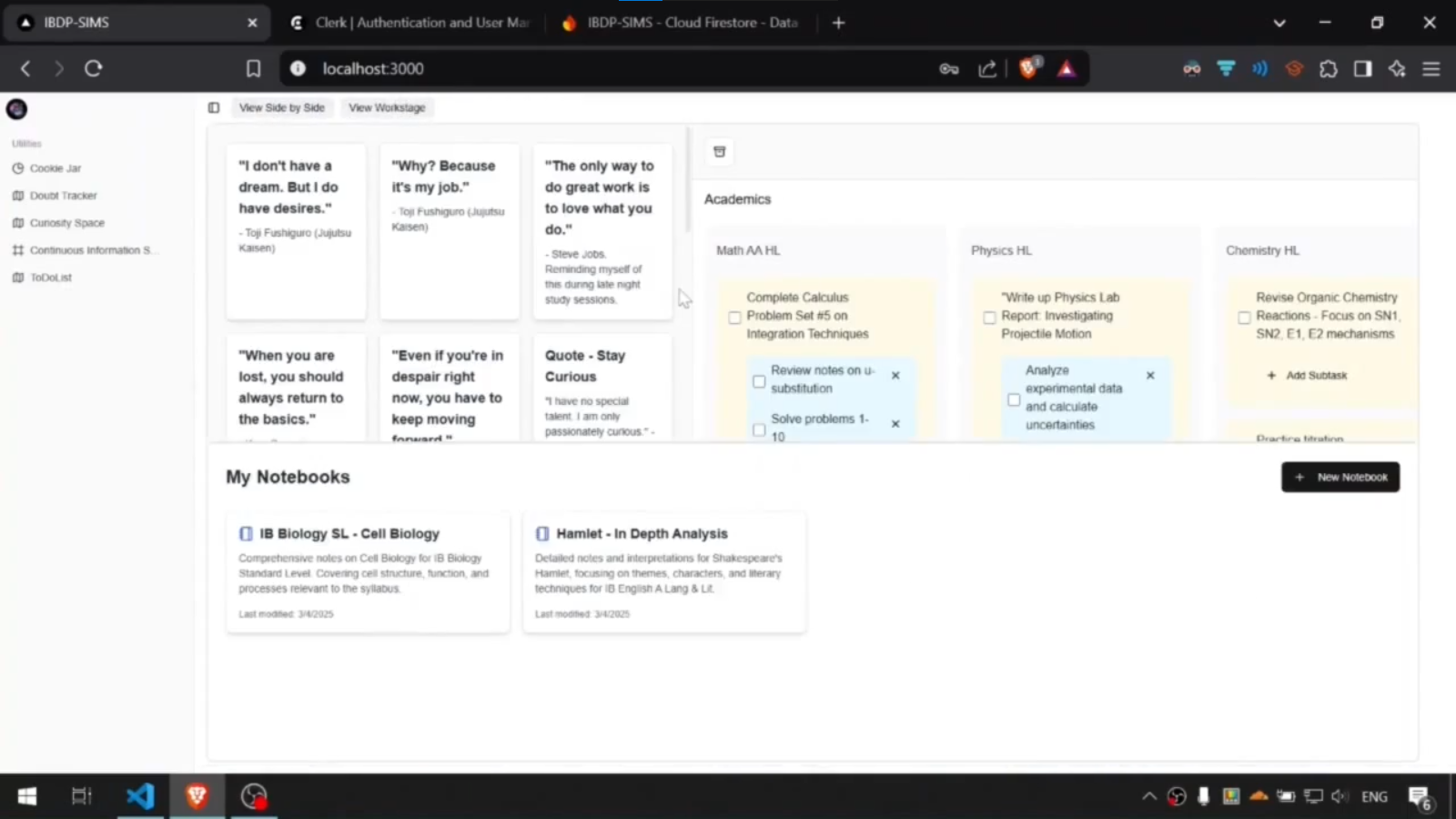
This platform integrates several key modules into a unified, interactive dashboard to create a "mission control" for a student's academic and personal life.
- Dynamic Window Manager (
WorkStage): A custom-built 'stage manager' interface allowing users to create multiple workspaces ("Spaces"), each containing draggable, resizable, and interactive windows for true multitasking. - Kanban-Style To-Do List: A feature-rich task manager with sections, columns, and draggable notes and sub-tasks, enabling complex project and workflow organization.
- Cookie Jar: A motivational tool inspired by David Goggins, allowing users to save and organize snippets of achievements and affirmations in a flexible, sortable grid layout.
- Idea & Doubt Trackers: Two dedicated, Reddit-inspired modules for logging, tracking, and resolving ideas and doubts, complete with voting, nested commenting, and resolution features.
- Continuous Information Space: A digital notebook system for creating and managing long-form documents with a flexible, multi-column hierarchical structure.
- Unified Dashboard: All modules can be viewed together in a central, resizable dashboard, providing a bird's-eye view of all your information.
IBDP-SIMS is built on a modern, robust, and scalable technology stack, showcasing the integration of industry-standard tools and best practices.
| Layer | Technology |
|---|---|
| Frontend Framework |  (with App Router) (with App Router) |
| UI Library |  & &  |
| Styling |  |
| UI Components | Shadcn/UI & Radix UI - for accessible, unstyled primitives. |
| Authentication | Clerk - for user management, sign-in, and middleware-based route protection. |
| Database |  - as the primary NoSQL document database. - as the primary NoSQL document database. |
| Drag & Drop | dnd-kit - for all draggable elements (ToDo notes, Cookie Jar, etc.). |
| Schema Validation | Zod - for ensuring data integrity in server actions. |
Beyond the features, this project demonstrates a strong understanding of fundamental software architecture and security principles.
- Secure by Default: The application uses Clerk's middleware (
src/middleware.ts) to protect all routes by default. Publicly accessible routes, like the/sign-inpage, are explicitly whitelisted. - Route Protection: The
auth().protect()function ensures that no unauthenticated user can access any part of the application, preventing unauthorized data access.
- Per-User Scoping: The application architecture strictly isolates data on a per-user basis. The Firestore schema is designed so that a user's data is always stored under a path scoped to their unique user ID (e.g.,
collection(db, "users", user.id, "nugget")inDoubtTracker.tsx). - Prevents Data Leakage: This pattern is a critical security measure in multi-tenant applications, making it architecturally impossible for one user to access another user's data through backend queries.
- Server Actions: All database mutations (create, update, delete) are handled exclusively through Next.js Server Actions located in
src/lib/*-actions.ts. - No Direct DB Access from Client: The client-side components call these server actions but never interact with the database directly. This abstracts away the database logic and prevents malicious users from attempting to manipulate the database from the browser.
- Input Validation: Zod schemas (e.g.,
CookieSchema) are used to validate the shape and type of data before it's written to the database, ensuring data integrity and preventing malformed data from being saved.
- Work Shadowing: Observing the client's physical workflow of laying out multiple paper sheets directly inspired the Stage Manager module, providing a digital "mission control" for multitasking.
- Familiar UI Patterns: The client's frequent use of Reddit inspired the card-based layout, voting system, and nested comments in the Doubt Tracker and Curiosity Space, significantly reducing the learning curve.
- Real-time Synchronization: The application uses Firebase Firestore's
onSnapshotlistener to establish a real-time, bidirectional data flow. Any change made in the database is instantly reflected in the UI across all logged-in devices. - Debounced Database Writes: For continuous input (like typing in a notebook),
useEffectandsetTimeoutcreate a debounced save function. This optimizes performance by batching rapid UI updates into less frequent database writes, reducing Firestore costs and network traffic.
The codebase is organized logically within the src/ directory:
src/app/: Contains the main page routes and layouts, following the Next.js App Router structure. Each feature (likeCookieJar,ToDoList) has its own page.src/components/: Home to the reusable React components that make up the UI. This includes:ui/: Base UI components from Shadcn/UI.- Feature-specific folders (e.g.,
curiosity-space,doubts-tracker,stage-manager) containing the logic and UI for each module.
src/lib/: Core application logic, including:firebase.ts: Firebase initialization and configuration.*-actions.ts: All the Server Actions for database interaction.utils.ts: Utility functions.
src/hooks/: Custom React hooks used throughout the application.src/middleware.ts: The Clerk authentication middleware for route protection.
Follow these instructions to get a local copy of the project up and running.
- Node.js (v18.0 or later)
- npm or yarn
- A Firebase project with Firestore enabled.
- A Clerk account and project.
-
Clone the repository:
git clone https://github.com/your-username/ibdp-sims.git cd ibdp-sims -
Install dependencies:
npm install
-
Set up environment variables: Create a file named
.env.localin the root of the project and add the following environment variables from your Firebase and Clerk project settings:# Clerk NEXT_PUBLIC_CLERK_PUBLISHABLE_KEY=your_clerk_publishable_key CLERK_SECRET_KEY=your_clerk_secret_key NEXT_PUBLIC_CLERK_SIGN_IN_URL=/sign-in NEXT_PUBLIC_CLERK_SIGN_UP_URL=/sign-up NEXT_PUBLIC_CLERK_AFTER_SIGN_IN_URL=/ NEXT_PUBLIC_CLERK_AFTER_SIGN_UP_URL=/ # Firebase NEXT_PUBLIC_FIREBASE_API_KEY=your_firebase_api_key NEXT_PUBLIC_FIREBASE_AUTH_DOMAIN=your_firebase_auth_domain NEXT_PUBLIC_FIREBASE_PROJECT_ID=your_firebase_project_id NEXT_PUBLIC_FIREBASE_STORAGE_BUCKET=your_firebase_storage_bucket NEXT_PUBLIC_FIREBASE_MESSAGING_SENDER_ID=your_firebase_messaging_sender_id NEXT_PUBLIC_FIREBASE_APP_ID=your_firebase_app_id
-
Run the development server:
npm run dev
Open http://localhost:3000 with your browser to see the result. You can start by signing up for a new account.
This project successfully met all 20 success criteria defined during the planning phase, as confirmed by the client during the final evaluation. The client was "thrilled by how much this simplifies [their] work" and found the interface "super simple and intuitive."
Based on the final evaluation, potential future enhancements include:
- Expanded User Accessibility: Exploring options for public deployment to make the application available to a wider audience.
- Study Hours Tracking & Analytics: Adding a feature to track study time and provide productivity insights.
- Enhanced Customization: Introducing customizable themes and layouts to further increase the application's adaptability.
- The Stage Manager module was built by adapting and modifying the excellent open-source React Kitten library by Rohan Rhu.
- The UI components are built using the fantastic primitives from Shadcn/UI and Radix UI.
- Drag and drop functionality is powered by dnd-kit.
- Authentication is handled by Clerk.
This project is open-sourced under the MIT License.