Ridiculous-Coding, but for Minecraft. Every keystroke in chat (and any text field) detonates — explosions, fire, soul fire, brutal flying letters, screen shake and explosion sounds. The faster you type, the hotter the amplifier gets: bigger booms, hotter letters, higher-pitched sound, harder shake. Stop typing and it cools down, draining your combo. Pure dopamine, pure for fun.
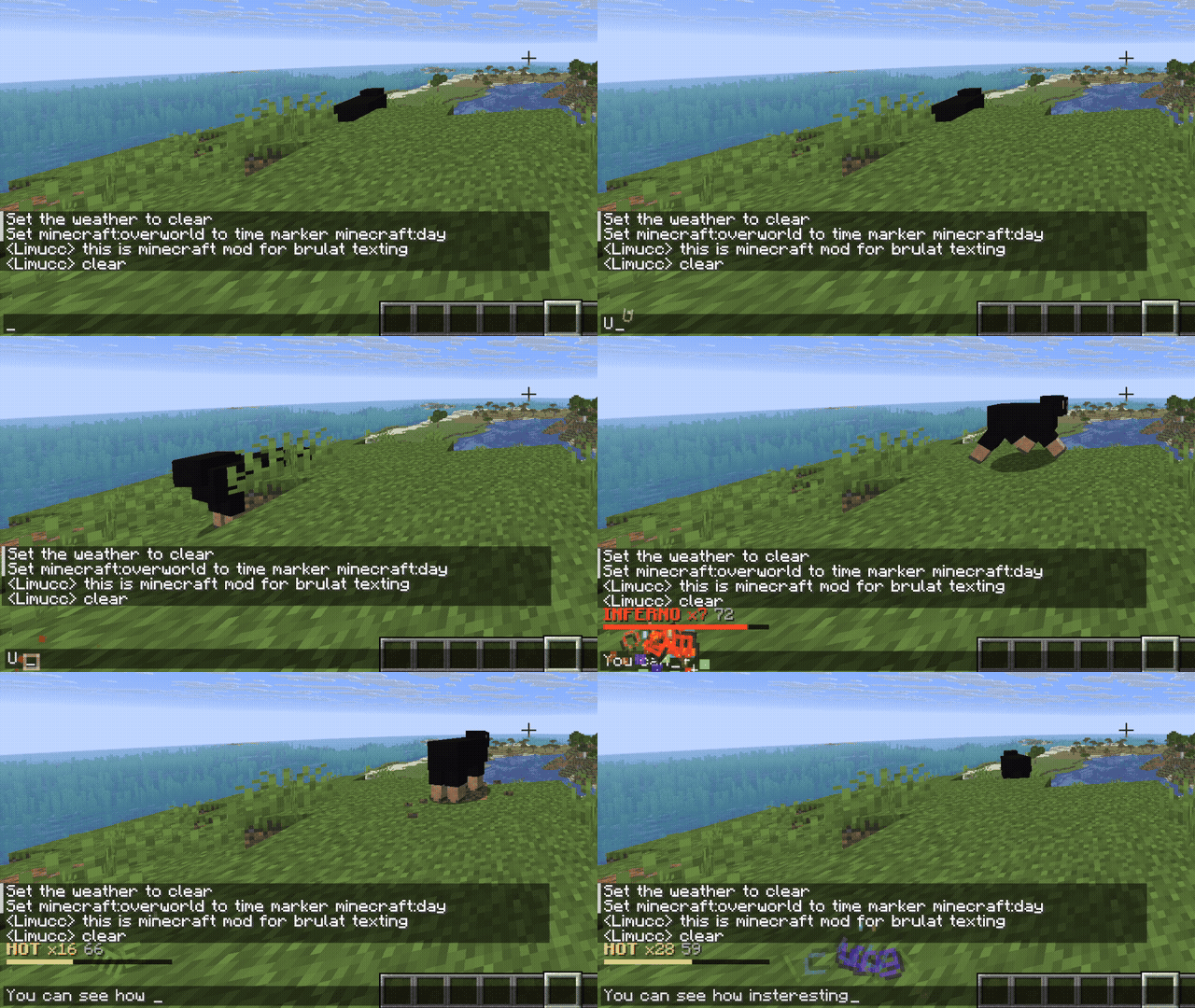
Directly inspired by the Ridiculous Coding and Power Mode VS Code extensions — this is the Minecraft take on them.
Client-side only. Built for Minecraft 26.1.2 / Fabric, in the flat Limucc UI style (shared with Trashventory). By Limucc-dev · github.com/dev-limucc · modrinth.com/user/Limucc.
- Brutal letters — the character you typed flies off, spins, burns and fades. Hotter amplifier = bigger, faster, whiter-hot letters (rainbow at max).
- Fire / Soul fire / TNT — procedural fire (orange/gold) and soul fire (cyan) burst from the caret; combo milestones trigger a full TNT-style flash + shockwave + smoke + debris.
- Screen shake — the whole screen (or just the chatbox) rattles, scaled by how hot you are.
- Voice — each keystroke fires a vanilla explosion sound whose pitch rises with your typing speed.
- The amplifier — a heat value (0→1) that fast typing fills and idling drains, with named tiers:
COLD → WARM → HOT → BRUTAL → INFERNO → APOCALYPSE. An optional compact combo/WPM meter shows your tier. - ALL-CAPS importance — type a word in caps (
NOT,STOP) and its letters go bigger, bolder, fierier. - Impact frames — a small chance the spacebar triggers a comic-book impact frame (white flash, letterbox, radial speed lines).
- Weapon drops — random weapon textures (mace, sword, axe, trident…) fall in with their own sounds.
- Send-slam — when you send a message, a weapon swings up and smashes it into the chat; harder the faster you typed.
- Varied deletes — backspace/delete picks a different demolition sound each time (anvil, glass, wood, stone…).
- Exclusivity — crit stars and enchant (sharpness) sparkles at high heat, plus firework bursts on milestones.
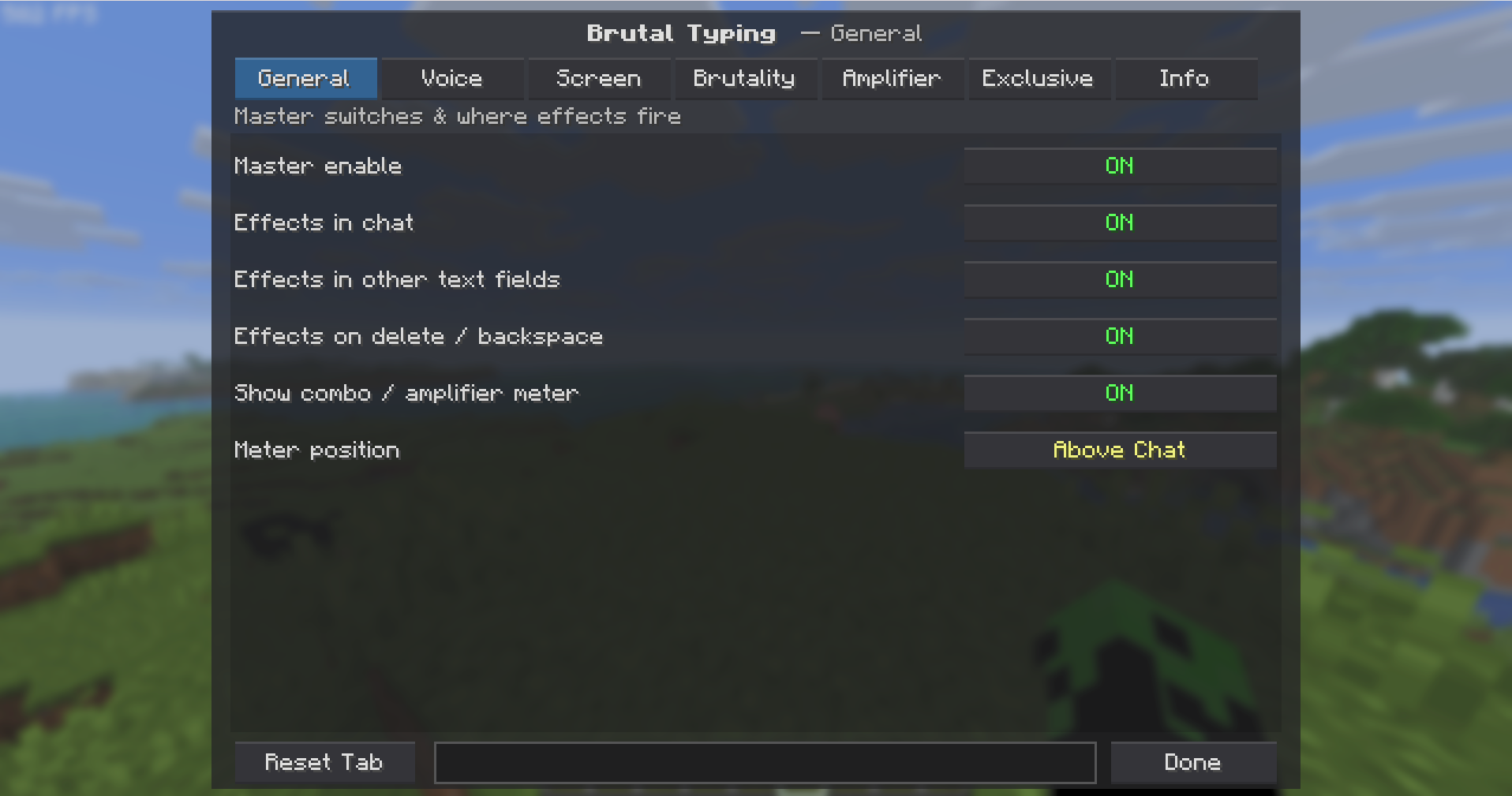
Open via ModMenu (mod list → Brutal Typing → config) or bind a key under Options → Controls → Brutal Typing. The settings screen has a "Try typing here…" box at the bottom so you feel every change live.
| Tab | What it controls |
|---|---|
| General | master on/off · effects in chat · in other text fields (anvil, world naming, settings…) · on delete · combo meter + its position |
| Voice | sound preset (TNT · Dragon · Wither · Lightning · Firework · Anvil · XP-blip · Mute) · volume · pitch range · milestone sounds |
| Screen | shake target (whole screen / chatbox only / off) · intensity · settle speed |
| Brutality | brutal letters · sparks · fire · soul fire · TNT explosions · screen flash · ALL-CAPS importance · amount · size · gravity |
| Amplifier | sensitivity · cool-down · max strength · combo window · WPM counter |
| Exclusive | crit stars · sharpness sparkles · fireworks · weapon drops (+chance) · impact frames (+chance) · send-slam · rainbow-at-max · milestone interval |
| Info | about the mod & creator, with GitHub/Modrinth links |
Controls: click a toggle/cycler, click a slider track to set it, scroll over any row to fine-tune.
Config is saved to config/brutaltyping.json.
This mirrors Trashventory's toolchain exactly (Fabric Loom, Java 25, Loom 1.16-SNAPSHOT, Fabric API
0.150.0+26.1.2, ModMenu 18.0.0-beta.1). Build it the same way you build Trashventory:
./gradlew build      # jar lands in build/libs/
./gradlew runClient  # launch a dev client to try it
Requires a JDK 25 on your Gradle/IDE toolchain (the build sets
options.release = 25). Open the folder in your IDE (same setup as Trashventory) and run therunClienttask, or drop the built jar + Fabric API + ModMenu into a 26.1.2 Fabricmods/folder.
Brutal Typing ships with vanilla explosion/dragon/wither/lightning/firework/anvil sounds (no binary audio is bundled). To add your own "super" or funny sounds:
- Drop your
.oggfiles intosrc/client/resources/assets/brutaltyping/sounds/. - Add an
assets/brutaltyping/sounds.jsonmapping an id to them, register aSoundEventfor that id inBrutalTyping#onInitialize, and add a new value toSoundPresetthat returns it.
The SoundPreset enum (src/client/.../config/SoundPreset.java) is the single place that maps presets to sounds.
mixin/EditBoxMixin— injectsEditBox#charTyped/keyPressed; firesEffectEnginewith the caret's on-screen position.mixin/ScreenMixin— wrapsScreen#extractRenderStateWithTooltipAndSubtitles: pushes a JOML pose translation (screen shake) at HEAD, draws the particle overlay and pops at RETURN.engine/EffectEngine— the amplifier/combo state machine + particle pool + the combo/WPM meter.engine/Particle— hand-drawn screen-space particles (no world particles, no texture atlas).gui/BrutalTypingScreen— the tabbed settings GUI in the Limucc flat style.
Style & code by dev-limucc. Reuse freely.