
Generate shareable Umamusume profile cards from an in-game Trainer ID.
Live: https://card.notvo.id
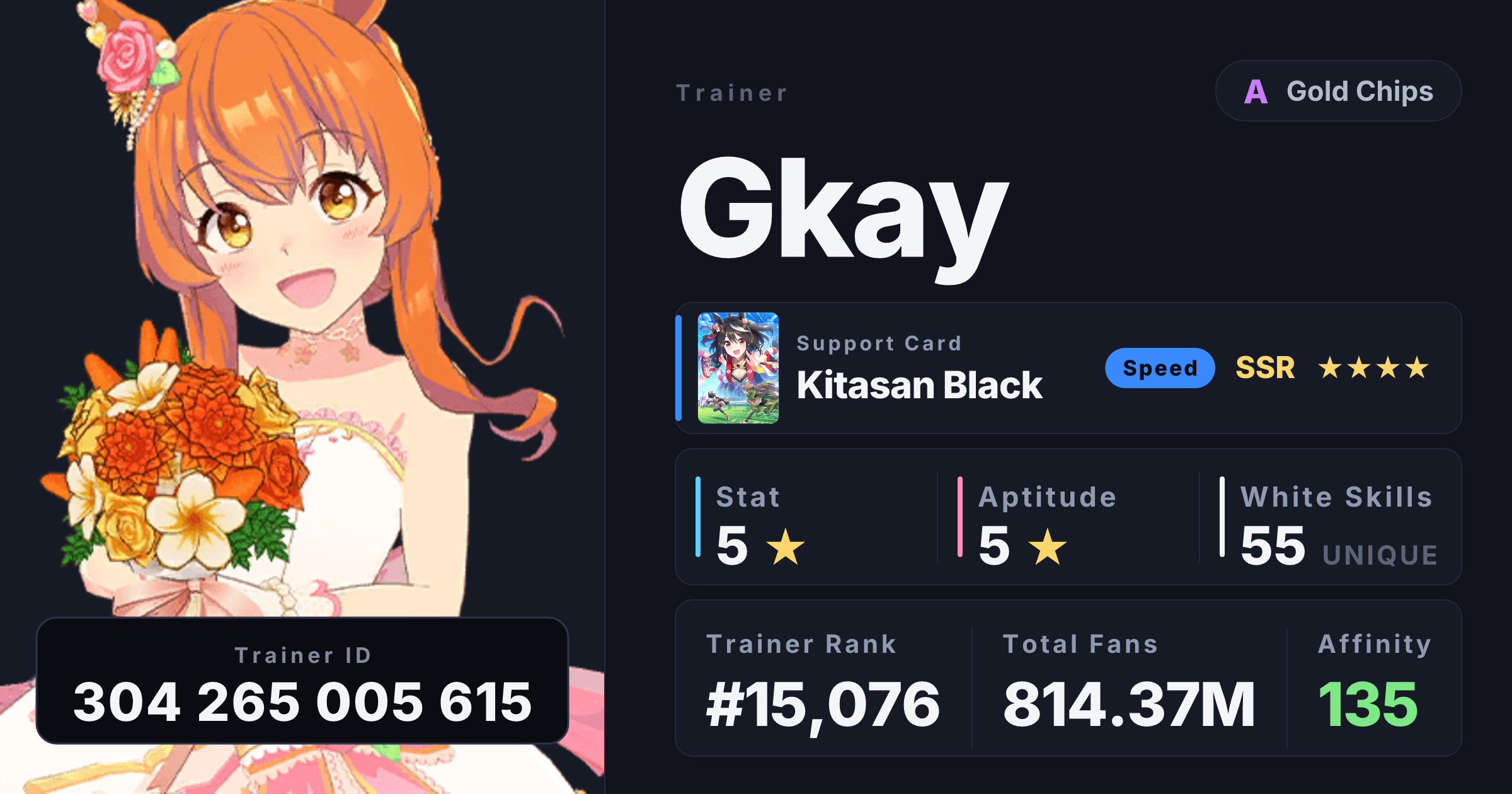
Type a 9–12 digit Trainer ID and you get a profile card showing:
- Trainer name, club + tier (D → SS), full-body costume art of their borrowed umamusume
- Inheritance sparks (stat / aptitude / unique skill / white skill / race-win / scenario), with main-parent overlap highlighted
- Borrowed support card (name + type + rarity + LB stars)
- Trainer rank, total fans, average daily gain, parent affinity
- Per-trainer share URLs (
umacard.com/{id}) that unfurl as image previews in Discord, Slack, iMessage, Twitter/X - One-click PNG download or "Copy image" to clipboard
All data comes from https://uma.moe.
- Vite + React 18 for the SPA
- Pure CSS — no Tailwind, no styled-components, single dark "editorial racing program" theme
- html-to-image for PNG export from the browser
- @resvg/resvg-js + bundled Inter / Noto Sans JP fonts for server-side OG image rasterization
- opentype.js to convert OG text to SVG paths (resvg's Linux runtime drops
<text>elements without it) - Vercel Node serverless functions in
api/for the OG image, the per-trainer HTML wrapper, and an authenticated uma.moe API proxy
api/
  _lib/umamoe.js Shared server-side uma.moe client (adds X-API-Key)
  umamoe.js      Authenticated, read-only proxy used by the SPA
  og/[id].js     PNG OG image at /api/og/{id}.png — 1200×630 SVG → PNG
  og/fonts.js    Inter Bold + ExtraBold + Noto Sans JP, base64-embedded
  og/cards.js    Support-card name/type/rarity lookup
  page.js        Per-trainer HTML wrapper that injects og:image meta tags
  search.js      Backwards-compatible proxy for the old /api/search route
public/
  icon.ico       Favicon
  _redirects     SPA fallback for Netlify/Cloudflare Pages
src/
  api/           Browser-side uma.moe client + profile aggregator
  components/    TrainerForm, ProfileCard, themes/ModernTheme
  data/          characters.json, supportCards.json, factors.json
  lib/           assets, format helpers, spark merger, lookups
  styles/        global.css
  App.jsx, App.css, main.jsx
index.html
vercel.json      SPA rewrite + functions config
uma.moe requires an API key for scripts and external apps. Sign in at
https://uma.moe/settings, create a key, copy .env.example to .env.local,
and replace the placeholder:
UMA_MOE_API_KEY=uma_k_your_key_hereThe key is read only by Vite's development proxy and the Vercel serverless
functions. Do not prefix it with VITE_ or use it in browser code.
npm install
npm run dev      # Vite dev server on http://localhost:5173
npm run build    # production build to dist/
Server-side functions in api/ only run on Vercel. To smoke-test them locally, install vercel globally and use vercel dev instead.
- Push this repo to GitHub (or any provider Vercel supports).
- Sign in at https://vercel.com, Add New… → Project, import the repo.
- Vercel auto-detects Vite. Build command
npm run build, outputdist. - In Project Settings > Environment Variables, add
UMA_MOE_API_KEYfor Production and Preview using a key created at https://uma.moe/settings.
After setup, Vercel auto-deploys on every push to main and creates preview deployments for every other branch / PR — no further config needed.
If you'd rather drive deployments from CI (e.g. you can't grant Vercel access to the repo), this project ships .github/workflows/deploy.yml that runs vercel --prod on every push to main. To enable it, add three repo secrets:
VERCEL_TOKEN— create at https://vercel.com/account/tokensVERCEL_ORG_ID— copy from.vercel/project.jsonafter runningvercel linkonceVERCEL_PROJECT_ID— same file
Vercel project → Settings → Domains → Add → enter your domain, then add the DNS records Vercel shows you. HTTPS provisions automatically.
Per-trainer share URLs need crawler-friendly meta tags. Discord/Twitter/Slack don't run JS, so the SPA's client-rendered card is invisible to them. Two server-side pieces handle this:
api/page.jsis a Node serverless function.vercel.jsonrewrites/{9-12 digit id}→/api/page?id={id}. The function fetches the static SPA shell, fetches the trainer name from uma.moe, and injects per-trainerog:title/og:description/og:imagemeta tags before responding. The SPA still boots normally for human visitors.api/og/[id].jsis a Node serverless function at/api/og/{id}.png. It fetches the trainer profile, builds a 1200×630 SVG with the character art (base64-embedded so OG scrapers don't have to follow nested image references), and rasterizes it to PNG with@resvg/resvg-js. All text is converted to SVG paths server-side via opentype.js — resvg's Linux native binary doesn't reliably register<text>fonts in the Vercel runtime. Fonts are base64-embedded inapi/og/fonts.js(~7 MB) so Vercel ships them inside the function bundle without needingincludeFilesconfig.
CDN-cached for 5 minutes (300s) at the edge with stale-while-revalidate, so re-fetches are cheap.
- uma.moe — all profile, circle, ranking, inheritance, and support-card data
- Cygames — Umamusume Pretty Derby
- Inter by Rasmus Andersson, Noto Sans JP — fonts
Not affiliated with Cygames.