Explore the cosmos from your terminal
A beautiful, real-time terminal-based astronomy application that brings the night sky to your command line. Built with Go and the Bubbletea framework, skyterm delivers a stunning celestial experience without leaving your terminal.
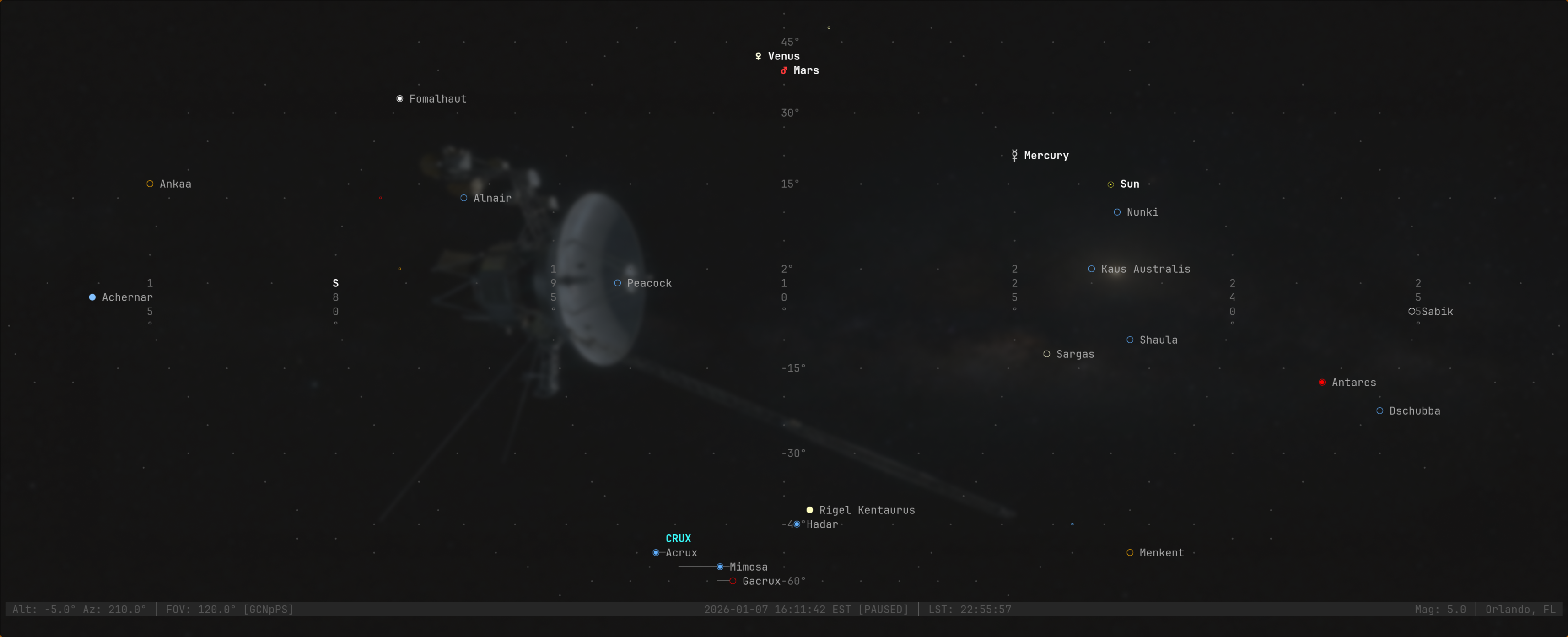
- 🌟 Terminal-native - Designed for the terminal from the ground up, not a desktop app port
- ⚡ Lightning fast - Minimal CPU/memory compared to OpenGL astronomy applications
- 🎮 Keyboard-driven - Efficient navigation once you learn the keys
- 🌍 SSH-friendly - Perfect for remote observatory operations
- 📦 Offline-capable - Core star catalog bundled, no internet required
- 🎨 Beautiful rendering - Color-coded stars by spectral type, constellation lines, and more
- 🪐 Real-time planets - See the current positions of planets, the Moon, and Sun
- 🔍 Deep sky objects - Explore Messier catalog objects right in your terminal
- 9,110 stars from the Hipparcos catalog with accurate positions
- 88 constellations with traditional line patterns
- Planets including Mercury, Venus, Mars, Jupiter, and Saturn
- Moon and Sun with real-time positions
- 110 Messier objects for deep sky exploration
- Color-coded stars by spectral type (O, B, A, F, G, K, M)
- Pan and zoom with intuitive keyboard controls
- Snap to cardinal directions (N, S, E, W) or zenith
- Search for objects by name
- Select and follow celestial objects
- Time controls: pause, step, or jump to specific moments
- Toggle constellation lines and names
- Adjustable magnitude limit for star visibility
- Coordinate grid overlay (Alt/Az system)
- Planet and star labels
- Info panel for selected objects
Head over to the Releases page and grab the right ZIP for your platform:
- Linux:
skyterm_<version>_linux_*.zip - macOS:
skyterm_<version>_darwin_*.zip - Windows:
skyterm_<version>_windows_*.zip
Unzip, then run:
./skyterm        # Linux/macOS
skyterm.exe # Windows# Clone the repository
git clone https://github.com/craigderington/skyterm.git
cd skyterm
# Build
go build -o skyterm ./cmd/skyterm
# Run
./skytermskyterm uses XDG-compliant configuration at:
~/.config/skyterm/config.yaml(or$XDG_CONFIG_HOME/skyterm/config.yaml)
location:
  latitude: 51.5074    # Your latitude (positive = North)
  longitude: -0.1278   # Your longitude (positive = East)
  altitude: 11         # Meters above sea level
  name: "London, UK"   # Display name

display:
  magnitude_limit: 5.0                 # Faintest stars to show
  show_constellation_lines: true       # Draw constellation patterns
  show_constellation_names: false      # Label constellations
  show_coordinate_grid: false          # Alt/Az grid overlay
  show_planet_labels: true             # Label planets
  color_stars_by_type: true            # Spectral type colors

time:
  use_utc: false          # false = local time, true = UTC
  time_step: "1m"         # Time step increment (1m, 1h, 24h, etc.)
Default location: New York City (40.7°N, 74.0°W)
| Key | Action |
|---|---|
↑/k |
Pan up |
↓/j |
Pan down |
←/h |
Pan left |
→/l |
Pan right |
K/J/H/L |
Fast pan |
+ |
Zoom in |
- |
Zoom out |
0 |
Reset view |
| Key | Action |
|---|---|
n |
Face North |
s |
Face South |
e |
Face East |
w |
Face West |
z |
Look to Zenith (straight up) |
| Key | Action |
|---|---|
g |
Toggle coordinate grid |
C |
Toggle constellation lines |
N |
Toggle constellation names |
p |
Toggle planets (Sun, Moon, planets) |
P |
Toggle planet labels |
d |
Toggle deep sky objects (Messier catalog) |
S |
Toggle star labels (bright stars) |
m |
Cycle magnitude limit |
| Key | Action |
|---|---|
Enter |
Select nearest object to center |
i |
Toggle info panel for selected object |
c |
Center view on selected object |
f |
Follow selected object (locks view) |
/ |
Search for object by name |
| Key | Action |
|---|---|
Space |
Pause/resume time flow |
[ / ] |
Step time backward/forward |
{ / } |
Fast step (10x) |
T |
Jump to current time (now) |
t |
Set custom time |
| Key | Action |
|---|---|
? |
Show help |
q |
Quit |
Esc |
Close modals/cancel |
- Go 1.21 or later
- Terminal with Unicode and 256-color support
# Run tests
go test ./...

# Run specific package tests
go test ./internal/astro
go test ./internal/render

# Verbose test output
go test -v ./...

# Build for release (optimized)
go build -ldflags="-s -w" -o skyterm ./cmd/skyterm

# Cross-compile for different platforms
GOOS=linux GOARCH=amd64 go build -o skyterm-linux ./cmd/skyterm
GOOS=darwin GOARCH=arm64 go build -o skyterm-macos ./cmd/skyterm
GOOS=windows GOARCH=amd64 go build -o skyterm.exe ./cmd/skytermskyterm/
├── cmd/skyterm/ # Application entry point
├── internal/
│ ├── app/ # Main Bubbletea model
│ ├── render/ # Terminal rendering engine
│ ├── catalog/ # Star and object catalogs
│ ├── astro/ # Astronomical calculations
│ ├── ui/ # UI components
│ └── config/ # Configuration handling
├── data/ # Bundled catalogs
└── screenshots/ # Application screenshots
- Coordinate conversions between Equatorial (RA/Dec) and Horizontal (Alt/Az) systems
- Sidereal time calculations for accurate star positions
- Precession corrections for star coordinates
- Planetary positions using astronomical algorithms from Jean Meeus
- Stereographic projection for celestial sphere → 2D terminal mapping
- Unicode characters for star magnitude representation
- ANSI 256-color support for spectral type coloring
- Efficient culling of objects outside field of view
- Hipparcos catalog - High precision star positions
- IAU constellations - Official constellation boundaries and line patterns
- Messier catalog - 110 deep sky objects
- Astronomical algorithms - Jean Meeus calculations for planetary ephemeris
- Satellite tracking (TLE data integration)
- NGC/IC catalog support
- Export screenshots to image files
- Telescope control via INDI protocol
- Observing session logs
- Multi-cluster location presets
- Braille rendering mode for higher resolution
- Eclipse and transit predictions
If you like skyterm, you might also enjoy:
- Stellarium - Full-featured desktop planetarium
- wttr.in - Weather in your terminal
- mapscii - OpenStreetMap in your terminal
This is a FOSS project and contributions are welcome! Whether it's:
- Bug reports and feature requests
- Code contributions
- Documentation improvements
- Additional catalog data
Feel free to open an issue or submit a pull request.
TBD
Created by Craig Derington
Built with:
Astronomical data:
- Hipparcos Space Astrometry Mission
- International Astronomical Union (IAU)
- Messier Catalog
skyterm - Because astronomers deserve a beautiful terminal experience ✨