Svgfont is a lightweight Python library that loads SVG fonts as sequences of polylines. The polylines are represented as 2d numpy arrays (Nx2), each having N points.
The main use for this is to load Hershey fonts for drawing with a plotter, robot or CNC machine. The library comes with some standard Hershey fonts bundled, and a curated list of fonts can be found here.
The functionality of the Svgfont library is similar to the Hershey extension for the InkScape vector drawing program, but this library allows you to easily load these kind fonts in any Python script.
pip install svgfont
Clone the repository, navigate to the directory and from there
pip install -e .
A simple use case is:
import svgfont
import matplotlib.pyplot as plt

font = svgfont.load_font('TwinSans')
paths = svgfont.text_paths('Hello\nWorld', font, 20,
                           align='center',
                           pos=[50,20],
                           tol=0.1) # pos is optional
plt.figure(figsize=(6,3))
for P in paths:
    plt.plot(P[:,0], P[:,1], 'k')
plt.axis('equal')
plt.gca().invert_yaxis()
plt.show()
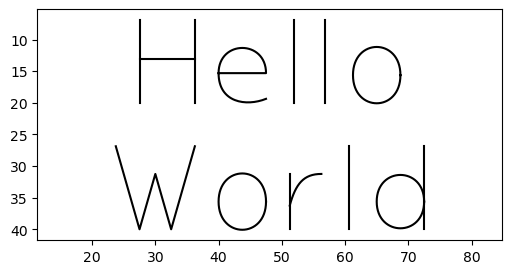
The tol parameter is optional and it determines the maximum error for sampling the Bezier curves that compose each character.
You can also fit the text to a rectangle (with optional padding) as follows:
import svgfont
import matplotlib.pyplot as plt
from matplotlib import patches

w, h = 200, 100
font = svgfont.load_font('HersheyScript1')
paths = svgfont.text_paths('Hello World', font, box=svgfont.rect(0, 0, w, h), padding=10)
plt.figure(figsize=(6,3))
for P in paths:
    plt.plot(P[:,0], P[:,1], 'k')
plt.gca().add_patch(patches.Rectangle((0, 0), w, h, fill=False, edgecolor='r'))
plt.axis('equal')
plt.gca().invert_yaxis()
plt.show()
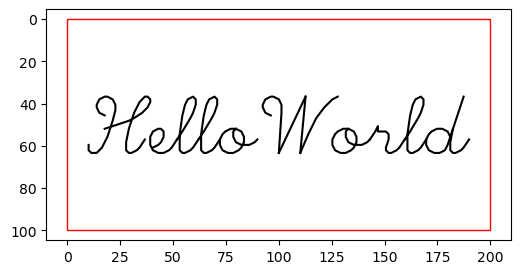
These examples use the Hershey fonts bundled with the library, but a path to a SVG font file can be provided also.