


Spend Wise is envelope budgeting that runs where you want it - as a desktop app, or as a small server you host yourself and reach from any browser.
No account. No cloud. No subscription. No telemetry.
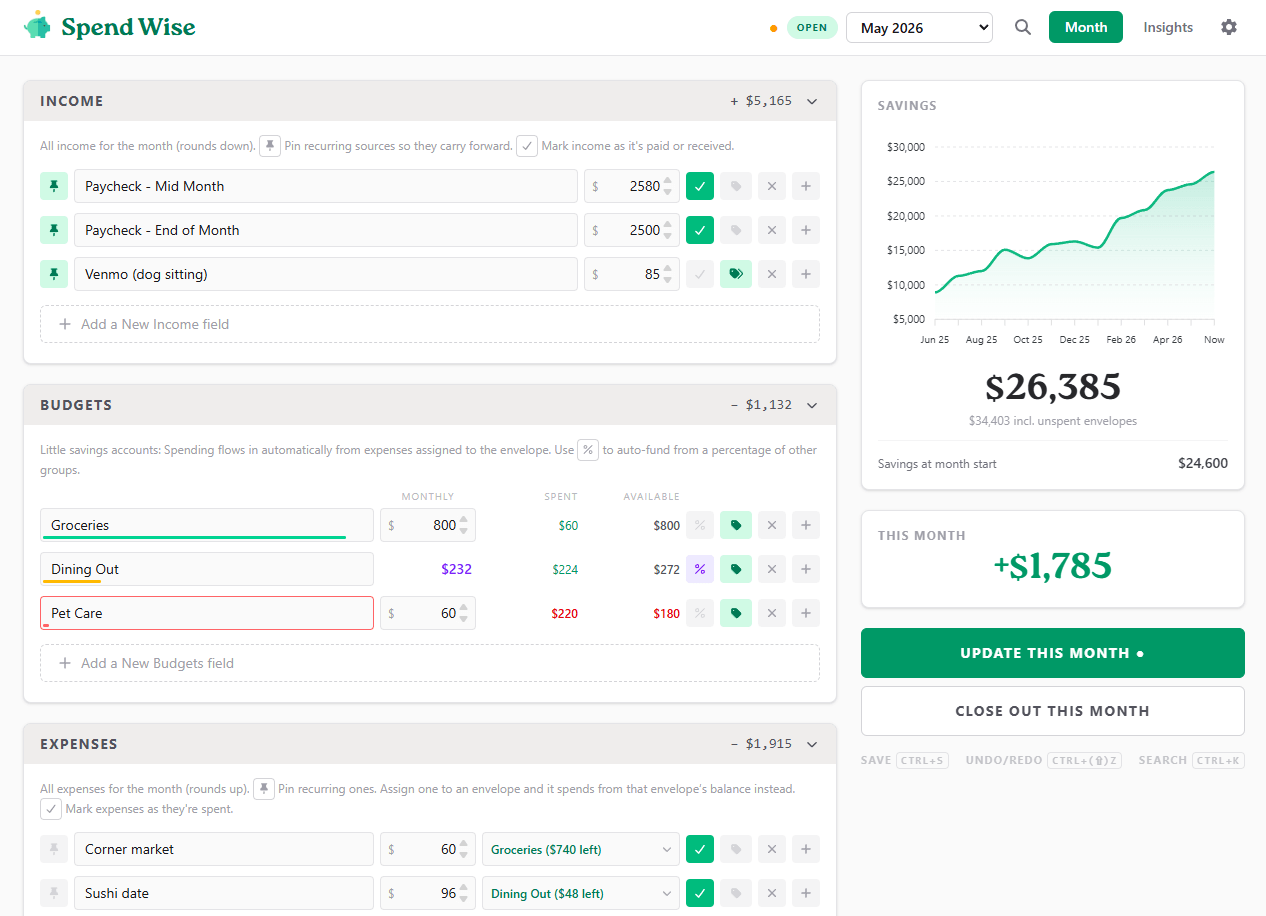
Budget in envelopes. Each budget is a little savings account: it gets a monthly allotment, and unspent money stays in it. Groceries left over in May is still there in June - no zeroing out, no starting over.
Spending flows in on its own. Assign an expense to an envelope and it draws from that balance instead. Every envelope shows what's left at a glance: a full green line when untouched, amber when it's nearly gone, red when it's overdrawn.
Save up for the big, irregular stuff. Goal budgets fill toward a target - the annual insurance bill, a vacation - and stop contributing once they're full. Give one a due date and it works out the monthly deposit for you. Spend from it and contributions resume automatically.
Fund budgets from a percentage. Point an envelope at other groups and it takes a cut of them, live - freelance tax savings at 33% of self-employment income minus expenses, recalculated as you type and carried forward every month.
Close out the month when you're done: balances roll over, recurring lines copy forward, savings gets a snapshot, and next month is waiting for you.
See where it actually went. Tag anything; the Insights view turns those tags into spending and income trends, per-tag averages, and your savings trajectory over the years.
Find anything in one keystroke. Ctrl+K searches every month at once -
this month's matches first, then the full history - so "what do we usually pay
for insurance?" answers itself, and picking a result jumps straight to that row.
Light or dark. A full dark theme, everywhere - charts, dialogs, even the sign-in screens - following your system or your explicit choice in Settings.
Starts gently. A fresh install asks a few questions - what's in savings right now, how money comes in, whether to set aside self-employment taxes - and builds a sensible starting layout with starter rows to rename.
Keeps working offline. Editing in a browser when the server drops? Keep typing - saving pauses and resumes when the connection returns, merging as usual.
Budget together. Two people editing the same month merge field by field rather than one clobbering the other - you both keep your edits.
Change your mind later. Past months are view-only until you unlock them. Edit one and every later month's balances and savings history recompute correctly, after taking a backup and showing you exactly what changed.
Grab the latest Windows installer or portable .exe from
Releases. That's the whole
setup - it keeps its database in %APPDATA%/Spend Wise/db.json.
Hosting the web version somewhere? The desktop app can use that server as its database instead of a local file: Settings → Data → Database location → Remote server, sign in with the server's app password, and it edits the same live books as every browser - merges included.
On macOS or Linux, run it from source (see docs/development.md) or host the web version below.
If NPM is your thing - Electron is never installed, just one process owns the database, so everyone editing through it merges cleanly.
npm i -g spendwise
spendwise-server --set-password   # everyone signs in with this
spendwise-server # → http://localhost:4180Or with Docker:
docker build -t spendwise .
docker run -d --name spendwise -p 4180:4180 \
  -v /srv/spendwise:/data -e FINANCES_PASSWORD=change-me spendwise
The server speaks plain HTTP and has no TLS of its own. On a LAN that's fine; before putting it on the internet, read docs/hosting.md - reverse proxy configs for Caddy, nginx and Apache, every setting, and an account of the security model.
The desktop app can share itself. Set an app password, flip on Web access, and phones and laptops on your network open the printed URL and edit the same live data - until you close the app.
- Hosting - self-hosting, Docker, reverse proxies, TLS, configuration, security model.
- Development - how the money math works, architecture, scripts, tests.
MIT - see LICENSE.
Icons are Font Awesome Free (CC BY 4.0).