

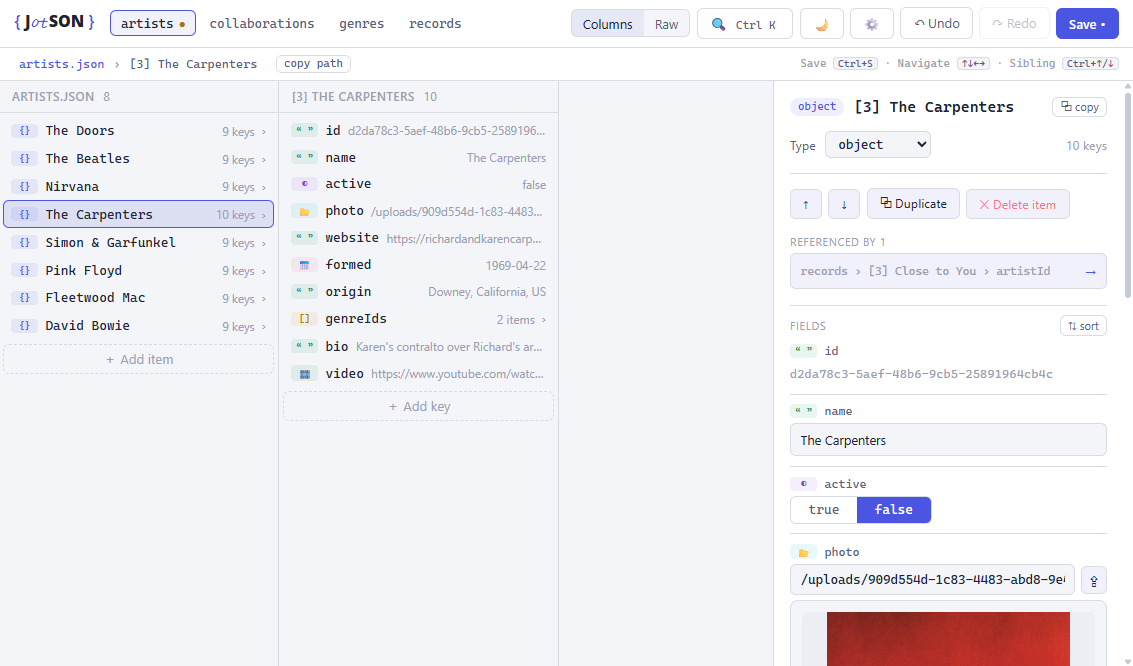
- Finder-style columns - drill through your data with breadcrumbs, keyboard navigation, and browser back/forward across jumps.
- Smart types - dates, datetimes, and colors get native pickers; images and videos preview inline (with pixel dimensions and file size), external URLs unfurl into link cards, and multi-line strings render as Markdown.
- File uploads - point a key at local media, or upload straight from the editor: files land in your configured upload directory as collision-proof UUIDs and the site-relative path is stored. Includes unused-upload cleanup and directory migration.
- References (opt-in) - string ids that resolve to objects across all your files: resolved labels in columns, a searchable picker, "referenced by" backlinks, and integrity guards that offer to update or clean references when ids are renamed or objects deleted. Enable in ⚙️ when your ids are globally unique.
- Full structural editing - add/rename/reorder/duplicate/delete keys and items (sort an object's keys with one click), auto-generated UUID ids, per-file undo/redo, and an inline fields overview where every field is editable with its full type-aware editor.
- Schema-aware - if
records.jsonhas arecords.schema.jsonbeside it, jotson respects it: string fields with anenumbecome dropdowns instead of free text. No schema yet? One click derives one from your existing data, inferring dropdown options for fields whose values repeat from a small set. Either way you can open and edit the schema inside jotson itself, with the same columns, undo, and diff-confirmed saves as any other file. - Safe saves - every save shows a line diff for confirmation, preserves line endings for minimal git noise, and nothing touches disk until you say so.
- Fuzzy search across every file (Ctrl+K), a syntax-highlighted raw view, dark/light themes, and a built-in update notice.
Install once globally, then run jotson in any project:
npm i -g @blindmikey/jotson
cd your-project
jotson
Prefer zero-install? npx @blindmikey/jotson works too.
Copy this jotson/ folder into any project, then:
node jotson/server.mjsThere are no npm dependencies, the server uses only
Node built-ins (including global fetch for link previews), and the UI runs on a vendored copy of
Vue (vendor/vue.js, Vue 3.5, MIT license). No build step, ready to use out-of-the-box.
JotSON looks for its config in your project's root as jotson.config.json (override the
path with the JOTSON_CONFIG env var). In drop-in mode, a jotson.config.json inside the
tool's folder also works if no project-root config exists.
{
  "jsonDir": "data/json",
  "publicDir": "public",
  "uploadDir": "media",
  "logo": "/assets/images/logo.svg",
  "logoLight": "/assets/images/logo_alt.svg",
  "title": "My Project",
  "labelFields": ["title", "label", "name", "id"],
  "references": true,
  "idFields": ["id"]
}| Key | Meaning | Default |
|---|---|---|
jsonDir |
Directory of editable .json files, relative to the project root |
empty (= project root) |
publicDir |
Static media root; served at /site/* so /… asset paths preview |
public |
uploadDir |
Where file uploads are stored, relative to publicDir (created on first upload). Changing it offers to move existing uploads along and update every path referencing them |
empty (= the publicDir root) |
logo |
Optional image path (relative to publicDir) shown as the header brand |
null (shows title) |
logoLight |
Optional logo variant for the light theme (e.g. dark-text version) | null (reuses logo on a dark chip) |
title |
Text brand fallback and window title | JotSON wordmark |
labelFields |
Priority-ordered fields used to name objects in columns/breadcrumbs | see above |
references |
Opt-in id-based reference detection. Leave off for datasets whose ids aren't globally unique (e.g. per-file incrementing numbers), which would show spurious references. Unavailable in projects with files over 20 MB | false |
idFields |
Field names that identify objects as reference targets | ["id"] |
schemaFill |
For discriminated-union schemas: when a field's value makes the schema require more keys, ask (prompt), auto (add them), or off |
ask |
All of this is also editable in-app via the ⚙️ panel (directory changes are validated
server-side; saves go to the resolved config path). If no config file exists, the defaults
above apply and the first ⚙️ save creates jotson.config.json in your project root.
- Binds to
127.0.0.1only; intended as a local dev tool, never a deployed service. - Built to stay responsive on multi-MB files: huge collections render in capped windows with "show more", value edits are recorded as deltas for undo, and dirty checking runs debounced off the typing path.
- Saves are validated (must parse as JSON), shown as a line diff for confirmation first, and preserve each file's existing CRLF/LF line endings for minimal version-control noise.
- Minified (single-line) files stay minified: you edit and diff in pretty-printed form, but saves write the file back as one line, preserving its format.
- There is deliberately no backup system, the assumption is your data files live in git.
- Destructive actions confirm through an in-app dialog (Enter to accept, Esc to cancel), not the browser's native prompt, so a delete or type change never silently no-ops.
- String
idfields are auto-generated as UUIDs when adding/duplicating items. - Strings matching
YYYY-MM-DD/ ISO datetimes are treated asdate/datetimetypes with native pickers and multi-format previews (RFC 3339, Unix, Unix ms, UTC, relative). - Multi-line strings that read as Markdown (headings, lists, bold, links, code fences, …) render as formatted Markdown in the preview; plain prose keeps a text preview. The renderer is dependency-free and escapes input before rendering, so it is injection-safe.
- The per-object fields overview in the inspector edits every field inline with its real editor: date/datetime/color pickers, the file uploader, the reference picker, schema dropdowns, plus image/video/link previews - the same experience as selecting the field directly, without leaving the object.
- An object's keys can be reordered (↑/↓ in the inspector) or sorted with one click (id fields first, then alphabetical). Key order is preserved through every edit and save.
- Image previews show pixel dimensions and file size. If the image's object has sibling
keys named
width/height/size, a "Fill … from image" button writes the real values into them (matching each field's existing string-or-number shape). - Schema: a sidecar named
<file>.schema.jsonin the same directory is picked up automatically (it never appears as an editable tab). Jotson readsproperties/items(plus local$ref) to find each field's schema; an all-stringenum(or stringconst) renders as a dropdown. Values not in the enum stay selectable, marked "⚠ not in schema". A ⛭ gear at the left of the pathbar carries the schema state: green when a schema exists, neutral when not. Clicking it opens the schema itself in jotson - a closable extra tab with the full column editor, undo, and diff-confirmed saves, so adding an enum option is the same three clicks as any other edit (while open, a matching border wraps the gear and the schema file name). On a schema-less file the gear offers to derive one from the current data (draft-07:required,integer/number, date formats, and enums inferred only for short, repeating, non-id string values) or start from a minimal skeleton; nothing is written until you review and save. Saved schema changes apply to the data file's editors instantly, and a re-derive button refreshes the schema from the data as an undoable edit. To remove a schema, delete the sidecar file; jotson offers to generate a fresh one next time. Schemas are respected, not enforced - saving never validates against them (yet). - Conditional schemas (discriminated unions) work too: use
if/then(inallOf) oroneOfto say "a block of typefilmsalso needsfilmIdsandgrid". jotson reads the discriminator from the schema (never a hardcoded field name), gives the conditionally-required keys their proper editors, and - when you set a type that pulls in new required keys - offers to add them with schema-derived starter values (one undoable step). Controlled byschemaFill: ask (default), auto, or off; the prompt can remember your choice per project. - Strings that look like local media paths (
/media/hero.png) are treated as thefiletype: still a plain string, but with an Upload button. Uploads are copied into the upload directory renamed to a UUID, and the stored value becomes the site-relative path (so the preview renders). Media-only allowlist, 100 MB cap. - Deleting a key never deletes the file it points to. Abandoned uploads are reclaimed via ⚙️ → "Scan unused uploads", which lists UUID-named media files nothing references (unsaved edits count as references) and deletes them only after confirmation. Files jotson didn't create are never touched.
- References: a string equal to some object's
id(configurable viaidFields) is treated as thereferencetype - columns show the resolved label (→ Jane Doe), the inspector shows a target card with a go-to link, and a picker modal (search or browse collections) swaps the target. Works across files. Id-bearing objects list everything that references them as jump links, and browser back/forward retraces jumps and file switches. Renaming an id offers to update every reference to follow; deleting a referenced object warns and offers to clean the references up (array entries removed, key values blanked). - YouTube, Vimeo, Loom, Wistia, Dailymotion, Cloudflare Stream, and Bunny Stream URLs
preview as playable embeds (direct
.mp4/.webmlinks play natively); other external links show an OpenGraph preview card (title/description/image), fetched server-side and cached in memory. - Light/dark theme toggle in the top bar (persisted per browser).
- Update notice: on load, the current version is compared against npm (one registry request per server run, skipped silently when offline). If a newer version exists, a green pill in the top bar shows it - click to copy the right update command for how you run JotSON.
JOTSON_PORT: server port. Unset, the default4400is tried and, if busy, a free port is chosen automatically (printed at startup). Set explicitly, a busy port is an error.JOTSON_ROOT: project root, if thejotson/folder does not live directly inside it (default: the folder's parent;npx jotsonsets it to the invocation directory)JOTSON_CONFIG: explicit config file path (default:<project root>/jotson.config.json, falling back to the same name inside the tool's folder)