
Decoupled, High-Performance Repository Intelligence Platform
Chat with any GitHub repository using AST Symbol Parsing, Two-Stage Vector Retrieval, FlashRank Reranking, and Multi-LLM Failover.
Demo Walkthrough • Key Features • Architecture • RAG Evals • Getting Started • Environment Variables • Makefile Commands
askRepo is an AI-powered codebase exploration and QA engine. It allows developers to index any public GitHub repository and converse with it in real-time.
Unlike naive RAG systems that slice code by arbitrary line numbers, askRepo parses repositories at the Abstract Syntax Tree (AST) level using Tree-Sitter to extract logical code symbols (functions, classes, interfaces, and methods). It evaluates code context using Two-Stage Vector Retrieval + FlashRank Reranking and generates streaming responses with automatic multi-provider failover (Google Gemini, Groq / Meta Llama 3.3, and Mistral AI).
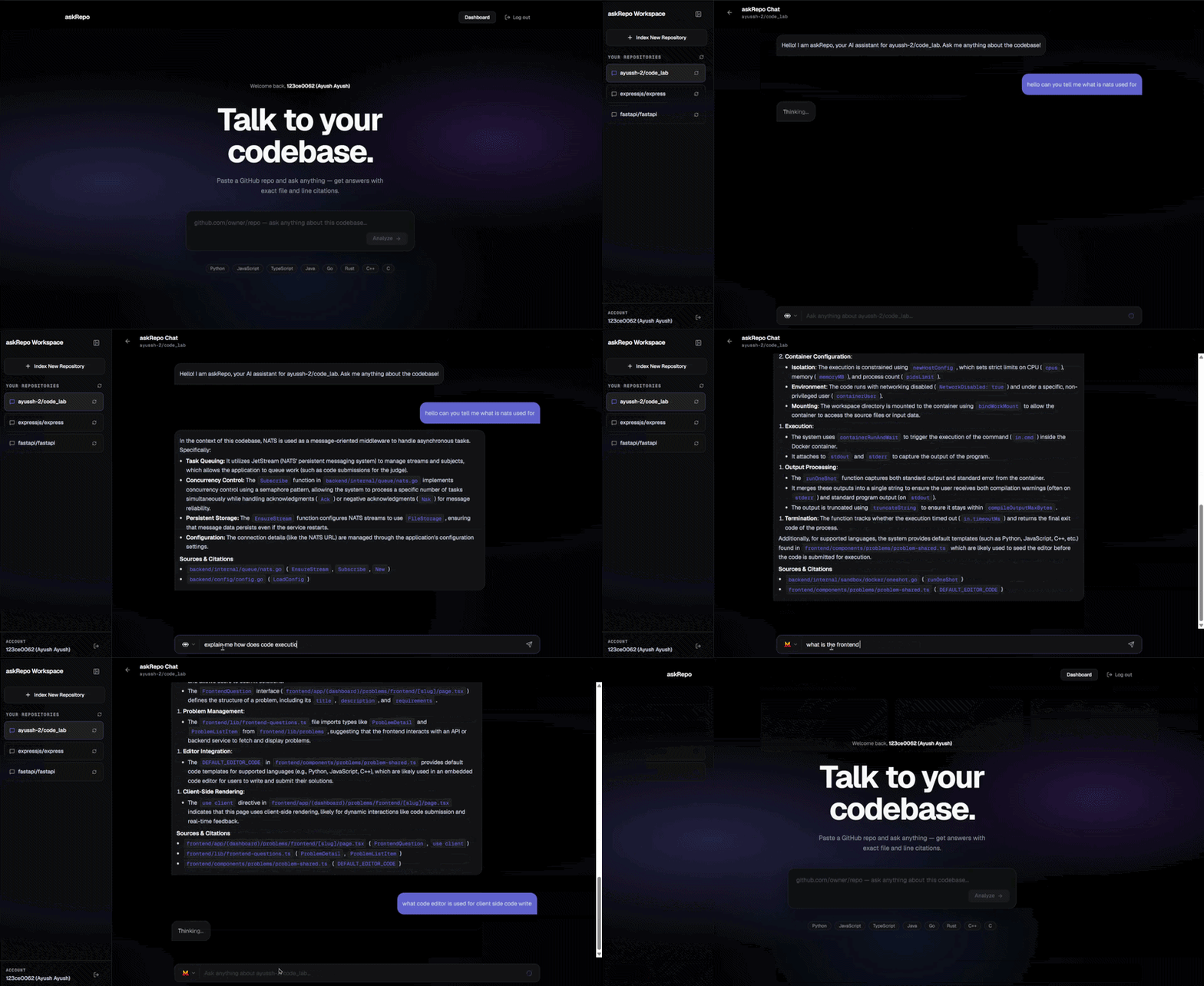
Note on Browser Extension: The Chrome Browser Extension codebase is preserved and available on the
extensionbranch. Themainbranch represents the primary web-first application.
Note on Query Embedding & Modal: Live user queries are converted into vector embeddings before searching PostgreSQL. By default, setting
EMBEDDING_PROVIDER=localinapi/.envuses your local Ollama CPU instance (embeddinggemma) with zero external cloud dependencies. Optionally, settingEMBEDDING_PROVIDER=modalroutes embedding requests to Modal.com (a serverless Python cloud runner that runsembed-service/embed_app.pyon demand).
Codebases are parsed structurally across supported languages (JavaScript, TypeScript, Python, Go, Java, C++, Rust). Functions, classes, and methods are extracted as intact logical symbols rather than arbitrary text chunks. Slided token windows (MAX_TOKENS = 500, OVERLAP = 50) act as fallback for non-code assets and lockfiles (package-lock.json, yarn.lock).
- First Stage (Vector Search): Queries PostgreSQL
pgvectorusing 768-dimensional embeddings to fetch top 15 candidate code chunks. - Second Stage (Cross-Encoder Reranking): Runs FlashRank (
ms-marco-TinyBERT-L-2-v2ONNX model) to score cross-attention relevance in ~10ms, filtering candidates down to the top 4 most relevant chunks. - Low Footprint: Consumes only ~60 MB RAM
- Providers Supported: Google Gemini (
gemini-3.1-flash-lite), Groq (llama-3.3-70b-versatile), and Mistral AI (mistral-small-latest). - Automatic Fallback: If a primary LLM hits a
429 Rate Limitor API error, the backend seamlessly routes the request to the next configured provider without interrupting the user's streaming session. - Interactive UI Selector: Web Dashboard features an inline model selector dropdown with provider logos and auto-inversion filters.
Toggle between 0-cost local CPU embedding for development and serverless GPU acceleration for production via EMBEDDING_PROVIDER:
-
EMBEDDING_PROVIDER=local$\rightarrow$ Uses local Ollama (embeddinggemma) on CPU. Zero external cloud dependencies required for local dev. -
EMBEDDING_PROVIDER=modal$\rightarrow$ Uses Modal.com serverless GPU endpoint.
- Decoupled Heavy Operations: Heavy cloning, AST parsing, and vector embedding execute inside GitLab CI/CD runners (
worker/), keeping the main API server lightweight. - Parallel Workers: Generates embeddings concurrently.
- Bulk Database Writes: Inserts chunks into PostgreSQL in bulk batches of 500 records.
Every codebase response includes a structured ### Sources & Citations section detailing exact file paths and symbol names. Out-of-context or unindexed feature queries return strict fallback responses ("I could not find that information in the retrieved repository context.") to prevent hallucinations.
Includes a built-in RAG evaluation runner (evals/run_eval.py) with LLM-as-a-Judge scoring (faithfulness, relevancy, overall_score) and sample benchmark datasets (evals/dataset.json).
graph TD
    subgraph Clients ["Clients"]
        Web["Next.js 16 Web Dashboard (web/)"]
    end

    subgraph Backend ["API Service (api/)"]
        API["FastAPI API Server (Docker)"]
        LLMEngine["Multi-LLM Failover Engine (Gemini / Groq / Mistral)"]
        Reranker["FlashRank ONNX Reranker"]
    end

    subgraph Ingestion ["Ingestion Worker (worker/)"]
        GitLabRunner["GitLab CI/CD Pipeline"]
        TreeSitter["Tree-Sitter AST Parser"]
        WorkerEmbed["Ollama (embeddinggemma)"]
    end

    subgraph EmbedService ["Query Embedder (embed-service/)"]
        ModalEndpoint["Modal Serverless GPU (embeddinggemma)"]
    end

    subgraph Storage ["Storage & Database"]
        Postgres[("Neon PostgreSQL + pgvector")]
        Redis[("Redis / Upstash Session Cache")]
        GitRepo["GitHub Repositories"]
    end

    Web -->|Ingest / Query / History| API
    API -->|POST /trigger/pipeline| GitLabRunner
    GitLabRunner -->|1. Clone Repo| GitRepo
    GitLabRunner -->|2. Parse AST| TreeSitter
    GitLabRunner -->|3. Parallel Embed| WorkerEmbed
    GitLabRunner -->|4. Bulk Insert| Postgres

    API -->|1. Query Embedding| ModalEndpoint
    API -->|2. Cosine Candidate Search| Postgres
    API -->|3. Cross-Encoder Rerank| Reranker
    API -->|4. Session Management| Redis
    API -->|5. Streaming Response| LLMEngine
askRepo includes an offline RAG evaluation framework (evals/run_eval.py) to test retrieval accuracy and generation quality.
- Faithfulness Score (0.0 to 1.0): Checks if 100% of statements in the answer are grounded in context without hallucinating non-existent files or functions.
- Answer Relevancy Score (0.0 to 1.0): Evaluates whether the generated response directly answers the user query.
- Overall Benchmark Percentage: Aggregates test performance across benchmark datasets.
make eval
# OR
python evals/run_eval.py
Detailed evaluation benchmark reports are saved toevals/eval_report.json.
repo-assistant/
├── api/                  # FastAPI Backend Application
│   ├── main.py           # API endpoints (/health, /ingest, /query, /status, /repos, /chat-history)
│   ├── config.py         # Application settings & environment variables
│   ├── db/               # SQLModel schemas & pgvector integration
│   ├── lib/              # Redis session & history management
│   ├── services/         # RAG pipeline, FlashRank reranker, LLM fallback engine
│   └── Dockerfile        # Production Docker build definition
│
├── web/                  # Next.js 16 Web Dashboard Application
│   ├── src/app/          # Next.js App Router (Home, Login, Dashboard, Chat)
│   ├── src/components/   # Modular UI components (RepoGrid, RepoCard, AuthModal, Sidebar, ChatScreen)
│   ├── src/context/      # Global RepoProvider context & state
│   ├── src/hooks/        # Custom React hooks (useIngest, useChat)
│   ├── src/lib/          # Typed API client (api.ts) & session utilities (utils.ts)
│   └── public/models/    # Provider SVG logo assets (Gemini, Llama, Mistral, Auto)
│
├── worker/               # Standalone Ingestion Engine (GitLab CI/CD Worker)
│   ├── cli.py            # Ingestion CLI entrypoint
│   ├── .gitlab-ci.yml    # GitLab runner job & model caching definition
│   ├── lib/ast_parser/   # Tree-Sitter AST symbol extractor
│   └── utils/            # Parallel embeddings & bulk DB insertion
│
├── embed-service/        # Serverless Query Embedding Service (Modal.com)
│   └── embed_app.py      # Modal GPU serverless function
│
├── evals/                # Offline RAG Evaluation Suite
│   ├── dataset.json      # Benchmark test cases across 4 categories
│   ├── run_eval.py       # LLM-as-a-Judge benchmark runner script
│   └── eval_report.json  # Output evaluation benchmark report
│
└── Makefile              # Development & deployment command targets
- Python 3.11+
- Node.js 18+ or Bun
- PostgreSQL with
pgvectorextension enabled (e.g. Neon DB) - Redis server (local or Upstash)
- Ollama (if using
EMBEDDING_PROVIDER=local)
If you are using local embeddings (EMBEDDING_PROVIDER=local):
-
Install Ollama:
- Linux / macOS:
curl -fsSL https://ollama.com/install.sh | sh - Windows: Download installer from ollama.com/download
- Linux / macOS:
-
Pull the
embeddinggemmaModel:ollama pull embeddinggemma
-
Start Ollama Service:
ollama serve
# Ollama will start listening at http://localhost:11434
git clone https://github.com/ayussh-2/AskRepo.git
cd AskRepo

# Create and activate Python virtual environment
python -m venv .venv
# On Windows:
.venv\Scripts\activate
# On Linux/macOS:
source .venv/bin/activatepip install -r api/requirements.txtcd web
bun install # Or: npm install
cd ..Create .env inside api/.env:
# API Keys (Provide at least one)
GEMINI_API_KEY="your_gemini_api_key"
GROQ_API_KEY="your_groq_api_key"
MISTRAL_API_KEY="your_mistral_api_key"

# LLM Failover Configuration
LLM_PROVIDER_ORDER="gemini,groq,mistral"

# Embedding Provider Selection ("local" or "modal")
EMBEDDING_PROVIDER="local"
OLLAMA_BASE_URL="http://localhost:11434"
EMBEDDING_MODEL="embeddinggemma"

# Optional Modal GPU Settings (Only if EMBEDDING_PROVIDER=modal)
MODAL_EMBED_URL="https://your-workspace--askrepo-embed-embedserver-embed.modal.run"
MODAL_EMBED_TOKEN=""

# Database & Redis Credentials
DATABASE_URL="postgresql://user:password@localhost/dbname"
REDIS_URL="redis://localhost:6379/0"
Create .env.local inside web/.env.local:
NEXT_PUBLIC_API_URL="http://localhost:8000"
NEXT_PUBLIC_GOOGLE_CLIENT_ID="your_google_oauth_client_id"
Note on
makeUtility:
The instructions below assume GNUmakeis installed on your system. Ifmakeis not available on your operating system (e.g. standard Windows Command Prompt without GNU tools), you can refer directly toMakefileto run the raw underlying commands (such ascd api && python -m uvicorn main:app --reload --port 8000orcd web && bun dev).
make dev-api
# Equivalent if make is not installed: cd api && python -m uvicorn main:app --reload --port 8000make dev-web
# Equivalent if make is not installed: cd web && bun dev (or: cd web && npm run dev)make dev-worker repo=https://github.com/expressjs/express
# Equivalent if make is not installed: cd worker && python cli.py --repo-url https://github.com/expressjs/express| Command | Description | Raw Shell Command (if make unavailable) |
|---|---|---|
make dev-api |
Start FastAPI development server | cd api && python -m uvicorn main:app --reload --port 8000 |
make dev-web |
Start Next.js Web application | cd web && bun dev (or npm run dev) |
make dev-worker |
Test Worker Ingestion locally for a repo | cd worker && python cli.py --repo-url <url> |
make eval |
Run offline RAG evaluation benchmark | python evals/run_eval.py |
make deploy-embed |
Deploy Modal GPU serverless embedding service | cd embed-service && python -m modal deploy embed_app.py |
make docker-build |
Build production API Docker image | docker build -t your_docker_username/askrepo-api:latest ./api |
make docker-run |
Run production API Docker container | docker run -d -p 8000:8000 --env-file api/.env --name askrepo-api your_docker_username/askrepo-api:latest |
# 1. Build Docker container image
docker build -t your_docker_username/askrepo-api:latest ./api

# 2. Push to Docker Hub
docker push your_docker_username/askrepo-api:latest

# 3. Run container on Azure / Cloud VM
docker run -d \
  --name askrepo-api-container \
  -p 8000:8000 \
  --restart unless-stopped \
  --env-file api/.env \
  your_docker_username/askrepo-api:latest