Skip to content

Add H3 Studio, an adaptive macOS GUI - #45

Open
PierpaoloV wants to merge 13 commits into
antirez:mainfrom
PierpaoloV:feature/h3-studio-gui
Open

Add H3 Studio, an adaptive macOS GUI#45
PierpaoloV wants to merge 13 commits into
antirez:mainfrom
PierpaoloV:feature/h3-studio-gui

Conversation

@PierpaoloV

Copy link
Copy Markdown

Why

Local video generation should be approachable beyond users who are already comfortable assembling long terminal commands. This PR adds H3 Studio, a small native macOS GUI aimed at democratizing access to H3 while keeping the existing CLI workflow unchanged.

H3 Studio detects the Mac it is running on, reports its relevant hardware characteristics, and recommends a practical starting preset. Users can then work with the same generation controls exposed by the terminal through a more discoverable desktop interface.

What it adds

  • Automatic detection of Apple silicon, unified memory, architecture, and Metal support.
  • Hardware-aware Fast, Balanced, and Quality presets, plus a Custom mode exposing the practical generation parameters.
  • Controls for model location, prompt, output, aspect ratio, duration, seed, render canvas, steps, layers, reuse, core reuse, token reduction, SSD streaming, reference sizing, and supported M5 INT8 acceleration.
  • Ordered multi-image conditioning for up to nine reference pictures, matching H3's Picture 1, Picture 2, … prompt semantics.
  • Automatic HEIC/HEIF-to-PNG conversion for iPhone photos. Embedded orientation is materialized into the output pixels so Qt, FFmpeg, and H3 all see the same upright image; originals remain untouched.
  • Separate previews for selected inputs and live denoising frames, with resize-aware rendering and clear preview failures.
  • A cancellable generation runner with three progress stages—preparation, generation, and decode/export—and an ETA that handles repeated encoder phases and recovers from early underestimates.
  • A responsive, scrollable English-only interface that adapts from wide to narrow windows.
  • Session-only prompts and reference images, while useful technical choices are persisted locally.
  • A make gui-app target that builds and signs a double-clickable H3Studio.app, bundling the H3 executable and Metal shader while keeping model weights external.

The GUI is optional: the existing CLI remains the primary engine interface and its behavior is preserved.

Verification

  • make test — 1,768 core checks passed; available Metal, FFmpeg, and audio primitive tests passed.
  • QT_QPA_PLATFORM=offscreen .venv-gui/bin/python -m unittest discover -s gui/tests -t . — 33 GUI tests passed.
  • .venv-gui/bin/python -m mypy gui — passed.
  • make gui-app — application built, ad-hoc code signature verified, and packaged smoke test passed.
  • Orientation handling was also verified against a real iPhone HEIC reference: the normalized PNG is upright, metadata-neutral, and reported consistently as 3024×4032 by Qt and FFmpeg.

@PierpaoloV

Copy link
Copy Markdown
Author

Hi Salvatore,

Following your goal of democratising AI access, as discussed in the latest Resistori Live, I thought a small GUI could make local image/video generation easier and more approachable.

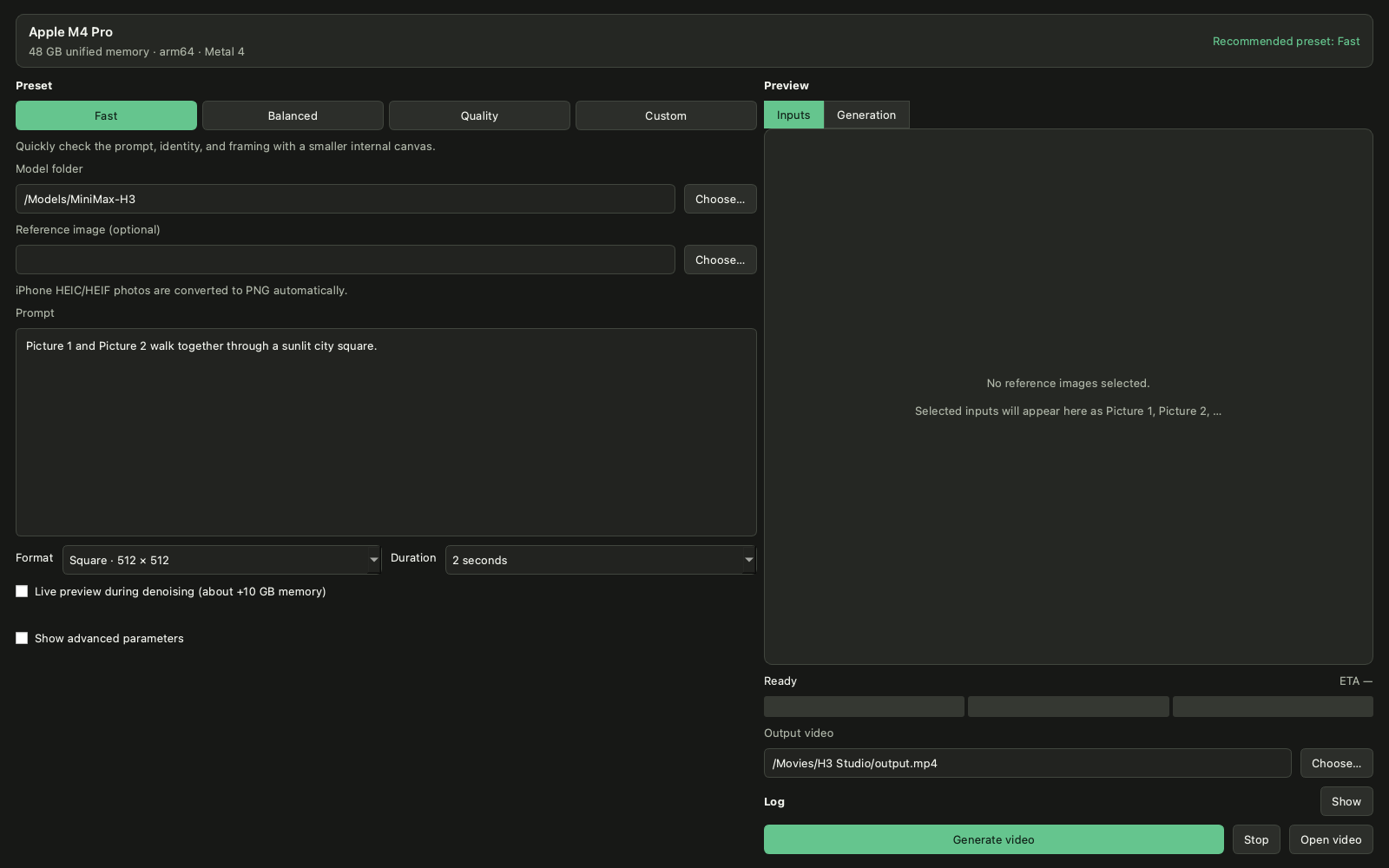
H3 Studio running with its hardware-aware Fast preset

The interface is organised around a simple workflow:

  • Hardware-aware starting point: the top panel detects the Mac, unified memory, architecture, and Metal support, then recommends a suitable preset.
  • Progressive control: Fast, Balanced, and Quality cover common workflows, while Custom exposes the practical terminal parameters for users who want full control.
  • Reference workflow: users can provide ordered image references, including iPhone HEIC/HEIF photos, and inspect them as Picture 1, Picture 2, and so on before generation.
  • Generation feedback: the right panel switches between input previews and live denoising frames, while the three-part progress bar tracks preparation, generation, and decode/export with an ETA and cancellation support.
  • CLI compatibility: the GUI remains optional and launches the existing H3 executable with explicit arguments; the terminal workflow is unchanged.

The aim is to preserve H3's flexibility while giving people who are less comfortable with long CLI commands a practical path into local generation.

@PierpaoloV
PierpaoloV marked this pull request as ready for review August 21, 2026 13:05
@Henninges

Copy link
Copy Markdown

Is it a coincidence that your GUI has the same name as mine from last week? ^^
( https://github.com/Henninges/h3-studio )

@Henninges

Copy link
Copy Markdown

Great to see this! I actually published a web-based GUI last week with the same name (https://github.com/Henninges/h3-studio), but it's a different approach: I focus on the music-video workflow (lip-synced video from image + audio references, bilingual DE/EN, 9 images / 3 videos / 3 audio refs, Context-IR prompt builder), while your native macOS app looks like it targets a broader desktop use case with hardware-aware presets.

Two findings from my testing that might be useful for both projects:

  1. --token-reduction causes ghosting + audio artifacts on my M4 Max 128GB. I tested this systematically: every render with --token-reduction produced double-image artifacts and garbled audio, while disabling it restored clean output. My GUI now disables it by default.

  2. Language limitation for speech: The model handles singing well (clear lip-sync), but German speech becomes garbled/nonsensical while English speech works fine. This appears to be a model training limitation, not a code bug. Worth mentioning in docs to set expectations.

Happy to share more benchmarks (512x512 / 10s / 20 steps = 32min on M4 Max) or collaborate on documentation!

@PierpaoloV

Copy link
Copy Markdown
Author

@Henninges Yes, i think is a coincidence.
I haven't chosen the name myself and let GPT 5.6 Sol do it for me. On my side, my responsability not to doublecheck if someone else already used that name.

@PierpaoloV

Copy link
Copy Markdown
Author

@Henninges Also, as you can see from my screen, my hardware is limited and I haven't been able to achieve great results for now, but I will do more configuration tests.
I will also take into account your suggestions and of course will be happy to collaborate on documentation!

@Henninges

Copy link
Copy Markdown

@PierpaoloV : Haha, no worries about the name – great minds (and LLMs; GPT 5.6 Sol vs Qwen3.8 Max) obviously think alike! 😄

And hey – if your hardware is limited, I'm happy to be your test bench:
I can run benchmark/config tests for your PR on my M4 Max (128 GB).
Just tell me which configurations you'd like validated (token-reduction,
core-reuse, presets, ...). That's what community is for, right?

Looking forward to collaborating on the docs!

Sign up for free to join this conversation on GitHub. Already have an account? Sign in to comment

Labels

None yet

Projects

None yet

Development

Successfully merging this pull request may close these issues.

2 participants