This simple command line python program makes use of Natural Language ToolKit - nltk - to analyse the user input text and return on a scale of -1 to 1 the level of positivity or as stated by the program as "happiness score". The program then proceeds to print a random emoticon based on the happiness score from a set of five predefined levels - excited, happy, neutral, sad and melancholic. Based on the score, the user will either be asked to answer a few questions or proceeds to prompt for the next input. If the user is asked to answer a few questions based on pet preference, the program proceeds to display a picture of the certain pet chosen.
User can enter exit any time of prompt to terminate the program.
- NLTK
- Pillow
- NLTK
-
Install the package using pip.
pip install nltk -
Run
pythoncommand and the following commands in order to download required module:import nltknltk.downloader.download('vader_lexicon')
-
- Pillow
-
Install the package using pip.
pip install Pillow
-
For other details, check out the official website for NLTK and Pillow.
-
Clone the repo locally.
git clone https://github.com/aloiva/vibe-check.git -
Run
main.pyin the terminal usingpython main.py

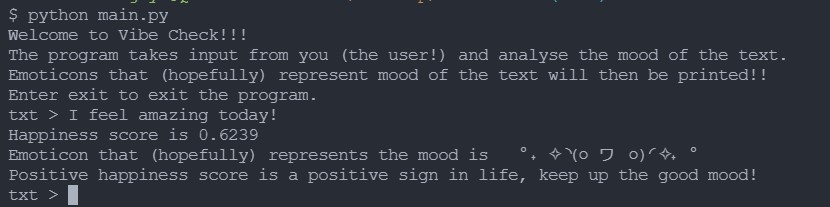
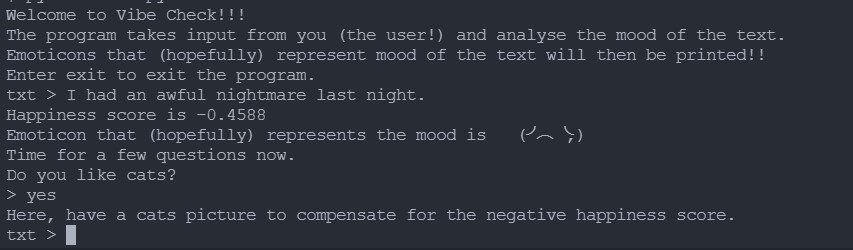
Output

To cutomise the output emoticons, make changes to the .txt files present in assets/emoticons folder.
-
Enter an emoticon in a new line to add it.
-
Delete the line with emoticon to remove it.
Do not leave a blank line in any of the files, else there is a chance of getting a null output.
-
To add or remove the images, upload or delete the .jpg files in the
assets/img/<pet>folder where is to be replaced by any of the three pets mentioned - cats, hamsters and bunnies.Remember to rename the .jpg to an integer.jpg following the name of numerically last file in the folder.
-
Change the value of respective constants in the source code to the present total number of images. Example:
CATS = <enter number of images in the folder assets/img/cats>HAMSTERS = <enter number of images in the folder assets/img/hamsters>BUNNIES = <enter number of images in the folder assets/img/bunnies>
- Written by @aloiva
- Reach out to me at LinkedIn
- Project Vibe Check - https://github.com/aloiva/vibe-check
The program is written as the final project for Code in Place and makes use the concept of conditional statements, loops, lists, dictionaries, images and file handling as taught by the course.
Thank you Code in Place for the wonderful one month filled with learning. (*^▽^*)