
Dependency impact analysis for TypeScript and JavaScript.
Change less. Break less. Know the blast radius of any file before you touch it.



npm install -g @alimaandev/ripple

# or try it without installing anything:
npx @alimaandev/ripple analyze src/your-file.ts
In any non-trivial codebase, there is a deceptively simple question:
If I change this file, what else could break?
Most developer tooling stops short.
grep finds text. Package managers track dependencies, not dependents. Traditional import graphs show what a file uses—not everything that relies on it.
So the blast radius of a change becomes a guess.
Ripple makes it explicit.
It builds the project's import graph once, then walks it in reverse to show exactly how a change propagates through your codebase:
$ ripple analyze src/authentication/login.ts

File        src/authentication/login.ts
Risk        MEDIUM · 34.7/100 ███░░░░░░░
Impact      4 routes · 2 components · 1 test
Affected    7 files
Max depth   2
Confidence  100%
No black box.
No cloud processing.
No telemetry.
No network calls.
Just deterministic analysis against the code you actually have.
Know the ripple before you commit.
| Feature | What it does |
|---|---|
| Impact analysis | Reverse dependency traversal, transitively, with depth caps. Know who imports a target file. |
| Risk scoring | A transparent 0–100 score from seven weighted signals, with a per-factor breakdown in --verbose. |
| Cycle detection | Strongly-connected components with a concrete cycle path — a → c → b → a, not just a list of names. |
| Alias & path support | tsconfig paths and custom aliases like { "@": "./src" }, including single-wildcard patterns. |
| Real-world resolution | Extension probing, index files, .js → .ts rewriting, dynamic import(), require(), export … from. |
| Categorized results | Routes, layouts, components, utilities, and tests detected by path conventions — not a raw string of file names. |
| Entry-point intelligence | package.json main/bin plus conventional root and src entry files, flagged in the report. |
| Stable JSON contract | A machine-readable report for CI gates, dashboards, and tooling — additive-only compatibility. |
| Change-set gating | ripple diff analyzes every changed file since a base ref and blocks the merge on risky code. |
| Diff allowlist | --allow <glob> (or diff.allow in config) exempts legacy files from blocking the gate — analyze, report, don't fail. |
| Graph exports | `ripple graph --format mermaid |
| Config JSON Schema | Editors autocomplete and validate ripple.config.json against the shipped ripple.schema.json via $schema. |
| Error-tolerant parsing | A broken file lowers confidence instead of aborting the run. No false precision. |
| Deterministic & offline | Same input, same output, every time. No hidden network dependency. |
Everything below is real output against a shipped example project in tests/fixtures/basic.
- Node.js ≥ 22
- pnpm 11+
npm install -g @alimaandev/ripple

ripple version                  # → 0.7.0
Or install from source:
git clone https://github.com/alimaandev/ripple.git
cd ripple
pnpm install
pnpm build                      # bundles dist/bin.js via tsup
npm link # exposes the global `ripple` binaryNo install required — npx pulls the package from the registry on the fly:
cd tests/fixtures/basic
npx @alimaandev/ripple analyze src/authentication/login.ts
Once you're sold, install it globally:
npm install -g @alimaandev/ripple
ripple analyze src/authentication/login.ts
Expected output:
ripple · impact analysis · v0.7.0

File        src/authentication/login.ts
Risk        MEDIUM · 34.7/100 ███░░░░░░░
Impact      4 routes · 2 components · 1 test
Affected    7 files
Max depth   2
Confidence  100%

› Top impact
● Dashboard (2)
● Admin (1)
● Index TS (1)

› Circular dependencies
◯ src/circular/a.ts → src/circular/c.ts → src/circular/b.ts → src/circular/a.ts

› Affected files (7)
├─ src/admin/page.tsx · depth 1
├─ src/dashboard/page.tsx · depth 1
└─ src/main.ts · depth 2
ripple graph gives a project-wide overview:
cd tests/fixtures/basic
ripple graph
ripple · dependency graph · v0.7.0
Files 25
Edges 28
External 4
Unresolved 0
Circular groups 1
› Circular dependencies
◯ src/circular/a.ts → src/circular/c.ts → src/circular/b.ts → src/circular/a.ts
Export the graph for documentation or a team wiki — no extra tooling needed:
ripple graph --format mermaid   # Mermaid flowchart (GitHub renders it natively)
ripple graph --format dot       # Graphviz digraph
ripple graph --format html      # self-contained dark-themed HTML report
ripple graph src/authentication/login.ts --format mermaid   # just a file's blast radius
Point it at a file to see its dependency tree — forwards (what it imports)
or, with -r, backwards (what imports it):
ripple graph src/circular/b.ts -rDependents (reverse)
├─ src/circular/c.ts
└─ src/circular/a.ts
ripple <command> [options]
| Command | Description | Example |
|---|---|---|
analyze <file> |
Impact analysis for a target file | ripple analyze src/authentication/login.ts |
graph [file] |
Project stats, or a single file's dependency tree | ripple graph src/circular/b.ts -r |
diff |
Gate all files changed since a git base ref | ripple diff --base main --gate critical |
doctor |
Project and environment health check | ripple doctor -v |
init |
Scaffold a ripple.config.json |
ripple init |
version |
Print the current version | ripple version |
| Command | Flag | Description |
|---|---|---|
analyze |
-j, --json |
Emit the JSON report instead of the terminal report |
analyze |
--sarif |
Emit a SARIF 2.1.0 report for code scanning |
analyze |
-v, --verbose |
Include the risk-factor point breakdown |
analyze |
-d, --depth <n> |
Cap the reverse traversal at n levels |
analyze |
-c, --config <path> |
Use a specific config file |
analyze |
--no-color |
Disable ANSI colors |
graph |
-j, --json |
Emit the JSON report |
graph |
-r, --reverse |
Show dependents (what imports this file) instead of dependencies |
graph |
-d, --depth <n> |
Cap tree depth |
graph |
-c, --config <path> |
Use a specific config file |
graph |
--no-color |
Disable ANSI colors |
doctor |
-c, --config <path> |
Use a specific config file |
doctor |
-v, --verbose |
Verbose output |
doctor |
--no-color |
Disable ANSI colors |
init |
-f, --force |
Overwrite an existing config |
diff |
-j, --json |
Emit the JSON report instead of the terminal report |
diff |
-b, --base <ref> |
Git ref to diff against (default: origin/main, main, HEAD~1, or diff.base from config) |
diff |
-g, --gate <level> |
Blocking level: medium, high, or critical (default: high, or diff.gate from config) |
diff |
-f, --format <fmt> |
Output: terminal, json, github (workflow annotations), or sarif |
diff |
-d, --depth <n> |
Cap reverse traversal per file |
diff |
-c, --config <path> |
Use a specific config file |
diff |
--no-color |
Disable ANSI colors |
Serve Ripple's analysis tools over the Model Context Protocol (see the MCP section below).
Independent health checks — config validity, tsconfig presence, source discovery, parse rate, import resolution, cycles. A failed check is reported but doesn't abort the run; the command exits non-zero if anything fails.
Tip
Run ripple doctor before your first analysis — it fails fast on config
and resolution problems and tells you exactly what to fix.
$ ripple doctor
✓ Node.js runtime v22.11.0
✓ package.json package.json
✓ ripple config ripple.config.json
✓ tsconfig.json tsconfig.json
✓ source files 25 discovered
✓ path aliases 1 configured
✓ parse all files parsed cleanly
✓ import resolution all internal imports resolved
⚠ circular dependencies 1 cycle group(s)
⚠ Diagnoses passed with warnings.
Writes ripple.config.json with the recommended defaults, ready to edit.
The minimal config references the shipped JSON Schema so editors
autocomplete and validate as you type:
ripple init                # minimal ripple.config.json + $schema
ripple init --full         # every built-in default, written out
ripple init --ts           # typed ripple.config.ts
ripple init --ts --full # full defaults as TypeScriptAnalyzes every file that changed since a base git ref, scores each with the
same risk model as analyze, and gates the change set: any file reaching
the gate level (HIGH by default) makes the command exit 1. Untracked
files are included; deleted files and non-source changes are skipped.
cd my-project
ripple diff                       # vs origin/main (then main, then HEAD~1)
ripple diff --base HEAD~1 --json  # machine-readable gate report
ripple diff --gate critical       # only CRITICAL blocks the merge
ripple diff --allow "src/legacy/**"   # legacy files never block the gate
Adopting the gate on an existing codebase? Allowlist the files you haven't
fixed yet — they are still analyzed and shown in the report, marked
(allowed), but they can't fail CI. The same list lives in config as
diff.allow, so the whole team shares it.
ripple · diff vs origin/main

Changed  2 files
Source   2 files
Allowed  1 file
Duration 118ms

✔ Gate passed — none (no HIGH or CRITICAL)

› Risk analysis (2 files)
✖ src/auth/token.ts     CRITICAL · 88.2/100 ████████░░
✔ src/legacy/session.ts LOW · 12.4/100 █░░░░░░░░░ (allowed)
… src/api/legacy.js     (not a source file)
Run ripple diff locally before opening a PR, and in CI as the same gate —
identical code, identical verdict.
ripple diff --format github--format github emits GitHub Actions workflow commands. Each risky change
shows as a warning or error annotation right on the PR's Files tab —
::error when a file blocks the gate, ::warning otherwise — plus a
::notice line with the gate verdict. The exit code still carries the
verdict, so the job fails when the gate blocks:
- run: npx @alimaandev/ripple diff --format github(--json is shorthand for --format json; the format flag also accepts
terminal, the default.)
--format sarif emits SARIF 2.1.0, the format GitHub Code Scanning speaks:
ripple diff --format sarif > ripple.sarifEach analyzed change becomes a finding on the file — error when it is
CRITICAL/HIGH, warning for MEDIUM, note for LOW — with a stable
primaryLocationLineHash fingerprint so results deduplicate across runs.
Allowlisted files are emitted as note with an in-source suppression, so
they show as exempted rather than failing. Upload the report straight into
Code Scanning alerts:
- uses: actions/upload-sarif@v3
  with:
    sarif_file: ripple.sarif
The exit code still carries the gate verdict regardless of format.
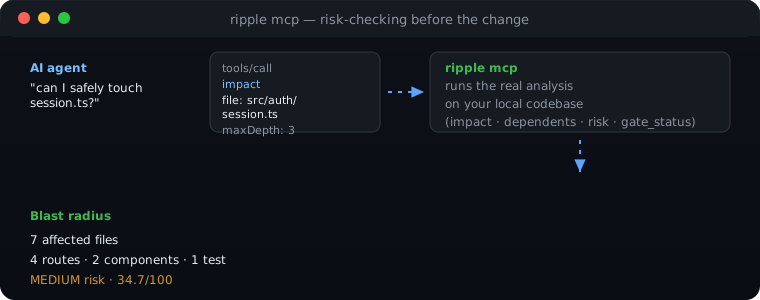
ripple mcp exposes Ripple's analysis to AI coding agents as a Model
Context Protocol server over stdio. Point any MCP client at the command and
the agent can check a file's blast radius before touching it:
{
  "mcpServers": {
    "ripple": { "command": "npx", "args": ["@alimaandev/ripple", "mcp"] }
  }
}
Four tools are served:
| Tool | Inputs | Returns |
|---|---|---|
impact |
file, maxDepth? |
Blast radius: affected files, routes, tests, components, risk level |
dependents |
file, depth? |
Who imports the file, up to a depth (default 1, direct) |
risk |
file |
Risk score with the factor breakdown behind it |
gate_status |
base?, gate? |
Current change set vs the merge gate: files, levels, pass/block verdict |
A typical agent loop: impact src/auth/session.ts before refactoring,
dependents to see who breaks, then gate_status after editing to confirm
the gate still passes. Tool results are JSON text; failures return
isError results instead of crashing the session.
Ripple discovers ripple.config.ts, .js, .cjs, .mjs, or .json in the
current directory, or from --config <path>. Your file is merged over the
defaults — every field is optional.
{
  "$schema": "./node_modules/@alimaandev/ripple/ripple.schema.json",
  "include": ["**/*.{ts,tsx,js,jsx}"],
  "ignore": ["node_modules", "dist", "build", "coverage", ".next", "out"],
  "aliases": { "@": "./src" },
  "tsconfigPath": "tsconfig.json",
  "risk": {
    "weights": {
      "affectedFiles": 0.3,
      "entryPoint": 0.15,
      "sharedUtility": 0.15,
      "publicExports": 0.1,
      "tests": 0.1,
      "routes": 0.1,
      "cycleMembership": 0.1
    },
    "thresholds": { "medium": 30, "high": 55, "critical": 80 }
  },
  "diff": {
    "base": "origin/main",
    "gate": "high",
    "allow": ["src/legacy/**"]
  }
}
Tip
The $schema line powers editor autocomplete and validation for
ripple.config.json — the package ships ripple.schema.json for it.
| Field | Default | Purpose |
|---|---|---|
include |
**/*.{ts,tsx,js,jsx} |
Source globs to analyze |
ignore |
node_modules, dist, build, coverage, .next, out |
Exclusions |
aliases |
{} |
Path aliases, merged with tsconfig paths (user wins) |
tsconfigPath |
tsconfig.json |
tsconfig to read for paths |
risk.weights |
see example | Risk signal weights |
risk.thresholds |
30 / 55 / 80 | Score thresholds for MEDIUM / HIGH / CRITICAL |
diff.base |
origin/main → main → HEAD~1 |
Git ref to diff against when --base is not given |
diff.allow |
[] |
Globs of files that never block the gate |
diff.gate |
high |
Blocking level when --gate is not given |
node_modules is always excluded, regardless of config.
The diff block sets command defaults only — --base/--gate flags always
win over the config file, which wins over the built-in defaults.
The score is a weighted sum of seven signals, normalized to 0–1. Affected counts are log-scaled so a big graph can never drown out the signal:
| Signal | Weight |
|---|---|
| Affected files | 0.30 |
| Entry point impacted | 0.15 |
| Shared utilities impacted | 0.15 |
| Target public export surface | 0.10 |
| Tests impacted | 0.10 |
| API routes impacted | 0.10 |
| Target in a circular dependency | 0.10 |
That yields a score from 0–100 and a level at thresholds 30, 55, 80 — the same colors the CLI prints on your terminal:

Confidence (0–100) is separate — how trustworthy the analysis is. It drops when files fail to parse or imports stay unresolved, and takes a penalty if the target sits inside a cycle. Use it to gate merges in CI, not just to look at pretty numbers.
Ripple is a small pipeline: discover source files, parse their imports in a real TypeScript project, build the dependency graph, then answer questions against it. Risk and confidence are derived from that same graph — never from heuristics invented on the fly.
flowchart LR
    A[Scanner] --> B[Parser]
    B --> C[Graph]
    C --> D[Reverse traversal]
    D --> E[Risk + confidence]
    E --> F[Terminal or JSON report]
The pieces map to the source tree: scanner/ discovers files from your
include/ignore globs, parser/ extracts imports and exports with
error-tolerant recovery, graph/ resolves specifiers and detects cycles, and
risk/ turns graph signals into the score you see in the report.
ripple analyze --json emits a stable, versioned contract:
{
  "tool": "ripple",
  "version": "0.5.0",
  "command": "analyze",
  "file": "src/authentication/login.ts",
  "risk": { "score": 34.4, "level": "MEDIUM", "factors": [] },
  "summary": {
    "affectedFiles": 7,
    "routes": 4,
    "components": 2,
    "entries": 1,
    "tests": 1,
    "utilities": 0,
    "maxDepth": 2,
    "confidence": 100,
    "topImpact": [
      { "label": "Dashboard", "count": 2 },
      { "label": "Admin", "count": 1 }
    ]
  },
  "affected": [
    {
      "path": "src/admin/page.tsx",
      "depth": 1,
      "direct": true,
      "categories": ["route"],
      "inCycle": false
    }
  ],
  "cycles": [
    {
      "members": ["src/circular/a.ts", "src/circular/b.ts", "src/circular/c.ts"],
      "path": ["src/circular/a.ts", "src/circular/c.ts", "src/circular/b.ts", "src/circular/a.ts"]
    }
  ],
  "targetInCycle": false,
  "durationMs": 242
}
Important
The contract is additive-only — existing field names and shapes never
change without a major version bump. graph --json follows the same
convention.
The diff report wraps a per-file view of the same risk model, plus the gate verdict:
{
  "tool": "ripple",
  "version": "0.5.0",
  "command": "diff",
  "base": "origin/main",
  "changedFiles": 2,
  "files": [
    {
      "file": "src/auth/token.ts",
      "analyzed": true,
      "risk": { "score": 88.2, "level": "CRITICAL", "factors": [] },
      "affectedFiles": 14,
      "targetInCycle": false
    },
    { "file": "src/api/legacy.js", "analyzed": false }
  ],
  "gate": {
    "level": "high",
    "blocked": true,
    "counts": { "low": 0, "medium": 0, "high": 0, "critical": 1 }
  },
  "durationMs": 118
}
blocked tells CI everything: exit code 1 if true, 0 otherwise.
ripple analyze src/authentication/login.ts --json | jq -r .risk.level
# MEDIUM
Gate every changed file in one call:
#!/usr/bin/env bash
set -euo pipefail

ripple diff --json --gate high
# exits 1 when any changed file is HIGH or CRITICAL#!/usr/bin/env bash
set -euo pipefail
level="$(ripple analyze "$1" --json | jq -r .risk.level)"
if [ "$level" = "CRITICAL" ]; then
echo "CRITICAL impact — review before merging" >&2
exit 1
fiWhy is confidence below 100%?
Warning
Confidence drops when files fail to parse or imports stay unresolved — the
two signals that make an analysis less trustworthy. Run ripple doctor to
see exactly which checks are failing.
Why do .css or package imports appear in the report?
Note
Non-source imports (styles, assets, npm packages) are classified as
external. They appear in the graph (see External in ripple graph) but
are never counted as affected files — you can't "break" a package by
changing local code.
Why are node_modules files never analyzed?
Note
node_modules is always excluded, even if your config adds it to
include. Analyzing installed packages would only add noise to your blast
radius.
Does Ripple work on Windows?
Tip
Yes — path handling is platform-aware. Integration tests run on Linux CI, and development happens on Windows; both report the same results from the same fixtures.
| Code | Meaning |
|---|---|
0 |
Success |
1 |
General failure / gate blocked |
2 |
Target file or git base ref not found |
3 |
Config missing or invalid |
pnpm install
pnpm run dev            # watch-mode rebuild via tsup
pnpm run typecheck      # tsc --noEmit
pnpm run lint           # eslint
pnpm run lint:fix       # eslint --fix
pnpm run format         # prettier --write
pnpm run test           # vitest run
pnpm run test:watch     # vitest
pnpm run build          # tsup
Architecture and design decisions live in docs/architecture.md. Before contributing, read CONTRIBUTING.md.
Quality gates run on every pull request: lint, typecheck, build, unit tests
(against a global coverage floor for src/**), integration tests on Linux
and Windows, and a dogfood job — Ripple gates its own PRs with
ripple diff --format github.
npm install -g @alimaandev/ripple
ripple analyze src/your-file.ts --json | jq -r .risk.level   # MEDIUM, HIGH, ...
If Ripple has ever kept you from an accidental breaking change, a little star goes a long way — it helps other developers find it.
MIT — see LICENSE.