


A Copier template I wrote for myself for starting Python backend projects, now packaged as Flint, a small CLI on top of the same template.
This exists because scaffolding is annoying. I got tired of burning time on the same
setup work over and over: project layout, pyproject, uv,
ruff, tests, type checking, FastAPI
setup, SQLModel when there is a database, auth wiring
when the profile calls for it, Docker for local Postgres when
you need it, CI.
None of that is hard. It is just repetitive. Repetitive setup is how you waste time and still end up with something inconsistent.
Flint is a backend-only FastAPI template that proves every generated project works, then keeps that project maintainable after the first commit.
It is not trying to be the most configurable FastAPI generator, and it is not a full-stack starter. Flint is for developers who want a typed, tested, secure, upgradeable API backend without inheriting React, five database choices, GraphQL, queues, observability vendors, or deployment machinery they need to delete.
You need the following installed before using this template:
- uv: install with:
# macOS / Linux
curl -LsSf https://astral.sh/uv/install.sh | sh

# Windows
powershell -ExecutionPolicy ByPass -c "irm https://astral.sh/uv/install.sh | iex"
- just: install with:
# macOS
brew install just

# Linux
curl --proto '=https' --tlsv1.2 -sSf https://just.systems/install.sh | bash -s -- --to /usr/local/bin

# or via cargo
cargo install just
- Docker (optional). For local Postgres and
Docker-based checks when you use the
apiorsaasprofiles. Install via Docker Desktop or your package manager. - Copier (optional). Only if you want to call
Copier directly instead of
flint:uv tool install copier
Recommended: uvx installs nothing permanently and pulls the published CLI.
uvx flint new my-projectPick a profile explicitly when you need to:
uvx flint new my-project --profile minimal
uvx flint new my-project --profile api
uvx flint new my-project --profile saas
Copier-only equivalent (same template):
copier copy gh:aidrecabrera/flint my-project --trustcd my-project
cp .env.example .envIf you chose api or saas (PostgreSQL):
just dbIf the project uses a database:
just revision "initial"
just migrate
Install dependencies (Copier already ran uv sync; this is the explicit recipe if you
want it):
just installStart the app:
just devThen open:
This template generates a FastAPI project. You do not
toggle fifteen options. You pick a profile that already encodes the big decisions:
no database, api (Postgres + SQLModel + Alembic + Docker for local dev), or saas
(all of that plus a real auth and user stack).
Use minimal when you want a service without a database. Use api for a
data-backed API without end-user auth. Use saas when you need users, sessions,
tokens, and password flows.
| Template | Best fit |
|---|---|
full-stack-fastapi-template |
FastAPI plus React plus a full app stack |
s3rius/FastAPI-template |
Maximum generator configurability |
| Flint | Backend-only FastAPI APIs that are proven, typed, tested, secure, and upgradeable |
I want fewer choices, stricter defaults, CI that actually generates code and runs checks, auth and migrations that work when the profile includes them, sane errors and logs, and upgrades that do not feel like a dare.
Because scaffolding is painful.
Every time I start a backend project, I end up doing the same things:
- making the same files
- writing the same commands
- checking the same docs
- fixing the same annoying setup details
- deciding the same tool choices again even though I already know what I want
That is dumb.
The question I asked myself before writing this template:
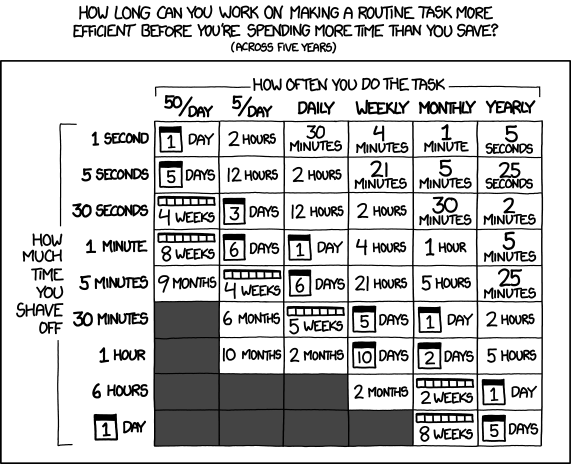
XKCD 1205. On whether automating repetitive work is worth the upfront effort.
spoiler
yes
Then, naturally:
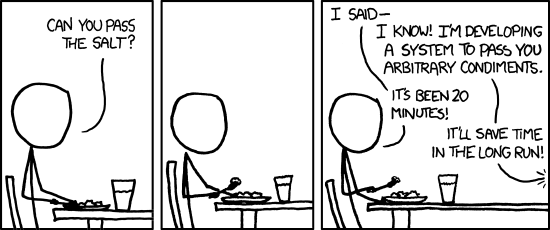
XKCD 974. The developer instinct to solve the fully general version of a specific problem instead of just doing the specific thing.
The point of a project template is not magic. It is just refusing to redo boring work badly.
So this template makes the boring decisions once and keeps them out of the way.
It is also inspired by the backend structure in Polar, especially the idea of keeping things organized around FastAPI modules, auth-aware routing when auth exists, and a backend layout that is practical instead of decorative.
Only three profiles are official:
| Profile | Includes | Excludes |
|---|---|---|
minimal |
FastAPI, uv, Ruff, Pyright, pytest, pydantic-settings, health checks, typed settings, standard JSON errors, request IDs, structured logs, GitHub Actions | database, auth, Docker |
api |
minimal plus PostgreSQL, SQLModel, Alembic, Docker Compose for local Postgres, database fixtures, migration commands, database tests |
auth, workers, vendor observability |
saas |
api plus users, register, login, current user, logout, revoke all sessions, password hashing, access tokens, refresh token rotation, hashed refresh-token storage, password reset token model, email verification token model, permissions, admin-only route example, auth tests |
OAuth, billing, multi-tenancy |
The default when you use Copier directly is api.
The generated output workflow generates every official profile and runs the checks
developers will run after generation:
| Gate | Minimal | API | SaaS |
|---|---|---|---|
uv sync --locked |
yes | yes | yes |
just check |
yes | yes | yes |
| OpenAPI export | yes | yes | yes |
just security-check (pip-audit + secret scan) |
yes | yes | yes |
| migration drift check | n/a | yes | yes |
| backend Docker image build | n/a | yes | yes |
| Docker Compose build | n/a | yes | yes |
The same workflow also tests the Copier update path through flint upgrade.
The upgrade test builds a temporary tagged template repository, generates a project
from v0.1.0, tags a template update as v0.1.1, runs flint upgrade, and confirms
the generated project receives the update before just check passes.
Use flint when you generate a project or when you run doctor, check, or upgrade
on an existing repo. Inside the generated repo you live in just. See Commands in
generated projects below.
flint new my-api
flint new my-api --profile saas --python-version 3.13
flint profiles
flint info
flint doctor
flint check
flint upgrade
flint new wraps Copier so you do not have to memorize Copier syntax. Flags you will
actually touch: --profile, --name, --package-name, --python-version (same as
--python), --no-git, --overwrite, --quiet, --dry-run, --trust. Power-user
stuff: --template (or FLINT_TEMPLATE), --vcs-ref for a tag or commit,
--skip-tasks if you want files rendered without running template tasks.
doctor, info, check, and upgrade take an optional path (default is the current
directory). flint upgrade also has --skip-check if you want Copier update without the
final just check.
Every generated project includes:
just install
just dev
just fmt
just lint
just typecheck
just test
just check
just openapi
The api and saas profiles also include:
just db
just db-stop
just db-logs
just db-reset
just revision "message"
just migrate
just downgrade
just migration-check
just docker-build
The justfile also defines optional security helpers (audit, secret-scan,
security-check) if you want pip-audit and a small secret scan script.
Generated APIs include:
/health/liveand/health/ready/api/v1prefix for versioned feature routes- stable JSON error responses with request IDs
- request ID middleware using
X-Request-ID - local human-readable request logs
- production JSON logs
- typed response models
- OpenAPI export through
just openapi
Error shape:
{
  "error": {
    "code": "auth.invalid_credentials",
    "message": "Invalid email or password.",
    "request_id": "req_..."
  }
}Generated projects fail during production settings load when unsafe defaults remain:
- default
SECRET_KEY DEBUG=true- wildcard CORS
- local development database URL
The SaaS profile stores hashed refresh tokens, rotates refresh tokens, rejects reuse,
uses strong password hashing through pwdlib[argon2], and avoids raw token storage.
Every generated project includes:
- FastAPI
- uv
- Ruff
- Pyright
- pytest
- just
- pydantic-settings
- GitHub Actions
- structured request logging and JSON logs in production (
app/observability.py) - health routes, typed settings, standard JSON errors
- a
pyproject.toml,justfile, and generated projectREADME.md
api and saas additionally include SQLModel, Alembic, migrations, Docker Compose
for Postgres (local dev), and a backend Dockerfile for image builds.
saas additionally includes JWT-style auth (access + refresh), password hashing with
pwdlib, user lifecycle routes, and auth tests.
These choices are intentionally fixed in core:
- FastAPI
- uv
- Ruff for linting and formatting
- Pyright
- pytest
- pydantic-settings
- just
- SQLModel and Alembic for database profiles
- PostgreSQL for database profiles
- GitHub Actions
If you do not want these choices, this is the wrong template for you. Popular alternatives include:
- The official full-stack-fastapi-template (React frontend, by the FastAPI team)
- s3rius/FastAPI-template (highly configurable, multiple ORMs and databases)
- jlevy/simple-modern-uv (minimal modern Python + uv)
- fastapi-practices/fastapi-best-architecture (enterprise-style stack with Celery, etc.)
That is fine. Use something else, or fork this and change it.
These do not belong in the core template:
- React, Next.js, Vue
- GraphQL
- MongoDB
- multiple ORM choices
- Kafka
- Kubernetes
- Terraform
- admin dashboards
- Stripe billing
- OAuth
- multi-tenancy
- Celery or background workers
- Prometheus, OpenTelemetry, Sentry
- Redis
- AI integrations
Those can become recipes. Core stays small enough to test completely.
Copier asks for the things that actually change the project:
project_name,project_slug,package_namedescription,authorprofile:minimal,api, orsaaspython_version:3.12,3.13, or3.14
Database and auth modes are derived from the profile (they are not separate menus anymore).
flint new exposes the same choices through flags and prompts without making you
remember Copier syntax.
A typical layout (exact files depend on the profile):
my-api/
├── app/
│   ├── main.py
│   ├── config.py
│   ├── errors.py
│   ├── observability.py
│   ├── routers/
│   │   └── health.py
│   ├── db.py                 # api / saas
│   ├── dependencies.py      # api / saas
│   ├── models.py            # api / saas
│   └── auth/                # saas only
├── scripts/
├── tests/
├── alembic/                 # api / saas
├── .github/workflows/
├── .env.example
├── .python-version
├── justfile
├── pyproject.toml
├── README.md
├── Dockerfile               # api / saas
└── docker-compose.yml       # api / saas (Postgres)
This template does not eliminate thinking. It just removes setup repetition.
You still have to do the real work yourself.
That includes:
- deciding your actual domain model
- writing real routes
- designing your schema properly
- reviewing generated migrations before applying them
- changing defaults that are wrong for your app
- setting a real
SECRET_KEY - deciding how you want to deploy
- organizing the code further if the project grows
- deleting parts you do not need
If you picked saas, you should understand the auth code.
If you picked api or saas, you should understand the models and migrations.
If you use Docker for Postgres or image builds, you should understand what the containers are doing.
The template gives you a working starting point. It does not absolve you from knowing what you are running.
That would be a stupid way to build software.
This follows the FastAPI docs fairly closely: routers, CORS, testing, and security patterns when auth exists.
SQLModel is the ORM when a database is enabled. There is no ORM choice in the template.
This uses sync SQLModel sessions, consistent with the mainstream FastAPI + SQLModel tutorial flow. FastAPI runs sync dependencies in a threadpool, so this works well for many backends.
If you need async I/O against the database, you will swap to async SQLAlchemy sessions yourself.
Alembic is included and configured so migrations work immediately.
That does not mean you should blindly trust autogenerated migrations. Read them.
Not because those tools are bad. They just do not belong in the base template I want.
If a project needs them, add them: YAGNI.
Generated projects include .copier-answers.yml, .flint.toml, .flint-version,
and .flint-profile.
flint doctor
flint upgrade
flint doctor checks project metadata, tool availability, Git cleanliness, lockfile
presence, environment keys, unsafe settings, dependency sync, template updates, lint,
typecheck, tests, migrations when present, and Docker Compose availability when used.
flint upgrade requires a clean Git tree, runs Copier update, detects conflict
markers, syncs dependencies with uv sync --locked, and runs just check.
If you use plain Copier on a generated tree:
copier update --trustPublic example repositories are part of the release process:
Each example should be regenerated on release and keep its own CI green so users can
inspect the real output before adopting Flint. The publish examples workflow
regenerates them from the release tag, verifies the generated projects, then force
pushes the result to the example repositories. It requires an EXAMPLES_TOKEN secret
with write access to those repositories.
- FastAPI
- FastAPI SQL databases tutorial
- FastAPI security tutorial
- SQLModel
- uv
- Ruff
- Copier
- just
- Polar backend inspiration
Fork it. Change it. Remove things you do not like.
This is mainly a personal template that I open-sourced. Issues, PRs, and suggestions are welcome, especially if you find bugs or have ideas that would make the defaults better.
This template is licensed under the MIT License. See the LICENSE file for details.