A beautiful visual representation of a 90-year human life where each box is one week. Inspired by Tim Urban's famous Wait But Why post.
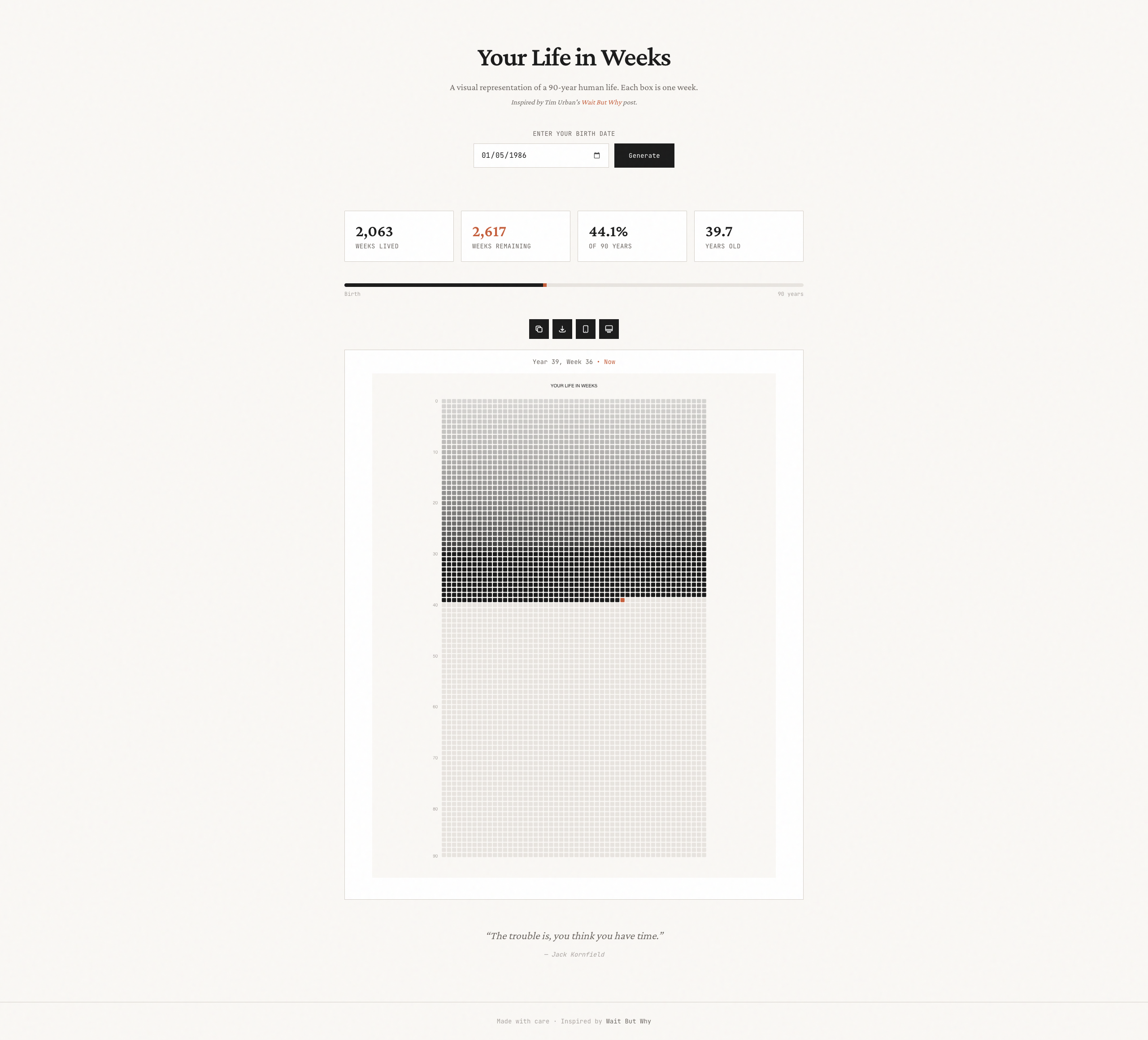
- Interactive visualization - Hover over any week to see which year and week it represents
- Current week indicator - Visual highlighting of the week you're currently living
- Fading timeline effect - Older weeks gradually fade, creating a visual sense of time passing
- Real-time stats - See weeks lived, weeks remaining, percentage of life, and years lived
- Progress bar - Visual progress bar showing your life progression
- Download as PNG - Save your personalized life chart as a high-quality image
- Shareable links - Copy and share your personalized life chart URL with others
- Web Wallpaper mode - Fullscreen real-time life counter for desktop/browser use
- iOS Wallpaper automation - Set up automatic daily wallpaper updates on your iPhone lock screen
- Custom image generation - Generate wallpaper images for any iPhone model (iPhone 14-17 series, SE)
- Responsive design - Works beautifully on all devices
- API endpoints - Get your life stats as JSON or generate custom-sized images
- Node.js 18+
- npm, yarn, or pnpm
# Install dependencies
npm install

# Run the development server
npm run dev
Open http://localhost:3000 in your browser.
npm run build
npm startThe easiest way to deploy this app is with Vercel:
Or deploy manually:
# Install Vercel CLI
npm i -g vercel

# Deploy
vercelA fullscreen, distraction-free view of your life in weeks with a real-time counter — perfect for keeping open as a browser tab or setting as a desktop wallpaper.
- Real-time life counter - Watch your life tick by in seconds, minutes, hours, days, months, and years
- Precise percentage - See your life progress with 8 decimal places of precision
- Minimal UI - Clean, focused design with no distractions
- Responsive - Automatically adjusts to any screen size
Access wallpaper mode by adding &wallpaper=true to any URL with a birth date:
https://your-domain.com/?birthDate=1990-01-15&wallpaper=true
Or click the monitor icon in the app after entering your birth date.
- Keep open as a dedicated browser tab for daily reflection
- Set as a browser homepage for a mindful start to each day
- Use browser's "Add to Desktop" feature for a standalone app experience
- Display on a secondary monitor as an ambient life visualization
GET /api/stats?birthDate=1990-01-15
Response:
{
  "birthDate": "1990-01-15",
  "currentDate": "2024-01-15",
  "totalWeeksIn90Years": 4680,
  "weeksLived": 1774,
  "weeksRemaining": 2906,
  "percentageLived": 37.91,
  "yearsLived": 34.0,
  "daysLived": 12419,
  "daysRemaining": 20431
}
Generate a custom-sized PNG image of your life in weeks, perfect for wallpapers.
GET /api/image?birthDate=1990-01-15&width=1179&height=2556
Parameters:
birthDate(required) - Your birth date in YYYY-MM-DD formatwidth(optional) - Image width in pixels (default: 1170)height(optional) - Image height in pixels (default: 2532)
Supported iPhone Sizes:
| Model | Width | Height |
|---|---|---|
| iPhone 17 Pro Max | 1320 | 2868 |
| iPhone 17 Pro | 1206 | 2622 |
| iPhone 16 Pro Max | 1320 | 2868 |
| iPhone 16 Pro | 1206 | 2622 |
| iPhone 16 Plus | 1290 | 2796 |
| iPhone 16 | 1179 | 2556 |
| iPhone 15 Pro Max | 1290 | 2796 |
| iPhone 15 Pro | 1179 | 2556 |
| iPhone SE (3rd gen) | 750 | 1334 |
Share your personalized life chart with others using URL parameters:
https://your-domain.com/?birthDate=1990-01-15
Set up an iOS Shortcut automation to automatically update your lock screen wallpaper daily:
- Open the app and enter your birth date
- Click the phone icon to open the iOS Wallpaper Setup modal
- Select your iPhone model
- Follow the step-by-step instructions to create a Shortcuts automation
The automation will fetch a fresh image from the API at midnight each day, keeping your lock screen updated with your life progress.
- Next.js 14 - React framework
- TypeScript - Type safety
- Tailwind CSS - Styling
- Canvas API - Interactive visualization rendering
- @vercel/og - Dynamic image generation for wallpapers
- Concept inspired by Tim Urban's Your Life in Weeks post on Wait But Why
- Quote by Jack Kornfield
MIT