







PowerGSLB is a DNS-based Global Server Load Balancing (GSLB) solution built as a PowerDNS Authoritative Server Remote Backend. It continuously health-checks the endpoints behind your DNS records and returns only the live ones, honoring weighted priorities, per-rrset routing policies (round-robin, weighted-random, sticky-hash), and DNS views (CIDR and GeoIP).
- Main features
- Architecture
- Quick start with the published Docker image
- Persisting data
- Upgrading
- Building the Docker image
- Manual setup
- Configuration
- Database
- Web administration interface
- Record selection
- Health checks
- Traffic management patterns
- Performance
- API
- Tests
- License
- Written in Python 3.12
- Built as PowerDNS Authoritative Server Remote Backend
- Modular and multithreaded architecture
- Systemd status and watchdog support
- Quick installation and setup
- All-in-one Docker image
- DNS GSLB configuration stored in a MySQL / MariaDB database
- Master-Slave DNS GSLB using native MySQL / MariaDB replication
- Multi-Master DNS GSLB using native MySQL / MariaDB Galera Cluster
- Web-based administration interface
- JSON HTTP API for DNS queries and CRUD administration
- HTTPS support for the web server
- Audit trail of every admin write
- Record selection:
- DNS GSLB views (CIDR and GeoIP)
- EDNS Client Subnet (ECS) support
- Weighted (priority) records
- Per-rrset routing policies: round-robin, weighted-random, sticky-hash
- "All down = all up" so DNS never fails entirely during a full outage
- Extendable health checks:
- Arbitrary command execution
- ICMP ping
- HTTP request
- TCP connect
- TLS connect
PowerGSLB runs a fixed set of cooperating service threads under a systemd-aware supervisor:
- Monitor - periodically reads the health-check configuration from the database, runs one check thread per monitored record, and maintains the in-memory set of records that are currently down. Rise / fall counters debounce flapping endpoints.
- DNS interface (default
127.0.0.1:8080, plain HTTP) - implements the PowerDNS Remote Backend protocol. PowerDNS forwards each query here; PowerGSLB filters the candidate records by query type, view, and health status, then the rrset's routing policy chooses the answers (reading each record's weight), and returns a JSON DNS response. - Admin interface (default
0.0.0.0:443, HTTPS) - the web management UI and its CRUD API. Authenticates via HTTP Basic Auth against the database (crypt(3) SHA-512 hashes, verified in constant time).
The two HTTP surfaces are served by separate handler classes on separate ports, so the admin API is never reachable on
the DNS port and vice versa. The supervisor integrates with systemd (READY=1, watchdog, STOPPING=1) and shuts the
threads down cooperatively on SIGTERM / SIGINT.
Click to expand the class diagram
The diagram below maps the application classes and their relationships. Standard-library and third-party base classes
are marked <<stdlib>> / <<builtin>>; the helper modules that hold free functions are shown as <<module>>
pseudo-classes.
classDiagram
    direction TB

    %% ===== Entry point =====
    class PowerGSLB {
        +main()$ None
    }

    %% ===== system =====
    class Config {
        -dict _data
        +get(section, option, default) Any
        +items(section) dict
    }
    class _Section {
        -Config _config
        -str _section
        +get(option, default) Any
        +pop(option, default) Any
    }
    class SystemService {
        +Sequence~ServiceThread~ service_threads
        +float sleep_interval
        +float shutdown_timeout
        +start() None
        +systemd_notify(status, unset)$ None
        +watchdog_interval(default)$ float
    }
    class ServiceThread {
        <<Protocol>>
        +str name
        +start() None
        +is_alive() bool
        +shutdown(timeout) None
    }
    class password {
        <<module>>
        +str MASK$
        +hash_password(password)$ str
        +verify_password(password, stored)$ bool
    }

    %% ===== client =====
    class ClientGeo {
        +str | None country
        +str | None continent
    }
    class ClientContext {
        +IPAddress ip
        +int prefixlen
        +ClientGeo | None geo
    }

    %% ===== view =====
    class GeoIPReader {
        +frozenset~str~ CONTINENT_CODES$
        +frozenset~str~ COUNTRY_CODES$
        -Reader _reader
        +parse_geo_token(token)$ tuple | None
        +lookup(ip) ClientGeo
    }
    class ViewRule {
        -GeoIPReader | None _geoip$
        +tuple~IPNetwork~ cidrs
        +tuple~tuple~ geos
        +bool matches_all
        +configure(geoip_config)$ None
        +resolve(rule)$ ViewRule
        +matches(context) bool
    }

    %% ===== monitor =====
    class AbstractThread {
        <<abstract>>
        +float sleep_interval
        +run() None
        +shutdown(timeout) None
        +task()* None
    }
    class MonitorManager {
        -dict~int,CheckThread~ _threads
        -StatusRegistry _status_registry
        +build_check(check)$ Check
        +task() None
        +shutdown(timeout) None
    }
    class StatusRegistry {
        -set~int~ _status
        +add(id) None
        +remove(id) None
        +is_down(id) bool
        +snapshot() list
        +get_writer(id) StatusWriter
        +retain(valid_ids) set
    }
    class StatusWriter {
        -StatusRegistry _registry
        +int content_id
        +set_down() None
        +set_up() None
        +is_down() bool
    }
    class CheckThread {
        +Check check
        +StatusWriter status_writer
        +content_id() int
        +task() None
    }

    %% ===== monitor/check =====
    class Check {
        <<abstract dataclass>>
        -dict _registry$
        +str name$
        +bool skip$
        +int interval
        +int timeout
        +int fall
        +int rise
        +create(spec)$ Check
        +configure(options)$ None
        +execute()* bool
    }
    class NoCheck {
        +name = "none"
        +skip = True
        +execute() bool
    }
    class IcmpCheck {
        +name = "icmp"
        +bool privileged$
        +str ip
        +execute() bool
    }
    class TcpCheck {
        +name = "tcp"
        +str ip
        +int port
        +execute() bool
    }
    class TlsCheck {
        +name = "tls"
        +str ip
        +int port
        +bool tls_verify
        +str host
        +execute() bool
    }
    class HttpCheck {
        +name = "http"
        +str url
        +str method
        +str expected_status
        +str body_match
        +bool tls_verify
        +str host
        +execute() bool
    }
    class ExecCheck {
        +name = "exec"
        +list~str~ args
        +int expected_code
        +str output_match
        +bool redirect_error
        +execute() bool
    }

    %% ===== routing =====
    class RoutingPolicy {
        <<abstract dataclass>>
        +str name$
        +create(spec)$ RoutingPolicy
        +resolve(policy_json)$ RoutingPolicy
        +network_prefix(context) int | None
        +select(candidates, context)* list
    }
    class RoundRobin {
        +name = "round-robin"
        +int max_answers
        +select(candidates, context) list
    }
    class WeightedRandom {
        +name = "weighted-random"
        +int max_answers
        +select(candidates, context) list
    }
    class StickyHash {
        +name = "sticky-hash"
        +int max_answers
        +int ipv4_prefix
        +int ipv6_prefix
        +network_prefix(context) int | None
        +select(candidates, context) list
    }

    %% ===== server/http =====
    class HTTPServerManager {
        +str address
        +int port
        +bool ssl
        +str root
        +float keep_alive_timeout
        -type~HTTPRequestHandler~ _handler
        +run() None
        +shutdown(timeout) None
    }
    class _ThreadingHTTPServer {
    }
    class HTTPRequestHandler {
        <<abstract>>
        +str route$
        +Database database
        +StatusRegistry status_registry
        +bytes body
        +handle() None
        +do_GET() None
        +do_HEAD() None
        +do_POST() None
        +_handle_route()* None
    }
    class PowerDNSRequestHandler {
        +route = "dns"
        +content() str
    }
    class AdminRequestHandler {
        +route = "admin"
        +UserContext | None user
        -dict _commands$
        +send_head() BytesIO | BinaryIO | None
        +content() str
    }
    class queryparser {
        <<module>>
        +parse_query(query_string)$ dict
    }
    class QueryParserError {
        <<Exception>>
    }

    %% ===== database =====
    class MySQLDatabase {
        +Error
        +join_operation(op)$ str
        +select(op, params) list
        +modify(op, params) int
        +last_insert_id() int
        +transaction() ContextManager
        +__enter__() Self
        +__exit__() None
    }
    class PowerDNSMixIn {
        <<abstract>>
        +zone_suffixes(qname)$ list
        +gslb_checks() list
        +gslb_domains(include_disabled) list
        +gslb_records(qname, qtype) list
    }
    class W2UIMixIn {
        <<abstract>>
        +check_user(user, password) list
        +get_data(data, recid, page, ...) tuple
        +save_data(data, save_recid, user_context, ...) int
        +delete_data(data, ids, user_context) int
    }
    class PageRequest {
        <<dataclass>>
        +tuple searches
        +bool or_logic
        +tuple sorts
        +int | None limit
        +int | None offset
        +from_query(query)$ PageRequest
    }
    class SearchClause {
        <<dataclass>>
        +str field
        +str type
        +str operator
        +Any value
        +from_clause(clause)$ SearchClause
    }
    class SortClause {
        <<dataclass>>
        +str field
        +str direction
        +from_clause(clause)$ SortClause
    }
    class serialize {
        <<module>>
        +json_default(value)$ str
    }
    class Masked {
        <<dataclass>>
        +str mask$
        +Any value
    }
    class UserContext {
        <<NamedTuple>>
        +int id
        +str user
        +str name
        +str client_ip
    }
    class AuditRow {
        <<NamedTuple>>
        +str user
        +str client_ip
        +str action
        +str data
        +int record_id
        +str | None record_before
        +str | None record_after
    }
    class Selector {
        <<Protocol>>
        +select(op, params) list
    }
    class Executor {
        <<Protocol>>
        +modify(op, params) int
        +last_insert_id() int
    }
    class Table {
        <<dataclass>>
        +str name
        +str key
        +tuple fields
        +tuple columns
        +Mapping aliases
        +Mapping defaults
        +get(db, recid, page, ...) tuple
        +save(db, save_recid, ...) int
        +written_recid(db, save_recid, ...) int
        +remove(db, ids) int
    }
    class Records {
        +get(db, recid, page, ...) tuple
        +save(db, save_recid, ...) int
    }
    class Users {
        +check_user(db, user, password) list
        +save(db, save_recid, ...) int
    }
    class Status {
        +save(db, save_recid, ...) int
        +remove(db, ids) int
    }
    class Audit {
        +record(db, rows) int
        +save(db, save_recid, ...) int
        +remove(db, ids) int
    }

    %% ===== stdlib bases =====
    class Thread { <<stdlib>> }
    class SimpleHTTPRequestHandler { <<stdlib>> }
    class HTTPServer { <<stdlib>> }
    class ThreadingMixIn { <<stdlib>> }
    class MySQLConnection { <<mysql.connector>> }
    class dict { <<builtin>> }

    %% ===== Inheritance =====
    dict <|-- _Section
    Thread <|-- AbstractThread
    AbstractThread <|-- MonitorManager
    AbstractThread <|-- CheckThread
    Check <|-- NoCheck
    Check <|-- IcmpCheck
    Check <|-- TcpCheck
    Check <|-- TlsCheck
    Check <|-- HttpCheck
    Check <|-- ExecCheck
    RoutingPolicy <|-- RoundRobin
    RoutingPolicy <|-- WeightedRandom
    RoutingPolicy <|-- StickyHash
    Thread <|-- HTTPServerManager
    ThreadingMixIn <|-- _ThreadingHTTPServer
    HTTPServer <|-- _ThreadingHTTPServer
    SimpleHTTPRequestHandler <|-- HTTPRequestHandler
    HTTPRequestHandler <|-- PowerDNSRequestHandler
    HTTPRequestHandler <|-- AdminRequestHandler
    PowerDNSMixIn <|-- MySQLDatabase
    W2UIMixIn <|-- MySQLDatabase
    Selector <|-- Executor
    Table <|-- Records
    Table <|-- Users
    Table <|-- Audit
    Records <|-- Status
    ServiceThread <|.. MonitorManager : satisfies
    ServiceThread <|.. HTTPServerManager : satisfies
    Executor <|.. MySQLDatabase : satisfies

    %% ===== Associations / composition =====
    PowerGSLB ..> Config : creates
    PowerGSLB ..> StatusRegistry : creates
    PowerGSLB ..> ViewRule : configure
    PowerGSLB ..> MonitorManager : creates
    PowerGSLB ..> HTTPServerManager : creates
    PowerGSLB ..> SystemService : creates
    Config ..> _Section : builds
    SystemService o--> "*" ServiceThread : supervises
    MonitorManager o--> "*" CheckThread : manages
    MonitorManager --> StatusRegistry
    MonitorManager ..> Check : create
    CheckThread --> Check
    CheckThread --> StatusWriter
    StatusRegistry ..> StatusWriter : creates
    StatusWriter --> StatusRegistry
    HTTPServerManager o--> _ThreadingHTTPServer : owns
    HTTPServerManager --> StatusRegistry
    HTTPServerManager ..> HTTPRequestHandler : instantiates per request
    HTTPRequestHandler --> MySQLDatabase : per-connection
    MySQLDatabase o--> MySQLConnection : holds
    HTTPRequestHandler --> StatusRegistry
    AdminRequestHandler ..> MonitorManager : build_check (validate)
    AdminRequestHandler ..> RoutingPolicy : resolve (validate)
    AdminRequestHandler ..> ViewRule : resolve (validate)
    AdminRequestHandler ..> queryparser : parse_query
    AdminRequestHandler ..> PageRequest : builds
    AdminRequestHandler ..> UserContext : builds
    AdminRequestHandler ..> serialize : json_default
    queryparser ..> QueryParserError : raises
    PageRequest o--> SearchClause : parses into
    PageRequest o--> SortClause : parses into
    W2UIMixIn ..> Table : routes by token
    W2UIMixIn ..> UserContext : audits under
    W2UIMixIn ..> AuditRow : builds
    W2UIMixIn ..> serialize : json_default
    Table ..> Executor : executes through
    Table ..> PageRequest : reads
    Audit ..> AuditRow : inserts
    Users ..> password : hash / verify
    Users ..> Masked : binds hash
    Masked ..> password : MASK
    PowerDNSRequestHandler ..> RoutingPolicy : resolve
    PowerDNSRequestHandler ..> ViewRule : resolve
    PowerDNSRequestHandler ..> ClientContext : builds
    ViewRule o--> GeoIPReader : classvar
    ViewRule ..> ClientContext : reads / fills
    GeoIPReader ..> ClientGeo : returns
    RoutingPolicy ..> ClientContext : reads
The fastest way to try PowerGSLB is the all-in-one image, which bundles PowerGSLB, PowerDNS Authoritative Server, MariaDB, and systemd on a single RHEL UBI 10 base.
The run below is volume-less and disposable: each docker run starts from a clean, freshly-initialized database, and
removing the container discards everything. That is the right mode for a demo and tests. For any data that must outlive
the container, see Persisting data below.
docker pull docker.io/acudovs/powergslb:2.4.3

docker run -it --privileged \
    --name powergslb --hostname powergslb \
    --tmpfs /run --tmpfs /tmp \
    docker.io/acudovs/powergslb:2.4.3
Find the container IP address and use it to reach the services:
CONTAINER_IP=$(docker inspect -f '{{range .NetworkSettings.Networks}}{{.IPAddress}}{{end}}' powergslb)Smoke-test DNS once the container is up:
dig @${CONTAINER_IP} example.com SOA
dig @${CONTAINER_IP} example.com A
dig @${CONTAINER_IP} example.com AAAA
dig @${CONTAINER_IP} example.com ANY
Then open the admin interface at https://${CONTAINER_IP}/admin/. Each container generates its own self-signed
certificate on first start, so the browser shows a security warning; proceed past it to reach the UI.
- Default username:
admin - Default password:
admin
Change the default password after first login. Edit the admin user in the admin UI under the "Users" section.
Manage and stop the container:
docker exec -it powergslb bash
docker stop powergslb
The container log carries the boot progress and the errors of every service (PowerGSLB, PowerDNS, MariaDB, systemd itself). The journal keeps every level, volatile and capped at 32 MB:
docker logs -f powergslb
docker exec powergslb journalctl -u powergslb
Forwarding needs a tty (the -t above). The console level is a run-time choice, no image rebuild required: systemd
reads the arguments of PID 1 as its kernel command line, so appending
/sbin/init systemd.journald.max_level_console=info to the docker run command adds the service INFO lines to
docker logs. See journald.conf.
To reach the services on the host instead of the container IP, publish the ports with
-p 53:53/tcp -p 53:53/udp -p 443:443/tcp. Note that these may conflict with a DNS resolver or HTTPS service already
listening on the host, so connecting to the container IP is usually simpler.
The image ships an empty datadir and initializes the database on first start, so without a volume every run begins from
scratch. Any deployment whose data must outlive the container must mount a named volume at /var/lib/mysql:
docker volume create powergslb-db

docker run -it --privileged \
    --name powergslb --hostname powergslb \
    --tmpfs /run --tmpfs /tmp \
    -v powergslb-db:/var/lib/mysql \
    docker.io/acudovs/powergslb:2.4.3
First boot initializes the database inside the volume; later runs detect the existing data and reuse it untouched. A
bind mount (-v "$PWD/db:/var/lib/mysql") or a Kubernetes PVC works the same way.
Upgrading between PowerGSLB versions is a container swap; the volume is the only state carried across. Stop and remove the old container, pull (or rebuild) the new image, and run it with the same named volume:
docker stop powergslb && docker rm powergslb
docker pull docker.io/acudovs/powergslb:"$NEW_VERSION"

docker run -it --privileged \
    --name powergslb --hostname powergslb \
    --tmpfs /run --tmpfs /tmp \
    -v powergslb-db:/var/lib/mysql \
    docker.io/acudovs/powergslb:"$NEW_VERSION"
The service logs its version as the first line it writes at startup, so the journal confirms which version is serving:
docker exec powergslb journalctl -u powergslb | grep PowerGSLBBuild the image from a checkout of the repository instead of pulling it:
VERSION=$(PYTHONPATH=src python3 -c "from powergslb.version import VERSION; print(VERSION)")

docker build -f docker/Dockerfile --force-rm --no-cache -t powergslb:"$VERSION" .

docker run -it --privileged --name powergslb --hostname powergslb \
    --tmpfs /run --tmpfs /tmp \
powergslb:"$VERSION"The Docker image is the recommended way to run PowerGSLB. To install the Python package directly - for development, or to integrate with an existing PowerDNS and MariaDB - build the package and install it into a virtual environment.
Create a virtual environment (activation is required each time before use):
python3 -m venv --copies --system-site-packages --upgrade-deps .venv
source .venv/bin/activate
Install dev dependencies and the project in editable mode, then build the sdist and wheel:
pip install --group dev --editable .
python -m build
Install the built wheel:
pip install --force-reinstall --upgrade dist/powergslb-*-py3-none-any.whlRun the service against a configuration file (-c / --config is required), or print the version without starting
the service (-V / --version):
powergslb -c /etc/powergslb/powergslb.toml
powergslb --version
The service also needs a MariaDB database with the schema and seed data loaded (database/scheme.sql and
database/data.sql), and a PowerDNS Remote Backend pointed at the DNS interface. See the files under docker/rootfs/
for reference configuration (powergslb.toml and pdns.conf.powergslb).
PowerGSLB is configured from a single TOML file, passed with -c / --config. The default file ships at
docker/rootfs/etc/powergslb/powergslb.toml and is deployed to
/etc/powergslb/powergslb.toml in the Docker image. Values are natively typed: ports and timeouts are integers, ssl
is a boolean, and the rest are strings.
| section | purpose | key options |
|---|---|---|
[logging] |
Python logging | format, level |
[database] |
MySQL / MariaDB connection | database, user, password, host, port, unix_socket |
[server] |
DNS interface (Remote Backend) | address, port, TLS options, keep_alive_timeout |
[admin] |
admin interface (web UI + API) | address, port, TLS options, keep_alive_timeout, root |
[monitor] |
health-check engine | update_interval (seconds), per-check-type knobs |
[geoip] |
geo routing for views | database (path to a GeoIP database) |
The [database] is passed straight to mysql.connector as connect kwargs. When unix_socket is set it takes
precedence over host / port.
A connection the database closed while idle (server restart, failover, wait_timeout) is reconnected transparently on the next statement. A connection lost mid-statement fails the request instead of retrying it, and a transaction is aborted rather than resumed on a fresh connection.
[server] and [admin] are served by the same HTTP engine, so they accept the same options. Both take
keep_alive_timeout (the HTTP keep-alive idle timeout in seconds) and the same TLS set: ssl (bool) to enable HTTPS,
cert (a PEM that may also bundle the private key), key (a separate key file when cert holds only the
certificate), and ciphers (an OpenSSL cipher string).
The [admin] certificate is self-signed, generated once on first container start (the powergslb-certgen oneshot
unit writes /etc/powergslb/powergslb.pem only if it is missing) so each deployment gets its own unique cert. Replace
cert with your own PEM for production.
The bundled PowerDNS reaches the [server] DNS interface over loopback, so it ships as plain HTTP. To secure that hop
for an external PowerDNS instance, enable TLS on [server] the same way as on [admin] - just set ssl = true and
point cert (and key) at a certificate - then switch the Remote Backend URL to https://.
The [monitor] section tunes the health-check engine as a whole. update_interval is how often it re-reads the
monitor configuration from the database; the remaining keys are <type>_<option> defaults applied to every check of
that type (unlike the per-monitor JSON in Health checks, these are process-global):
| option | type | default | effect |
|---|---|---|---|
update_interval |
int | 60 |
Seconds between database re-reads of the monitor configuration. |
exec_output_chunk |
int | 65536 |
Bytes of command output searched by a check's output_match. |
http_body_chunk |
int | 65536 |
Bytes of the HTTP body read and searched by a check's body_match. |
http_user_agent |
str | PowerGSLB/<version> |
User-Agent header every HTTP check sends. |
icmp_privileged |
bool | true |
Raw ICMP socket (CAP_NET_RAW) vs. an unprivileged datagram socket. |
The [geoip] section database is the path to a MaxMind DB (MMDB) file. The Docker image bundles the
DB-IP IP-to-Country Lite at
/usr/share/powergslb/dbip-country-lite.mmdb; point database at a
MaxMind GeoLite2 / GeoIP2 file to swap it.
Every option can be overridden by an environment variable named POWERGSLB_<SECTION>_<OPTION> (uppercased), coerced to
the configured value's type. This is how the Docker image is tuned without editing the file; the systemd unit
allow-lists these via PassEnvironment.
Click to expand example values
# [logging]
POWERGSLB_LOGGING_FORMAT="%(levelname)s %(message)s"  # Python logging format string
POWERGSLB_LOGGING_LEVEL=INFO

# [database]
POWERGSLB_DATABASE_DATABASE=powergslb
POWERGSLB_DATABASE_USER=powergslb
POWERGSLB_DATABASE_PASSWORD=secret
POWERGSLB_DATABASE_HOST=192.168.1.20                  # connect to a remote database
POWERGSLB_DATABASE_PORT=3306
POWERGSLB_DATABASE_UNIX_SOCKET=                       # empty: use host/port over TCP instead of the socket
POWERGSLB_DATABASE_CONNECTION_TIMEOUT=1

# [server]
POWERGSLB_SERVER_ADDRESS=0.0.0.0                      # expose the DNS backend beyond loopback
POWERGSLB_SERVER_PORT=8080
POWERGSLB_SERVER_SSL=false
POWERGSLB_SERVER_CERT=
POWERGSLB_SERVER_KEY=
POWERGSLB_SERVER_CIPHERS=
POWERGSLB_SERVER_KEEP_ALIVE_TIMEOUT=300

# [admin]
POWERGSLB_ADMIN_ADDRESS=0.0.0.0
POWERGSLB_ADMIN_PORT=8443
POWERGSLB_ADMIN_SSL=true
POWERGSLB_ADMIN_CERT=/etc/powergslb/powergslb.pem
POWERGSLB_ADMIN_KEY=                                  # separate key file when cert holds only the certificate
POWERGSLB_ADMIN_CIPHERS=ECDHE-RSA-AES256-GCM-SHA384
POWERGSLB_ADMIN_KEEP_ALIVE_TIMEOUT=300
POWERGSLB_ADMIN_ROOT=/tmp/powergslb                   # override the admin UI document root

# [monitor]
POWERGSLB_MONITOR_UPDATE_INTERVAL=2                   # pick up monitor changes faster (handy for testing)
POWERGSLB_MONITOR_ICMP_PRIVILEGED=false               # use an unprivileged ICMP datagram socket
POWERGSLB_MONITOR_HTTP_BODY_CHUNK=65536
POWERGSLB_MONITOR_HTTP_USER_AGENT=PowerGSLB-probe     # override the HTTP check User-Agent
POWERGSLB_MONITOR_EXEC_OUTPUT_CHUNK=65536

# [geoip]
POWERGSLB_GEOIP_DATABASE=/data/GeoLite2-Country.mmdb # use a MaxMind file instead of the bundled DB-IP LiteThe DNS GSLB configuration lives in a MySQL 8 / MariaDB 10.5+ database. The schema uses a two-level model: an rrset
is one (domain, name, type) and owns its ttl and routing policy; a record is one answer inside it (content
plus the monitor, view, weight and disabled flag). Record names are stored relative to the zone (@ for the
apex, otherwise the labels left of the domain), so in the admin grid the Domain column is authoritative and Name
is relative.
DNS invariants (CNAME exclusivity, SOA cardinality, rrset garbage collection) are enforced in the database itself via CHECK constraints and triggers, so both the web UI and handwritten SQL are covered.
The schema, seed data, entity-relationship diagram, table reference, and the rationale behind the design are documented in database/README.md.
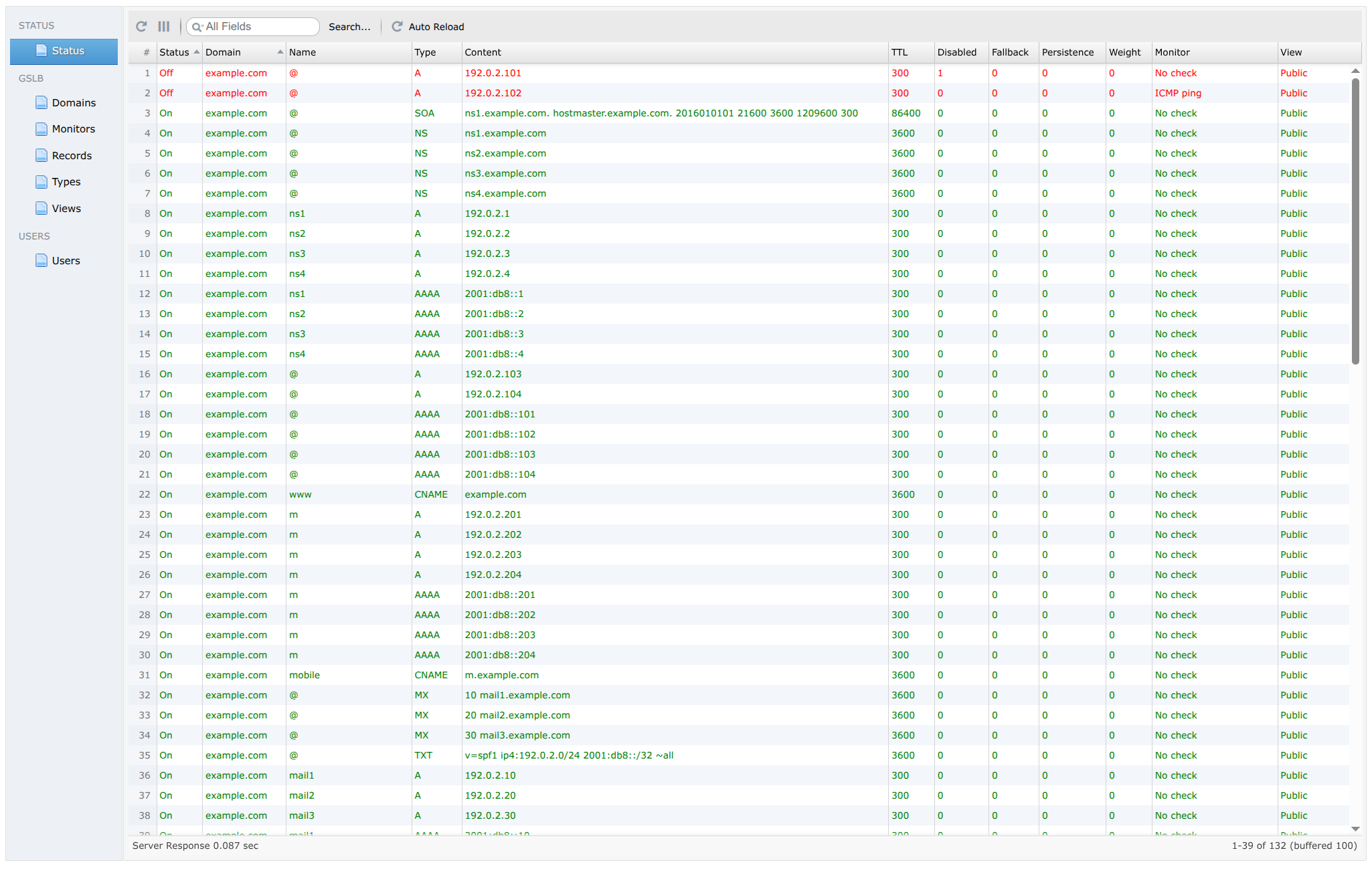
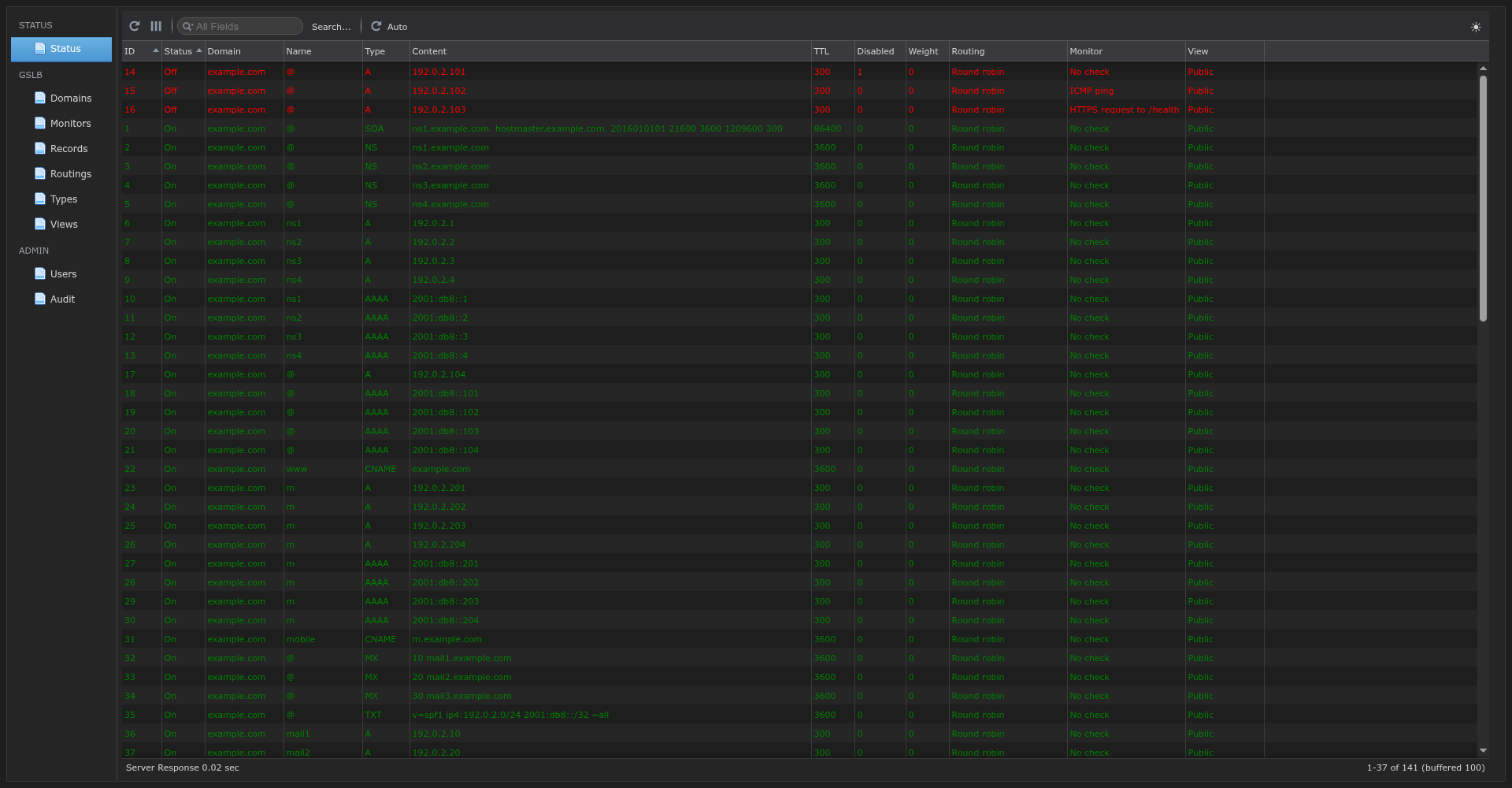
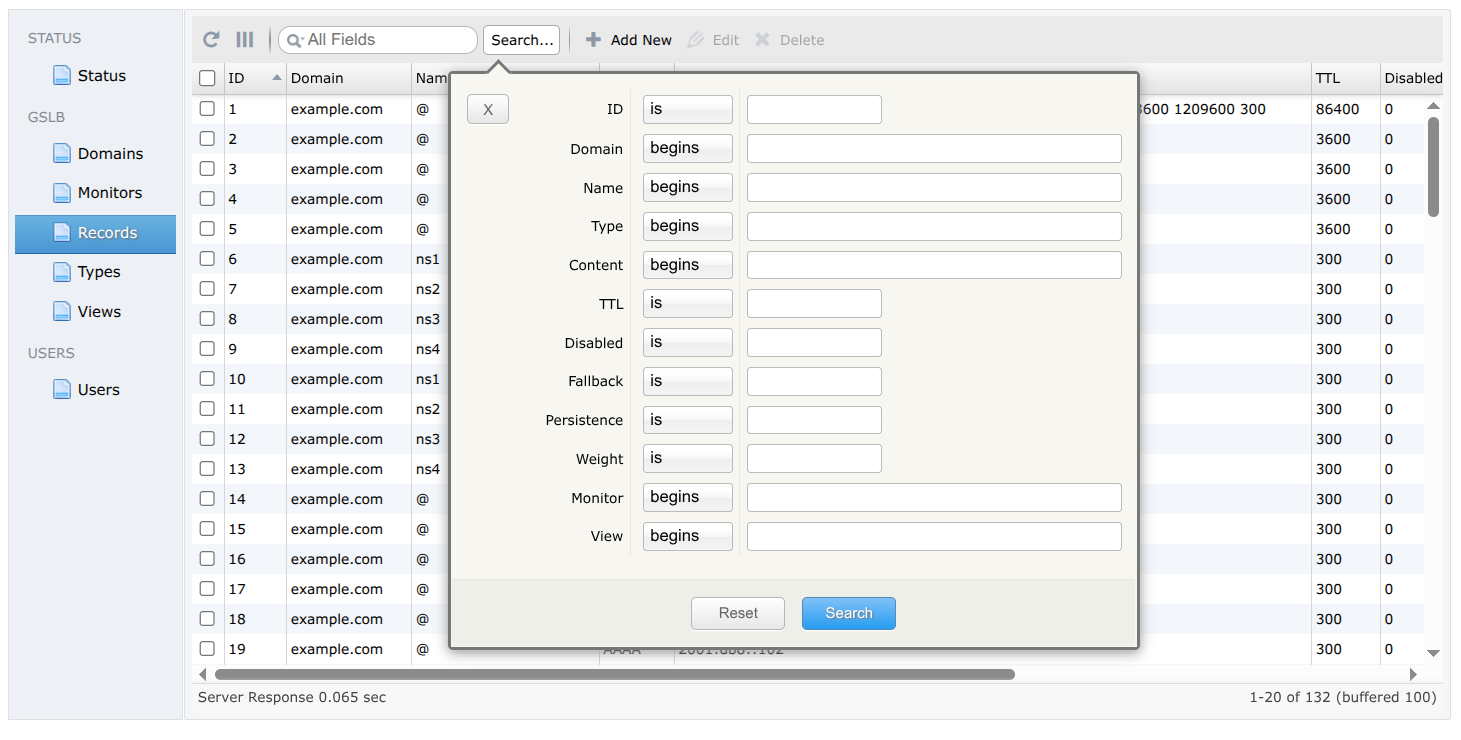
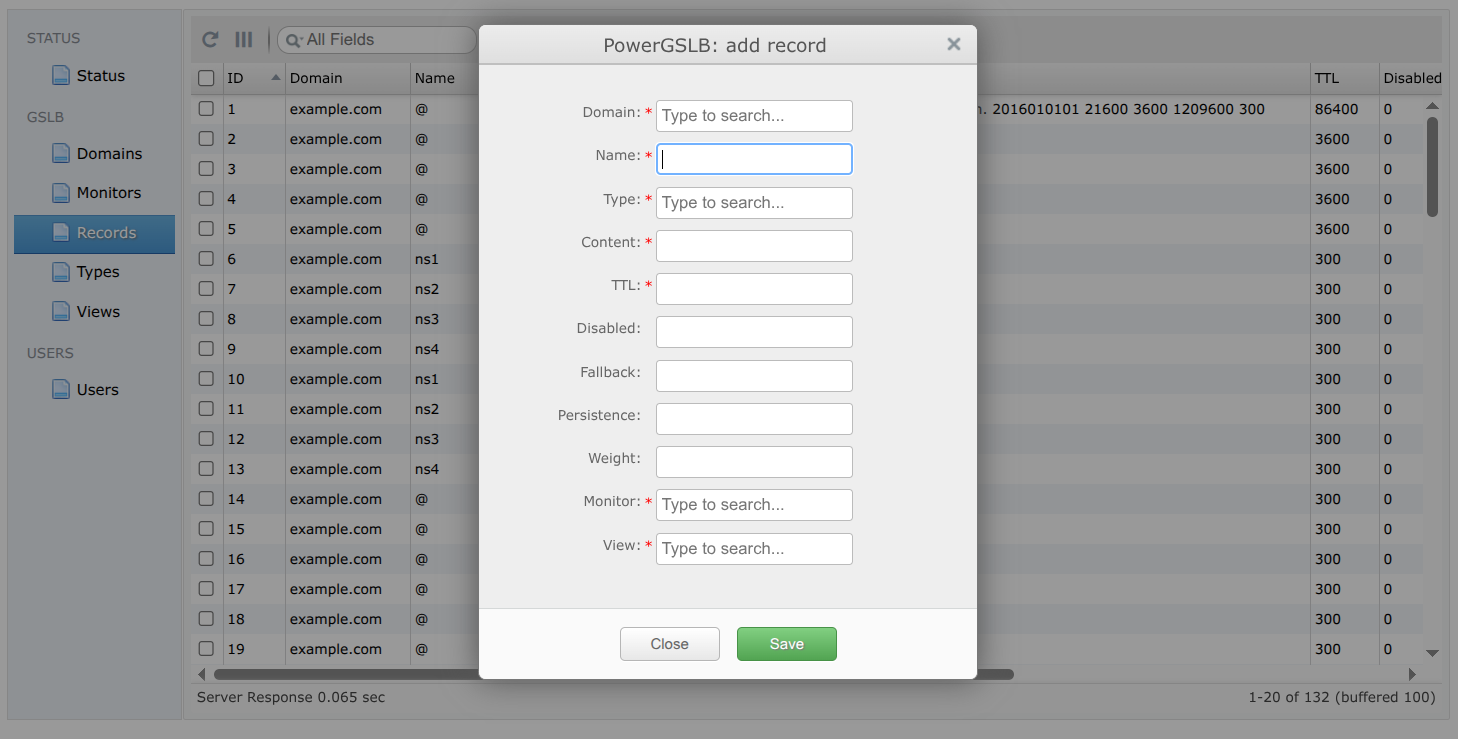
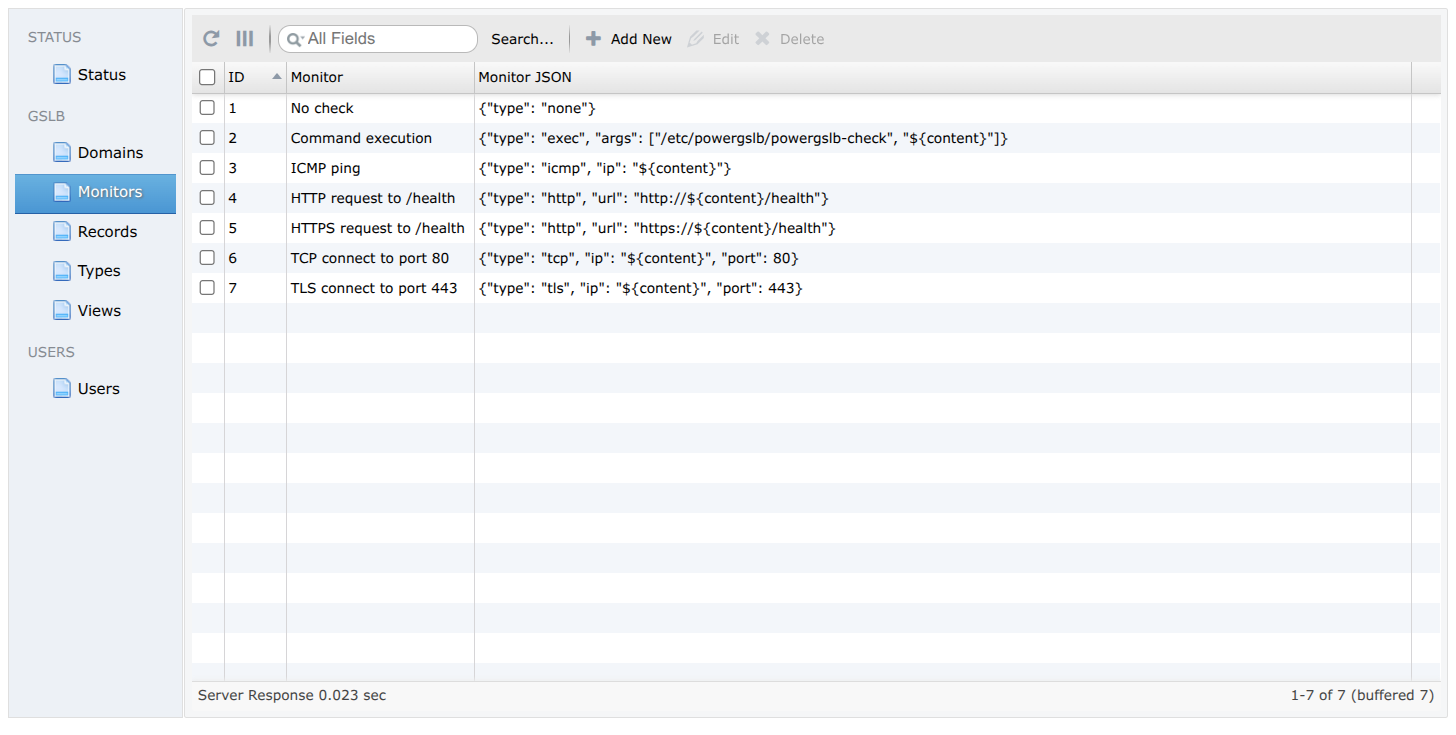
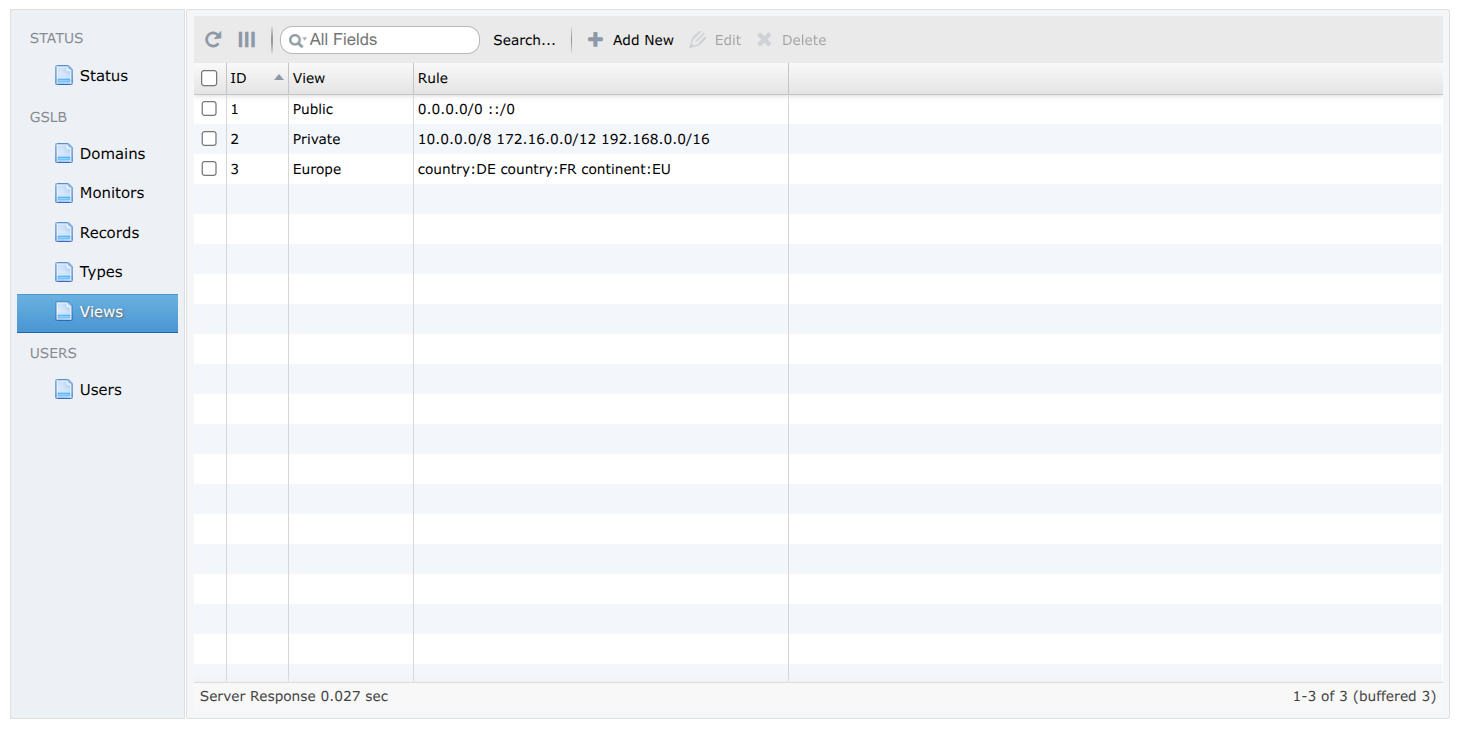
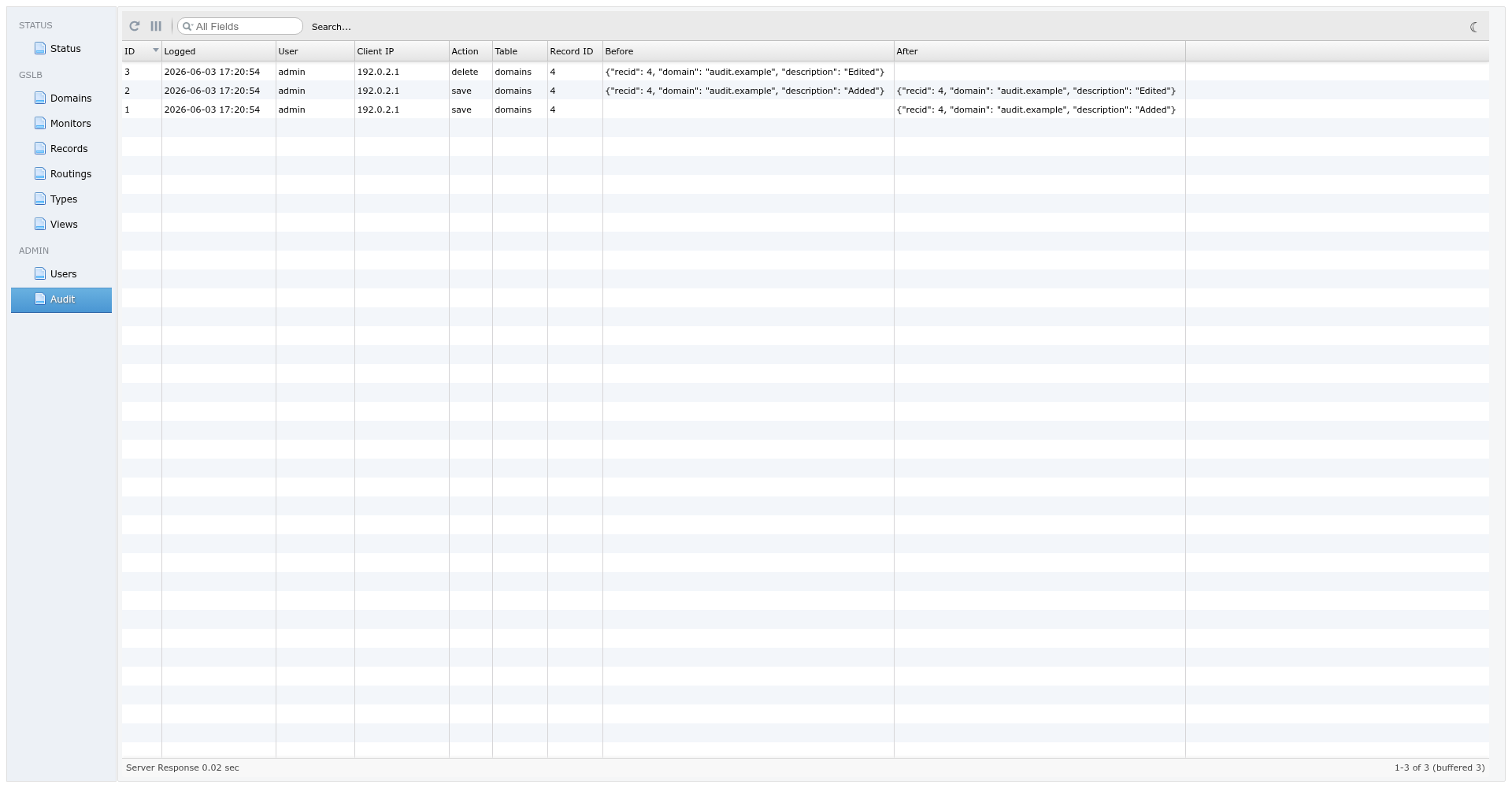
The admin console is a single-page app served over HTTPS behind Basic Auth. It manages every entity through editable grids - Domains, Monitors, Records, Routings, Types, Views, and Users - with inline add, edit, and delete. A live Status grid shows the current health of each record, and a read-only Audit grid shows every admin write. Search, sort, and paging run server-side, so large record sets stay responsive. Monitor and routing parameters are edited as indented JSON and view rules as one token per line, both normalized back to their stored one-line form on save. The console offers a light and a dark theme.
Status (Light theme)
Status (Dark theme)
Advanced search
Add new record
Monitors
Views
Audit
For each query PowerGSLB starts from every enabled record at the requested (name, type) and runs a pipeline before
answering: the view filter (client match), then the health filter (drop down records), then the rrset's
routing policy, which reads each record's weight and chooses the answers. The client IP used
for the view filter and for sticky routing is read from the X-Remotebackend-Real-Remote header PowerDNS sends (the
real resolver address, or the client subnet when ECS is in play), not the PowerDNS host.
If the view filter leaves no candidate for a query type, that type is answered with nothing. A match-all view (the
seed Public, 0.0.0.0/0 ::/0) is a catch-all: its records serve only when no narrower (specific) view matched
the client or every matched specific-view record is down. The health filter picks the first non-empty tier of live
specific-view records, live catch-all records, down specific-view records, down catch-all records - the down tiers
are the "all down = all up" rule, so a name never goes empty during a full outage; the policy then picks among them
as a last resort. Weights never cross a tier boundary: a high-weight Public record cannot outrank an in-view
specific record.
A view maps clients to records, so one name can resolve differently per client. Each view holds a space-separated
rule, and a record references exactly one view; a record is a candidate only when the client matches the rule. A
view whose rule matches every client (a prefixlen-0 CIDR in both families) is a catch-all: its records serve only
clients no specific view matched, per the precedence in Record selection. The seed data ships a
Public view (0.0.0.0/0 ::/0, the catch-all), a Private view (the RFC 1918 ranges), and a geo Europe view
(country:DE country:FR continent:EU).
A rule is a space-separated list or CIDR and geo tokens - the client matches when it satisfies any one of them:
- CIDR (IPv4 or IPv6):
10.0.0.0/8,2001:db8::/32- matches when the client IP falls inside the range. country:<ISO>- a two-letter ISO 3166-1 alpha-2 country code, e.g.country:DE.continent:<CODE>- a two-letter continent code (AF,AN,AS,EU,NA,OC,SA), e.g.continent:EU.
Geo tokens are case-insensitive and may be mixed freely with CIDRs, e.g. 10.0.0.0/8 country:DE continent:EU. The
client's country and continent are resolved from the [geoip] database at most once per query, and
only when the CIDR tokens miss (the CIDR check short-circuits first). Each view rule is compiled once into a cached
object and reused, so repeated lookups do no re-parsing. When no database is loaded the geo tokens never match.
ECS (RFC 7871) changes which client record selection sees and
returns the matching scope so DNS caches keep per-subnet answers apart. Public resolvers (8.8.8.8, 1.1.1.1, ...)
often sit far from the end user; with ECS the resolver passes a truncated client subnet, so the view and routing policy
stages track the user instead of the resolver. The shipped pdns.conf enables edns-subnet-processing, which
forwards the client subnet to PowerGSLB as X-Remotebackend-Real-Remote - no extra configuration.
The scope returned per name and query type:
- Every record in a view that matches all clients (the seed
Publicview,0.0.0.0/0 ::/0) under a client-independent policy: scope0, globally cacheable. - Any record in a narrower CIDR or geo view: scope = the resolver's source prefix - even for a public client that
matched only the
Publicrecord, so one subnet's answer is never cached for another. sticky-hashrouting policy keys on the client network: scope = the policy's prefix, capped at the source prefix.SOA,NSandDS: always scope0, for a consistent view of delegation.- No ECS option in the query: no ECS option in the response (PowerDNS ignores the scope PowerGSLB returns).
If every record at a name for a query type sits in a narrower (non-Public) view, an out-of-view client gets an
empty (NODATA) answer that an ECS-aware resolver may cache globally at scope 0, hiding the records from in-view
clients. Give such a name a Public fallback record so it never goes empty by subnet.
Every routing policy reads the single per-record weight, but interprets it per its own rules (see
Routing policies). Under the default round-robin and under sticky-hash, weight is a
tier: only the highest-weight group of live records is answered; equal-weight records all serve and load-share,
while lower-weight records stay on standby until every higher-weight record at the name is down. Under
weighted-random, weight is a proportion of the traffic instead. See
Traffic management patterns for how the tiers and proportions map to concrete rollouts.
A routing policy is a named, reusable, JSON-configured object that an rrset references (like a monitor). It decides which records to answer from the live, in-view candidates - never their order, since PowerDNS and recursors re-sort RRsets. The seed data ships one of each type; manage them in the "Routings" sidebar section. Every rrset references exactly one policy.
| policy | weight | returns | parameters (default) |
|---|---|---|---|
round-robin |
tier | up to max_answers from the highest tier |
max_answers (8) |
weighted-random |
weight | up to max_answers by weighted random |
max_answers (1) |
sticky-hash |
tier | up to max_answers from the highest tier, sticky |
max_answers (1), ipv4_prefix/ipv6_prefix (24/64) |
- round-robin (default) answers the highest-weight live tier. A tier of
max_answersor fewer is returned whole; a larger tier is randomly subsampled tomax_answersto bound UDP fragmentation /TC=1truncation. Example:{"type": "round-robin"}or{"type": "round-robin", "max_answers": 4}. - weighted-random answers up to
max_answersrecords (default1), sampled weighted-random byweightwithout replacement over all live records. With the default single answer each query picks one record by weight, so the proportional split is exact across queries;max_answersabove 1 returns several weighted records per answer that resolvers may reorder, so the split then holds only statistically. An all-zero-weight set samples evenly. Example:{"type": "weighted-random"}or{"type": "weighted-random", "max_answers": 3}. - sticky-hash answers up to
max_answersrecords (default1) from the highest live tier, pinned per client network via rendezvous (HRW) hashing: the client is masked toipv4_prefix/ipv6_prefixand records are ranked by a salt-free hash of(network, content), returning the topmax_answers, so a health flap or record change remaps only ~max_answers/N clients (~1/N at the defaultmax_answers). Stickiness is stable per client network given the same live set and prefixes. Example:{"type": "sticky-hash"}or{"type": "sticky-hash", "max_answers": 2, "ipv4_prefix": 16}.
Liveness is decided by the health checks below, and candidates follow the view precedence in
Record selection: a live catch-all (Public) record takes over when every matched specific-view
record is down. When every in-view record is down, the down records are reactivated ("all down = all up") so the name
still resolves; round-robin / sticky-hash then serve the highest-weight tier as a last resort, and
weighted-random falls back to its split.
A record can be administratively disabled in the admin UI. A disabled record is excluded from every DNS answer regardless of health, view, or weight - handy for draining an endpoint for maintenance without deleting its configuration.
Health checks are configured in the "Monitors" sidebar section in JSON format.
Supported check types:
| type | description |
|---|---|
| none | no check (always healthy) |
| exec | arbitrary command execution |
| icmp | ICMP ping |
| http | HTTP request |
| tcp | TCP connect |
| tls | TLS connect |
Parameters shared by all check types. Only type is required; the timing parameters are optional and fall back to
their defaults, so a monitor JSON may omit them.
| parameter | description | default |
|---|---|---|
| type | check type | |
| interval | seconds between checks | 3 |
| timeout | per-run check timeout in seconds | 1 |
| fall | number of failed checks to disable record | 3 |
| rise | number of successful checks to enable record | 5 |
The none type takes no parameters ({"type": "none"}); it is the "No check" monitor and is never run.
The token ${content} in any string value is replaced with the record's content (typically its IP address), so one
monitor can serve many records. Every other character - including %, $, { and } - is treated literally and
needs no escaping.
A check does not have to target the record's own content. Because the target is whatever you put in the monitor JSON,
you can omit ${content} and hard-code any IP, URL, or command, so a record's liveness is gated on a separate endpoint
or a script. This is useful when a record should serve only while some dependency is reachable - an origin behind a CDN
record, an upstream gateway, a database, or any external API:
{
  "type": "http",
  "url": "https://origin.example.com/health"
}| parameter | description | default |
|---|---|---|
| type | exec | |
| args | command to execute and arguments | |
| expected_code | exit code that counts as healthy | 0 |
| output_match | regex against the first 64 KiB of output; "" skips the scan |
"" |
| redirect_error | merge the command's stderr into stdout so output_match sees both |
true |
Example:
{
  "type": "exec",
  "args": [
    "/etc/powergslb/powergslb-check",
    "${content}"
  ]
}
The whole run is bounded by timeout; on timeout the process is killed and the check fails. Only the first
exec_output_chunk bytes (a [monitor] config knob, default 64 KiB) are kept for output_match;
any excess is drained so a chatty command can still exit.
| parameter | description |
|---|---|
| type | icmp |
| ip | endpoint IP address |
Example:
{
  "type": "icmp",
  "ip": "${content}"
}
ICMP checks open a raw ICMP socket and therefore need CAP_NET_RAW or root. The shipped container satisfies this:
the service runs as root and powergslb.service keeps CAP_NET_RAW in CapabilityBoundingSet. To run unprivileged,
set icmp_privileged = false in the [monitor] config section: this uses an ICMP datagram socket, but only works when
the service's GID is inside the kernel net.ipv4.ping_group_range range:
sysctl -w net.ipv4.ping_group_range="0 2147483647"| parameter | description | default |
|---|---|---|
| type | http | |
| url | endpoint URL | |
| method | request method, GET or HEAD |
GET |
| expected_status | comma-separated codes and inclusive ranges, e.g. "101,200-204,300-308" |
"200-399" |
| body_match | regex against the first 64 KiB of body; GET only; "" skips the scan |
"" |
| tls_verify | verify the server TLS certificate | true |
| host | override the HTTP Host header; TCP destination unchanged; "" off |
"" |
Redirects are never followed: a 3xx is evaluated on its own status (accepted by the default success range). Only the
first http_body_chunk bytes (a [monitor] config knob, default 64 KiB) are read for body_match,
and every request sends the http_user_agent header (same section) - both apply to all HTTP checks.
Example:
{
  "type": "http",
  "url": "http://${content}/health"
}
Example with optional parameters - require an exact 200 carrying "ok" in the body, over self-signed HTTPS, and
override two timing defaults:
{
  "type": "http",
  "url": "https://${content}/health",
  "method": "GET",
  "expected_status": "200",
  "body_match": "\"status\":\\s*\"ok\"",
  "tls_verify": false,
  "host": "health.example.com",
  "interval": 5,
  "fall": 2
}| parameter | description |
|---|---|
| type | tcp |
| ip | endpoint IP address |
| port | endpoint port number |
Example:
{
  "type": "tcp",
  "ip": "${content}",
  "port": 80
}
The check opens a TCP connection to ip:port and passes as soon as the handshake completes; it sends no data and
reads no response. Connection setup is bounded by timeout; a refused connection or a timeout fails the check.
| parameter | description | default |
|---|---|---|
| type | tls | |
| ip | endpoint IP address | |
| port | endpoint port number | |
| tls_verify | verify the server TLS certificate | true |
| host | SNI server name and verified certificate name; "" falls back to ip |
"" |
Example:
{
  "type": "tls",
  "ip": "${content}",
  "port": 443
}
The check opens a TCP connection to ip:port and completes the TLS handshake. Connection setup and the handshake are
bounded by timeout. With tls_verify (the default true), an untrusted chain, an expired certificate, or a
hostname mismatch fails the check; set tls_verify to false to require only that the handshake completes. Unlike
tcp, which stops at the TCP handshake, tls confirms the endpoint actually serves TLS - use it for non-HTTP TLS
services (SMTPS, IMAPS, LDAPS, etc.) that the http check cannot handle.
With tls_verify (used by the http and tls checks), each check validates the endpoint chain against the image's
system trust store. To check endpoints served by a private or internal CA, add that CA so the checks trust it:
- Copy the CA certificate (PEM or DER, named
.crtor.pem) intodocker/rootfs/etc/pki/ca-trust/source/anchors/. - Rebuild the image.
The build runs update-ca-trust, folding the certificate into the system trust store that OpenSSL and Python's ssl
read, so tls_verify succeeds.
Traffic management in PowerGSLB works along two independent axes: a view decides which records a client may see at all (by CIDR or GeoIP), and the rrset's routing policy plus weight decides which of those to answer. Combined with the health checks, they express the common ways of shifting traffic across backends. Health checks run continuously, pruning down records before the policy picks, so every pattern is liveness-aware by default.
The view and policy axes stack: the view filters first, so every routing policy operates on the per-client records.
One name can therefore carry, say, a weighted-random canary inside each geo view, or active-passive failover
inside the Private view. Steering by client and by routing policy together on a single rrset is what lets PowerGSLB
serve client-scoped, health-checked, weighted answers at once.
These use views to serve one name differently per client, by network or location:
| goal | mechanism | view layout |
|---|---|---|
| Geo proximity | per-region views | each region in a continent:/country: view; Public = catch-all |
| Split-horizon | Private vs Public view |
internal addresses in Private, public addresses in Public |
| Regional failover | narrow view + fallback | region-pinned records; Public = active fallback |
- Geo proximity (optimization) - give each region its own view (
continent:NA,continent:EU, ...) and put that region's records there, so a client resolves to the nearest backend. Regions coexist, each actively serving its own local traffic; the match-allPublicis a catch-all for clients no region view matches. - Split-horizon (view) - put internal addresses in the
Privateview and public addresses in thePublicview under one name, so on-network clients get private IPs and everyone else gets public ones. - Regional failover (resilience) - pin one region's clients to a narrow view of in-region backends, and pair it with
a
Publicfallback that actively carries traffic when those backends are down or the client is out of view. Same as geo proximity, narrowed to one pinned region whosePublicis a failover target rather than catch-all.
Because ECS resolvers cache by subnet, always give any view-restricted name a Public (match-all) fallback record so
an out-of-view client never gets an empty answer cached globally - see EDNS Client Subnet.
These pick which records to return from the candidates a view has already allowed:
| goal | policy | weight layout |
|---|---|---|
| Blue-green cutover | round-robin |
new environment in a higher tier; lower it to roll back |
| Active-passive failover | round-robin |
backups in a lower tier; serve only on full outage of the primary |
| Canary / A-B | weighted-random |
new version at a small proportion; raise it to shift more traffic |
| Sticky sessions | sticky-hash |
equal-tier records; each client network pins to one endpoint |
- Blue-green cutover (
round-robin) - run the new servers alongside the old ones in a lowerweighttier, then raise their weight above the current group to cut all traffic over at once. The old servers fall to standby but keep serving, so rolling back is just lowering the weight again. - Active-passive failover (
round-robin) - put backup records in a lowerweighttier under the same policy; they stay on standby and serve only once every higher-weight record at the name is down. - Canary / A-B (
weighted-random) -weightis a traffic proportion, so ship the new version at a small weight next to the old (e.g.5vs95for a 5 % canary) and raise it gradually for a progressive rollout, or fix the split for A-B testing. With the defaultmax_answersof1the split is exact across queries. - Sticky sessions (
sticky-hash) - each client network deterministically maps to the same endpoint via rendezvous hashing, so stateful backends stay pinned and a health flap or record change remaps only ~1/N clients instead of reshuffling everyone. It also keeps a client on one endpoint across queries, so a user never flips between backends.
PowerGSLB answers DNS queries with low, flat latency at scale and keeps the web console responsive on large tables. The guiding principle is that correctness and freshness are the defaults: GSLB answers are per-client (view / ECS), health-dependent and routing-randomized, so the application recomputes them on every query rather than caching them. Response caching is available but ships off, opt-in with the trade-offs below.
Every backend lookup resolves the owning zone by an indexed longest-suffix match: the candidate parent zones of the
query name are computed in the application and matched against the unique-indexed domains.domain, and the
most-specific zone wins. This is an index lookup, so per-lookup latency stays flat as the number of zones grows.
PowerDNS issues each resolution as several backend lookups - an ANY lookup for the name, a separate SOA lookup
for the authority section, and additional-section glue for NS / MX targets.
PowerDNS Authoritative can cache backend answers to skip repeated lookups. Three TTLs in pdns.conf (shipped at
docker/rootfs/etc/pdns/pdns.conf.powergslb) control it:
cache-ttl=0           # packet cache: a full response, keyed by the exact query (including ECS)
query-cache-ttl=0     # query cache: a backend record set, keyed by name / type / zone (no ECS)
negquery-cache-ttl=0  # negative (NODATA / NXDOMAIN) entries in the query cache
Two properties hold regardless of the TTLs and make caching safe to enable when you want it:
- Only globally cacheable answers are ever cached. An answer that varies by client - any view / ECS differentiated
name, or a
sticky-hashrrset - carries a non-zero ECS scope, and PowerDNS never caches a scoped answer; it is recomputed on every query. Enabling caching cannot serve one subnet's answer to another. negquery-cache-ttlnever affects positive answers. It gates only negative responses, and it does not change the negative TTL sent to resolvers (that is the zone'sSOAminimum).
Raising the TTLs speeds up repeated, globally cacheable queries at the cost of freshness. The side effects, per TTL:
cache-ttl/query-cache-ttldelay health failover and admin edits on match-all (scope-0) names: a record that goes down, or an edit, is masked for up tomin(cache-ttl, record TTL)for an identical repeat and up toquery-cache-ttlfor other clients. Per-subnet names are unaffected (never cached).cache-ttl/query-cache-ttlfreeze the routing pick per cache entry:round-robinrotation andweighted-randomdraws are recomputed once per TTL instead of per query (sticky-hashis deterministic, so unaffected).negquery-cache-ttlwidens the ECS negative-answer window. A view-restricted name with noPublicfallback returnsNODATAto an out-of-view client; that negative is cached globally, so it can withhold the records from in-view clients for up tonegquery-cache-ttlat the authoritative server (and up to the zoneSOAminimum at downstream ECS resolvers). See EDNS Client Subnet (ECS).
To enable caching - set conservative TTLs within your health-failover budget and never above your served record TTLs.
Before raising negquery-cache-ttl, give every view-restricted name a Public (match-all) fallback record.
The three TTLs above are independent of the PowerDNS zone cache (zone-cache-refresh-interval, default 300s),
which PowerGSLB feeds through the getAllDomains backend request. The zone cache is an in-memory list of the
authoritative zones, with their ids and SOA serials, refreshed on that interval. PowerDNS uses it to decide which
zone a query belongs to, answering out-of-zone names and rejecting unknown ones without a backend lookup. It caches no
view / health / routing decision, so it never affects answer freshness, and it is on by default. The only trade-off
is that a newly added or removed domain becomes visible at the next refresh, up to zone-cache-refresh-interval
seconds. Records within an already-known zone are unaffected, so keep it enabled.
The admin interface compresses its responses to cut transfer size and speed up the web console. The DNS backend is
never compressed. Compression is negotiated from the request Accept-Encoding header. Brotli is preferred over gzip,
and a client that accepts neither coding is served the uncompressed response. Two paths are handled independently.
Static assets. The bundled console files (.js, .css, .html, and .svg) are precompressed once at build time,
into .gz (gzip level 9) and .br (Brotli quality 11) siblings placed next to each file. A sibling is kept only when
it is smaller than the original, so already-tiny assets stay uncompressed. At request time the handler serves the
precompressed twin the client accepts, or the original file otherwise. The response carries Vary: Accept-Encoding
and If-Modified-Since handling, so caches keep the identity and compressed representations apart.
Dynamic responses. The admin grid data served at /admin/w2ui is generated per request and compressed on the fly
with Brotli quality 5 or gzip level 6, tuned for low latency rather than maximum ratio. A response smaller than 256
bytes is sent uncompressed, where the processing cost outweighs the saving. Each dynamic response carries
Cache-Control: no-store and is never cached.
The admin Status and Records grids page large tables without materializing a full join per page: a page of rows is
selected by primary key from the records table alone (with search, sort and paging in SQL), then the lookup tables
are joined to just that page. This keeps the grids responsive at hundreds of thousands of records.
PowerGSLB exposes two HTTP interfaces, both returning JSON:
-
DNS backend - the PowerDNS Remote Backend protocol, read-only, plain HTTP (default
127.0.0.1:8080). It binds loopback by default, so reach it from inside the container or setPOWERGSLB_SERVER_ADDRESS=0.0.0.0to expose it.GET /dns/lookup/<qname>./<qtype>returns the filtered answers andGET /dns/getAllDomainsreturns the zone list. -
Admin API - the w2ui CRUD endpoint at
POST /admin/w2uiover HTTPS (default:443), behind HTTP Basic Auth. Parameters are form-encoded (also accepted on the GET query string); records are addressed bycmdand adatatable, andmonitorandvieware matched by name, not id.The same commands apply to every table -
datais one ofdomains,monitors,views,records,routings,types,users,status,audit:get-records- list a table; supportssearch,sort, andlimit/offsetpaging.get-record(recid=<id>) - fetch one row by id.get-items(field=<column>) - list the values of one column; supportssearch.save-record(recid=0to insert,recid=<id>to update) - write one row fromrecord[...]fields.delete-records(selected[0]=<id>) - delete rows by id.
statusandauditare read-only (get-*only);statusis the live health view andauditis the append-only trail of admin writes (one row per record, holding the stored row before and after the write - an insert has no before state, a delete no after state).An update re-sends the whole row, so editing one field (a record's weight, say) is a read-modify-write:
get-record, change the field,save-recordwith the unchanged fields preserved.
# DNS backend (inside the container; loopback by default)
curl 'http://127.0.0.1:8080/dns/lookup/example.com./A'
curl 'http://127.0.0.1:8080/dns/getAllDomains'

# Admin API: list records (-k accepts the self-signed certificate)
curl -sk -u admin:admin https://powergslb/admin/w2ui -d cmd=get-records -d data=records

# Admin API: fetch one record by id (the id is the recid field from get-records)
curl -sk -u admin:admin https://powergslb/admin/w2ui -d cmd=get-record -d data=records -d recid=133

# Admin API: create an A record (omitted fields - disabled, weight - default to 0)
curl -sk -u admin:admin https://powergslb/admin/w2ui \
    -d cmd=save-record -d data=records -d recid=0 \
    -d 'record[domain]=example.com' \
    -d 'record[name]=app' \
    -d 'record[name_type]=A' \
    -d 'record[ttl]=60' \
    -d 'record[content]=192.0.2.10' \
    -d 'record[monitor]=No check' \
    -d 'record[view]=Public' \
    -d 'record[policy]=Round robin'

# Admin API: change a record's weight (recid=133 updates in place; re-send the row's other fields unchanged)
curl -sk -u admin:admin https://powergslb/admin/w2ui \
    -d cmd=save-record -d data=records -d recid=133 \
    -d 'record[domain]=example.com' \
    -d 'record[name]=app' \
    -d 'record[name_type]=A' \
    -d 'record[ttl]=60' \
    -d 'record[content]=192.0.2.10' \
    -d 'record[monitor]=No check' \
    -d 'record[view]=Public' \
    -d 'record[policy]=Round robin' \
    -d 'record[weight]=10'

# Admin API: delete a record by id
curl -sk -u admin:admin https://powergslb/admin/w2ui -d cmd=delete-records -d data=records -d 'selected[0]=133'

# Admin API: list / add domains
curl -sk -u admin:admin https://powergslb/admin/w2ui -d cmd=get-records -d data=domains
curl -sk -u admin:admin https://powergslb/admin/w2ui \
    -d cmd=save-record -d data=domains -d recid=0 \
    -d 'record[domain]=example.net'

# Admin API: list monitors / add a TCP check (monitor_json is the check definition; ${content} expands to the record)
curl -sk -u admin:admin https://powergslb/admin/w2ui -d cmd=get-records -d data=monitors
curl -sk -u admin:admin https://powergslb/admin/w2ui \
    -d cmd=save-record -d data=monitors -d recid=0 \
    -d 'record[monitor]=TCP 443' \
    -d 'record[monitor_json]={"type": "tcp", "ip": "${content}", "port": 443}'

# Admin API: list views / add a view (rule is a space-separated list or CIDR and geo tokens)
curl -sk -u admin:admin https://powergslb/admin/w2ui -d cmd=get-records -d data=views
curl -sk -u admin:admin https://powergslb/admin/w2ui \
    -d cmd=save-record -d data=views -d recid=0 \
    -d 'record[view]=Internal' \
    -d 'record[rule]=10.0.0.0/8 192.168.0.0/16'

# Admin API: add a geo view
curl -sk -u admin:admin https://powergslb/admin/w2ui \
    -d cmd=save-record -d data=views -d recid=0 \
    -d 'record[view]=Europe' \
    -d 'record[rule]=country:DE country:FR continent:EU'
The values here need no URL-encoding (none contain &, +, %, or =), so plain -d is enough; reach for
--data-urlencode if a field ever carries one of those characters.
The integration suite ships ready-made DNSClient and W2UIClient wrappers in
tests/integration/conftest.py; reuse them as a reference client. A minimal
requests-based equivalent:
import requests

# DNS backend (loopback by default)
requests.get("http://127.0.0.1:8080/dns/lookup/example.com./A", timeout=10).json()

# Admin API
ADMIN = "https://powergslb/admin/w2ui"
AUTH = ("admin", "admin")

def w2ui(cmd, data, **params):
    params.update(cmd=cmd, data=data)
    # verify=False: the demo image ships a self-signed certificate
    return requests.get(ADMIN, params=params, auth=AUTH, verify=False, timeout=15).json()

def save(data, recid, fields):
    return w2ui("save-record", data, recid=recid, **{f"record[{k}]": v for k, v in fields.items()})

# Records: list, create, delete
records = w2ui("get-records", "records")["records"]
save("records", 0, {"domain": "example.com", "name": "app", "name_type": "A", "ttl": 60,
                    "content": "192.0.2.10", "monitor": "No check", "view": "Public", "policy": "Round robin"})
w2ui("delete-records", "records", **{"selected[0]": 133})

# Change a record's weight: read-modify-write (an update re-sends the whole row)
record = w2ui("get-record", "records", recid=133)["record"]
record["weight"] = 10
save("records", record["recid"], record)

# Domains
save("domains", 0, {"domain": "example.net"})

# Monitors: monitor_json is the check definition; ${content} expands to the record content
save("monitors", 0, {"monitor": "TCP 443", "monitor_json": '{"type": "tcp", "ip": "${content}", "port": 443}'})

# Views: rule is a space-separated list or CIDR and geo tokens
save("views", 0, {"view": "Internal", "rule": "10.0.0.0/8 192.168.0.0/16"})
save("views", 0, {"view": "Europe", "rule": "country:DE country:FR continent:EU"})The repository ships with three checks:
- Linting -
pylintandmypyoversrcandtests. - Unit tests - in-process tests under
tests/unit/, run under coverage; no container required. - Integration tests - black-box tests under
tests/integration/against a freshly built Docker container.
See tests/README.md for the layout, the exact commands, and how to point the suite at a non-default host or database.
PowerGSLB is released under the MIT License. See LICENSE for details.
The Docker image bundles the IP Geolocation by DB-IP database, licensed under CC BY 4.0.