
Live viewer for Electron apps in the browser, plus an MCP server so an AI agent can drive them. Built for the browser pane of AI coding tools (such as Claude Code): you and the agent watch and control the same app window, in real time.
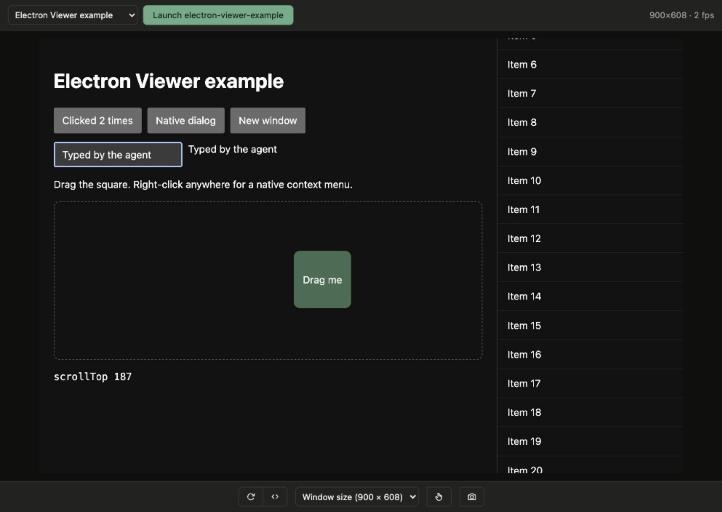
- Live video:
Page.startScreencastfrom the Chrome DevTools Protocol (CDP) over WebSocket. It keeps streaming while the app window is covered or minimized. - Real input: mouse move and hover, click, double click, right click, drag, wheel and full keyboard passthrough (including ⌘C/⌘V/⌘A on macOS, IME and dictation).
- Touch: a touch mode in the viewer turns the pointer into a finger, and the agent can tap, swipe, long press and pinch, for touch-first and kiosk apps.
- Every app and window: launch your project with
electron .from the viewer, or attach to any app started with--remote-debugging-port. Apps on ports 9222–9231 are found automatically. - Main process too: launched apps also expose their main process (Node inspector), so the agent can run code there, resize the real window and open DevTools.
- MCP server: the same actions as tools, plus JavaScript in the renderer and main process, the accessibility tree with click-ready coordinates, and console logs.
- Nothing to add to your app: no preload, no dependency, no code changes.
- Node.js 18 or later.
- An Electron app. To launch it from the viewer, the project must have
electronin itsnode_modules(npm install --save-dev electron); if its binary hasn't been downloaded yet, the viewer downloads it on the first launch. - Works on macOS, Linux and Windows.
From your Electron project folder:
npx @acertijosapps/electron-viewer@1.1.1Open http://localhost:8094 and click Launch. The viewer runs electron . on free debugging
ports (CDP from 9222, Node inspector from 9229). Deep link to a window: ?window=<target id>.
If your app is started by another tool (electron-vite, Electron Forge, a custom script), give the viewer
your own start command. {cdpPort} and {inspectPort} are replaced with free debugging ports, and the
Launch button (and launch_app) runs it in the project folder:
npx @acertijosapps/electron-viewer@1.1.1 --launch-cmd "yarn dev --remoteDebuggingPort {cdpPort} --inspect {inspectPort}"That line is for electron-vite; for an npm script that ends in electron ., pass the flags after --:
--launch-cmd "npm start -- --remote-debugging-port={cdpPort} --inspect={inspectPort}". The command is
only read from the command line or ELECTRON_VIEWER_LAUNCH_CMD, never from the HTTP API or the MCP.
Or start the app yourself with the flags and the viewer finds it:
electron --remote-debugging-port=9222 --inspect=9229 .Apps on CDP ports 9222–9231 are found automatically, and so is their main process when its inspector is
on 9229–9238. --inspect is optional; without it you get everything except the main-process features
(evaluate_main, real window resizing and in-app DevTools). To attach on other ports, use the form in
the viewer or --attach and --inspect.
electron-viewer [options]        Start the viewer
electron-viewer mcp [options]    Start the MCP server on stdio

      --project <dir>      Project to launch with "electron ." (default: current folder)
      --launch-cmd <cmd>   Launch with this shell command instead; {cdpPort} and {inspectPort}
                           are replaced with the debugging ports
  -p, --port <port>        Viewer port (default 8094, env PORT)
      --host <host>        Interface to bind (default 127.0.0.1, env HOST)
      --attach <port>      Attach at startup to an app on this CDP port
      --inspect <port>     With --attach: the app's main process inspector port
      --viewer-url <url>   Viewer the MCP talks to (default http://localhost:8094)
Other environment variables: MAX_DIM (longest side of the streamed frames, default 1920), QUALITY
(JPEG quality, default 80), SCREENSHOT_MAX (longest side of MCP screenshots, default 1024),
CDP_PORT / INSPECT_PORT (first ports to scan and launch on, default 9222 / 9229) and
ELECTRON_VIEWER_STATE_DIR (where launched and attached apps are remembered, default
~/.cache/electron-viewer).
Claude Code:
claude mcp add electron-viewer -- npx -y @acertijosapps/electron-viewer@1.1.1 mcpAny other MCP client:
{
  "mcpServers": {
    "electron-viewer": {
      "command": "npx",
      "args": ["-y", "@acertijosapps/electron-viewer@1.1.1", "mcp"]
    }
  }
}
Also listed in the official MCP Registry as
io.github.acertijosapps/electron-viewer.
The examples pin an exact version. The viewer and the MCP can run code in your app, so pin the version
you reviewed instead of letting npx fetch whatever was published last, and update it on purpose.
Keep the viewer running (npx @acertijosapps/electron-viewer@1.1.1) to watch what the agent does. Without
it, the MCP drives the app over CDP directly. Apps launched by either one are visible to the other.
| Tool | What it does |
|---|---|
list_windows |
Running apps (with main when the main process is reachable) and their windows |
launch_app |
Run electron . in the project on free debugging ports and wait for the first window |
attach |
Attach to an app on a CDP port, optionally with its inspector port |
screenshot |
PNG of the window content, longest side ≤ 1024 px |
click |
Left, right or middle click; count: 2 for a double click; optional modifiers |
drag |
Press, move in steps and release: a real drag |
hover |
Move the mouse without clicking |
tap |
One-finger tap (touch events, pointerType: "touch") |
swipe |
One-finger swipe: scrolls touch lists and drives swipe gestures |
long_press |
Hold one finger down for a while, 800 ms by default |
pinch |
Two-finger pinch around a point; scale > 1 zooms in, < 1 zooms out |
scroll |
Mouse wheel at a point, deltas in CSS px |
type_text |
Insert text into the focused element (any Unicode) |
press_key |
Enter, Tab, Escape, arrows, F1–F12… or any character, with modifiers |
resize_window |
Resize the content area: the real window with the main process, an emulated viewport when the window can't reach the size (or with emulate: true) |
reload |
Reload the window's page |
evaluate |
Run JavaScript in the window's page and return the value |
evaluate_main |
Run JavaScript in the main process, with require('electron') available |
get_accessibility_tree |
Roles, names, values and states; interactive elements carry their normalized center |
get_console_logs |
Console messages and exceptions from renderer windows and the main process, or the raw stdout |
Coordinates are normalized to 0–1 over the content screenshot (x = pixel_x / image_width), so they
hold at any window size. window is optional when only one window is open; it takes the target id
from list_windows or part of the window title.
Add the viewer to .claude/launch.json and open it with preview_start electron-viewer:
{
  "version": "0.0.1",
  "configurations": [
    {
      "name": "electron-viewer",
      "runtimeExecutable": "npx",
      "runtimeArgs": ["-y", "@acertijosapps/electron-viewer@1.1.1"],
      "port": 8094,
      "autoPort": false
    }
  ]
}The MCP uses the viewer's API; you can call it too. window (target id or part of the title) goes in
the query string or the body and is optional with a single window. The server only listens on
127.0.0.1, only accepts a local Host and origin, and POST requests require
content-type: application/json, so other websites can't drive your apps.
Parameters are validated with the same limits as the MCP tools. A missing, unknown or out-of-range field
gets a 400 that names it, e.g.
{"error": "POST /api/swipe: missing x1, y1, x2, y2; unknown fromX, fromY, toX, toY (fields: window, x1, y1, x2, y2, ms)"}.
Coordinates are normalized 0–1 and query string values are converted to numbers and booleans.
| Endpoint | |
|---|---|
GET /api/windows |
[{ id, name, cdpPort, inspectPort, main, windows: [{ id, title, url }] }] |
GET /api/project |
The project the viewer launches and whether it has Electron installed |
GET /api/screenshot?max=<px> |
PNG; viewport size in X-Viewport-Width / X-Viewport-Height |
GET /api/ax-tree?interactiveOnly=true |
{ tree } |
GET /api/logs?level=&source=&limit= |
{ logs } or { stdout } |
POST /api/launch |
{ project? } |
POST /api/attach |
{ port, inspectPort? } |
POST /api/click |
{ x, y, button?, count?, modifiers? } |
POST /api/drag |
{ x1, y1, x2, y2, ms? } |
POST /api/hover |
{ x, y } |
POST /api/tap |
{ x, y } |
POST /api/swipe |
{ x1, y1, x2, y2, ms? } |
POST /api/long-press |
{ x, y, ms? } |
POST /api/pinch |
{ x?, y?, scale, ms? } |
POST /api/scroll |
{ x, y, dx, dy } |
POST /api/text |
{ text } |
POST /api/key |
{ key, modifiers? } |
POST /api/resize |
{ width, height, emulate? } (0 × 0 restores the window size) |
POST /api/reload |
{ ignoreCache? } |
POST /api/evaluate |
{ expression } |
POST /api/evaluate-main |
{ expression, app? } |
POST /api/devtools |
Toggles DevTools; without the main process returns the DevTools url |
- Everything goes through CDP with
ws: no Playwright, no Puppeteer, nothing injected into the app. The renderer is reached through--remote-debugging-port(onepagetarget per window) and the main process through the Node inspector (--inspect), where the console API providesrequire. - One screencast session per window, shared by every viewer tab and stopped when the last one closes. The last frame is kept for late joiners. Focus and page lifecycle are emulated while someone is watching, so a covered or minimized window keeps painting.
- Viewer input is queued in order and mouse moves are coalesced to one per animation frame. A hidden
textarea holds the focus: keys are sent with
Input.dispatchKeyEvent, and text that arrives without key events (IME, dictation) withInput.insertText. On macOS, ⌘A, ⌘C, ⌘V, ⌘X and ⌘Z are sent as editing commands, because the native menu that normally handles them never sees CDP events. - Touch goes through
Input.dispatchTouchEvent. The first touch action on a window also turns on touch emulation (navigator.maxTouchPoints5,pointer: coarse) until the viewer or MCP that sent it exits. - Each process keeps one connection per window and per main process, which also collects console messages and exceptions (the last 1000 per app).
- For an app with no known inspector, each Node inspector on ports 9229–9238 is asked once, read only,
whether it is Electron and which CDP port its app listens on. Any other Node process started with
--inspectin that range gets one short connection (it logsDebugger attached.) and is left alone. - Launched and attached apps are remembered in
~/.cache/electron-viewer, so the viewer and the MCP see the same apps. Launched apps write their output to a log file there and keep running if the viewer or MCP exits.
- CDP only sees web content. Native UI (title bar, menus, dialogs, tray, notifications) isn't shown or
clickable; use
evaluate_mainto drive it from the main process. Capturing it would mean capturing the screen, and with it any other window on top of the app, so the viewer doesn't: the frame mode andscreenshotframeoption of 1.0.0 were removed in 1.1.0 for that reason (see the CHANGELOG). - Synchronous dialogs (
dialog.showMessageBoxSync) block the main process:evaluate_mainwaits until the dialog is closed. - Each
WebContentsViewis a separate CDP target, so it is listed as its own window.<webview>tags are not listed. - A long press reaches the app as a held touch, so apps that time
touchstartthemselves see it, but Chromium on desktop doesn't turn it into a context menu. The viewer's touch mode is one finger; usepinchfor two. - No audio.
- A
--launch-cmdmust pass the ports on to Electron; how depends on the tool. Launched apps keep running when the viewer exits; close them from the app (or its terminal).
Branching model (main · beta), Conventional Commits and releases are described in
CONTRIBUTING.md; changes are listed in CHANGELOG.md. The
example app in example/ is there to try changes.
Made by AcertijosApps. See the rest of our libraries at acertijosapps.com/librerias.
Questions or proposals: acertijos.contacto@gmail.com or open an issue.
MIT