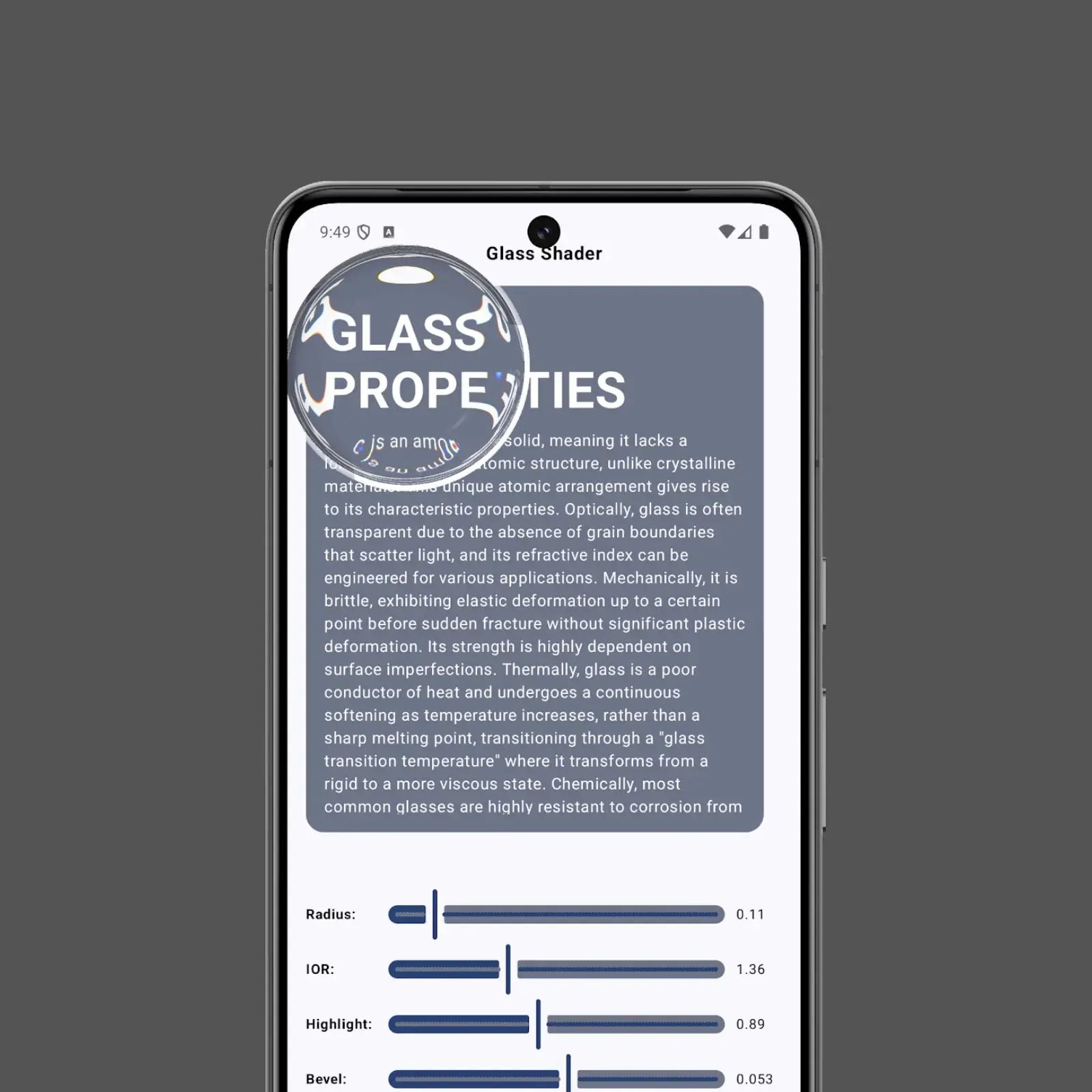
This project demonstrates a real-time glass shader effect implemented using Android's Jetpack Compose and AGSL (Android Graphics Shading Language). It allows users to interactively explore various optical properties of glass, such as refraction, specular highlights, bevels, and shadows, through a draggable lens and adjustable parameters.
-
Interactive Glass Lens: A draggable circular lens simulates looking through a piece of glass.
-
Real-time Refraction: The content behind the lens is distorted based on the Index of Refraction (IOR).
-
Adjustable Glass Properties: Sliders allow for real-time manipulation of:
- Radius: Controls the size of the glass lens.
- IOR (Index of Refraction): Modifies the amount of light bending and distortion.
- Highlight Strength: Adjusts the intensity of specular highlights on the glass surface.
- Bevel Width: Defines the width of the highlighted edge of the glass.
- Thickness: Simulates the perceived thickness of the glass, affecting distortion.
- Shadow Intensity: Controls the darkness of the cast shadow beneath the lens.
- Chromatic Aberration: (Currently subtle or placeholder) Simulates the color fringing effect.
- Frosted Glass Blur: (Currently subtle or placeholder) Adds a blur effect to simulate frosted glass.
-
AGSL Shader: The core visual effect is powered by a custom AGSL shader.
-
Jetpack Compose: The UI and interactions are built entirely with Jetpack Compose.
-
Demo: https://youtube.com/shorts/fgomVJwwMFs?si=vwecFL0OU7efFNtE
The application uses a RuntimeShader to apply the AGSL code to a graphicsLayer in Jetpack Compose.
-
AGSL Shader (
SHADER_SRC):- Calculates the distance from the current fragment to the center of the lens.
- If within the lens radius, it simulates refraction by offsetting the texture coordinates based on the IOR and the normal vector (approximated for a sphere).
- Adds specular highlights based on a simplified lighting model.
- Renders a bevel effect around the edge of the lens.
- Applies a subtle shadow effect.
- Handles chromatic aberration and frosted glass effects (though these might be minimal in the current version).
- Mixes the glass effect with the background content.
-
Compose UI (
SimpleShaderComposable):- Manages the state for all adjustable parameters (radius, IOR, etc.) using
rememberandmutableStateOf. - Uses
pointerInputwithdetectDragGesturesto allow dragging the lens. The lens position is normalized and passed to the shader. - Updates shader uniforms (
shader.setFloatUniform) whenever a parameter changes or the lens is moved. - The
graphicsLayerrenderEffectis updated with theRuntimeShaderEffect. - Sliders are provided for each adjustable parameter, updating the corresponding state variable.
- Manages the state for all adjustable parameters (radius, IOR, etc.) using
MainActivity.kt: Contains the main activity and theSimpleShadercomposable function.SHADER_SRC: AStringconstant holding the AGSL code for the glass effect.SimpleShader(): The main Composable function that:- Initializes the
RuntimeShader. - Manages state variables for shader uniforms (e.g.,
iorValue,circleRadius). - Handles user input (drag gestures, slider changes).
- Applies the shader using
graphicsLayerandRenderEffect. - Lays out the UI elements (content box, text, sliders).
- Initializes the
- Clone the repository.
- Open the project in Android Studio (latest stable version recommended).
- Ensure you have an Android device or emulator running API level 33 (Android 13) or higher, as
RuntimeShaderwas introduced in this version. - Build and run the application.
- Drag the "glass lens" across the content area to see the refraction and highlight effects.
- Use the sliders at the bottom of the screen to adjust the different properties of the glass in real-time.
- Observe how the changes in parameters affect the visual appearance of the lens and the content behind it.
- More Advanced Lighting Model: Implement Phong or Blinn-Phong shading for more realistic highlights.
- Environment Mapping: Reflect a surrounding environment onto the glass surface.
- Caustics: Simulate the bright patterns of light focused by a refractive object.
- Improved Chromatic Aberration: Enhance the visual separation of colors for a more noticeable effect.
- Realistic Frosted Glass: Implement a more sophisticated blur algorithm for the frosted effect.
- Performance Optimization: Profile and optimize the shader and Compose code if needed for complex scenes.
- More Complex Shapes: Extend the shader to support shapes other than a simple circle.
- Android Studio
- Android API Level 33+ (Android 13 or higher) for
RuntimeShadersupport.
Feel free to fork the project, experiment with the shader code, and submit pull requests with improvements or new features!