A playable anime character studio for the browser.
Chat with VRM characters, trigger expression and body motion, and upgrade to realtime voice when you bring your own OpenAI key.
Watch demo | Run locally | Roadmap | Docs


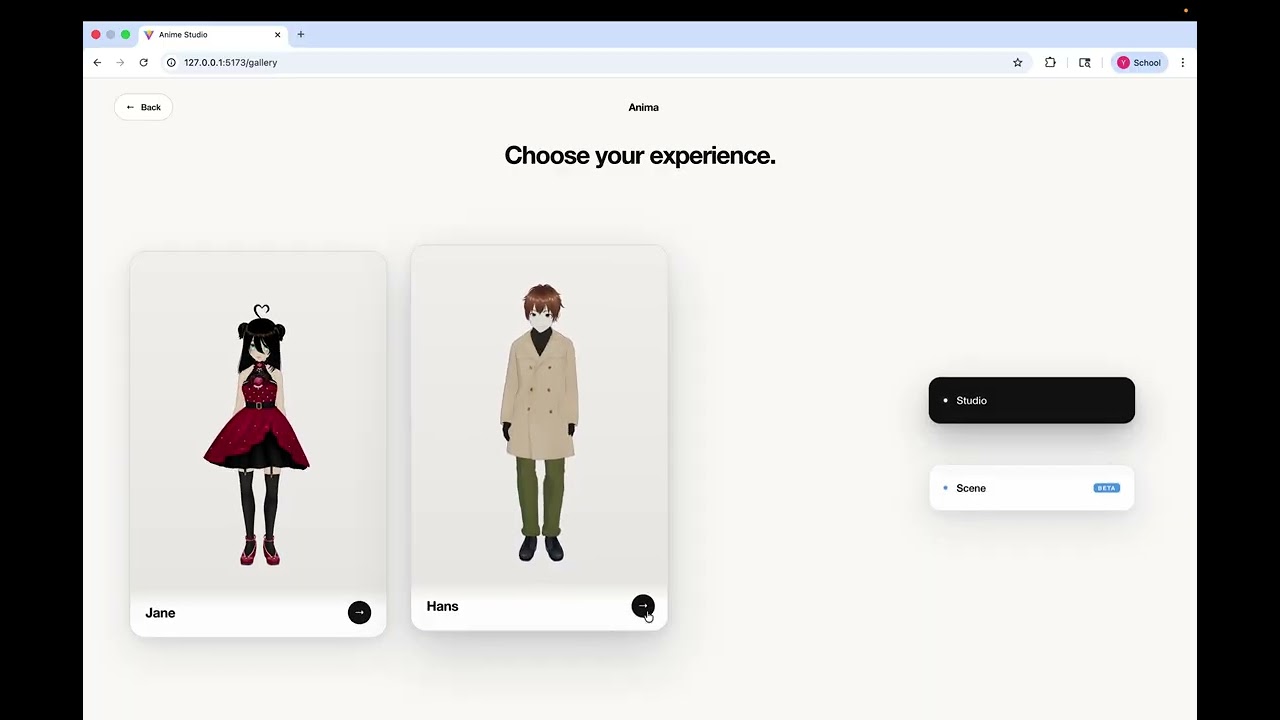
Note: the intro video was recorded from an earlier version of Anima. The current open-source project is now Studio-focused, so some beta scene flows, UI details, and one VRM demo model shown in the video may differ from this repository.
Open Anima, pick a character, type a line, and watch the avatar respond with emotion, lip sync, and body motion. Text mode works locally without provider keys. Voice mode is available when you configure your own OpenAI credentials.
Most AI avatar projects either feel like a static chatbot with a face attached, or a research demo that takes too long to run. Anima is designed around a simpler promise:
Start a local browser studio, talk to a character, and see the character act back.
It is useful if you want to prototype:
- AI companions with expressive 3D avatars.
- Virtual streamer or NPC interaction flows.
- VRM character chat experiments.
- Realtime voice + lip sync + body motion pipelines.
- A lightweight entertainment demo that people can actually try.
| Path | Works without keys? | What you see |
|---|---|---|
| Text mode | Yes | Type to a character and get a local playable interaction. |
| Character Studio | Yes | Switch between included VRM demo characters. |
| Lip sync | Optional provider audio | Mouth movement follows real audio playback. |
| Realtime voice | Needs your OpenAI key | Speech-to-speech conversation through WebRTC. |
| Body motion | Optional animation files | Wave, nod, shake, idle, talking, and sad idle with local Mixamo-compatible files. |
- 3-Minute Local Tryout
- Agent Quickstart
- Core Features
- Voice Mode
- Animation Assets
- Roadmap
- Documentation
- Project Layout
- Safety and Asset Notes
Text mode is the fastest path. You can try the Studio first and add voice later.
Start the backend:
cd backend
python3.12 -m venv .venv
source .venv/bin/activate
pip install -r requirements.txt
cp .env.example .env
python -m app.main
Start the frontend:
cd frontend
npm install
cp .env.example .env
npm run dev
Open the frontend URL printed by Vite, enter the Studio, keep Text mode selected, and send a message. Voice mode appears only after you configure provider credentials.
If you use Codex, Cursor, Claude Code, or another coding agent, hand it this prompt:
Clone or open Anima, then run the backend and frontend locally from the README. Keep Text mode local first, and only configure provider keys if I ask for Voice mode.
| Feature | What it means |
|---|---|
| Browser VRM Studio | Loads included VRM characters in a React + Three.js scene. |
| No-key Text mode | Lets people try the character interaction path before touching paid APIs. |
| BYOK realtime voice | Uses OpenAI realtime voice only after the user provides their own key. |
| Separate acting planner | Keeps speech/audio in the realtime provider while /api/motion-plan chooses avatar expression and motion from transcripts. |
| Lip sync | Drives mouth movement from the actual audio stream instead of fake timed text. |
| Swappable animation set | Supports a compact Mixamo-compatible set for idle, talking, waving, nodding, shaking, and sad idle. |
Voice mode is BYOK: set LOCAL_MODE=false, add your own OPENAI_API_KEY, and restart the backend.
OpenAI voice uses gpt-realtime-2 through WebRTC. OpenAI does not receive avatar-control tools; lip sync follows the audio stream, and /api/motion-plan uses OPENAI_MOTION_MODEL to choose expression and body motion from the user transcript plus the assistant spoken transcript. Text mode remains available even when no voice provider is configured.
Typed Text mode can optionally use ElevenLabs TTS after you add your own ELEVENLABS_API_KEY and voice IDs in backend/.env. TTS audio is returned as a one-time browser-playable data URL in the API response; the backend does not write mp3 files or expose a generated-audio static directory.
The repo intentionally does not redistribute Mixamo .fbx files. To enable the full compact motion set, download your own Mixamo animations and place them under frontend/public/animations/ using the filenames in frontend/public/animations/README.md.
The app can still open without those files; missing animations fall back to static/no-motion behavior.
- Browser Studio for VRM character playback.
- No-key Text mode for quick local demos.
- Optional OpenAI realtime voice mode.
- Lip sync, expression changes, and compact motion planning.
- Two included VRM demo characters.
- Hosted one-click public demo.
- Built-in redistributable animation pack.
- In-app character import and scene presets.
- Shareable character conversations.
- More character personalities and scene moods.
- Usage Guide - longer setup notes and troubleshooting.
- Animation Asset Notes - required local animation filenames.
- Asset License Notes - redistribution boundaries for models, animations, generated audio, and video.
Repository root: this Anime Studio/ folder is the Git project root. If you opened the parent Demo/ folder, switch into Anime Studio/ before running commands or opening the project in an editor.
frontend/- React, Three.js, VRM loading, Studio UI, animation playback, lip sync.backend/- FastAPI services for conversation, realtime voice tokens, TTS, and motion planning.docs/- usage notes and project documentation.
npm --prefix frontend test -- --run
cd backend && pytestAnima is designed as a local-first demo. Do not commit real .env files, provider keys, generated audio, or third-party animation assets unless you have clear redistribution rights.
Read ASSET_LICENSE.md before publishing or redistributing character, animation, audio, or video assets. The included VRM models are documented for public demo use with this repository; Mixamo animation files are user-supplied and intentionally excluded.