Native crash reporting for Flutter apps, with Google Crashpad — the crash reporter Chrome, Electron and a good part of the software you use ship with.
A Dart exception is something your app can catch. A segfault in a plugin, an
abort() in the engine, an access violation in a native library you load over
FFI is not: the process is gone before any Dart code runs again. fl_crashpad
installs Crashpad in your app, and when the process dies it writes a minidump — the threads, their stacks, the loaded modules, your annotations —
to a folder you choose, and, if you say so, uploads it to any minidump server.
flutter pub add fl_crashpadThat is all the setup there is. The first build downloads the native half for your platform — under a megabyte on Linux, verified against a SHA-256 digest pinned in the package — into a per-user cache, and every later build reuses it.
As early as possible, before runApp: nothing that crashes before
Crashpad.start returns is caught.
import 'dart:io';

import 'package:fl_crashpad/fl_crashpad.dart';
import 'package:flutter/widgets.dart';
import 'package:path_provider/path_provider.dart';

Future<void> main() async {
  WidgetsFlutterBinding.ensureInitialized();
  final support = await getApplicationSupportDirectory();

  Crashpad.start(CrashpadOptions(
    databaseDirectory: Directory('${support.path}/crashpad'),
    fixedAnnotations: {'version': '1.4.0', 'channel': 'stable'},
    attachments: [File('${support.path}/logs/latest.log')],
  ));

  runApp(const MyApp());
}
start is synchronous and takes as long as the handler takes to start, which
is tens of milliseconds — plus, on the launch after a crash, the time to
sanitise that crash's report (a few milliseconds for a typical one, and never
more than half a second; anything left over finishes in the background). It checks the handler before trusting it — present,
executable, from the same Crashpad build as the library, and on Linux able to
run — so a broken install fails here, with a CrashpadException saying what
is wrong, rather than silently at the first crash.
Crashpad can be started once per process, and there is no stop: its
handlers are process-wide and cannot be uninstalled.
Crashpad.isAvailable is false where this build has no native half; check it
to skip crash reporting there. Everywhere else, catch from start: a
CrashpadException carries a CrashpadErrorCode to branch on —
unsupportedPlatform on Android 8 and 9, sandboxed in the macOS App
Sandbox, handlerMissing for a broken install — never a message to parse.
- Linux, Windows and macOS, x64 and arm64; Android 10 and later, 64-bit; and iOS.
- Everything native in the process is covered, whichever language it is in. A Rust engine behind flutter_rust_bridge, a C++ plugin, the Flutter engine itself: a crash in any of them is a crash of the process, and Crashpad catches it. (Errors your code returns and handles are still yours to report the way you already do.)
- Reports are sanitised before anybody reads or sends them. The home directory, the account name, email addresses, credentials, secret-looking environment variables and private paths are masked inside the minidump itself, byte for byte, before the report can be read, previewed or uploaded — and what it cannot catch is said as plainly.
- Annotations fixed at start and annotations that change while the app runs, attachments read at the moment of the crash, the user's consent kept in the database, and any backend: Sentry, Backtrace, BugSplat, Socorro, or a folder nobody uploads.
- No logger, no backend, no service assumed. The package logs nothing and
depends on no reporting SDK; it throws a
CrashpadExceptionwhen something is wrong and otherwise stays out of the way. - Nothing to add to your runners. The package ships its native half through Flutter's own build: a build hook for the library, and on desktop small package-owned platform files for the handler executable.
Crashpad.annotations['screen'] = 'editor';
Crashpad.annotations['document'] = 'chapter-3.md';
Crashpad.annotations.remove('document');
These are read at the moment of the crash, from memory Crashpad can read
without allocating — which is why they are small: up to 64 entries, keys and
values up to 255 bytes of UTF-8. Larger than that, write it to a file and pass
it as an attachment. Fixed for the life of the process, pass it in
CrashpadOptions.fixedAnnotations, which Crashpad does not size-limit: those
travel on the handler's command line.
A minidump is a snapshot of the process: thread stacks and whatever was on them, every loaded module's path, and — on Linux and macOS — the environment and the command line. Out of the box, every report is sanitised before it can be read or sent:
What it can promise, and what it cannot. Sanitising removes what is recognisably about the user — paths, names, addresses, credentials, the secrets and folders you name — before a report can be read or sent. It cannot know whether something of theirs that is not shaped like any of those, a line of a document, a value in a buffer, happened to be on a native stack at the moment of the crash. Say in your privacy policy that crash reports are sent, and ask before sending them.
SECURITY.mdhas the rest of what the package promises, and how to report a hole in it.
| becomes | |
|---|---|
| the home directory | <home>*****, the folders beneath it kept |
| the account name | <user>* |
| email addresses | <email>**** |
tokens, Bearer …, password=…, credentials in URLs |
<redacted>*** |
an environment variable whose name admits a secret (GITHUB_TOKEN, AWS_SECRET_ACCESS_KEY, SESSION_COOKIE…) |
its value masked |
| any other absolute path | <path>****/libapp.so — the basename is kept, because it is how a crash server finds symbols |
| IP addresses other than loopback | <ip>******* |
| strings and folders you name | <secret>**, <private>*** |
Masked in place, byte for byte. Each span is overwritten with a marker of exactly its own length, in the encoding it was found in — UTF-8, and the UTF-16 Windows uses for paths and its environment — so every offset in the minidump stays valid and a crash server reads it like any other. The app's own install directory is left alone: every module of the crashed app was loaded from it. Text attachments are rewritten with the same rules.
When it happens. Crashpad's handler uploads from its own process, straight
after the crash, while the app is gone — nothing of the app's can run in
between. So while sanitising is on, Crashpad itself never uploads on its own:
it parks every report, and the next Crashpad.start sanitises it before it
launches the new handler, then queues it for upload if the user agreed. The
handler sends the cleaned copy on its first pass. The price is that a report
leaves on the launch after the crash rather than from the dying process.
CrashReportDatabase sanitises too, before reports() returns anything and
before requestUpload sends anything, so there is no road to a report that
skips it.
The rules are the same ones ripple_effect's own logs go through, and they err
on the side of taking too much: PWD= loses its value because pwd also
means password. To add your own:
Crashpad.start(CrashpadOptions(
  databaseDirectory: dir,
  sanitizer: ReportSanitizer.forHost(
    secrets: [licenceKey, accountId],
    sensitiveRoots: [projectsFolder.path],
  ),
));
Turning it off is one deliberate line — disableSanitization: true — and
Crashpad goes back to sending each report from the crashed process, exactly as
it was written: environment, home directory, whatever was on the stack.
Nothing leaves the machine unless two things are true: the app gave Crashpad a URL, and the user said yes.
Crashpad.start(CrashpadOptions(
  databaseDirectory: dir,
  uploadEndpoint: CrashpadUploadEndpoint(url: Uri.parse('https://example.com/minidump')),
  uploadConsent: userAgreed, // null keeps the last answer
));

// Later, from the settings page:
CrashReportDatabase(dir).uploadConsent = false;
Consent lives in the database, not in the app's memory, so it survives
restarts. It is off unless something turns it on. A report written while it
was off is kept, not sent; requestUpload sends it later if the user asks.
On desktop Crashpad's handler sends reports. On Android and iOS the package
sends them itself, from Dart, in the background once start returns — the
same request, built from the same fields by Crashpad's own code — because
Crashpad's Android handler can only speak plain http. Either way a report
goes on the launch after the crash, once it has been sanitised, and one that
cannot be sent is tried again on later launches, five times in all.
Each report is POSTed as multipart/form-data: the minidump in
upload_file_minidump, every annotation as a field of its own — read back out
of the sanitised minidump — and the attachments as further parts. That is what
most minidump collectors accept. What a particular backend wants beyond it — a
release name, a token in the query string — is an annotation or part of the
URL.
A backend that is not a minidump collector — object storage behind its own
client, say — does not need the protocol at all. Give start no uploadEndpoint,
read the reports, send them however the backend wants, and tell the database:
final database = CrashReportDatabase(dir);
for (final report in await database.reports()) {
  if (report.uploaded || !userAgreed) continue;
  final key = await myBackend.put(report.minidump, report.attachments);
  await database.recordUpload(report.id, remoteId: key);
}
Both the minidump and the attachments are the sanitised copies. A recorded
report reads as uploaded with that remoteId, and nothing sends it again.
final database = CrashReportDatabase(dir);
for (final report in await database.reports()) {
  print('${report.id} ${report.createdAt} ${report.minidump.path}');
}
await database.requestUpload(reportId); // sanitised, then sent even with uploads off
database.delete(reportId);
The database works before start and from any isolate, so an app can show
"the last session ended in a crash — send the report?" on the next launch —
and what it shows is the sanitised report, the same bytes that would be sent.
Crashpad.dumpWithoutCrash();                          // a report, and carry on
Crashpad.crashForTesting(CrashpadTestCrash.segfault); // a report, and gone
The example app has a button for each.
- A Linux archive requires the glibc it was built against or newer (2.35 for the published builds).
- Uploads use libcurl, which the handler loads when it first needs it: a
machine without
libcurl.so.4still records every crash, and only sending fails. - The handler reads the crashed process with
ptrace. Crashpad arranges the permission itself under the usual Yama setting (ptrace_scope1), but not underptrace_scope3, in a Flatpak without--allow=devel, or in a strict Snap withoutprocess-control. - Native threads need a signal stack to report a stack overflow: Crashpad
sets one up for the thread that calls
start, and every other native thread that might overflow should callfl_crashpad_initialize_signal_stack_for_thread()(fromnative/include/fl_crashpad.h) once, early. Threads the Dart VM runs do not need it: a Dart stack overflow is a Dart exception. - A signal handler installed after Crashpad's —
ProcessSignal.watchon a crash signal, another crash reporter — takes over from it. Crashpad passes signals on to the handlers that were there before it. SIGQUIT(Ctrl+\) counts as a crash.
-
The handler and library use the shared C runtime, as Flutter apps do, so
abort()anywhere in the process is caught. -
Fast-fail crashes skip the handler Crashpad normally relies on: Rust's
std::process::abort, a panic that cannot unwind,/GSfailures, heap corruption Windows detects. They are reported throughcrashpad_wer.dll, which Windows loads only if it is listed in the registry — aDWORDvalue of0named after the DLL's full path, underHKEY_CURRENT_USER\Software\Microsoft\Windows\Windows Error Reporting\RuntimeExceptionHelperModules.startwrites that value itself, under the current user and with no elevation, so there is nothing to add to an installer. It also clearsSEM_NOGPFAULTERRORBOXfrom the process's error mode — with it set, Windows does not invoke WER at all, and the Dart runtime sets it — and asks WER for no UI instead, so no crash dialog appears where none did.registerWerModule: falseturns both off. The value is not removed when the app is: one naming a DLL that is gone does nothing, and an installer that wants to tidy it up can add it too, with Inno Setup'suninsdeletevalue:[Registry] Root: HKCU; Subkey: "Software\Microsoft\Windows\Windows Error Reporting\RuntimeExceptionHelperModules"; ValueType: dword; ValueName: "{app}\crashpad_wer.dll"; ValueData: 0; Flags: uninsdeletevalue
-
The pod needs the Podfile's default
use_frameworks!; with:linkage => :staticthere is no framework to embed the handler in, and the build says so. -
The App Sandbox is not supported yet:
startthrowsCrashpadException(sandboxed). -
A stack overflow on a native thread is not captured. macOS delivers the guard-page fault to Crashpad, but the handler cannot read the exhausted thread to write a dump and lets the process run on, re-faulting; there is no per-thread signal stack to change that, as there is on Linux and Android. Every other crash — a segfault, an
abort(), an access violation in any native code — is caught. -
The handler is signed ad hoc during the build, which is all a development build or an unsigned app needs. For Developer ID signing and notarisation, sign inside-out — the handler, then the framework holding it, then the app — with the hardened runtime:
app=build/macos/Build/Products/Release/MyApp.app
id="Developer ID Application: Your Name (TEAMID)"
fw="$app/Contents/Frameworks/fl_crashpad.framework"

codesign --force --options runtime --timestamp --sign "$id" \
  "$fw/Versions/A/Helpers/crashpad_handler"
codesign --force --options runtime --timestamp --sign "$id" "$fw"
# ...your other frameworks, then the app itself last:
codesign --force --options runtime --timestamp --sign "$id" \
  --entitlements macos/Runner/Release.entitlements "$app"
- Android 10 (API 29) or later. The handler is started by the system
linker out of the APK, which older versions cannot do; on 8 and 9
startthrowsCrashpadException(unsupportedPlatform), and below 8 the library does not load, whichCrashpad.isAvailablereports. - 64-bit only: arm64-v8a and x86_64. An app built for armeabi-v7a still builds and runs there without Crashpad.
- Nothing runs until a crash: the handler process exists only while it writes the report.
- Uploads need
android.permission.INTERNETin the app's manifest. - Android cuts a background app's network. An upload interrupted by the user leaving the app fails, and counts as one of the five attempts.
- Native threads need a signal stack, as on Linux: see there.
- Android keeps its own tombstone of every crash too; Crashpad passes the signal on once its report is written.
- Crashes are caught inside the process and written as an intermediate dump,
which becomes a report on the next launch — in the background after
start, before it is sanitised and sent. attachments,handlerArguments,metricsDirectoryandperiodicTasksdo nothing on iOS.- A debugger attached to the app takes the exceptions first: try crashes without one.
Crashpad cannot share a process with another native crash reporter — Breakpad, sentry-native with its Crashpad backend. They compete for the same signal handlers and exception ports, and the last one installed wins. Use one.
On desktop the handler is a separate executable, and a Flutter build hook can ship libraries but not executables. So the library travels through the hook, and the handler through a few lines of platform build files inside this package — nothing in your app's runners:
| The library (hook) | crashpad_handler (package platform files) |
|
|---|---|---|
| Linux | bundle/lib/libfl_crashpad_native.so |
bundle/lib/crashpad_handler, mode 755 |
| Windows | beside the .exe |
crashpad_handler.exe and crashpad_wer.dll beside the .exe |
| macOS | Contents/Frameworks/fl_crashpad_native.framework |
Contents/Frameworks/fl_crashpad.framework/Versions/A/Helpers/crashpad_handler |
CrashpadHandler.defaultPath() knows those places. For a custom layout, pass
CrashpadOptions.handler.
On Android and iOS there is no executable, and everything travels through the
hook. Android's handler is the library itself: at a crash, the system linker
starts libcrashpad_handler_trampoline.so, packaged beside it in the APK,
which loads the library again as the handler. iOS handles crashes inside the
process.
Both halves come from the same place, in this order:
-
a directory you name — the
artifacts_dirhook user-define, and theFL_CRASHPAD_ARTIFACTS_DIRenvironment variable for the platform files:# your app's pubspec.yaml hooks: user_defines: fl_crashpad: artifacts_dir: /path/to/linux-x64
-
the per-user cache of the machine building the app —
~/.cache/fl_crashpad,~/Library/Caches/fl_crashpad,%USERPROFILE%\AppData\Local\fl_crashpad— which holds the Android and iOS builds too; -
a download from this package's GitHub releases, refused unless it matches the digest in
native/artifacts.lock.json.
To fill the cache ahead of time — for CI, or before going offline:
dart run fl_crashpad:prefetchTo opt out of the native half altogether, on a build where you do not want
it, set disable: true under the same user-define; Crashpad.isAvailable
then reports false.
Everything that is downloaded can be built from source, with the same script the releases are built with:
dart run tool/build_native.dart --install   # from a checkout of this package
dart run tool/build_native.dart --target android-arm64 --install
It fetches Crashpad at the pinned revision with git, and GN and ninja from
Chromium's package server, and needs Python 3 and the platform's compiler —
clang 17 or newer on Linux (with libcurl's and zlib's headers), Xcode on
macOS and iOS, Visual Studio on Windows, and the Android NDK for Android
(from any of the three). --install puts the result in the cache, where the next
Flutter build finds it.
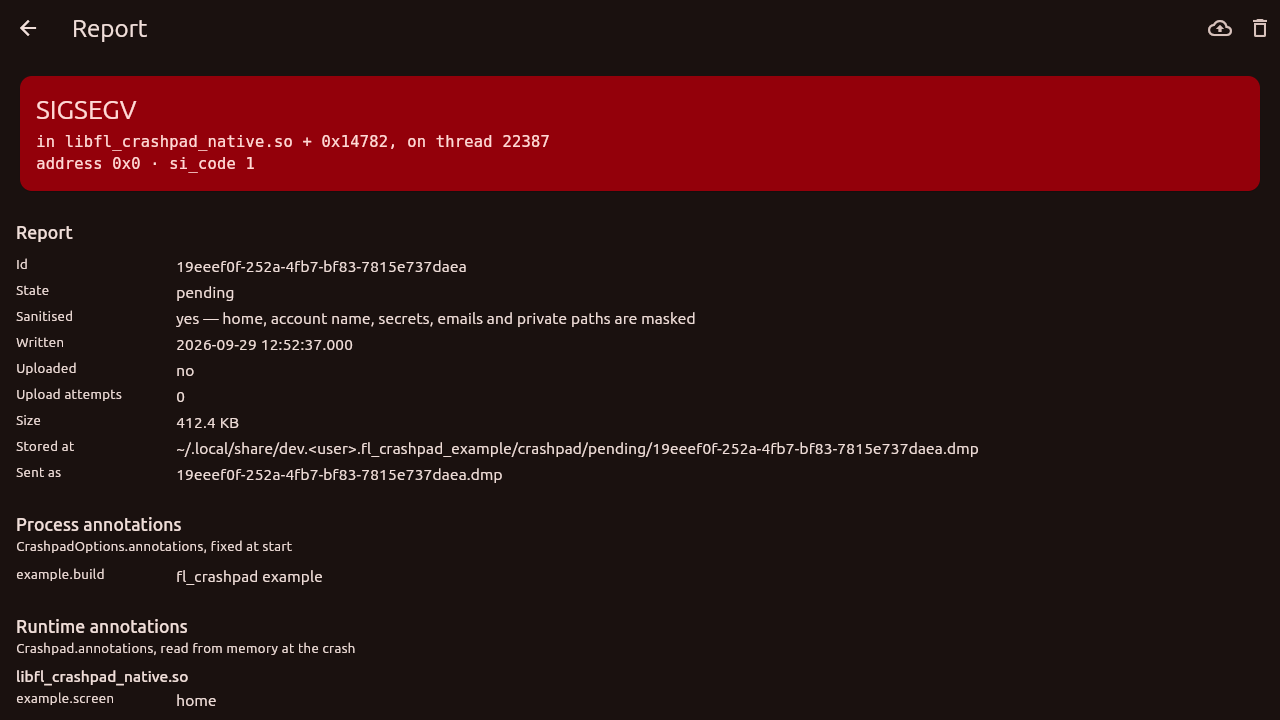
example/ starts Crashpad, sets a runtime annotation, crashes in each of the
ways CrashpadTestCrash names, and lists the reports. Open one and it shows
what the report would tell a crash server: the exception and the module it
happened in, both kinds of annotation, the machine, the attachments and every
loaded module — the page to build if you want users to see a report before
agreeing to send it.
cd example && flutter run -d linux # or windows, macos, android, iosIt also runs without a window, which is how CI checks a real bundle:
fl_crashpad_example --database=/tmp/db --crash=segfault. On Android the same
arguments go in through the launching intent, which is how
tool/android_e2e.dart crashes the app on a device, relaunches it, and checks
that every report arrives at a server on the development machine sanitised.
32-bit Android, attachments on iOS, the macOS App Sandbox, symbolication or stack walking — that is the crash server's job, from the symbol files your build keeps — and a reader for minidumps in the package itself; the example's is a starting point.
The package logs nothing. Crashpad itself, in C++, writes its own errors — a
handler that cannot start, a report that cannot be written — to stderr, and on
Android to logcat under the tags chromium and crashpad. That is where to
look when a CrashpadException says "Crashpad's own reason is in its log".
MIT. The native half is built from Crashpad and its dependencies, under their own licences — see THIRD_PARTY_NOTICES.md.