


Originally created by palfrey. This fork builds on that allowlist work with a live Home Assistant IP ban and allowlist manager UI.
Warning
THIS IS A HACK. USE AT YOUR OWN RISK. Home Assistant does not provide a public integration API for changing the HTTP IP ban manager at runtime, so this integration uses a small internal hook around Home Assistant's built-in ban manager.
IP Ban Manager gives Home Assistant's built-in IP filtering and banning the management UI it has always needed: trusted networks, live ban review and removal, automatic-ban controls, diagnostics, services, and a proper integration icon.
IP Ban Manager turns the original YAML-only allowlist wrapper into a practical management panel for Home Assistant IP banning. Exact IP bans stay in Home Assistant's native live ban manager and ip_bans.yaml workflow; IP Ban Manager adds the UI, allowlist, managed network blocks, safety checks, diagnostics, and services around it.
| Release | Highlights |
|---|---|
| v1.3.2 | Tightens local-network lockout safety: blocking a detected local network now requires an allowlist entry that keeps that detected network reachable, not just one host inside it. |
| v1.3.1 | Improves legacy cleanup by absorbing old ban_allowlist config entries from the new config flow and moving stale old folders out of Home Assistant's loader path. |
| v1.3.0 | Safer first-run defaults, local-network lockout validation, earlier failed-login notification capture, and smarter clear-ban confirmation only when multiple bans would be removed. |
| v1.2.15 | Fixes HACS installs by shipping only the real ip_ban_manager integration folder; old ban_allowlist YAML is still absorbed by IP Ban Manager. |
| v1.2.14 | Fixes blank Banned entries submissions and adds a confirmation screen before clearing every exact IP ban. |
| v1.2.13 | Optional Allow automatic bans inside Allowed IPs setting for carrier/VPN subnet allowlists where individual failed-login sources should still become exact Home Assistant bans. |
| v1.2.12 | Safer legacy ban_allowlist cleanup: removes stale old-domain cards only after IP Ban Manager exists, with startup cleanup and regression tests. |
| v1.2.11 | Removes stale old-domain ban_allowlist cards from the new IP Ban Manager config-entry startup path. |
| v1.2.10 | Removes stale old-domain ban_allowlist cards once the new IP Ban Manager entry exists, while preserving first-time migration. |
| v1.2.9 | Clean CI release for the legacy ban_allowlist migration loader, with GitHub Actions formatting/lint fixes. |
| v1.2.8 | Restores a tiny old-domain compatibility loader so existing ban_allowlist entries migrate into IP Ban Manager instead of staying Not loaded. |
| v1.2.7 | Completes the visible migration by renaming old ban_allowlist / IP Ban Allowlist config entries to IP Ban Manager during setup. |
| v1.2.6 | Unified allowlisted-login wording with Home Assistant terminology: Allowlisted login notifications everywhere. |
| v1.2.5 | Setup polish for the Allowlisted login notifications label plus refreshed live Home Assistant screenshots for setup, allowlist management, and ban management. |
| v1.2.4 | Quieter allowlisted failed-login notifications with a matching Allowlisted login notifications option and notification link, while repeated failures still escalate. |
| v1.2.3 | Startup notification cleanup so existing Home Assistant HTTP notifications are normalized into the current branded format immediately. |
| v1.2.2 | Repair-message cleanup and embedded notification logo so branded IP Ban Manager notifications do not depend on Home Assistant URL routing. |
| v1.2.1 | HACS packaging fix so new installs load the real ip_ban_manager integration cleanly and absorb leftover YAML. |
| v1.2.0 | Public-ready release with managed Blocked networks, allowlist precedence, automatic-ban notification controls, diagnostics, branded notifications, and full ip_ban_manager domain migration. |
| v1.1.2 | README and HACS display polish, including a more reliable license badge. |
| v1.1.1 | Repository brand assets so HACS and Home Assistant can discover the integration icon where supported. |
| v1.1.0 | Managed Blocked networks for CIDR ranges and IPv4 wildcard shorthand, allowlist precedence over blocked networks, automatic-ban notification control, and blocked-network diagnostics. |
| v1.0.0 | First public IP Ban Manager release with config-flow setup, YAML import, live Allowed IPs and Banned IPs editing, automatic-ban controls, services, diagnostics, and safer file handling. |
Core management features include:
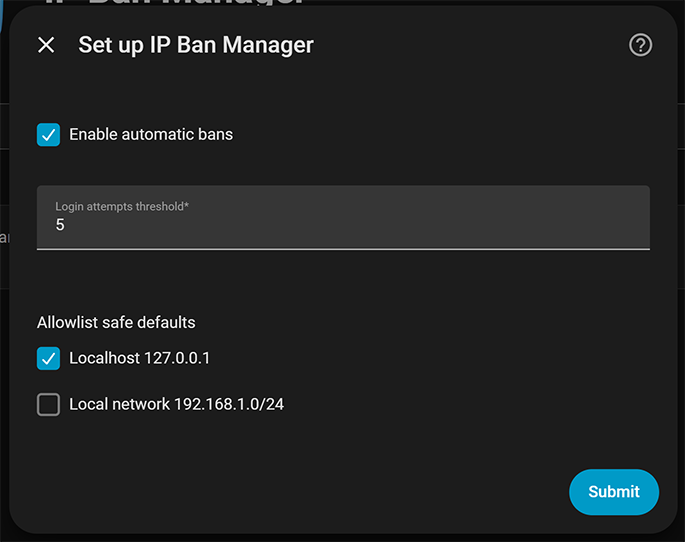
- Setup: UI setup with automatic-ban controls,
127.0.0.1safe default, detected local subnet selected by default, and YAML import for existing users. - Allowed IPs: live editable trusted IPs, CIDR networks, and IPv4 wildcard networks like
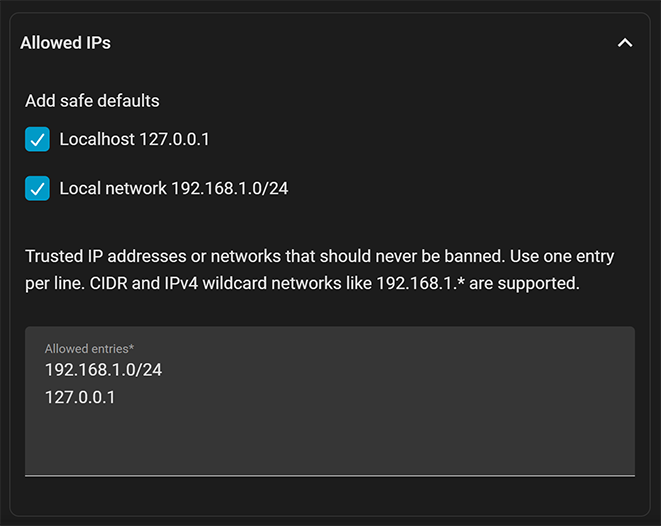
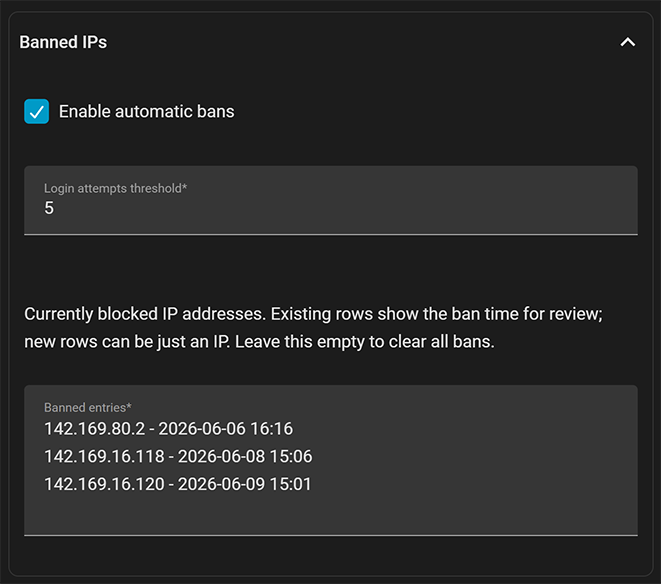
192.168.1.*. - Banned IPs: live exact-IP ban review, add, remove, and clear actions without restarting Home Assistant. Existing ban timestamps are shown as readable local times and preserved when unchanged, with confirmation before clearing every exact ban.
- Blocked networks: managed CIDR or wildcard network blocks, enforced behind Home Assistant's native ban lookup without pretending
ip_bans.yamlsupports ranges. - Allowed subnet auto-bans: optional exact automatic bans for failed logins inside allowed IP ranges, useful when a broad trusted carrier/VPN subnet should bypass network blocks but individual bad-login sources should still be banned.
- Ordering and persistence:
ip_bans.yamlrewrites stay oldest-first so new exact bans appear at the bottom, matching Home Assistant's normal file behavior. - Notifications: branded IP Ban Manager login/ban notifications include an embedded compact icon header, direct settings link where action is useful, stale-notification cleanup when bans are removed, optional automatic-ban notification suppression, earlier failed-login capture, and quieter allowlisted-login notifications that can still escalate if a trusted source keeps failing authentication.
- Safety checks: malformed entries, all-Internet allowlist or block entries, exactly banned IPs that are also allowed, local-network lockout risks, and unconfirmed multi-ban clear actions are rejected before anything is written.
- Automation:
ip_ban_manager.*services for adding, removing, and clearing exact bans plus adding and removing allowlist entries. - Diagnostics: sensors for active bans, allowlisted networks, managed blocked networks, and failed-login sources.
|
|
|
This is a HACK because Home Assistant does not provide a public integration API for changing the HTTP IP ban manager at runtime. IP Ban Manager wraps Home Assistant's internal HTTP ban manager and failed-login handling so Home Assistant's built-in ban middleware still does the actual blocking, while this integration adds allowlists and live management on top.
That internal hook is intentionally small and covered by tests, but it is still internal Home Assistant behavior. Check release notes and test after Home Assistant updates, especially major releases.
Home Assistant has a very useful IP banning feature, which is nice for a private but externally facing instance. The missing feature is IP allowlists. Without an allowlist, your own home IP can get banned when something inside the house uses your external hostname. The position of the core devs appears to be "this is a bug with something else that we shouldn't workaround", but this integration keeps that workaround available and manageable.

If the button does not work, add Wheemer/ip-ban-manager to HACS manually as a custom integration repository.
After installing, restart Home Assistant once so the custom integration is loaded. Then add the integration from Settings > Devices & services > Add integration. Setup starts with the important controls only: automatic bans, the login-attempt threshold, and allowlist safe defaults for 127.0.0.1 plus, when detected, Home Assistant's local subnet. 127.0.0.1 is selected by default; the detected local subnet is available but not selected by default. Add or remove trusted LAN and remote IPs from Configure after setup.
The visible integration name is IP Ban Manager and automation/service calls use ip_ban_manager.*. Normal setup is done from the UI; existing Home Assistant http: IP-ban settings can stay in configuration.yaml. Leftover ban_allowlist: allowlist YAML is absorbed automatically when IP Ban Manager first loads.
YAML import is optional and mainly kept as a one-time migration path for advanced/manual installs, including leftover ban_allowlist: allowlist YAML. After IP Ban Manager imports those settings, remove the old integration YAML key and restart Home Assistant. If the old key is left behind, IP Ban Manager ignores it once the UI config entry already exists. Most users should add and manage IP Ban Manager from the UI.
If you previously installed or manually copied an old custom_components/ban_allowlist folder, delete that folder. HACS should install only custom_components/ip_ban_manager from this repository.
Home Assistant's built-in HTTP banning must still be enabled:
http:
  ip_ban_enabled: true
The login-attempt threshold is managed from IP Ban Manager setup and Configure after Home Assistant's native IP banning is enabled.
If IP banning is not enabled, IP Ban Manager creates a Home Assistant repair warning with the required YAML and a link to the official HTTP documentation. It does not edit configuration.yaml automatically; that keeps existing http: settings, includes, comments, proxy configuration, and package layouts safe.
The options UI is the main workspace. Allowlist, ban list, and automatic-ban setting changes apply immediately; Home Assistant does not need to restart. The integration stores automatic-ban settings in its config entry and reapplies them when Home Assistant starts.
Open Settings > Devices & services > IP Ban Manager > Configure to:
- add safe defaults with checkboxes inside Allowed IPs
- edit Allowed IPs, one IP address, CIDR network, or IPv4 wildcard network per line
- enable or disable new automatic bans, automatic ban notifications, and the login-attempt threshold under Banned IPs
- optionally allow automatic exact bans inside Allowed IPs for broad trusted subnets
- edit Banned entries, one exact IP address per line
- edit Blocked networks, one CIDR network or IPv4 wildcard network per line
- view existing ban timestamps as readable local times in Banned IPs
- clear exact bans or managed blocked networks by emptying the matching field and submitting
Wildcard blocked-network entries such as 192.168.1.* are saved as 192.168.1.0/24. Exact banned IPs stay in Home Assistant's native live ban manager and ip_bans.yaml; CIDR and wildcard blocked networks are stored by IP Ban Manager and enforced behind the same native ban lookup. Allowed entries win over managed blocked networks, so you can block a subnet while keeping a trusted address allowed.
This gives you the practical behavior people expect from subnet banning without pretending Home Assistant's native ip_bans.yaml supports ranges. Exact IPs remain ordinary Home Assistant bans; managed networks are a small runtime layer that checks the same request path and still respects the allowlist first.
Existing exact banned IP rows are shown as IP - local ban time, oldest first. You can leave those timestamps in place when submitting; IP Ban Manager preserves the original ban date for unchanged bans. New exact banned IP rows can be entered as just the IP address, and Home Assistant records the current ban time when they are submitted. When the ban file is rewritten, entries are written oldest first so new exact bans appear at the bottom in both the UI and ip_bans.yaml.
The options UI validates edits before changing Home Assistant. It rejects all-Internet allowlist or blocked-network entries, IPs that are both allowed and exactly banned, and malformed entries. Service calls use the same safety posture for risky operations, including typo removals, allowlist networks that contain active exact bans, and clear-all ban requests without confirm: true.
The live hooks are installed at setup even if the initial allowlist is empty, so adding your first allowed IP later works immediately. If the integration is unloaded, those hooks are restored so Home Assistant is left in its normal state.
The integration also adds services for automations and scripts:
ip_ban_manager.add_ip_banip_ban_manager.remove_ip_banip_ban_manager.remove_all_ip_bansip_ban_manager.add_allowlist_networkip_ban_manager.remove_allowlist_network
Adding an IP ban updates Home Assistant's live ban manager and persists to ip_bans.yaml. Removing a ban updates the live ban manager, clears any failed-login counter for that IP, and rewrites ip_bans.yaml. Clearing every ban requires confirm: true.
IP Ban Manager adds diagnostic sensors with count states and detailed attributes:
sensor.ip_ban_manager_active_banssensor.ip_ban_manager_allowlisted_networkssensor.ip_ban_manager_blocked_networkssensor.ip_ban_manager_failed_login_sources