- setup.pyとjcmc.pyをダウンロードし、1つのディレクトリ内に配置します。
python setup.py installを実行してください。
解析ファイルを作成し、jcmcをインポートして用います。
from jcmc import JCMC
JCMC = JCMC('output.csv') #出力ファイル名を決めておきます
JCMC.export('hydrothermal')
JCMC.export('hot,spring') #複数キーワードはカンマで区切るjcmc.pyの中身をつくっていきます。まずは必要なモジュールをインポートしておきます。
import requests
import json
from bs4 import BeautifulSoup
import pandas as pd
import sys
import os
import urllib
import csv
import pprintターミナルに出力するときに色をつけられるようにします。Colorクラスを作成して、色を指定しておきます。
class Color:
    BLACK     = '\033[30m'
    RED       = '\033[31m'
    GREEN     = '\033[32m'
    YELLOW    = '\033[33m'
    BLUE      = '\033[34m'
    PURPLE    = '\033[35m'
    CYAN      = '\033[36m'
    WHITE     = '\033[37m'
    END       = '\033[0m'
    BOLD      = '\038[1m'
    UNDERLINE = '\033[4m'
    INVISIBLE = '\033[08m'
REVERCE = '\033[07m'JCMCクラスの作成を始めます。まず最初に、class JCMCを呼び出した時に一度だけ読み込まれる__init__を作っておきます。引数はnameだけ要求しておき、これには保存するcsvの名前を入れておきましょう。
class JCMC:
    def __init__(self,name):
        self.oname = name
ここまでで一度実行してみます。別のファイル (main.pyなど)をつくって、class JCMCを呼び出してみます。
from jcmc import JCMC #ここでclass JCMCがjcmc.pyからインポートします。
JCMC = JCMC('test.csv') #test.csvがclass JCMCの__init__で用意したnameに渡されてself.onameに格納されます。ここでは何も起きないですが、先程作成したclass JCMCを呼び出してtest.csvという名前を用意できました。試しに、新しい関数def testを作ってみましょう。
class JCMC:
    def __init__(self,name):
        self.oname = name

    def test(self, data):
return data * 2 #引数dataを2倍した値を返しますここでmain.pyに戻って、作成したtest関数を使ってみます。
from jcmc import JCMC
JCMC = JCMC('test.csv')

a = JCMC.test(2) #test関数のdataに2を渡します。返ってきた4 (2倍された数)がaに格納されます。
print(a)

b = JCMC.test(3) #test関数のdataに3を渡します。返ってきた6 (2倍された数)がbに格納されます。
print(b)

c = JCMC.test(2) * JCMC.test(3) #関数どうしの積をとることもできます
print(c)test関数と同じようにしてjcmcを関数として作っていくことで、mian.pyから呼び出して処理することができるようになります。export関数をつくって実際に出力してみましょう。
class JCMC:
    def __init__(self,name):
        self.oname = name

    def export(self,keyword):
        keyword = keyword.replace(',','+') #検索できる形に変換
        url = 'https://www.jcm.riken.jp/cgi-bin/jcm/jcm_kojin?ANY=' + keyword #URLをつくる
        print(url)
keyword = keyword.replace(',','+')をなぜやるのかですが、例えば"hydrothermal vent"をJCMで検索すると、検索結果のURLはhttps://www.jcm.riken.jp/cgi-bin/jcm/jcm_kojin?ANY=hydrothermal+ventとなっていました。ここから、2つ以上の単語でつくられた語句で検索すると+で繋がれて検索にかけられることがわかります。スペースはやや扱いにくいので、このソフトウェアでは2つ以上の単語はカンマで区切る方式をとります。keywordには検索したい1つの単語またはカンマで区切られた2つ以上の単語が渡されているので、keyword = keyword.replace(',','+')で処理することでとりあえず検索キーワードを準備することができました。この検索キーワードをurl = 'https://www.jcm.riken.jp/cgi-bin/jcm/jcm_kojin?ANY='に繋げることで、検索するURLを準備できました。print(url)して確認してみましょう。
from jcmc import JCMC
JCMC = JCMC('test.csv')
JCMC.export('hydrothermal,vent')
JCMC.export('hot,spring')
% python main.py
https://www.jcm.riken.jp/cgi-bin/jcm/jcm_kojin?ANY=hydrothermal+vent
https://www.jcm.riken.jp/cgi-bin/jcm/jcm_kojin?ANY=hot+spring
このURLをコピーしてgoogleで見てみましょう。目的の検索結果のページが表示されていてば成功です。生成したURLから、そのページのhtmlファイルを取得するプログラムを作っていきます。urllib.request.urlopen(url)を用いると簡単に書けます。続いてBeautifulSoup()で持ってきたhtmlを使いやすい形にパースします。
class JCMC:
    def __init__(self,name):
        self.oname = name

    def export(self,keyword):
        keyword = keyword.replace(',','+') #検索できる形に変換
        url = 'https://www.jcm.riken.jp/cgi-bin/jcm/jcm_kojin?ANY=' + keyword #URLをつくる
        parent = 'https://www.jcm.riken.jp' #親URLを指定しておきます (今後つかいます)
        html = urllib.request.urlopen(url) #指定したURLからhtmlをもってくる
        soup = BeautifulSoup(html, 'html.parser')
        a = soup.find_all('a') #<a>タグで囲まれた部分の中身(JMC numberのURLが含まれる)を抜き出す
        url_list = []
        for tag in a:
            called = tag.get('href') #リンク先のURLのリストをもってくる
            if 'JCM=' in called:
                url_list.append(parent+called)
        print(url_list)
        print(len(url_list)) #何個のURLが取得できたか確認する
一気に書いてしまいました。まずはもってきたhtmlの中身を見てみましょう。
<H1>Strain data</H1>
Search for keyword=[hydrothermal vent].
<HR>
<FONT FACE="Arial,Helvetica"> <I>Thermococcus</I> <I>profundus</I></FONT><BR>
JCM number: <a href="/cgi-bin/jcm/jcm_number?JCM=9378">9378</a> #これが目的のURL
<-- T. Kobayashi DT5432.<br>
Source: <STRONG>Hydrothermal vent at the Mid-Okinawa Trough [<a href="/cgi-bin/jcm/jcm_ref?REF=3633">3633</a>]</STRONG>.<BR>
Morphology: [<a href="/cgi-bin/jcm/jcm_ref?REF=3633">3633</a>].<BR>
Biochemistry/Physiology: [<a href="/cgi-bin/jcm/jcm_ref?REF=3633">3633</a>].<BR>
G+C (mol%): 52.5 (HPLC) [<a href="/cgi-bin/jcm/jcm_ref?REF=3633">3633</a>].<BR>こんな感じに、<a>タグの中にリンク先のurlの情報が含まれていることがわかります。この中で、JCM番号にリンクされているものは全てJCM=の後にJCM番号がついている形をしたURLで共通しています。if文でJCM=が含まれるURLを全てurl_listに追加していくことで、検索ワードで検索した結果のページからJCM番号へのリンクが含まれる全てのURLを取得することができました。何個のURLが取得できたか確認し、漏れなく取得できているか確認しておきましょう。
このURLもコピーしてgoogleで見てみましょう。Temperatureなどの情報が含まれる個別のページが表示されれば成功です。このURLから温度情報を取得する関数を書いておきます。大人の事情で、__init__の次にこの関数を定義するようにプログラムを書き換えます。
class JCMC:
    def __init__(self,name):
        self.oname = name

    def call_temp(self,url): #URLから温度の情報をもってくる関数を定義
        html = urllib.request.urlopen(url)
        data = BeautifulSoup(html, 'html.parser')
        text = data.get_text().splitlines() #テキストデータに変換
        for inf in text:
            if 'Temperature:' in inf: #Temperatureが存在する部分を抜き出す
                print(url,inf)
                return inf
                break

    def export(self,keyword):
        #------以下略-----
main.pyに書き加えて確認してみます。
from jcmc import JCMC
JCMC = JCMC('test.csv')
tmp = JCMC.call_temp('https://www.jcm.riken.jp/cgi-bin/jcm/jcm_number?JCM=9378')
print(tmp)
https://www.jcm.riken.jp/cgi-bin/jcm/jcm_number?JCM=9378 Temperature: 80°C; Anaerobic.
Temperature: 80°C; Anaerobic.
call_tempの中でprintされた情報と、returnされてmain.pyでtmpに保存されてprintされた情報が2つ出力されていれば成功です。
次に、def export()に戻って、種名を取得するプログラムを作っていきます。
class JCMC:

        #-----中略-----

    def export(self,keyword):

        #-----中略-----

        text = soup.get_text().splitlines()
        print(text)
['', '', '', 'Strain data', '', '', '', '', '', '', '', '', '', ' window.dataLayer = window.dataLayer || [];', ' function gtag(){dataLayer.push(arguments);}', " gtag('js', new Date());", " gtag('config', 'UA-49139209-3');", '', 'Strain data', 'Search for keyword=[hydrothermal vent].', '', '', ' Thermococcus profundus', 'JCM number: 9378', ' <--\xa0T. Kobayashi DT5432.', 'Source: Hydrothermal vent at the Mid-Okinawa Trough [3633].', 'Morphology: [3633].', 'Biochemistry/Physiology: [3633].', 'G+C (mol%): 52.5 (HPLC) [3633].', 'Phylogeny: 16S rRNA gene (AY099184), 16S rRNA gene & ITS & 23S rRNA gene (Z75233) [3633].', 'Other taxonomic data: Polyamine [4098].', 'Genome sequence: CP014862, CP014863 (plasmid).', 'Production: Extracellular amylase [3728].', '', 'Publication(s) using this strain [B04029, A04053, A04193, B05123, B07136].', 'Delivery category: Domestic, B; Overseas, B.', 'Viability and purity assays of this product were performed at the time of production as part of quality control. The authenticity of the culture was confirmed by analyzing an appropriate gene sequence, e.g., the 16S rRNA gene for prokaryotes, the D1/D2 region of LSU rRNA gene, the ITS region of the nuclear rRNA operon, etc. for eukaryotes. The characteristics and/or functions of the strain appearing in the catalogue are based on information from the corresponding literature and JCM does not guarantee them.', '', ' Thermococcus peptonophilus', 'JCM number: 9653', ' <--\xa0C. Kato; JAMSTEC, Japan; OG1.', 'Source: Deep-sea hydrothermal vent in the western Paciffic Ocean [3908].', 'Morphology: [3908].', 'Biochemistry/Physiology: [3908,4244].', 'G+C (mol%): 52 (HPLC) [3908].', 'DNA-DNA relatedness: [3908].', 'Phylogeny: 16S rRNA gene (D37982) [3908], 16S rRNA gene (AB055125).', 'Other taxonomic data: Polyamine [4204].', 'Genome sequence: CP014750, CP014751 (plasmid).', 'More information: Culturability [4150].', 'Genomic DNA is available from RIKEN BRC-DNA Bank:', 'JGD 12568.', '', 'Publication(s) using this strain [B04029, A04193, A05044, B05123, B07136].', 'Delivery category: Domestic, B; Overseas, B.', 'Viability and purity assays of this product were performed at the time of production as part of quality control but note that the authenticity has not yet been checked by gene sequencing. The characteristics and/or functions of the strain appearing in the catalogue are based on information from the corresponding literature and JCM does not guarantee them.', '', ' Thermococcus peptonophilus', 'JCM number: 9654', ' <--\xa0C. Kato; JAMSTEC, Japan; SM2.', 'Source: Deep-sea hydrothermal vent in the western Paciffic Ocean [3908].', 'Morphology: [3908].', 'Biochemistry/Physiology: [3908].', 'G+C (mol%): 52 (HPLC) [3908].', 'DNA-DNA relatedness: [3908].', 'Phylogeny: 16S rRNA gene (D37983) [3908].', '', 'Publication(s) using this strain [A05044].', 'Delivery category: Domestic, B; Overseas, B.', 'Viability and purity assays of this product were performed at the time of production as part of quality control but note that the authenticity has not yet been checked by gene sequencing. The characteristics and/or functions of the strain appearing in the catalogue are based on information from the corresponding literature and JCM does not guarantee them.', '', ' Rhodothermus marinus', 'JCM number: 9785',
soup.get_text()でhtmlからテキストを抽出でき、splitlines()で1行ずつリストに加えることができます。取得したテキスト一覧を見てみると、種名は必ずJMC number:の1つ前に存在しているという法則が見えてきます (ここらへんは経験)。したがってテキストをfor文で回しつつ、JCM number:が現れたら1つ前のテキストをname_listに加えるというプログラムを書きます。
class JCMC:
    def export(self,keyword):

        #-----中略-----

        text = soup.get_text().splitlines()
        name_list = []
        for i in range(len(text)):
            if 'JCM number:' in text[i]:
                name_list.append(text[i-1])
        print(name_list)
        print(len(name_list))
何種類の種名を取得できたかも確認しておきます。先程取得したURLの個数と一致していれば大丈夫そうという予測を立てます。 ここまでで、
- 検索ワードからURLを作成して検索する
- JCM番号が含まれるリンク先から温度情報を取得する
- JCM番号に対応した種名を取得する
の3点を実装できたので、最後にこれらを1つのcsvファイルに書き込むプログラムを作成すれば完了です。途中.replace('\xa0', '')という見慣れない処理をしていますが、これはshift_jisでExcelに書き込む際のエラーを回避するための処理です。
    def export(self,keyword):

        #-----中略-----

        with open(self.oname, 'a', encoding='shift_jis') as f: #'a'を指定すると追記できる (ファイルがない場合は新規)
            k1 = 'Keyword'
            k2 = 'Species'
            k3 = 'JCM number'
            k4 = 'URL'
            k5 = 'Temperature'
            k6 = 'Information'
            #k1~k6の6つの情報を書き込みます。
            fieldnames = [k1,k2,k3,k4,k5,k6]
            writer = csv.DictWriter(f, fieldnames=fieldnames)
            for line in url_list: #先程作成したurl_listから1つずつ処理していきます。
                ind = url_list.index(line)
                info = self.call_temp(line) #urlから温度を取得する関数はここで用います。
                spname = name_list[ind].replace('\xa0', '').replace('"','')
                JCMnumber = line.split('=')[1]
                tmp = float(info.split('°C')[0].split(':')[1])
                try:
                    apx = ','.join(info.split(';')[1:]).replace('\xa0', '')
                except IndexError:
                    apx = 'None.'
                print(Color.CYAN+'Calling... '+Color.GREEN+spname+Color.END)
                writer.writerow({k1:keyword,k2:spname,k3:JCMnumber,k4:line,k5:tmp,k6:apx}) #csvに書き込み
main.pyを書き直して確認してみます。
from jcmc import JCMC
JCMC = JCMC('test.csv')
JCMC.export('hydrothermal,vent')
ここまでで十分使えるプログラムですが、例えば上のように2つ以上の処理が続くとヘッダーが複数書き込まれてしまうことがわかります。これを回避するために、csvファイルの中身が空のときだけヘッダーを書き込むという処理を追加します。これにより、2つ以上の処理を行っても1つのcsvファイルに情報が保存され、この後に行う処理も行いやすくなります。
    def export(self,keyword):

        #-----中略-----

        with open(self.oname, 'a', encoding='shift_jis') as f: #'a'を指定すると追記できる (ファイルがない場合は新規)
            k1 = 'Keyword'
            k2 = 'Species'
            k3 = 'JCM number'
            k4 = 'URL'
            k5 = 'Temperature'
            k6 = 'Information'
            #k1~k6の6つの情報を書き込みます。
            filecheck = 0
            with open(self.oname, 'r', encoding='shift_jis') as c:
                if len([i for i in c.readlines()]) > 0:
                    filecheck = 1
            fieldnames = [k1,k2,k3,k4,k5,k6]
            writer = csv.DictWriter(f, fieldnames=fieldnames)
            if filecheck == 0: writer.writeheader() #fileが空のときだけheaderを書き込む
            for line in url_list:
            #-----以下略-----
今回作成したjcmc.pyの中身は次のようになりました。
from selenium import webdriver
import time
import requests
import json
from bs4 import BeautifulSoup
import pandas as pd
import sys
import time
import os
import urllib
import csv
import pprint

class Color:
    CYAN  = '\033[36m'
    GREEN = '\033[32m'
    END   = '\033[0m'

class JCMC:
    def __init__(self,name):
        self.oname = name

    def call_temp(self,url): #URLから温度の情報をもってくる関数を定義
        html = urllib.request.urlopen(url)
        data = BeautifulSoup(html, 'html.parser')
        text = data.get_text().splitlines() #テキストデータに変換
        for inf in text:
            if 'Temperature:' in inf: #Temperatureが存在する部分を抜き出す
                print(url,inf)
                return inf
                break

    def export(self,keyword):
        #keyword = input('search key : ') #検索キーワードを入力 (複数キーワードはカンマで)
        keyword = keyword.replace(',','+') #検索できる形に変換
        url = 'https://www.jcm.riken.jp/cgi-bin/jcm/jcm_kojin?ANY=' + keyword #URLをつくる
        parent = url.split('/')[0]+'//'+url.split('/')[2]
        html = urllib.request.urlopen(url) #指定したURLからhtmlをもってくる
        soup = BeautifulSoup(html, 'html.parser')

        a = soup.find_all('a') #<a>タグで囲まれた部分の中身(JMC numberのURLが含まれる)を抜き出す
        url_list = []
        for tag in a:
            called = tag.get('href') #リンク先のURLのリストをもってくる
            if 'JCM=' in called:
                url_list.append(parent+called)

        text = soup.get_text().splitlines()
        name_list = []
        for i in range(len(text)):
            if 'JCM number:' in text[i]:
                name_list.append(text[i-1]) #賢いやり方かは怪しいが。

        with open(self.oname, 'a', encoding='shift_jis') as f: #'a'を指定すると追記できる (ファイルがない場合は新規)
            k1 = 'Keyword'
            k2 = 'Species'
            k3 = 'JCM number'
            k4 = 'URL'
            k5 = 'Temperature'
            k6 = 'Information'
            filecheck = 0
            with open(self.oname, 'r', encoding='shift_jis') as c:
                if len([i for i in c.readlines()]) > 0:
                    filecheck = 1
            fieldnames = [k1,k2,k3,k4,k5,k6]
            writer = csv.DictWriter(f, fieldnames=fieldnames)
            if filecheck == 0: writer.writeheader() #fileが空のときだけheaderを書き込む
            for line in url_list:
                ind = url_list.index(line)
                info = self.call_temp(line)
                spname = name_list[ind].replace('\xa0', '').replace('"','')
                JCMnumber = line.split('=')[1]
                tmp = float(info.split('°C')[0].split(':')[1])
                try:
                    apx = ','.join(info.split(';')[1:]).replace('\xa0', '')
                except IndexError:
                    apx = 'None.'
                print(Color.CYAN+'Calling... '+Color.GREEN+spname+Color.END)
                writer.writerow({k1:keyword,k2:spname,k3:JCMnumber,k4:line,k5:tmp,k6:apx}) #csvに書き込み
簡単なRスクリプト (vis.R)を用意して可視化してみましょう。ヒストグラムを描きます。
library(ggplot2)

rawdata <- read.csv("output.csv",header=T)

ggplot(rawdata,aes(x=Temperature,fill=Keyword))+
      geom_histogram(position="dodge")
main.pyを次のように編集することで、まとめて処理できます。
from jcmc import JCMC
import os

JCMC = JCMC('output.csv')

#3つの検索ワードを調査してみる
JCMC.export('hydrothermal')
JCMC.export('hot,spring')
JCMC.export('methane')

#横軸に生息温度をとり、検索ワードで色分けしてヒストグラムを描く
os.system('Rscript vis.R')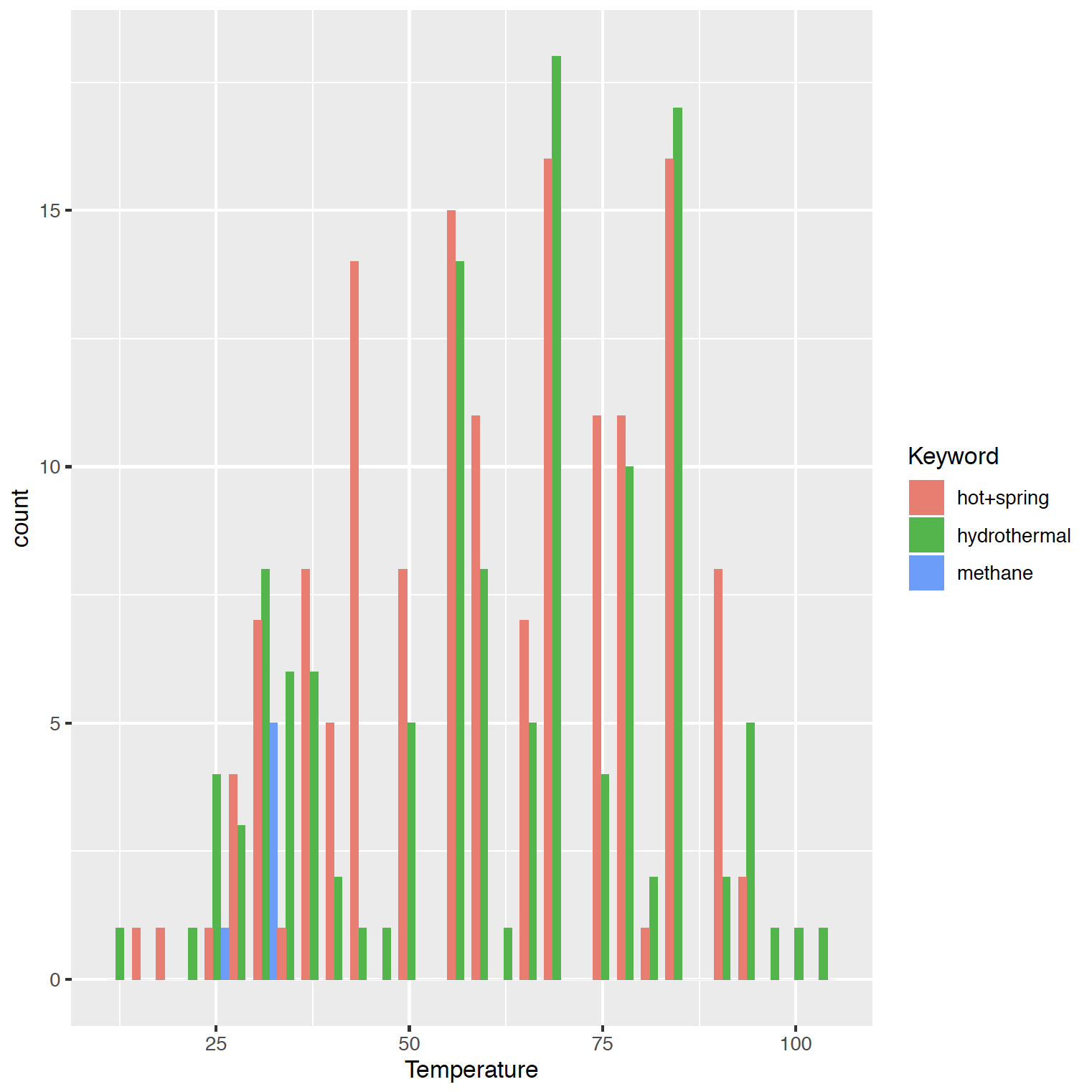
Rに渡さなくてもpythonにはseabornがあるじゃんと思いました。新しい関数summaryを作ってみましょう。インポートするモジュールが増えているので注意。
from selenium import webdriver
import time
import requests
import json
from bs4 import BeautifulSoup
import pandas as pd
import sys
import time
import os
import urllib
import csv
import pprint
import seaborn as sns
import matplotlib.pyplot as plt
import matplotlib.gridspec as gridspec

#-----中略-----

class JCMC:
    def __init__(self,name):
        self.oname = name

    #-----中略-----

    def summary(self,keywords):
        data,cpalette = pd.read_csv(self.oname),'Dark2'
        print(data)
        sns.set(palette=cpalette);cmap = plt.get_cmap(cpalette);plt.figure(figsize=(14, 9))
        gs = gridspec.GridSpec(nrows=len(keywords),ncols=3,hspace=0.3)
        for i in range(len(keywords)):
            plt.subplot(gs[i, 0])
            sns.distplot(data[data["Keyword"]==keywords[i].replace(',','+')].Temperature,kde=True,rug=True,color=cmap(i))
            plt.title(keywords[i].replace(',','+'))
            plt.xlabel('')
            plt.xlim(0,data.Temperature.max()+10)
        plt.subplot(gs[:, 1]);sns.boxplot(x="Keyword", y="Temperature", data=data)
        plt.subplot(gs[:, 2]);sns.swarmplot(x="Keyword", y="Temperature", data=data)
        plt.savefig(self.oname.replace('csv','png'))
        os.system('open '+self.oname.replace('csv','png'))
そしてmain.pyを次のように書き換えます。
from jcmc import JCMC

JCMC = JCMC('output.csv')
keywords= ['hydrothermal','hot,spring','methane']
[JCMC.export(i) for i in keywords]
JCMC.summary(keywords)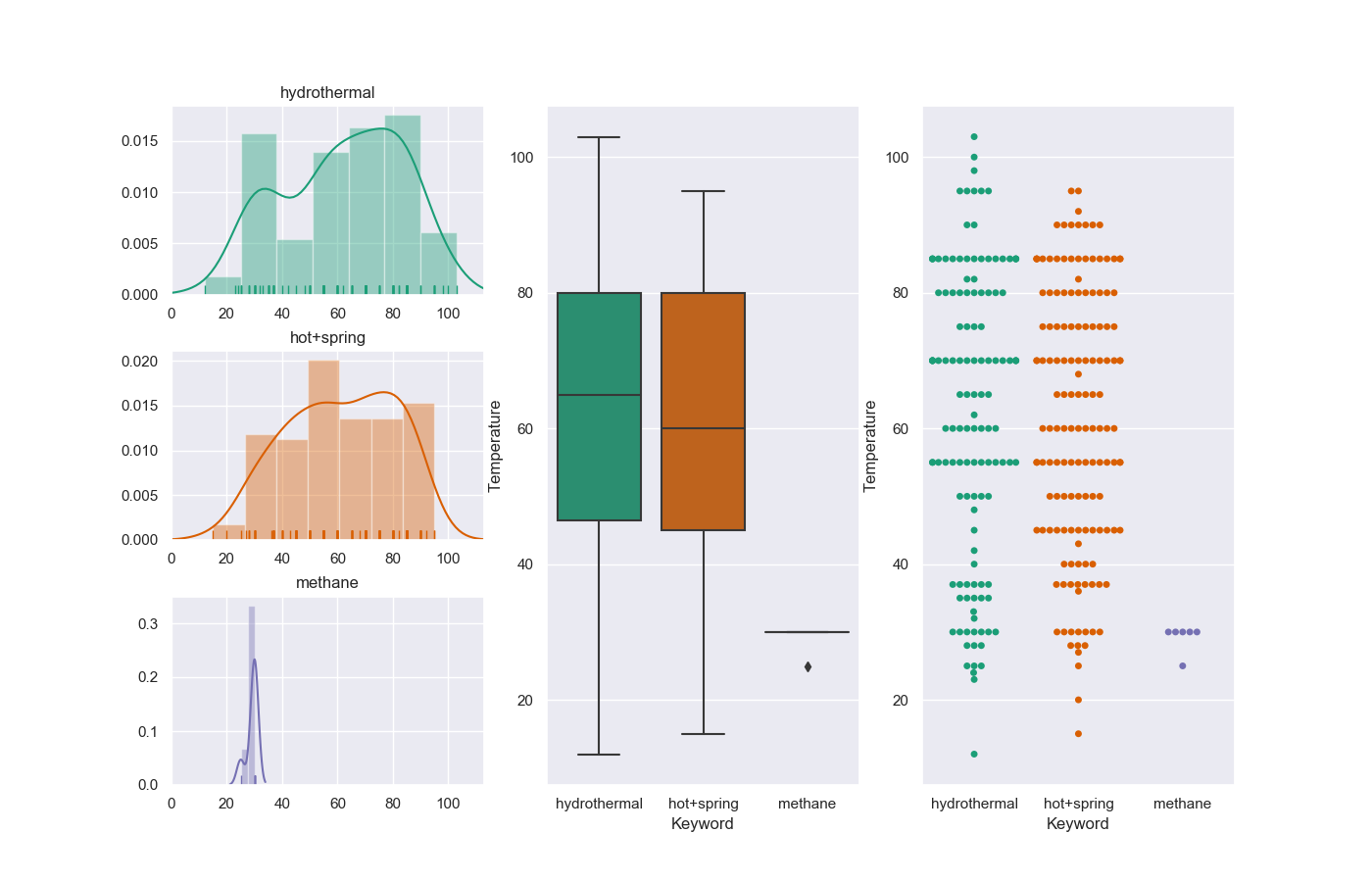
注意点
- 同じJCM番号を持つ種を区別できません。例えばhydrothermalとhot springで同じJCM番号が割り振られた種が検索された場合、情報が重複します。
- 検索結果が1種類の生物種のみだった場合、ヒストグラムが表示できずエラーがでます。