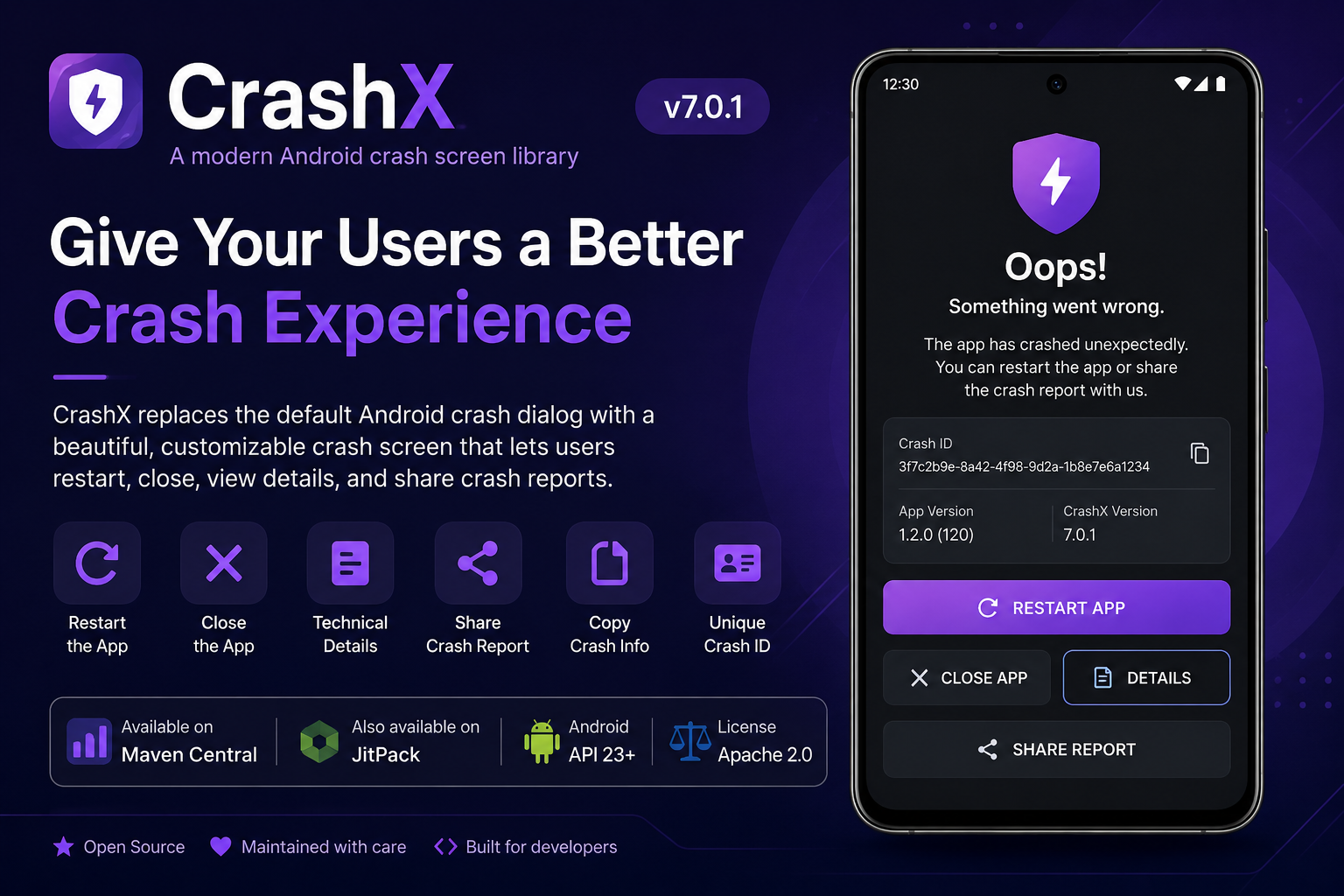
A modern Android crash screen library for a cleaner, safer, and more professional app crash recovery experience.
Replace the default Android crash dialog with a friendly, configurable crash screen that supports restart, close, technical details, crash IDs, app/device metadata, copy-to-clipboard, and crash report sharing.







Installation • Quick Start • What's New • Configuration • Custom Error Activity • Attribution • License
CrashX is a maintained and modified derivative of the excellent open-source library CustomActivityOnCrash, originally created by Eduard Ereza Martínez.
- Original project: https://github.com/Ereza/CustomActivityOnCrash
- Original author: Eduard Ereza Martínez
- Original license: Apache License 2.0
CrashX keeps the Apache License 2.0, preserves attribution, and adds new maintenance work, documentation, Android compatibility improvements, crash-screen customization, reporting features, and CrashX-specific updates.
This repository is not intended to hide, replace, or misrepresent the original author's work. It exists as a continued maintenance and modernization effort with clear credit to the original project.
Please see the NOTICE file for attribution details.
CrashX is an Android library that catches uncaught Java/Kotlin exceptions and opens a custom error screen instead of immediately showing the default Android crash dialog.
It helps developers provide a better crash recovery experience by allowing users to restart the app, close the app, view technical details, copy crash information, or share a crash report.
CrashX is useful when you want to:
- Show a professional crash screen instead of the default system crash dialog.
- Let users restart the app safely after an unexpected crash.
- Let users close the app cleanly.
- Show or hide technical crash details based on your build type.
- Share crash reports through email or Android share sheet.
- Add a support email for crash reporting.
- Customize title, message, icon, colors, and button labels.
- Display a unique crash ID on the crash screen.
- Include app version, CrashX version, Android version, API level, device name, brand, manufacturer, crash date, thread name, and stack trace in reports.
- Track recent Activity lifecycle events before the crash.
- Prevent infinite crash restart loops.
- Keep your open-source attribution and licensing transparent.
Even well-tested apps can crash because of device-specific behavior, third-party SDK issues, network edge cases, unexpected null values, database errors, lifecycle timing issues, or unhandled exceptions.
The default Android crash dialog is generic and does not help users recover. CrashX gives your app a controlled, branded, and more professional fallback experience.
| Default Android crash | CrashX |
|---|---|
| Generic system crash dialog | Branded custom crash screen |
| No custom recovery UI | Restart and close buttons |
| No friendly explanation | Custom title and message |
| No simple reporting flow | Optional report/share button |
| No custom metadata | Crash ID, app info, device info, thread, stack trace |
| No UI control | Fully configurable colors and labels |
| Poor user experience | Professional recovery screen |
CrashX v7.0.1 is a major transparency, modernization, and feature upgrade.
- Clear attribution to CustomActivityOnCrash and Eduard Ereza Martínez.
- Added
NOTICEfile with original project credit and derivative-work note. - Source headers now clearly mention the original project and CrashX maintenance.
- Documentation now clearly explains the relationship with the original project.
- Apache License 2.0 notice preserved.
- Modern default crash screen.
- Configurable crash screen title.
- Configurable crash screen message.
- Configurable restart button text.
- Configurable close button text.
- Configurable details button text.
- Configurable report button text.
- Configurable copy button text.
- Separate restart and close buttons.
- Optional close button visibility.
- Optional crash ID display.
- Optional app information display.
- Custom crash screen icon through
errorDrawable().
CrashX v7.0.1 allows direct color customization from Java configuration:
- Background color
- Card background color
- Primary button color
- Secondary button color
- Title text color
- Message text color
- Button text color
- Secondary button text color
- Meta text color
- Optional crash report/share button.
- Optional support email for report sharing.
- Optional report email subject.
- Optional Android chooser title.
- Optional extra report information.
- Optional stack trace in reports.
- Optional device info in reports.
- Optional build date in reports.
- Optional crash ID in reports.
- Optional activity lifecycle log in reports.
- Copy crash details from the details dialog.
CrashX v7.0.1 can include:
- Crash ID
- Package name
- App version
- CrashX version
- Android version
- API level
- Device model
- Brand
- Manufacturer
- Crash date
- Crash thread
- Throwable class
- Throwable message
- Stack trace
- Build date
- Activity lifecycle log
- Additional developer-defined report information
- Safer
getConfigFromIntent()handling. - Safer crash-loop protection.
- Configurable minimum time between crashes.
- Bounded Activity lifecycle log queue.
- Configurable Activity log size.
- Configurable stack trace trimming size.
- Improved foreground/background tracking.
- Improved
CrashInitProviderinitialization return value. - Preserves previous uncaught exception handler where possible.
- Default error activity runs in a separate
:error_activityprocess.

CrashX is available through Maven Central.
JitPack is also supported as an alternative installation source.
Maven Central is the recommended installation method.
Add this in your root settings.gradle.kts:
dependencyResolutionManagement {
    repositoriesMode.set(RepositoriesMode.FAIL_ON_PROJECT_REPOS)
    repositories {
        google()
        mavenCentral()
    }
}Add this in your root settings.gradle:
dependencyResolutionManagement {
    repositoriesMode.set(RepositoriesMode.FAIL_ON_PROJECT_REPOS)
    repositories {
        google()
        mavenCentral()
    }
}
For older Gradle projects, add this in your root build.gradle:
allprojects {
    repositories {
        google()
        mavenCentral()
    }
}Add this in your app module build.gradle file.
dependencies {
    implementation("io.github.tutorialsandroid:crashx:7.0.1")
}dependencies {
implementation 'io.github.tutorialsandroid:crashx:7.0.1'
}Use JitPack only if you want to install CrashX directly from the GitHub release tag.
Add this in your root settings.gradle.kts:
dependencyResolutionManagement {
    repositoriesMode.set(RepositoriesMode.FAIL_ON_PROJECT_REPOS)
    repositories {
        google()
        mavenCentral()
        maven("https://jitpack.io")
    }
}Add this in your root settings.gradle:
dependencyResolutionManagement {
    repositoriesMode.set(RepositoriesMode.FAIL_ON_PROJECT_REPOS)
    repositories {
        google()
        mavenCentral()
        maven { url 'https://jitpack.io' }
    }
}
For older Gradle projects, add this in your root build.gradle:
allprojects {
    repositories {
        google()
        mavenCentral()
        maven { url 'https://jitpack.io' }
    }
}Add this in your app module build.gradle file.
dependencies {
    implementation("com.github.TutorialsAndroid:crashx:v7.0.1")
}dependencies {
implementation 'com.github.TutorialsAndroid:crashx:v7.0.1'
}CrashX v7.X.X is designed for modern Android projects.
android {
    defaultConfig {
        minSdk 23
    }
}CrashX installs automatically through its initialization provider.
After adding the dependency, force a test crash:
throw new RuntimeException("Test CrashX crash");Your app should open the CrashX error screen instead of showing only the default Android crash dialog.
It is recommended to configure CrashX inside your Application class so the configuration is ready as early as possible.
import android.app.Application;

import com.developer.crashx.config.CrashConfig;

public class MyApplication extends Application {

    @Override
    public void onCreate() {
        super.onCreate();

        CrashConfig.Builder.create()
                .backgroundMode(CrashConfig.BACKGROUND_MODE_SHOW_CUSTOM)
                .enabled(true)
                .showErrorDetails(true)
                .showRestartButton(true)
                .showCloseButton(true)
                .trackActivities(true)
                .apply();
    }
}
Register your Application class in AndroidManifest.xml:
<application
    android:name=".MyApplication"
    android:allowBackup="true"
    android:theme="@style/AppTheme">

</application>This example uses most of the new v7.X.X features.
CrashConfig.Builder.create()
        .backgroundMode(CrashConfig.BACKGROUND_MODE_SHOW_CUSTOM)
        .enabled(true)

        // Core crash behavior
        .showErrorDetails(true)
        .showRestartButton(true)
        .showCloseButton(true)
        .showReportButton(true)
        .showCopyButtonInDetails(true)
        .logErrorOnRestart(true)
        .trackActivities(true)
        .minTimeBetweenCrashesMs(3000)

        // Crash screen text
        .errorTitle("Oops! The app crashed")
        .errorMessage("Something unexpected happened. Please restart the app or send a crash report to help us fix it.")
        .restartButtonText("Restart app")
        .closeButtonText("Close app")
        .detailsButtonText("View technical details")
        .reportButtonText("Send crash report")
        .copyButtonText("Copy details")

        // Crash report options
        .supportEmail("support@example.com")
        .reportSubject("Crash report from my Android app")
        .reportChooserTitle("Send crash report using")
        .additionalReportInfo("Environment: Production")

        // Visibility and report metadata
        .showCrashId(true)
        .showAppInfo(true)
        .includeDeviceInfo(true)
        .includeActivityLog(true)
        .includeStackTrace(true)
        .includeBuildDate(true)
        .includeCrashId(true)
        .crashIdPrefix("CRASHX")

        // Limits
        .maxActivityLogEntries(50)
        .maxStackTraceSize(128 * 1024)

        // UI colors
        .backgroundColor(0xFFB91C1C)
        .cardBackgroundColor(0xFFFFFFFF)
        .primaryButtonColor(0xFFB91C1C)
        .secondaryButtonColor(0xFFF3F4F6)
        .titleTextColor(0xFF111827)
        .messageTextColor(0xFF4B5563)
        .buttonTextColor(0xFFFFFFFF)
        .secondaryButtonTextColor(0xFF111827)
        .metaTextColor(0xFF6B7280)

        // Optional custom restart target
        .restartActivity(MainActivity.class)

.apply();CrashX can be customized using CrashConfig.Builder.
.backgroundMode(CrashConfig.BACKGROUND_MODE_SHOW_CUSTOM)Available modes:
| Mode | Description |
|---|---|
BACKGROUND_MODE_SHOW_CUSTOM |
Shows the CrashX error screen even if the app crashes in background. |
BACKGROUND_MODE_CRASH |
Lets the default/original uncaught exception handler handle background crashes. |
BACKGROUND_MODE_SILENT |
Silently closes the app when it crashes in background. |
.enabled(true)Use this if you want to enable or disable CrashX depending on build type, flavor, or environment.
Example:
CrashConfig.Builder.create()
        .enabled(!BuildConfig.DEBUG)
.apply();.showErrorDetails(true)When enabled, CrashX shows a button that allows users or testers to view technical crash details.
For production apps, you may prefer:
.showErrorDetails(false).showRestartButton(true)When enabled, the default error screen shows a restart button.
If no restart activity is configured, CrashX will try to find your launcher activity automatically.
.showCloseButton(true)When enabled, the default error screen shows a close button so the user can exit the app cleanly.
.showReportButton(true)When enabled, CrashX shows a report/share button on the crash screen.
You can combine it with:
.supportEmail("support@example.com")
.reportSubject("Crash report")
.reportChooserTitle("Send crash report using").showCopyButtonInDetails(true)When enabled, the error details dialog includes a copy action so the crash report can be copied to the clipboard.
.logErrorOnRestart(true)When enabled, CrashX logs the previous crash stack trace again when the crash activity opens.
This is useful because the crash screen runs in a new process and Android Studio Logcat may otherwise switch away from the original crashing process.
.trackActivities(true)When enabled, CrashX records recent Activity lifecycle events before the crash.
Example activity log:
2026-05-25 14:10:01: MainActivity created
2026-05-25 14:10:02: MainActivity resumed
2026-05-25 14:10:15: ProfileActivity created
2026-05-25 14:10:16: ProfileActivity resumed
This can help you understand what the user was doing before the crash.
.maxActivityLogEntries(50)CrashX v7.X.X uses a bounded Activity log queue, so the log does not grow forever.
.minTimeBetweenCrashesMs(3000)CrashX prevents infinite crash loops by checking if the app crashed recently.
If another crash occurs within the configured time, CrashX avoids repeatedly opening the custom crash screen.
.maxStackTraceSize(128 * 1024)Use this to control the maximum stack trace size passed to the crash screen.
.errorDrawable(R.drawable.ic_crash)Use this to replace the default crash icon.
.restartActivity(MainActivity.class)CrashX opens this activity when the user taps the restart button.
If not provided, CrashX tries to find your restart activity by intent filter, and then falls back to your launcher activity.
.errorActivity(MyCrashActivity.class)Use this when you want a completely custom crash screen instead of the default CrashX UI.
.eventListener(new MyCrashEventListener())Use this to track crash-screen events.
public class MyCrashEventListener implements CrashActivity.EventListener {

    @Override
    public void onLaunchErrorActivity() {
        // Called when CrashX opens the error screen
    }

    @Override
    public void onRestartAppFromErrorActivity() {
        // Called when the user restarts the app
    }

    @Override
    public void onCloseAppFromErrorActivity() {
        // Called when the user closes the app
    }
}
Important: the listener must not be an anonymous or non-static inner class because it needs to be serializable.
CrashX v7.X.X allows direct UI customization from Java configuration.
.errorTitle("Oops! Something went wrong")
.errorMessage("The app ran into an unexpected problem. Please restart the app.")
.restartButtonText("Restart now")
.closeButtonText("Close")
.detailsButtonText("Technical details")
.reportButtonText("Send report")
.copyButtonText("Copy details").backgroundColor(0xFF111827)
.cardBackgroundColor(0xFFFFFFFF)
.primaryButtonColor(0xFF2563EB)
.secondaryButtonColor(0xFFF3F4F6)
.titleTextColor(0xFF111827)
.messageTextColor(0xFF4B5563)
.buttonTextColor(0xFFFFFFFF)
.secondaryButtonTextColor(0xFF111827)
.metaTextColor(0xFF6B7280).showCrashId(true)
.crashIdPrefix("CRASHX")CrashX generates a unique crash ID for each crash. This helps developers match user reports with logs.
.showAppInfo(true)When enabled, the default crash screen can display app and crash metadata such as app version and CrashX version.
CrashX v7.X.X can show a report button and prepare a shareable crash report.
.showReportButton(true)
.supportEmail("support@example.com")
.reportSubject("Crash report from my Android app")
.reportChooserTitle("Send crash report using")
.additionalReportInfo("Environment: Production")
If supportEmail() is provided, CrashX prepares an email-style report. If no support email is provided, the user can still share the report through available Android share apps.
CrashX can include the following information in the generated report:
| Data | Description |
|---|---|
| Crash ID | Unique ID generated for the crash |
| Package name | App package identifier |
| App version | Installed app version |
| CrashX version | CrashX library version |
| Android version | Android release version |
| API level | Android SDK level |
| Device model | Device model name |
| Brand | Device brand |
| Manufacturer | Device manufacturer |
| Crash date | Date and time of crash |
| Crash thread | Thread where the crash happened |
| Throwable class | Exception class name |
| Throwable message | Exception message |
| Build date | App build date when available |
| Stack trace | Java/Kotlin exception stack trace |
| Activity log | Recent Activity lifecycle events |
| Additional report info | Custom developer-defined report text |
You can control what gets included:
.includeDeviceInfo(true)
.includeActivityLog(true)
.includeStackTrace(true)
.includeBuildDate(true)
.includeCrashId(true)
.additionalReportInfo("Environment: Production")Use this while developing and testing.
CrashConfig.Builder.create()
        .enabled(true)
        .showErrorDetails(true)
        .showRestartButton(true)
        .showCloseButton(true)
        .showReportButton(true)
        .showCopyButtonInDetails(true)
        .trackActivities(true)
        .includeDeviceInfo(true)
        .includeActivityLog(true)
        .includeStackTrace(true)
        .includeBuildDate(true)
        .includeCrashId(true)
        .errorTitle("Debug crash")
        .errorMessage("CrashX caught this crash in debug mode. Open details to inspect the stack trace.")
.apply();Use this for public apps where you want a clean user experience.
CrashConfig.Builder.create()
        .enabled(true)
        .showErrorDetails(false)
        .showRestartButton(true)
        .showCloseButton(true)
        .showReportButton(true)
        .showCopyButtonInDetails(false)
        .trackActivities(false)
        .includeDeviceInfo(true)
        .includeActivityLog(false)
        .includeStackTrace(true)
        .includeBuildDate(true)
        .includeCrashId(true)
        .supportEmail("support@example.com")
        .errorTitle("Something went wrong")
        .errorMessage("The app ran into an unexpected problem. Please restart the app or report the issue.")
.apply();Use this if you only want a clean restart screen.
CrashConfig.Builder.create()
        .enabled(true)
        .showErrorDetails(false)
        .showRestartButton(true)
        .showCloseButton(true)
        .showReportButton(false)
        .trackActivities(false)
.apply();If you want complete control, create your own crash activity.
public class MyCrashActivity extends AppCompatActivity {

    private CrashConfig config;

    @Override
    protected void onCreate(Bundle savedInstanceState) {
        super.onCreate(savedInstanceState);
        setContentView(R.layout.activity_my_crash);

        config = CrashActivity.getConfigFromIntent(getIntent());

        String crashId = CrashActivity.getCrashIdFromIntent(getIntent());
        String stackTrace = CrashActivity.getStackTraceFromIntent(getIntent());
        String activityLog = CrashActivity.getActivityLogFromIntent(getIntent());
        String threadName = CrashActivity.getThreadNameFromIntent(getIntent());
        String throwableClass = CrashActivity.getThrowableClassFromIntent(getIntent());
        String throwableMessage = CrashActivity.getThrowableMessageFromIntent(getIntent());
        String crashDate = CrashActivity.getCrashDateFromIntent(getIntent());
        String fullDetails = CrashActivity.getAllErrorDetailsFromIntent(this, getIntent());

        findViewById(R.id.btnRestart).setOnClickListener(v -> {
            CrashActivity.restartApplication(this, config);
        });

        findViewById(R.id.btnClose).setOnClickListener(v -> {
            CrashActivity.closeApplication(this, config);
        });
    }
}
Register it in your AndroidManifest.xml:
<activity
    android:name=".MyCrashActivity"
    android:process=":error_activity"
    android:exported="false" />
Then apply it:
CrashConfig.Builder.create()
        .errorActivity(MyCrashActivity.class)
.apply();You can define the error activity using an intent filter.
<activity
    android:name=".MyCrashActivity"
    android:process=":error_activity"
    android:exported="false">

    <intent-filter>
        <action android:name="com.developer.crashx.ERROR" />
        <category android:name="android.intent.category.DEFAULT" />
    </intent-filter>

</activity>
You can define the restart activity like this:
<activity
    android:name=".MainActivity"
    android:exported="true">

    <intent-filter>
        <action android:name="com.developer.crashx.RESTART" />
        <category android:name="android.intent.category.DEFAULT" />
    </intent-filter>

</activity>String stackTrace = CrashActivity.getStackTraceFromIntent(getIntent());String activityLog = CrashActivity.getActivityLogFromIntent(getIntent());String crashId = CrashActivity.getCrashIdFromIntent(getIntent());String threadName = CrashActivity.getThreadNameFromIntent(getIntent());String throwableClass = CrashActivity.getThrowableClassFromIntent(getIntent());String throwableMessage = CrashActivity.getThrowableMessageFromIntent(getIntent());String crashDate = CrashActivity.getCrashDateFromIntent(getIntent());String details = CrashActivity.getAllErrorDetailsFromIntent(this, getIntent());CrashConfig config = CrashActivity.getConfigFromIntent(getIntent());CrashActivity.restartApplication(this, config);Intent intent = new Intent(this, MainActivity.class);
CrashActivity.restartApplicationWithIntent(this, intent, config);CrashActivity.closeApplication(this, config);You can force a simple crash:
throw new RuntimeException("CrashX test crash");You can test a delayed crash:
new Handler(Looper.getMainLooper()).postDelayed(() -> {
    throw new RuntimeException("CrashX delayed crash test");
}, 3000);
You can test a null pointer crash:
String value = null;
int length = value.length();
After the crash, verify:
- Crash screen opens.
- Restart button launches the app again.
- Close button exits the app.
- Error details open when enabled.
- Copy button works when enabled.
- Report button opens share/email options when enabled.
- Crash ID appears when enabled.
- Device/app metadata appears in the report when enabled.
- Activity lifecycle log appears when tracking is enabled.
CrashX can be used with crash reporting tools, but initialization order matters.
If another library also uses Thread.setDefaultUncaughtExceptionHandler, initialize CrashX first, then initialize your crash reporting SDK.
Recommended order:
@Override
public void onCreate() {
    super.onCreate();

    CrashConfig.Builder.create()
            .enabled(true)
            .apply();

    // Initialize Firebase Crashlytics, ACRA, or another crash tool after CrashX if needed.
}
If a custom crash handler replaces CrashX and does not call the previous handler, CrashX may not receive crashes.
CrashX usually does not require special ProGuard rules.
If you use a custom error activity or custom event listener and your app has aggressive shrinking enabled, you can keep those classes:
-keep class your.package.MyCrashActivity { *; }
-keep class your.package.MyCrashEventListener { *; }
CrashX also includes consumer rules for safer library usage.
Crash reports may contain technical information such as stack traces, app version, device model, package name, Activity names, and exception messages.
For production apps:
- Avoid showing raw stack traces to normal users unless needed.
- Use
.showErrorDetails(false)for public builds if technical details are sensitive. - Use a support email controlled by your team.
- Do not collect or share personal user data without permission.
- Avoid adding sensitive information to
additionalReportInfo(). - Clearly explain crash reporting behavior in your app privacy policy if reports are sent externally.
Recommended production setup:
CrashConfig.Builder.create()
        .enabled(true)
        .showErrorDetails(false)
        .showReportButton(true)
        .supportEmail("support@example.com")
        .includeDeviceInfo(true)
        .includeActivityLog(false)
        .includeStackTrace(true)
        .includeCrashId(true)
.apply();CrashX is designed for uncaught Java/Kotlin exceptions.
CrashX does not handle every possible failure. It does not catch:
- ANRs
- Native crashes
- Low-level system kills
- Force stops by the operating system
- Crashes before the library is initialized
- Some multiprocess edge cases
- Errors inside the crash activity itself
CrashX improves the crash recovery experience, but it is not a replacement for proper crash monitoring, logging, testing, and bug fixing.
implementation 'com.github.TutorialsAndroid:crashx:v7.0.1'Make sure your repository includes:
LICENSE
NOTICE
README.mdimport com.developer.crashx.CrashActivity;
import com.developer.crashx.config.CrashConfig;For the v7.0.1 upgrade, replace these files in the library module:
library/src/main/java/com/developer/crashx/CrashActivity.java
library/src/main/java/com/developer/crashx/config/CrashConfig.java
library/src/main/java/com/developer/crashx/activity/DefaultErrorActivity.java
library/src/main/java/com/developer/crashx/provider/CrashInitProvider.java
library/src/main/AndroidManifest.xml
library/src/main/res/layout/crash_default_error_activity.xml
library/src/main/res/values/strings.xml
library/src/main/res/values/dimens.xml
library/src/main/res/drawable/crash_ic_bug_report.xml
library/consumer-rules.proOld basic setup:
CrashConfig.Builder.create()
        .showErrorDetails(true)
        .trackActivities(true)
        .apply();
New v7 recommended setup:
CrashConfig.Builder.create()
        .showErrorDetails(true)
        .showRestartButton(true)
        .showCloseButton(true)
        .trackActivities(true)
        .errorTitle("Oops! The app crashed")
        .errorMessage("Something unexpected happened. Please restart the app.")
        .showReportButton(true)
        .supportEmail("support@example.com")
        .includeDeviceInfo(true)
        .includeActivityLog(true)
        .includeStackTrace(true)
        .includeCrashId(true)
.apply();throw new RuntimeException("CrashX v7.0.1 migration test");Before publishing v7.0.1, verify:
README.mdusesv7.0.1everywhere.- GitHub release tag is exactly
v7.0.1. - JitPack dependency points to
com.github.TutorialsAndroid:crashx:v7.0.1. CrashActivity.VERSIONis7.0.0.NOTICEfile exists.- Apache 2.0 license exists.
- Original CustomActivityOnCrash attribution is visible.
- Sample app compiles.
- Library module builds successfully.
- Restart button works.
- Close button works.
- Details dialog works.
- Copy button works.
- Report/share button works.
- Crash ID appears when enabled.
- Production config hides technical details when required.
Build command:
./gradlew clean :library:assembleRelease :sample:assembleDebugWindows:
gradlew.bat clean :library:assembleRelease :sample:assembleDebugCrashX started from CustomActivityOnCrash and now continues as a credited derivative project.
The original project solved the core idea of showing a custom crash activity instead of the default Android crash dialog.
CrashX builds on that idea with:
- Modern Android maintenance
- Updated documentation
- UI customization
- Crash report sharing
- Crash IDs
- Safer configuration
- Activity log improvements
- Crash metadata improvements
- Updated default UI
- Clear attribution and licensing
Original project: https://github.com/Ereza/CustomActivityOnCrash
Original author: Eduard Ereza Martínez
License: Apache License 2.0
CrashX respects the original work and keeps credit visible.
CrashX is actively maintained by TutorialsAndroid.
Current goals:
- Keep the library working with modern Android versions.
- Improve crash screen customization.
- Improve documentation and examples.
- Keep attribution and licensing transparent.
- Accept useful issues and pull requests from the community.
Contributions are welcome.
You can contribute by:
- Reporting bugs
- Improving documentation
- Suggesting features
- Opening pull requests
- Testing CrashX on different Android versions
- Improving UI and accessibility
- Adding sample projects
Before opening a pull request:
- Fork the repository.
- Create a new feature branch.
- Make your changes.
- Test the sample app.
- Open a pull request with a clear explanation.
CrashX is maintained with respect for the open-source community.
This project acknowledges that it is derived from CustomActivityOnCrash and gives clear credit to the original author.
If you notice missing attribution, licensing issues, or documentation problems, please open an issue so it can be corrected.
CrashX is licensed under the Apache License, Version 2.0.
Copyright 2019 CrashX
Copyright original portions: Eduard Ereza Martínez and CustomActivityOnCrash contributors
Copyright modified portions: TutorialsAndroid and CrashX contributors

Licensed under the Apache License, Version 2.0.
You may obtain a copy of the License at:

http://www.apache.org/licenses/LICENSE-2.0
See the LICENSE and NOTICE files for details.
Special thanks to:
- Eduard Ereza Martínez for the original CustomActivityOnCrash project.
- CustomActivityOnCrash contributors.
- TutorialsAndroid contributors and users.
- The Android open-source community.
Made with ❤️ for Android developers.