This Unity AR application is the visualisation component of a wireless laser tag game, designed to deliver an immersive and hands-free mixed reality experience.
The app receives real-time game data via an MQTT broker hosted on a physical server (Ultra96) in the lab. This data, sent from a wearable system, includes player actions, hits, and status updates — all of which are visualised using dynamic effects in AR.
To enable stereoscopic rendering, the app uses the Google Cardboard XR plugin, allowing players to mount their mobile devices in a headset for a fully immersive, hands-free experience.
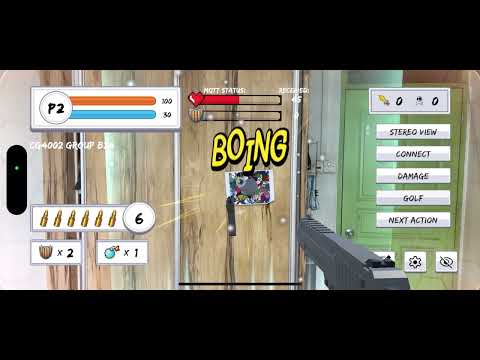
-
Player Actions
- Gun shot
- Snow bomb
- Badminton and golf projectiles
- Boxing and fencing animations
-
Visual Effects
- Snow blizzard effect upon snow bomb impact
- Shield barrier effect on players
-
AR Capabilities
- Opponent tracking using image targets (Players are to wear a vest with the image target attached)
- Floor reference image used to anchor Unity’s world origin to a physical location in the real world
The latest Android .apk build can be downloaded from the Releases section of this repository.
⚠️ Make sure to allow installations from unknown sources on your Android device.
The iOS version is not available on the App Store due to Apple’s distribution restrictions. If you would like to test the iOS build, please contact me directly to arrange a TestFlight invite or access to a development build.
Set the floor reference before starting a game session. Place the QR code image on the floor and point your camera towards it. The floor reference image can be found here.

You should see a gray plane object spawn on top of the qr code. Hide the plane object by toggling the button on the left of the settings button.
Ensure that the MQTT fields are set correctly to connect to the broker by clicking on the cog icon on the bottom left corner. The topics should be set correctly by default unless there are any changes to the backend code.
Click Connect once the settings are set accordingly.
Within the settings panel (after clicking the cog icon), you can also select the player number for the device (either 1 or 2).

If VR goggles are used for gameplay, click on the Stereo View button to enable stereoscopic rendering and place the device in the goggles. You should see the following:

-
Unity – Game engine for 3D rendering and real-time interaction.
-
Vuforia Engine – AR SDK used for image tracking and anchoring.
-
MQTT library – Lightweight messaging protocol used to receive real-time game data from the Ultra96 server.
-
Google Cardboard XR Plugin – Enables stereoscopic rendering for mixed reality via a mobile headset.
❗ We have transitioned from Unity's AR Foundation to Vuforia due to the inadequate image tracking performance of AR Foundation, which could not meet our requirement of image recognition at distances of 2–3 meters.
This AR laser tag game is built around action-based interactions and real-time visual tracking. Players must remain aware of their surroundings and opponent visibility, as attacks are only considered valid hits if the opponent is visible on the player's screen during the action.
Players can perform a variety of actions, categorized as follows:
-
Gun Shooting – Fires a virtual bullet at the opponent.
-
Snow Bomb – Launches a projectile that can create a snowfall zone.
-
Sports-Based Attacks
- Badminton Serve
- Fencing Lunge
- Boxing Jabs
- Golf Swing
-
Auxiliary Actions
- Shield Activation – Temporarily blocks incoming attacks
- Gun Reload – Replenishes ammunition
- Logout – Disconnects the player from the game session
When a snow bomb projectile hits an opponent, it creates a snowfall area with a 1-meter radius centered on the opponent's location.
- These snowfall areas persist in the game world.
- An opponent who walks into a previously created snow zone takes snow damage.
- Additionally, any action performed by the opposing player while their target is inside a snow zone inflicts bonus damage.
This mechanic encourages spatial control, strategic movement, and the tactical use of terrain and visibility to gain an advantage.
For more information regarding the project implementation, please take a look at our report or the developer guide.