Near-zero-token Claude Code helpers. Inside a Claude Code session, run !ccpop view <md> /
!ccpop ide [path] / !ccpop dev / !ccpop log to pop a rendered markdown file into a window,
open your editor, background-start a dev server, or review this session's prompts on a timeline —
without leaving the conversation and without spending model tokens on the work. Pure Node, zero
runtime dependencies, cross-platform (Windows / macOS / Linux / WSL).
npx ccpop installThen, in Claude Code:
!ccpop view docs/prd.md     # render Claude's markdown into a popup window
!ccpop ide src/auth.ts:42   # open your editor at a line
!ccpop dev                  # start the dev server, wait until ready, open the browser
!ccpop log # review this session's prompts + what ran, in a timeline windowEach command is a single !-prefixed line and prints exactly one line back — and that one line
is the only thing that enters the model's context next turn (hence near-zero, see below):
| In Claude Code | One-line result |
|---|---|
!ccpop view docs/spec.md |
popped docs/spec.md (app window) |
!ccpop ide src/auth.ts:42 |
opened src/auth.ts:42 in code |
!ccpop dev |
dev running (pid 4821) → http://localhost:5173 |
!ccpop log |
popped log of 23 prompts (app window) |
GIFs for the two highlight commands (view and log) are embedded in their sections below; ide
and dev simply hand off to your editor / dev server, so they're shown by example above.
Degraded environments stay usable: no Chromium → a normal browser tab; headless/SSH → it prints the
file:// path. Nobody is locked out.
Claude Code is a TUI — it owns the terminal and can't pop a GUI inside itself. So when Claude
writes a 300-line spec, or edits your frontend, you're stuck reading raw markdown in the transcript
or asking Claude to do fiddly local chores (which is slow and spends tokens). ccpop moves those
GUI chores to the ! prefix, which Claude Code runs locally before your message reaches the
model.
The ! trigger itself costs no model tokens — the model never sees the command. But a command's
stdout is inserted into the transcript, so it's read as input tokens on the next turn. That's why
every ccpop command prints exactly one short line on success — the minimal-output rule is the
whole point, not a nicety. Net effect: ccpop view puts the document in your browser (entirely
outside the session) and adds one line to context — far cheaper than having Claude read/render the
file (thousands of tokens).
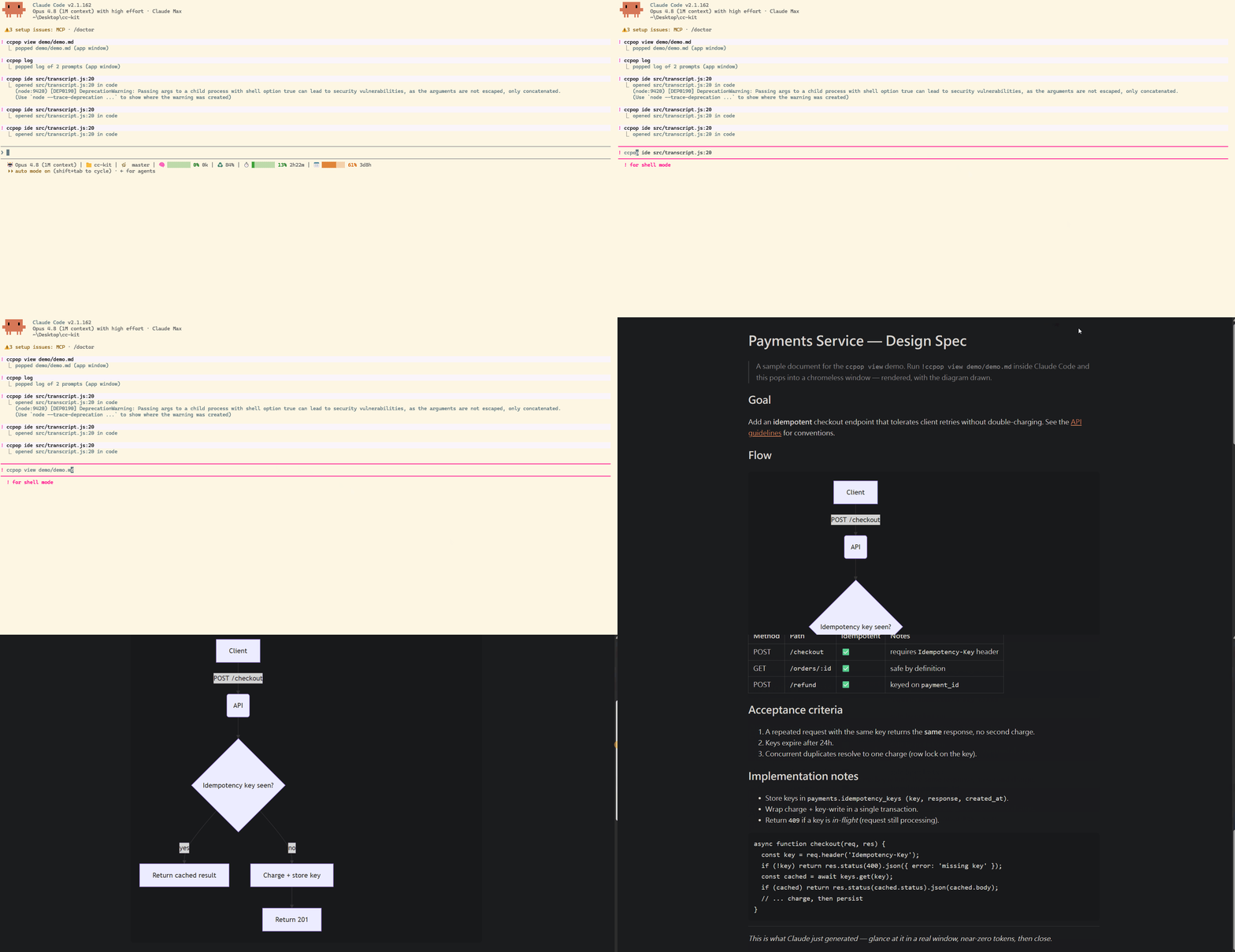
Renders markdown to HTML and opens it. Why a popup, not just a tab: the goal is "glance and close." Open method degrades gracefully in three tiers — nobody is locked out:
| Tier | When | Result |
|---|---|---|
| app | a Chromium-family browser (Chrome/Edge/Brave) is found | a chromeless app window (no tabs/URL bar) |
| tab | only Firefox/Safari/other | a normal browser tab (identical content) |
| headless / SSH / CI | prints the file:// path to open manually |
Raw HTML is escaped and dangerous link schemes are neutralized (safe to open untrusted AI-generated
markdown). ```mermaid blocks render via a single fixed-origin CDN script. Flags: --window app|tab|auto, --theme light|dark, --print (terminal ANSI).
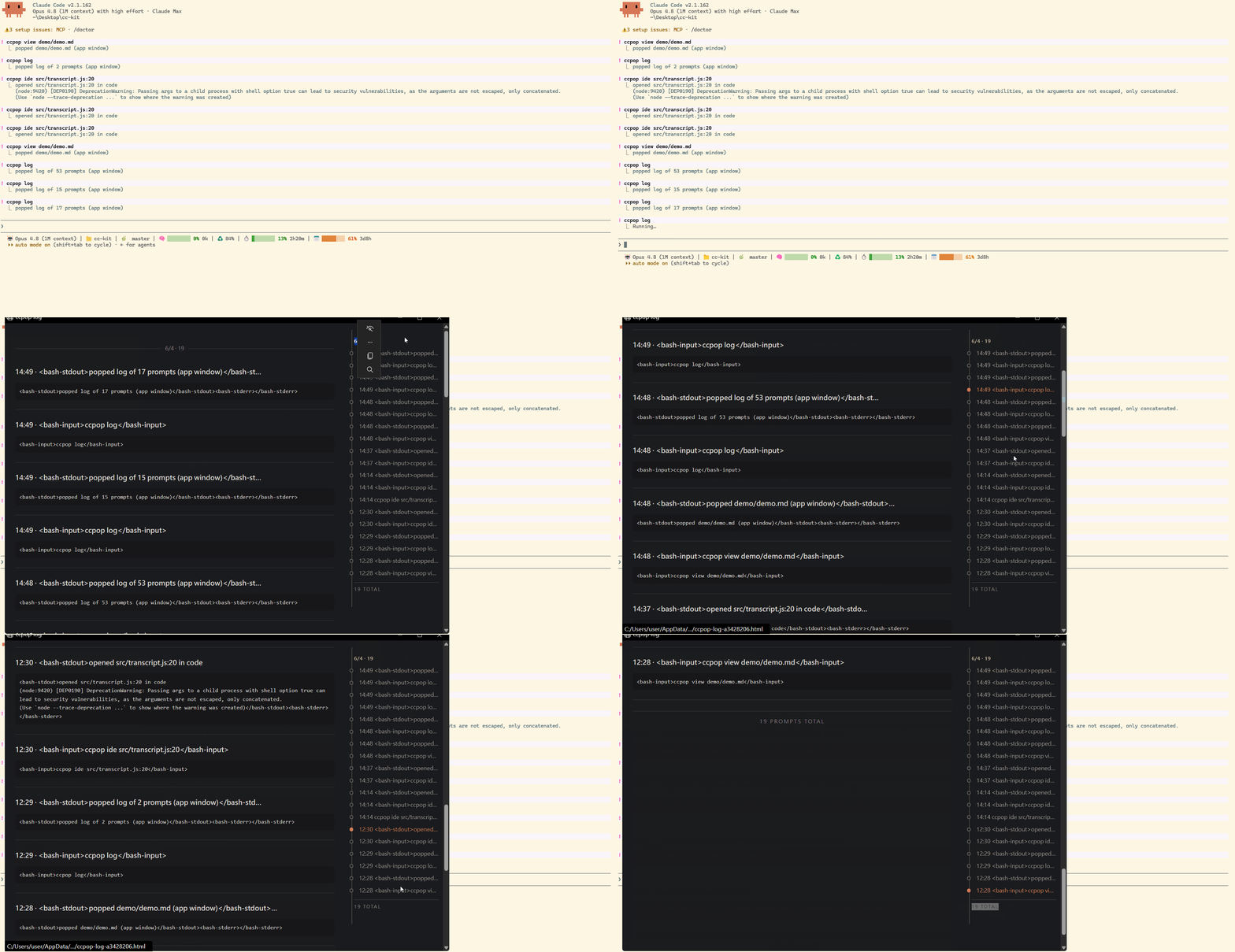
Pops a read-only timeline of the current folder's latest Claude Code session: every prompt with
what ran (Edits / Bash / …, noise folded) and a one-line result, plus a clickable right-side node
rail to jump between prompts. Optional keyword filters to matching turns (!ccpop log table).
Why: reviewing "what did I ask, and what happened" used to mean scrolling the terminal until the
prompt was lost. Built-in ↑/Ctrl+R only find your prompt text; /rewind changes state. log
is purely for reading — it reads the local session JSONL and never edits code or conversation.
And because the Claude Code TUI can't host a persistent timeline widget, log pops it out into a
window (where a clickable node rail is trivial). Harness noise (tool results, system reminders,
<task-notification>, interrupt markers) is filtered so only real prompts become nodes.
Editor is chosen by: CCK_EDITOR → config.editor → a running editor (process detection) →
$VISUAL → $EDITOR → code. Use <file>:<line> to jump to a line (VS Code family uses code -g).
Terminal editors (vim/nano/…) inherit the TTY; GUI editors detach. Windows UNC paths are refused
(NTLM-leak guard). Override once with --with <editor>.
Spawns your package.json dev script detached, waits until the server is actually listening
(parses the real bound port from its output — handles Vite/Next bumping 3000→3001), then opens the
browser and returns immediately. If a known port is already listening it just opens it (no restart).
--cmd "<command>"— escape hatch for non-JS / monorepo (uvicorn app:app,rails s,turbo dev,nx serve web)--port <n>--ready tcp|http--timeout <ms>--no-openccpop dev --status— show the running pid/port ·ccpop dev --stop— stop it
Why one-shot, not a status bar:
devprints one line and returns; it does not persist a "running on :5173" indicator. That's a status-line concern (the siblingclaude-statusproject's job). A future integration can haveclaude-statusread ccpop's state file and show🟢 dev:5173.
~/.claude/ccpop.config.json (deep-merge — only changed keys are written):
| Key | Default | Meaning |
|---|---|---|
editor |
null |
preferred editor; null → detection chain |
dev.script / dev.cmd |
dev / null |
npm script / arbitrary start command |
dev.ready / dev.timeoutMs |
tcp / 20000 |
readiness check & wait cap |
view.window |
auto |
auto | app | tab |
view.theme / view.mermaid |
auto / true |
rendered theme / mermaid on |
shortAliases |
false |
enable !view / !ide / !dev |
ccpop config set/get/list/reset.
| ccpop | grip | go-grip | markview | IDE preview | npx serve |
|
|---|---|---|---|---|---|---|
| Renders md to a window | ✅ | ✅ | ✅ | ✅ | ✅ | ➖ |
| Zero deps / offline | ✅ | ❌ (Python+GitHub API) | ✅ | ➖ | ➖ | ❌ |
| Cross-platform popup | ✅ | ➖ | ➖ | ❌ macOS only | ➖ | ➖ |
! near-zero-token in-session |
✅ | ❌ | ❌ | ❌ (MCP, spends tokens) | ❌ | ❌ |
| Also opens IDE + dev server | ✅ | ❌ | ❌ | ❌ | n/a | ❌ |
- Markdown is a pragmatic subset, not GitHub-grade (math/live-reload not yet supported; mermaid is).
devauto-port detection targets a singlepackage.jsonproject; for non-JS / monorepo use--cmd+--port.- The app-mode popup needs a Chromium-family browser; otherwise it falls back to a normal tab.
- Zero-dependency is deliberate — but the cross-platform open path is carefully hardened (Windows quoting, WSL, headless fallback, error-before-unref) where a naive version would break.
See SECURITY.md. ccpop reads only the file you pass to view, reads/writes
~/.claude/ccpop.config.json and ccpop.state.json, spawns your editor / npm / the system opener,
renders markdown locally (raw HTML escaped), and sends nothing over the network (except the optional
mermaid CDN script in rendered pages).
MIT