Openpyxl-compatible Excel I/O for Python, backed by Rust.
WolfXL Community is the maintained, MIT-licensed 2.0 generation of WolfXL for workbook creation, reading, writing, and streaming exports. Most openpyxl code runs unchanged after an import swap. Native recalculation, rendering, and format conversion ship separately in WolfXL Commercial.


Quick start · Migrating from openpyxl · Benchmarks · Fidelity · Community vs Commercial · wolfxl.com
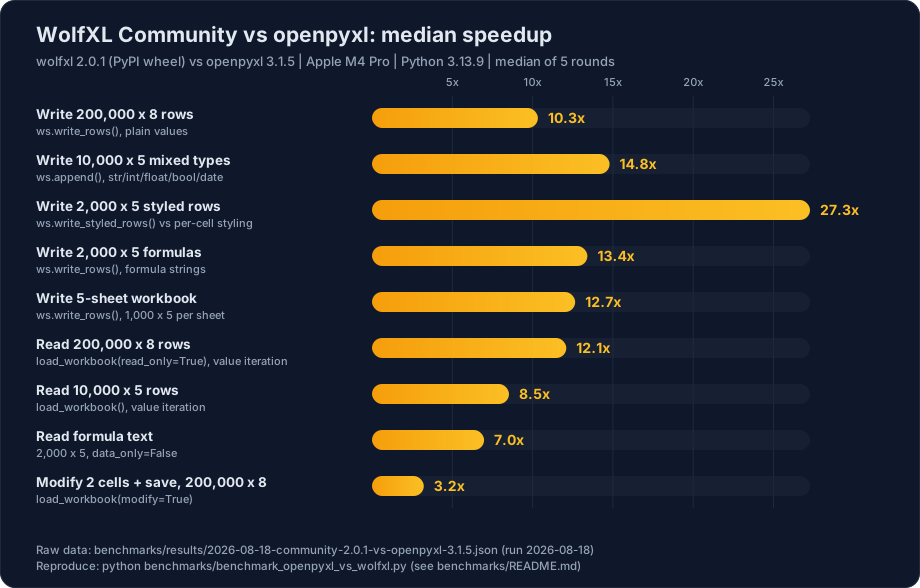
Median speedups over openpyxl 3.1.5 range from 2.6x on small in-place edits to 27x on styled row writes, with most reads and writes between 7x and 14x (wolfxl 2.0.1 PyPI wheel, Apple M4 Pro, Python 3.13.9, median of 5 rounds). Every chart in this README is generated from a committed raw results file, never edited by hand.
Install the current Community release:
python -m pip install wolfxl==2.0.1WolfXL Community supports Python 3.9 and newer CPython versions for which a wheel is published.
from wolfxl import Alignment, Font, PatternFill, Workbook, load_workbook

workbook = Workbook()
sheet = workbook.active
sheet.title = "Summary"
sheet["A1"] = "Revenue"
sheet["A1"].font = Font(bold=True, color="FFFFFF")
sheet["A1"].fill = PatternFill(fill_type="solid", fgColor="336699")
sheet["B1"] = 125000
sheet["B1"].alignment = Alignment(horizontal="right")
workbook.save("report.xlsx")

loaded = load_workbook("report.xlsx")
print(loaded["Summary"]["B1"].value)
loaded.close()Most openpyxl-shaped code needs only an import change:
- from openpyxl import Workbook, load_workbook
+ from wolfxl import Workbook, load_workbook
For applications that cannot change every import, install the runtime alias once at process startup:
import wolfxl

wolfxl.install_as_openpyxl()

import openpyxlFull openpyxl comparison from the committed benchmark run (wolfxl 2.0.1 PyPI wheel, Apple M4 Pro, Python 3.13.9, median of 5 rounds):
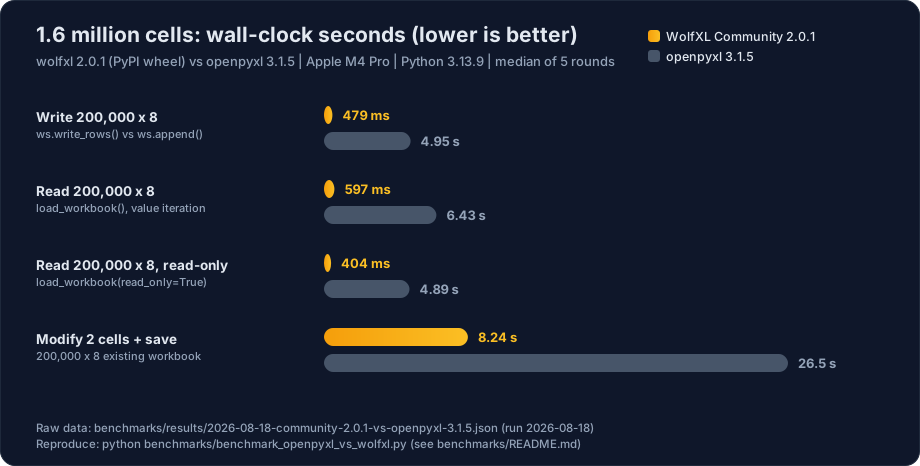
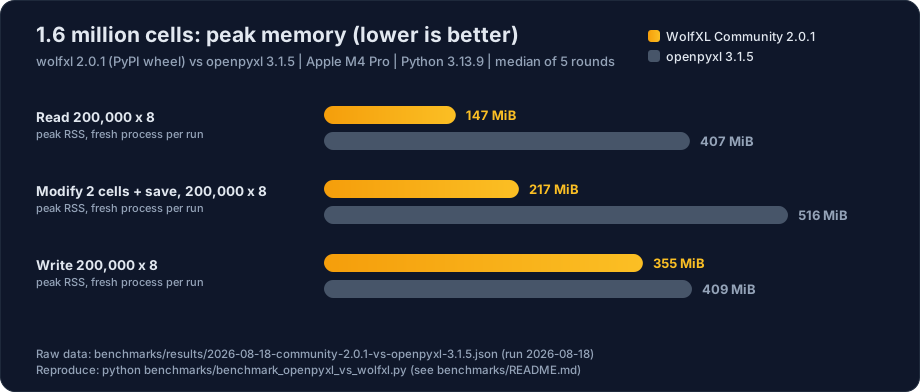
Cross-library comparison on a separate machine (AMD EPYC 9655, x86_64 Linux, Python 3.13, median of 5 rounds) against twelve other libraries: openpyxl, XlsxWriter, PyExcelerate, pylightxl, pandas, Polars, DuckDB, Tablib, pyexcel, python-calamine, fastexcel, and xlsx2csv. The bar for inclusion is xlsx support, no external application, and roughly one million PyPI downloads per month. To keep the baselines honest, the large plain write and the memory pass also measure openpyxl in write_only mode, XlsxWriter in constant_memory mode, and pandas with the xlsxwriter engine. Each library is measured only inside its supported scope; write-only, read-only, DataFrame, and SQL specialists are labeled:
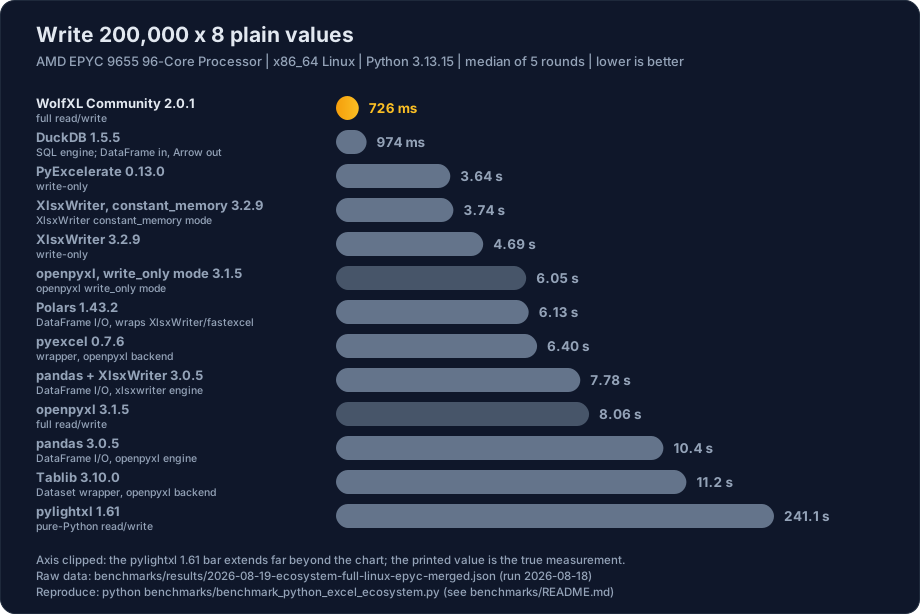
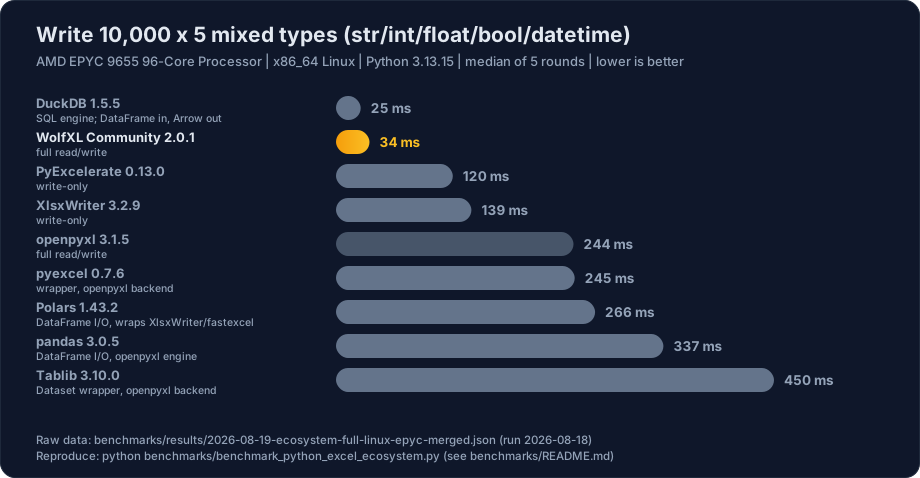
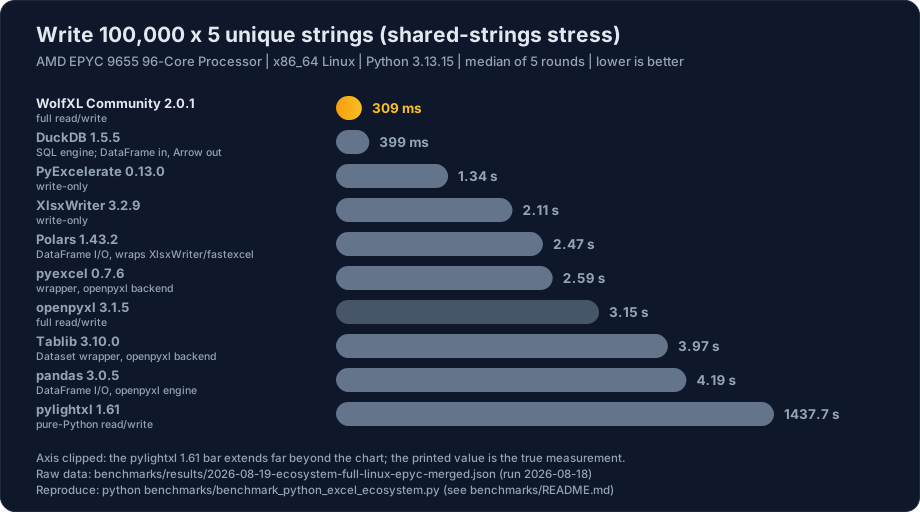
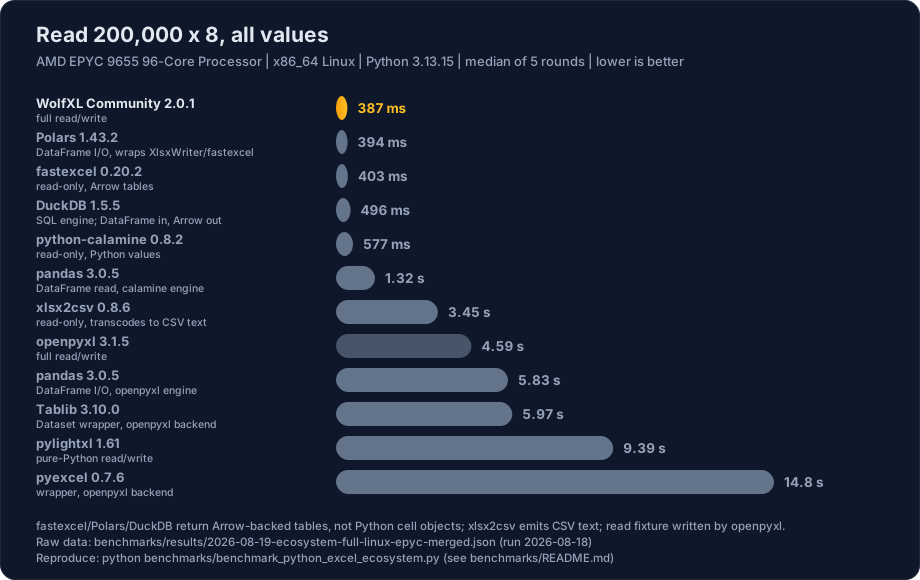
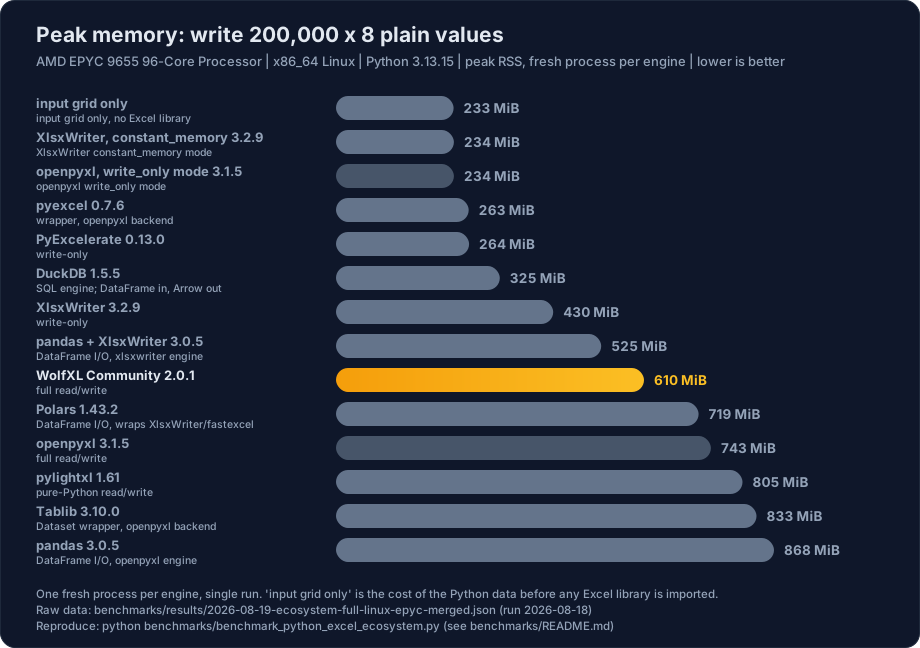
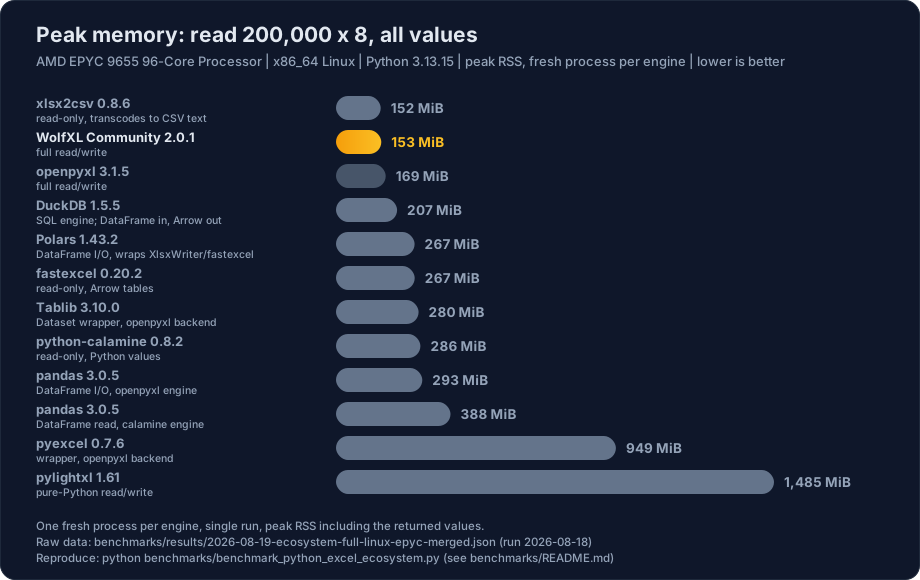
wolfxl leads every case in this run, including reads (387 ms vs 394 ms for Polars and 403 ms for fastexcel, which return Arrow-backed tables rather than Python cell values). The closest overall rival is DuckDB's excel extension, which wins the small mixed-type write outright (25 ms vs 35 ms, timed from a registered DataFrame) and stays within 1.4x elsewhere. The streaming modes own write memory: openpyxl write_only and XlsxWriter constant_memory peak at 234 MiB, effectively the cost of the input grid itself, where wolfxl's fully materialized workbook peaks at 610 MiB while writing 5-8x faster than either. pylightxl's pure-Python writer scales quadratically (241 s on the large plain write, 1,438 s on unique strings) and its bars are clipped to keep the charts readable.
Speedups vary by workload, and small workbooks see smaller wins. Raw results,
the benchmark harnesses, and reproduction instructions are in
benchmarks/.
The round-trip fidelity harness compares workbook packages before and after a no-edit save. Run it on your own files, inspect the typed part and relationship differences, and add another engine through the documented adapter protocol.
| WolfXL Community | WolfXL Commercial | |
|---|---|---|
| License | MIT | Commercial |
| Release line | Maintained 2.0 generation | Current 2.1+ generation |
| Workbook I/O | Included | Included |
| Existing 2.0 modify and pivot APIs | Included | Current implementations and fixes |
| Native recalculation | Not included | Included |
| Render, PDF, and image output | Not included | Included |
| Format conversion | Not included | Included |
| VBA and Power Query operations | Not included | Included |
| Production operations SDK | Not included | Included |
| Direct support | Community issues | Included with paid plans |
Community receives critical correctness and security fixes. New engines, expanded compatibility work, production operations, and direct support ship in WolfXL Commercial.
This split keeps the useful Excel I/O layer open while funding the compatibility, fidelity, and support work required by production workbook pipelines.
Use wolfxl.com for the current Commercial package, evaluation access, pricing, compatibility information, and support. Commercial source and releases are maintained separately and are not part of this repository.
Prerequisites: a supported CPython, Rust, and maturin.
python -m pip install maturin pytest defusedxml openpyxl Pillow
maturin develop
pytest tests/test_community_distribution.py -q
The distribution-boundary test verifies the Community version, compiled backends, and absence of Commercial-only Python modules.
See CONTRIBUTING.md for contribution guidelines and SECURITY.md for how to report a vulnerability.
WolfXL Community is available under the MIT License.